
The TS2068 has a second display file at 24576 (6000h). The hardware can show it, the EXROM has a routine to open it, but BASIC has no way to write to it.
Timex wrote a machine-code module to fill that gap. Dual Screen Mode Support is ASC No. 004 in the Timex Application Development Library, version 002, by V. C. Corcoran, dated February 22, 1984. It gives BASIC programs a set of calls for the second screen:
- write characters and strings, and position the cursor
- clear and scroll ranges of lines
- read back characters, colours and the cursor position
- copy or swap lines between the two screens
- switch which screen is showing
Loading it
The module lives at 57344 (E000h) and runs to 59231. Reserve the space first, then load it:
10 CLEAR 57343
20 LOAD "dualscreen" CODE 57344
It has to go at 57344. Timex wrote it as a relocatable module, and the versions on these tapes have been fixed up for that address, which is the one the listing documents. The original runs to 59231 and the patched version to 59351. Both load with the same lines.
How it talks to BASIC
Every call works the same way. You POKE the parameters into a block at the start of the module, then call an entry point with USR:
POKE 57351,0: POKE 57352,10: LET r=USR 57353
That sets the cursor to column 0, line 10. The value that comes back tells you how it went:
r | Meaning |
|---|---|
| 0 | Done |
| 1 | A parameter was out of range |
| 2 | Not enough memory to open screen 2, or the string variable doesn’t exist |
| 3 | Screen full (see “When the screen fills” below) |
Lines are 0 to 23 and columns are 0 to 31, the same as PRINT AT.
Strings are passed by name, not by value. To hand the module a$, POKE the character code of the letter into 23747. That’s a system variable byte the stock ROMs don’t otherwise use. Then make the call. Either case of letter works.
LET a$="HELLO": POKE 23747,CODE "a": LET r=USR 57348
Opening the second screen
Screen modes are set by POKEing 57380 and calling 57381.
| Mode | What it does |
|---|---|
| 128 | Open screen 2. Screen 1 stays on view, and the module writes to screen 1. |
| 1 | Open screen 2 if it isn’t open, and show it. The module writes to screen 2. |
| 5 | Send the module’s output to screen 2 without changing what’s on view. |
| 4 | Send the module’s output to screen 1 without changing what’s on view. |
| 0 | Close screen 2. |
Modes 4 and 5 only work while screen 2 is open; otherwise they return 1. Any other value returns 1.
The usual pattern is to open with 128, then switch output with 5. That way you can draw on screen 2 while the user is looking at screen 1:
110 POKE 57380,128: LET r=USR 57381: IF r THEN PRINT "Error ";r: STOP
120 POKE 57380,5: LET r=USR 57381
130 POKE 57356,0: POKE 57357,24: LET r=USR 57358
Line 130 clears screen 2, and you need it. The ROM routine that opens the second display file zeroes all of it, colours included, so a freshly opened screen 2 is black ink on black paper. Nothing you write to it will show until you clear it.
Opening screen 2 needs 6,912 bytes of free memory. It moves your BASIC program up by 4,800 bytes and relocates the machine stack to the top of RAM. If the room isn’t there, the call returns 2 and nothing changes. Closing it with mode 0 puts everything back.
A mode call that changes anything also puts the module’s cursor back at line 0, column 0, and resets the PLOT position.
The calls
| Address | Call | Set first |
|---|---|---|
| 57345 | Write one character | 57344 = character code (32–164) |
| 57348 | Write a string | 23747 = CODE of the string variable’s letter |
| 57353 | Set the cursor | 57351 = column, 57352 = line |
| 57358 | Clear lines | 57356 = first line, 57357 = number of lines |
| 57386 | Scroll lines up one | 57384 = first line, 57385 = number of lines |
| 57371 | Get the character at a position | 57369 = column, 57370 = line |
| 57374 | Get the attribute byte at a position | 57369 = column, 57370 = line |
| 57377 | Get the cursor position | (nothing) |
| 57381 | Set the screen mode | 57380 = mode |
| 57408 | Copy lines | 23747 = CODE of a string variable holding the parameters |
| 57411 | Swap lines | 23747 = CODE of a string variable holding the parameters |
Some notes on these:
Characters.
- 32–127 come from the ROM character set.
- 128–143 are the block graphics, from a table inside the module.
- 144–164 are your UDGs.
- In a string, codes outside 32–164 are skipped. As a single character, they return 1.
- Text wraps at the end of a line.
Clear fills the lines with the current colours and leaves the cursor at the start of the first line it cleared. The defaults, 0 and 24, clear the whole screen.
Scroll moves the given lines up by one. The line above the first one is overwritten and the last one is cleared. The defaults, 1 and 23, scroll the whole screen.
Get character returns the code of the character at that position, normal or inverse, and 0 if it doesn’t recognise it. Graphics character 128 is blank, so it reads back as 32, a space. An inverse space reads back as 143, the solid block.
Get cursor returns 256*line+column, and also leaves the column in 57351 and the line in 57352.
Copy and swap take five numbers in a string, separated by commas:
LET p$="0,10,2,2,2": POKE 23747,CODE "p": LET r=USR 57408
For copy, the order is from line, to line, from screen, to screen, number of lines. So that example copies lines 0–1 of screen 2 onto lines 10–11 of screen 2.
For swap, the order is first line, second line, first line’s screen, second line’s screen, number of lines.
Screens are numbered 1 and 2. Both calls work within one screen or between the two.
Colors
The module uses BASIC’s permanent color settings: the ones set by INK, PAPER, BRIGHT, FLASH, INVERSE and OVER used as statements on their own. Colors inside a PRINT statement are temporary and don’t carry over. INK 9 and PAPER 9 work as they do in BASIC.
PAPER 1: INK 7: POKE 57356,0: POKE 57357,24: LET r=USR 57358
That clears the whole of the current output screen to white on blue.
When the screen fills
If writing would go past the bottom line, the module stops and returns 3. When that happens during a string, the number of characters it didn’t write is in 57403 and 57404. The leftover characters are not written anywhere, so check for 3 if it matters.
To have it scroll instead, POKE 57390 with one more than the number of automatic scrolls you’ll allow. The default, 1, means none. After it uses them up, it returns 3 and resets the count to 1.
The bottom line is in 57389 (default 23), if you want to stop short of the last line.
Things to watch
The last three of these are bugs in the original code. The patched version fixes them.
BASIC’s PRINT always goes to screen 1. The module writes to whichever screen you’ve chosen, but PRINT, INPUT and the error report all stay on screen 1. If a program stops while screen 2 is on view, the report and anything you type are on the screen you can’t see. Switch back with mode 128, or close screen 2 with mode 0, before your program ends.
A bad line or screen number in copy or swap crashes the computer. These two calls check the count properly. But if a line number is 24 or more, or a screen number isn’t 1 or 2, they leave a value on the machine stack on the way out, and the return goes astray. On the stock ROMs the machine resets. Check the parameters yourself before you call. Neither call checks that the lines stay on the screen either, so keep line + number of lines at 24 or less. Copying eight lines onto screen 2 from line 20 runs past the end of the display file. While screen 2 is open, what comes after the display file is BASIC’s channel table. In testing, that copy wiped the table, and BASIC stopped with report C.
Don’t scroll from line 0. Scroll moves each line into the one above it, so a first line of 0 writes above the top of the screen. On screen 2 that lands in screen 1’s colour attributes. It returns 0 as though nothing were wrong. Use 1 or more.
Keep clear and scroll ranges sensible. They add the first line and the count in a single byte without checking for overflow. A first line of 250 with a count of 10 adds up to 4 and passes the check. In testing, clear then overwrote most of the module’s own code. Scroll damaged BASIC’s memory badly enough that it stopped with report 4, Out of memory.
The patched version
dualscreen-patched.tap is Corcoran’s module with these changes and nothing else. The new code is added after the end of the original module, and every address in this article works the same way with either version.
| Problem in the original | Fix |
|---|---|
| Copy and swap leave a value on the machine stack when a line or screen number is bad, and the computer crashes | They remove it before the error exit and return 1 |
| Copy and swap don’t check that the lines fit on the screen | They return 1 if line + number of lines is more than 24 |
| Scroll accepts a first line of 0 | It returns 1 |
| Clear and scroll miss an overflow when the first line is very large | They return 1 |
| The automatic scroll uses whatever is in 57384 and 57385 without checking | If those values are bad, it reports the screen full (3) instead of scrolling |
The patched version was run through every test the original was, with the same results. In each of the crash cases it returned 1 and BASIC carried on.
A demo: a help screen that’s already drawn
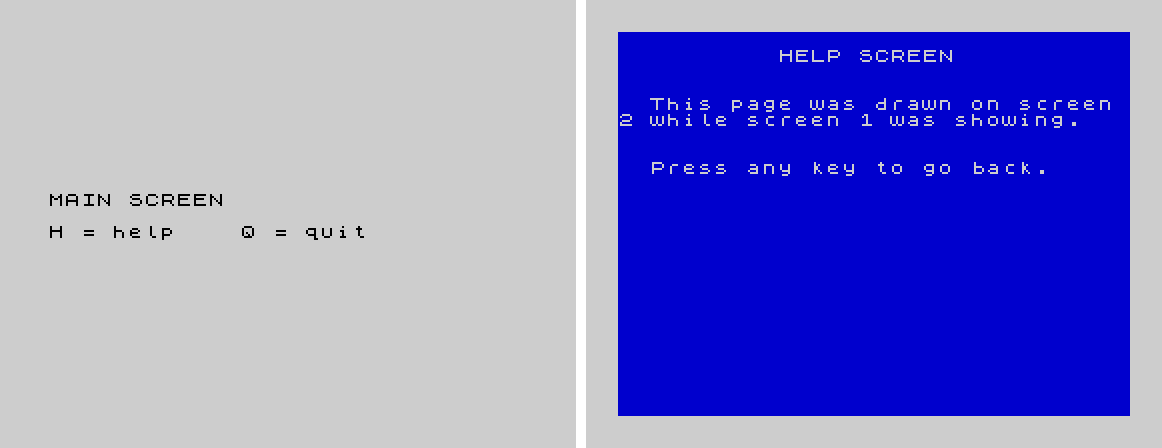
This program draws a help page on screen 2 while screen 1 shows the main screen. Pressing H flips to it instantly, and any key flips back.
10 CLEAR 57343
20 LOAD "dualscreen" CODE 57344
100 REM open screen 2 and send output to it
110 POKE 57380,128: LET r=USR 57381: IF r THEN PRINT "Error ";r: STOP
120 POKE 57380,5: LET r=USR 57381
130 PAPER 1: INK 7: POKE 57356,0: POKE 57357,24: LET r=USR 57358
140 POKE 23747,CODE "a"
150 POKE 57351,10: POKE 57352,1: LET r=USR 57353: LET a$="HELP SCREEN": LET r=USR 57348
160 POKE 57351,2: POKE 57352,4: LET r=USR 57353: LET a$="Drawn on screen 2 while": LET r=USR 57348
170 POKE 57351,2: POKE 57352,5: LET r=USR 57353: LET a$="screen 1 was showing.": LET r=USR 57348
180 POKE 57351,2: POKE 57352,8: LET r=USR 57353: LET a$="Press any key to go back.": LET r=USR 57348
200 REM screen 1 belongs to BASIC
210 PAPER 7: INK 0: CLS
220 PRINT AT 10,1;"MAIN SCREEN": PRINT AT 12,1;"H = help    Q = quit"
230 LET k$=INKEY$: IF k$="" THEN GO TO 230
240 IF k$="q" THEN GO TO 300
250 IF k$<>"h" THEN GO TO 230
260 POKE 57380,1: LET r=USR 57381
270 IF INKEY$<>"" THEN GO TO 270
280 IF INKEY$="" THEN GO TO 280
290 POKE 57380,128: LET r=USR 57381: GO TO 230
300 POKE 57380,0: LET r=USR 57381
310 CLS: PRINT "Screen 2 closed"
Line 270 waits for H to be let go. Without it, the key is still down when line 280 looks for a keypress, and the help screen flashes up and straight back.
From machine code
Each BASIC entry point loads its parameters and jumps into a routine that takes them in registers. The routines can be called directly, at these addresses with the module loaded at 57344. They return the same status in BC.
| Address | Routine | Registers |
|---|---|---|
| 57417 | Write character | A = code |
| 57586 | Write string | HL = address of text, BC = length |
| 57627 | Set cursor | B = line, C = column |
| 57816 | Clear lines | C = first line, B = number of lines |
| 57643 | Scroll | C = first line, B = number of lines |
| 57952 | Get character | B = line, C = column; code returned in A and BC |
| 58080 | Get attribute | B = line, C = column |
| 58097 | Get cursor | returns B = line, C = column |
| 58129 | Set mode | A = mode |
| 58429 | Copy lines | B = from line, C = to line, D = from screen, E = to screen, A = number of lines |
| 58669 | Swap lines | B = first screen, C = first line, D = second screen, E = second line, A = number of lines |
How this was checked
Every BASIC example and behaviour described here was run in an emulation of the TS2068 using the stock HOME ROM and EXROM. That includes opening and closing screen 2 through the ROM, and the crash and the scroll problem described above. The screenshots come from the same emulation. It hasn’t been tried on real hardware yet, and loading from tape wasn’t part of the test. The module was placed in memory directly. The machine-code entry points are taken from the listing and weren’t called directly in testing.