
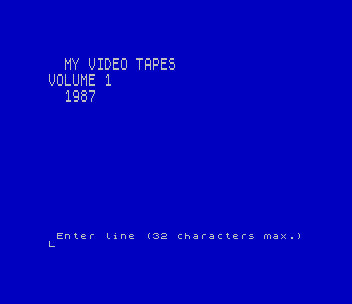
VHS Titles makes a title page for a video cassette. It asks for up to eleven lines of text, 32 characters each, and prints every line in double-height letters, white on blue, filling the screen from the top. The REM explains the rest of the idea: save the finished picture as a SCREEN$, then show it on the TV and record it onto the tape with the VCR.
The REM credits “J. Kealy”, Joan Kealy of El Paso, Texas, whose print routine also appears in John Colonna’s certificate program. This copy is from a SNUG library disk; the same program is on the SINCUS Exchange Tape 104 disk.
Program Analysis
How It Works
Line 90 does all the work. For each character of the entered line it finds the character’s eight bytes in the ROM character set (15616+8*(CODE a$(a)-32)) and POKEs each byte twice into the UDG area, starting at USR "a". Sixteen bytes span UDGs A and B, so A becomes the stretched top half of the letter and B the bottom half. It then prints a over b at the current position and moves one column right. Each line takes two screen rows, so eleven lines fill rows 0–21.
Notable Techniques
- The same two UDGs are redefined for every character. That works because PRINT copies the UDG pattern into the display file at the moment of printing, so earlier letters keep their shape.
- One FOR loop over
bfills both UDGs, sinceUSR "a"+b*2runs straight on fromAintoB. - The program ends with STOP once the page is full, leaving the picture on screen for the user to save with
SAVE "name"SCREEN$.
Potential Issues
- Lowercase letters and symbols are stretched like capitals, but anything outside the ROM character set (graphics, UDGs, keywords) gives meaningless shapes.
- There is no way to edit a line once entered; a mistake means running the program again.
From an Oliger (JLO SAFE) disk. For tape, the JLO printer set-up line (LET /p=o/g: POKE 23324,10) was replaced with a REM; nothing else uses the printer. Tested in ZEsarUX.
Image Gallery
Source Code
   10 REM *vhs titles* J. Kealy
   20 REM  This program allows you to create a title page for your video tapes. An 11 row by 32 column page is produced. Once you have the page the way you want it, save it as a SCREEN$. Then use your TV as your screen and save it with your VCR.
   30 LET /p=o/g: POKE 23324,10
   40 REM >> A & B in LINE 90 are entered in GRAPHICS mode
   50 BORDER 1: PAPER 1: INK 7: CLS : LET x=0: LET y=x
   60 FOR i=1 TO 11
   70 INPUT " Enter line (32 characters max.)"; LINE a$
   80 IF LEN a$>=33 THEN GO TO 70
   90 FOR a=1 TO LEN a$: LET c=15616+(8*(CODE a$(a)-32)): FOR b=0 TO 7: LET d=(USR "a"+(b*2)): POKE d,PEEK (c+b): POKE (d+1),PEEK (c+b): NEXT b: PRINT AT y,x;"a";AT y+1,x;"b": LET x=x+1: NEXT a
  100 LET y=y+2: LET x=0
  110 NEXT i
  120 STOP
  130 CLEAR : CLS : SAVE "vhs titles": BEEP 1,32: PRINT AT 8,0;"Program Saved - Rewind to Verify": VERIFY "": BEEP .1,10: BEEP .1,10: PRINT FLASH 1;"        VERIFY COMPLETE",
Note: Type-in program listings on this website use ZMAKEBAS notation for graphics characters.