
Typing a long REM line of filler characters to hold machine code is tedious. This program builds one for you. RUN it and it tells you to enter 200 REM, then GOTO 40. Enter how many characters you want, and the REM at line 200 grows one full stop at a time, up to 14991 of them. A 500-byte REM takes less than 20 seconds.
Line 10 holds a small machine-code routine that calls the ROM to make one space and move all the pointers up. When your REM is ready, delete lines 10-130. To change its line number, edit line 200, or if the line is too big to edit, POKE 16510,1 after deleting lines 10-130. To fill the REM with digits 1234… instead of full stops, change line 100 to POKE D+I,I-10*INT (I/10)+28.
The article has you type line 10 as keystrokes (1, 2, E, graphics shift W, RND, LN, inverse full stop, graphics shift D, TAN). The download has the line already in place.
Published in Syntax August 1982 (Spaces in REM Statements).
Image Gallery

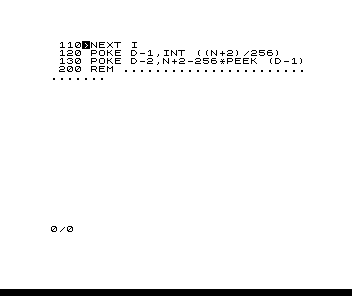
Source Code
  10 REM 12E▙RNDLN .▓TAN
  20 PRINT "ENTER 200 REM; THEN GOTO 40"
  30 STOP
  40 INPUT N
  50 LET D=PEEK 16396+256*PEEK 16397-2
  60 FOR I=1 TO N
  70 POKE 16515,INT ((D+I)/256)
  80 POKE 16514,D+I-256*PEEK 16515
  90 RAND USR 16516
 100 POKE D+I,27
 110 NEXT I
 120 POKE D-1,INT ((N+2)/256)
 130 POKE D-2,N+2-256*PEEK (D-1)
Note: Type-in program listings on this website use ZMAKEBAS notation for graphics characters.