
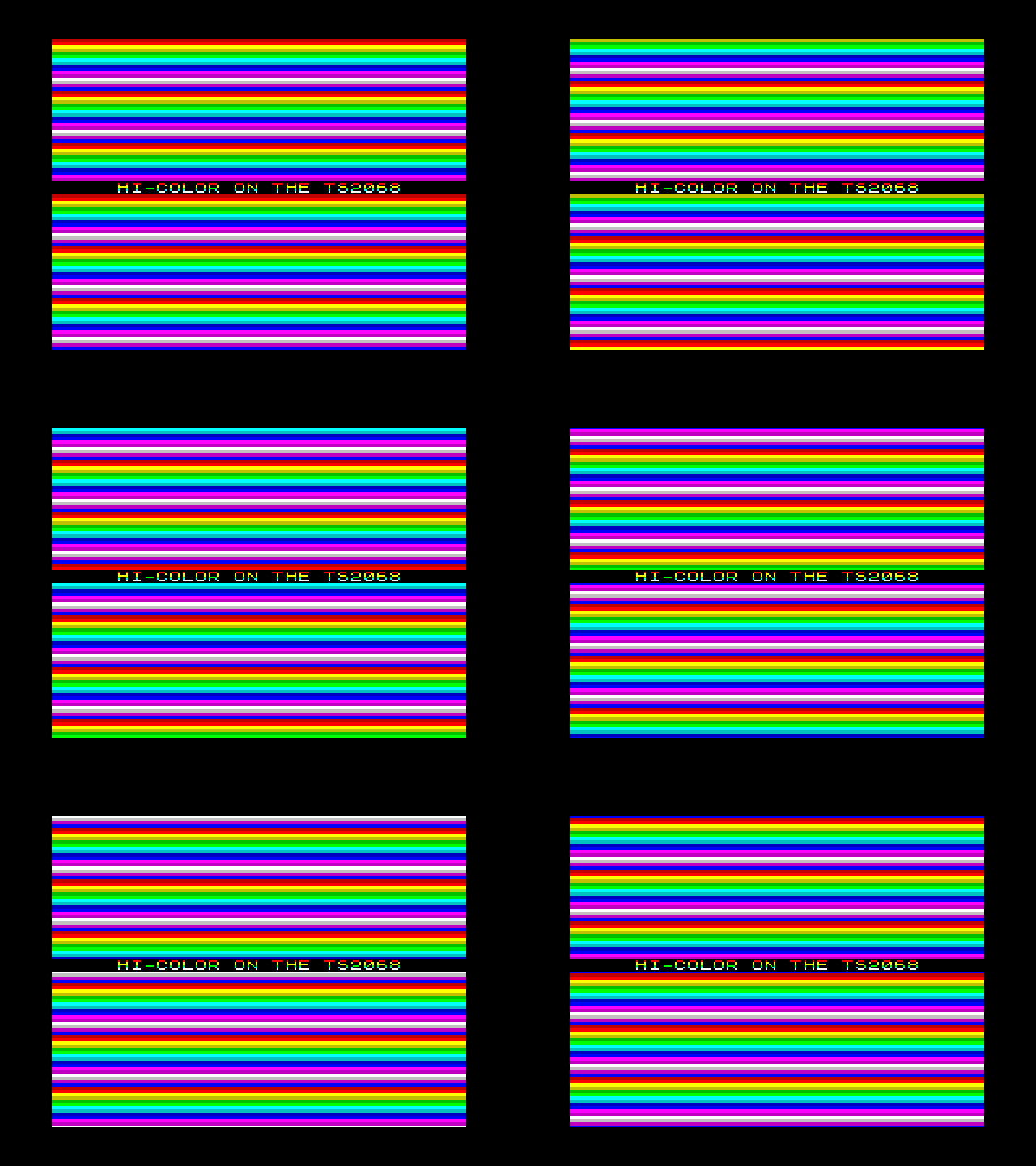
On a ZX Spectrum, color comes in 8×8 blocks: one ink and one paper for every character cell. That’s where color clash comes from. The TS 2068’s SCLD has a second way to color the screen, its hi-color mode, with one ink and one paper for every 8×1 strip of pixels. That’s a color for every line of every character.
This tutorial uses it for the oldest demo effect there is: color bars scrolling up the screen, every line a different color, sixty times a second, with a line of text where every pixel line has its own ink. It needs one OUT, one table, and a trick with the stack. The example program is under 200 lines of assembly, and the TAP is at the end.
Hi-color in one OUT
The SCLD’s screen mode is the low three bits of port FFh. Mode 2 is hi-color:
| Bits 0-2 | Mode |
|---|---|
| 000 | Standard screen, from 4000h |
| 001 | Standard screen, from the second display file at 6000h |
| 010 | Hi-color: the bitmap at 4000h, its colors at 6000h |
| 110 | 512×192, 64 columns; bits 3-5 pick the color pair |
Leave bit 6 at 0, since setting it turns off the interrupt, and bit 7 at 0 too. So:
        ld a,2
        out (0xff),a
In mode 2 the 6,144 bytes at 6000h are attributes, one for each byte of the bitmap at 4000h, laid out the same way. The bitmap byte at 4000h + n takes its colors from 6000h + n. Each attribute has the usual format: FLASH in bit 7, BRIGHT in bit 6, PAPER in bits 3-5 and INK in bits 0-2.
Bars don’t need a bitmap at all. Clear it to zeros and every pixel shows its paper color. Then setting all 32 attributes of a line to the same value colors that whole line.
The problem: 6,144 bytes a frame
To scroll the bars, every attribute has to be rewritten every frame. The obvious way is LDIR, at 21 T-states a byte. For 6,144 bytes that’s about 129,000 T-states. A TS 2068 frame is 58,688 T-states (224 per line, 262 lines, 60 times a second), so LDIR would take over two frames to do one.
Writing with the stack
PUSH is the Z80’s fastest way to write memory: two bytes in 11 T-states. It writes downwards from wherever SP points. So point SP at the end of a line’s attributes, put the color in both halves of DE, and sixteen PUSHes fill the line from right to left:
        ld a,(hl)        ;  7  this line's color, from the table
        inc l            ;  4  the next line's, next time
        ld e,a           ;  4
        ld d,a           ;  4  DE = the color, twice
        ld sp,LINE+32    ; 10  the end of this line's 32 attributes
        push de          ; 11  x 16 = 176
        push de
        ...
That’s 205 T-states a line, about 39,400 for the whole screen. It fits in a frame with room to spare.
Unrolling it
Each line’s attributes are 32 bytes in a row, but the lines themselves are scattered, just as they are in the bitmap. Line Y’s attributes start at:
6000h + (Y AND C0h) * 32 + (Y AND 7) * 256 + (Y AND 38h) * 4
The top two bits of Y pick the third of the screen, the low three the pixel line within a character, and the middle three the character row. Working that out at run time would cost more than the PUSHes. So the program doesn’t. The assembler writes the code out 192 times, once per line, with each address worked out as a constant. In sjasmplus that’s a DUP block with a counter:
fill:   ld (restore+1),sp     ; save the real stack pointer
Y = 0
        DUP 192
        ld a,(hl)
        ld e,a
        ld d,a
        inc l
        ld sp,0x6000+((Y&0xc0)<<5)+((Y&7)<<8)+((Y&0x38)<<2)+32
        DUP 16
        push de
        EDUP
Y = Y+1
        EDUP
restore:
        ld sp,0               ; the 0 is overwritten by the first line
        ret
It assembles to about 4.4K of straight-line code, a fair price for the speed. Other assemblers have the same thing under other names, such as REPT.
Making it scroll
The colors come from a table, one byte a line. The table is 256 bytes long and starts on a page boundary (ALIGN 256), so HL can walk through it with INC L alone. When L passes FFh it wraps back to the start of the same page, so there’s no end to check for.
The table holds 16 colors, two lines each: a pattern 32 lines long, written out 8 times. Each frame, the fill starts one byte further on:
        ld hl,phase
        inc (hl)              ; one line further on each frame
        ld l,(hl)
        ld h,high bars
        call fill
Line 0 gets the color line 1 had last frame, so the bars climb a pixel line a frame. Because 32 divides 256, the pattern wraps seamlessly. Change INC (HL) to add 2 and they move twice as fast; DEC (HL) sends them down.
Keeping interrupts out of it
While SP points into the screen, an interrupt would push its return address into the attributes, and then return to wherever two color bytes point. So each frame goes like this:
frame:  halt                  ; wait for the interrupt
        di                    ; the next one is a whole frame away
        ...                   ; the fill
        ei
        jr frame
HALT waits until the interrupt has just happened. The fill is done long before the next one is due, and EI lets it in again.
The interrupt handler is the program’s own, a two-instruction IM 2 handler that just returns. That’s because the attributes at 6000h land on top of BASIC itself. On a 2068 just switched on, the channel table starts at 26688 (6840h) and the BASIC program at 26710 (6856h). Both are inside the 6,144 bytes from 6000h, so once the bars are running, BASIC’s workspace is gone. For the same reason, SPACE doesn’t return to BASIC: it goes back to mode 0 and jumps to 0, a cold start. (To use the second display file and still go back to BASIC, you have to make room for it first. Using Timex’s Dual Screen Mode Support shows how Timex’s own module does it.)
How long it really takes
Counting T-states gives 39,400. To see the real figure, set the border red before the fill and black after it. Assemble with sjasmplus -DTIMING rainbow.asm, which does exactly that. The beam paints the border red for as long as the fill runs:
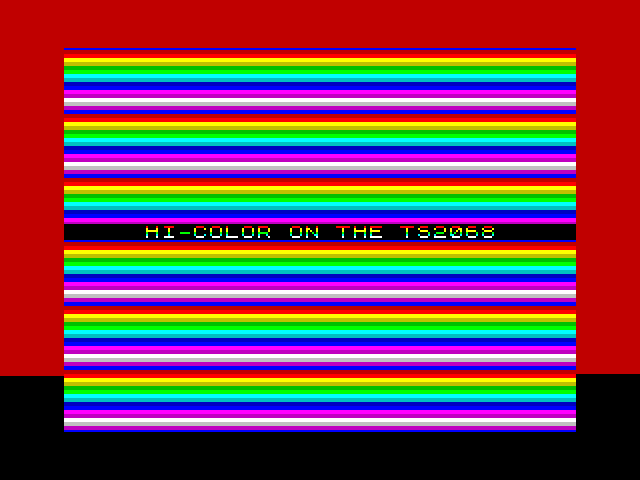
The red stops 163 lines into the 192-line screen. The first pixel line is drawn 9,169 T-states after the interrupt, so the fill ends at about 45,700 T-states: 78% of the frame. The extra 6,000 or so over the count is contention. Once the beam is drawing the screen, the video circuitry and the Z80 take turns at the memory from 4000h to 7FFFh, and every PUSH into 6000h waits its turn.
The picture shows something else too. The fill starts well before the beam reaches the screen, and finishes 28 lines ahead of it, so the beam never draws a line the fill hasn’t reached yet. If the fill fell behind, the bars would tear: the lower part of the screen would show the colors a line out of step.
One caution about the numbers. They were measured in an emulator that uses Fuse’s contention model, which is the Spectrum’s pattern, and that model hasn’t been checked against a real 2068’s SCLD. The margin is large enough that this program shouldn’t care, but if you run the timing build on a real 2068, the height of the red band would be worth a photograph.
Steady text, eight colors to a letter
The line of text across the middle stays put while the bars move past it, and every pixel line of it is a different color:
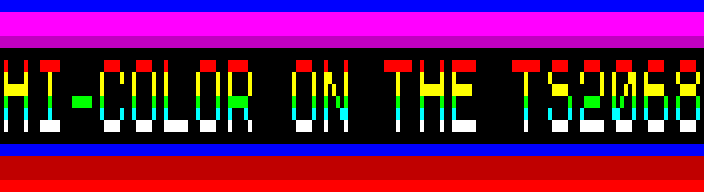
That’s the same unrolled code with a condition in it. While the assembler writes out each line, it checks whether Y falls inside the text’s character row. If it does, that line gets a fixed attribute instead of a byte from the table:
        IF Y >= TEXTROW*8 && Y < TEXTROW*8+8
        ld de,(0x40|((INKS>>((Y-TEXTROW*8)*4))&7))*0x101
        ELSE
        ld a,(hl)
        ld e,a
        ld d,a
        ENDIF
The fixed attribute is black paper, BRIGHT, and an ink taken from INKS, a 32-bit constant holding eight inks, one hex digit per pixel line. The ROM’s characters leave their top and bottom lines blank, so only the middle six show: red, yellow, yellow, green, cyan and white. On a Spectrum, one character cell can only have one ink.
The text itself is printed into the bitmap once, at the start, from the ROM’s font. The fixed lines cost a little less than table lines, and INC L still runs on them, so the bars below the text stay in step with the bars above it.
Things to try
- Vertical stripes: load D and E from two different tables. PUSH writes E to the lower address, so the 32 bytes alternate between the two colors, 8 pixels each.
- A different palette: it’s all in the table. Fewer lines per color gives thinner bars; repeating a color gives solid bands.
- Something in the bitmap: anything drawn at 4000h shows in the ink of whichever bar it’s on, which is why the dark colors in the table carry white ink and the light ones black.
- Two speeds: a second phase, and a second table for the bottom half of the screen.
Download and build
rainbow.tap is a BASIC loader and the code. It runs on a TS 2068 or any emulator of one, and from a TS-Pico with LOAD "tpi:rainbow.tap" then LOAD "". Press SPACE to restart the machine.
10 CLEAR 32767: LOAD "" CODE : RANDOMIZE USR 32768
The loader is one line:
To build it yourself you need sjasmplus (this was built with version 1.22) and zmakebas:
sjasmplus rainbow.asm
zmakebas -a 10 -n rainbow -o loader.tap rainbow.bas
cat loader.tap rainbow-code.tap > rainbow.tap
The effect comes from the HI-COLOR scene of a showcase demo written for ts2068-p4, a TS 2068 with a TS-Pico on an ESP32-P4 panel. The full listing:
; rainbow: scrolling color bars in the TS2068's hi-color mode, for the
; tutorial on timexsinclair.com (blog/hicolor-rainbow). The technique is
; the one demo/showcase.asm's HI-COLOR scene uses, on its own.
;
; A code block at 32768, loaded from BASIC (rainbow.tap: CLEAR 32767,
; LOAD "" CODE, RANDOMIZE USR 32768). SPACE restarts the machine: the
; attributes at 6000h cover BASIC's channels and program, so there's no
; BASIC to go back to.
;
; sjasmplus rainbow.asm                 ->  rainbow.bin, rainbow-code.tap
; sjasmplus -DTIMING rainbow.asm        ->  the border red while the
;                                           attributes are written

        DEVICE ZXSPECTRUM48

DEC     equ 0xff                ; the SCLD's mode port
CHARS   equ 0x5c36              ; system variable: the font, less 256
TABLE   equ 0xfe00              ; IM 2 vectors: 257 bytes of FDh
ISRVEC  equ 0xfdfd              ; where they all point
STACK   equ 0xfdf0
TEXTROW equ 11                  ; the text's character row: lines 88-95
INKS    equ 0x77546627          ; its ink on each of those 8 lines, a nibble each from the right:
                                ; red, yellow, yellow, green, cyan, white on the six the font uses

        org 0x8000
start:  di
        ld sp,STACK
        ld hl,TABLE             ; the interrupt: our own, which only returns
        ld de,TABLE+1
        ld bc,256
        ld (hl),high ISRVEC
        ldir
        ld a,0xc3               ; JP isr
        ld (ISRVEC),a
        ld hl,isr
        ld (ISRVEC+1),hl
        ld a,high TABLE
        ld i,a
        im 2

        ld hl,0x4000            ; a blank bitmap: every line shows its paper
        ld de,0x4001
        ld bc,6143
        ld (hl),l
        ldir
        ld hl,text              ; but for one row of text
        ld de,0x4000+((TEXTROW&0x18)<<8)+((TEXTROW&7)<<5)+5
        call print

        ld hl,bars              ; color the screen before showing it
        call fill
        xor a
        out (0xfe),a            ; a black border
        ld a,2                  ; mode 2: hi-color
        out (DEC),a
        ei

frame:  halt                    ; the interrupt has just run, so the next
        di                      ; is a whole frame away
        IFDEF TIMING
        ld a,2
        out (0xfe),a
        ENDIF
        ld hl,phase
        inc (hl)                ; one line further on each frame
        ld l,(hl)
        ld h,high bars
        call fill
        IFDEF TIMING
        xor a
        out (0xfe),a
        ENDIF
        ei
        ld a,0x7f               ; SPACE?
        in a,(0xfe)
        rra
        jr c,frame
        di                      ; back to the standard screen, and a cold
        xor a                   ; start
        out (DEC),a
        im 1
        jp 0

isr:    ei
        reti

phase:  db 0

; Prints the 0-terminated text at HL to the bitmap address DE, a character
; a column, from the ROM's font.
print:  ld a,(hl)
        or a
        ret z
        push hl
        push de
        sub 32
        ld l,a
        ld h,0
        add hl,hl
        add hl,hl
        add hl,hl
        ld bc,(CHARS)
        inc b                   ; CHARS points 256 bytes below the space
        add hl,bc
        ld b,8
.line:  ld a,(hl)
        ld (de),a
        inc hl
        inc d                   ; the next pixel line of the cell is 256 on
        djnz .line
        pop de
        pop hl
        inc hl
        inc e
        jr print

text:   db "HI-COLOR ON THE TS2068",0

; Writes all 6,144 attributes, one color a line, from the table at HL: L
; moves on a byte a line, wrapping round its page. The stack does the
; writing: SP is set to the end of a line's 32 attributes, and 16 PUSHes
; fill it from the right. About 39,500 T-states, so call it with
; interrupts off: an interrupt would push its return address into the
; screen.
fill:   ld (restore+1),sp
Y = 0
        DUP 192
        IF Y >= TEXTROW*8 && Y < TEXTROW*8+8
        ld de,(0x40|((INKS>>((Y-TEXTROW*8)*4))&7))*0x101
        ELSE
        ld a,(hl)
        ld e,a
        ld d,a
        ENDIF
        inc l
        ld sp,0x6000+((Y&0xc0)<<5)+((Y&7)<<8)+((Y&0x38)<<2)+32
        DUP 16
        push de
        EDUP
Y = Y+1
        EDUP
restore:
        ld sp,0
        ret

; The bars: 16 colors, 2 lines each, 8 times round a 256-byte page.
; Paper in bits 3-5, bright in bit 6; ink in bits 0-2 (white on the dark
; papers, black on the light ones, should anything land on a bar).
        align 256
bars:   DUP 8
        db 0x17,0x17,0x57,0x57,0x70,0x70,0x30,0x30,0x20,0x20,0x60,0x60,0x68,0x68,0x28,0x28
        db 0x0f,0x0f,0x4f,0x4f,0x5f,0x5f,0x1f,0x1f,0x78,0x78,0x38,0x38,0x1f,0x1f,0x4f,0x4f
        EDUP
end:
        assert end <= ISRVEC

        savebin "rainbow.bin",0x8000,end-0x8000
        savetap "rainbow-code.tap",CODE,"rainbow",0x8000,end-0x8000