
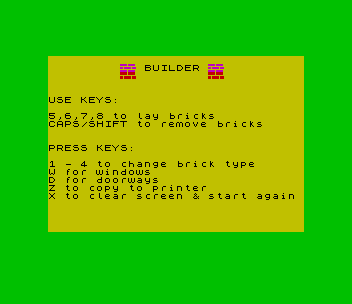
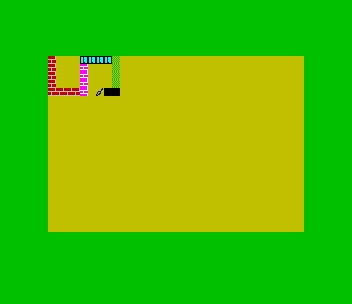
A screen toy for building walls and houses out of bricks. A cursor moves with keys 5 to 8 and lays the current brick as it goes, and CAPS SHIFT with the same keys moves while erasing. Keys 1 to 4 choose one of four brick patterns and colours, W lays a window and D a solid doorway block. Z asks for a title and copies the screen to the printer with the title above and below, and X clears the screen to start again.
REMs say it was written by M. Turner, entered by M. Leidel, and appeared in Sinclair User in April 1985; it was later printed as “Builder” in The Plotter. It is plain Sinclair BASIC and runs unchanged on the TS2068.
Program Analysis
- Lines 40–50: POKE six UDGs: two brick courses, two stippled bricks, a window and the cursor.
- Lines 60–80: the title and key instructions.
- Lines 110–240: the main loop.
PAUSE NOT PIwaits for a key,CODE INKEY$is tested against the key codes, the current piece is printed at the old position, and the position moves with logical expressions limited to the screen edges.
Notable Techniques
- The UDG DATA uses the letter
das an item: becauseREAD dhas just setd, eachdin the list repeats the previous byte, which shortens the DATA line. - Both the number keys and the cursor codes 8–11 move the cursor, so CAPS SHIFT with 5–8 acts as an eraser without separate code.
- Line 160 turns CAPS LOCK on for the title with
POKE 23658,8and prints the prompt in the lower screen withPRINT #0.
Potential Issues
- Every move first prints the current piece at the old position, so there is no way to move the cursor without laying or erasing.
- The doorway uses the solid block graphic with
INK 0but keeps the paper and brightness of the last brick chosen.
This program came from an Oliger (JLO SAFE) disk and was converted to load from tape. It needed no changes and was tested in ZEsarUX.
Image Gallery
Source Code
   10 REM   Builder
   20 REM written by: M. Turner  entered by M. Leidel, appeared  in Apr. 85 Sinclair user
   30 REM  was Oliger-only
   40 FOR f=0 TO 47: READ d: POKE USR "a"+f,d: NEXT f
   50 DATA 254,d,d,0,239,d,d,0,254,d,0,239,d,0,254,d,170,85,170,85,170,85,170,d,85,170,85,170,85,170,85,170,2,6,4,56,72,88,176,192,255,145,d,d,d,d,153,255
   60 BORDER 4: PAPER 6: CLS : PRINT '"         bb BUILDER bb"'"         aa         aa"'''"USE KEYS:"''"5,6,7,8 to lay bricks"'"CAPS/SHIFT to remove bricks"
   70 PRINT ''"PRESS KEYS:"''"1 - 4 to change brick type"'"W for windows"'"D for doorways"'"Z to copy to printer"'"X to clear screen & start again"
   80 PAUSE NOT PI: CLS
   90 LET x=0: LET y=x
  100 LET k=49: GO TO 180
  110 PAUSE 1: PRINT AT x,y; INK 1;"e"
  120 PAUSE NOT PI: LET k=CODE INKEY$
  130 BEEP .01,k/4: PRINT INK i; PAPER p; BRIGHT b;AT x,y;a$
  140 IF k=8 OR k=9 OR k=10 OR k=11 THEN PRINT AT x,y;" "
  150 LET x=x+((k=54 OR k=10) AND x<21)-((k=55 OR k=11) AND x>0): LET y=y+((k=56 OR k=9) AND y<31)-((k=53 OR k=8) AND y>0)
  160 IF k=122 THEN POKE 23658,8: INPUT "please enter title";t$: PRINT #0;AT 1,0;t$: POKE 23658,0: LPRINT '': COPY : LPRINT 't$'
  170 IF k=120 THEN CLS : GO TO 90
  180 IF k=49 THEN LET a$="a": LET i=2: LET p=7: LET b=0
  190 IF k=50 THEN LET a$="b": LET i=3: LET p=7: LET b=1
  200 IF k=51 THEN LET a$="c": LET i=4: LET p=6: LET b=0
  210 IF k=52 THEN LET a$="d": LET i=4: LET p=6: LET b=1
  220 IF k=119 THEN LET a$="f": LET i=0: LET p=5: LET b=1
  230 IF k=100 THEN LET a$="::": LET i=0
  240 GO TO 110
Note: Type-in program listings on this website use ZMAKEBAS notation for graphics characters.