
J N Creak gets into conversation with his ZX-81.
Listing 1.
 10 LET T=0
 20 FOR A=16514 TO 16866
 30 INPUT X
 40 POKE A,X
 50 SCROLL
 60 PRINT A,X
 70 LET T=T+X
 80 NEXT A
 90 IF T<>32625 THEN PRINT "ERROR IN DATA";0
100 FOR A=16867 TO 16912
110 POKE A,70
120 NEXT A
Listing 2.
  10 PRINT "PRESS ANY KEY TO CONT."
  15 PAUSE 4E4
  20 RAND USR 16514
  25 PAUSE 4E4
  30 POKE 16542,104
  35 POKE 16566,128
  50 CLS
  60 RAND USR 16540
  70 IF INKEY$<>"" THEN GOTO 1500
  80 FOR A=1 TO 50
  90 NEXT A
  95 GOTO 50
 100 GOSUB 3000
 105 GOSUB 1000
 110 PRINT "WHAT NAME ?"
 115 INPUT A$
 120 CLS
 130 POKE 16670,CODE A$
 140 POKE 16671,W-Q+[illegible]
 150 POKE 16672,Q+103
 160 LET A=INT (USR 1[illegible]676/256)
 170 IF A=1 THEN GOTO 2100
 180 IF A=2 THEN GOTO 2200
 190 RETURN
 200 GOSUB 3000
 205 PRINT "WHAT LETTER ?"
 210 INPUT A$
 215 CLS
 220 POKE 16670,CODE A$
 230 IF USR 16741<256 THEN GOTO 2300
 240 RETURN
 500 GOSUB 1000
 510 POKE 16542,103+Q
 520 POKE 16566,104+W
 530 RETURN
1000 PRINT "WHAT START (1 TO 24) ?"
1010 INPUT Q
1020 PRINT "AND END (1 TO 24) ?"
1030 INPUT W
1040 RETURN
1500 IF INKEY$="T" THEN RUN
1510 IF INKEY$="1" THEN GOSUB 500
1520 IF INKEY$="S" THEN GOSUB 100
1530 IF INKEY$="V" THEN GOTO 2000
1540 IF INKEY$="D" THEN GOSUB 200
1550 GOTO 80
2000 POKE 16542,104
2005 GOSUB 3000
2010 PRINT "ENTER LETTERS NOW"
2015 CLEAR
2020 DIM A$(25)
2025 INPUT B$
2030 CLS
2035 LET A$=B$+" £"
2040 IF USR 16570<256 THEN GOTO 2500
2050 FOR A=1 TO 140
2060 IF INKEY$<>"" THEN GOTO 2400
2070 NEXT A
2080 GOTO 2040
2100 PRINT "NO ROOM - MEM. FULL.","THINK AGAIN"
2110 PAUSE 100
2120 RETURN
2200 PRINT "DATA LIST FULL.",,"THINK AGAIN"
2210 PAUSE 100
2220 RETURN
2300 PRINT "NO SUCH PHONEME """;A$;"""."
2310 PAUSE 100
2320 RETURN
2400 CLEAR
2410 GOTO 1100
2500 PRINT "PHONEME NAME NOT FOUND."
2510 PAUSE 100
2520 GOTO 2400
3000 PRINT "PHONEME:","LENGTH:",,
3010 LET A=PEEK 16573+256*PEEK 16574
3020 IF A=16887 THEN GOTO 3060
3030 FOR A=16887 TO A-3 STEP 3
3040 PRINT TAB 2;CHR$ PEEK A;TAB 18;PEEK (A+2)
3050 NEXT A
3060 PRINT ,,,,
3070 RETURN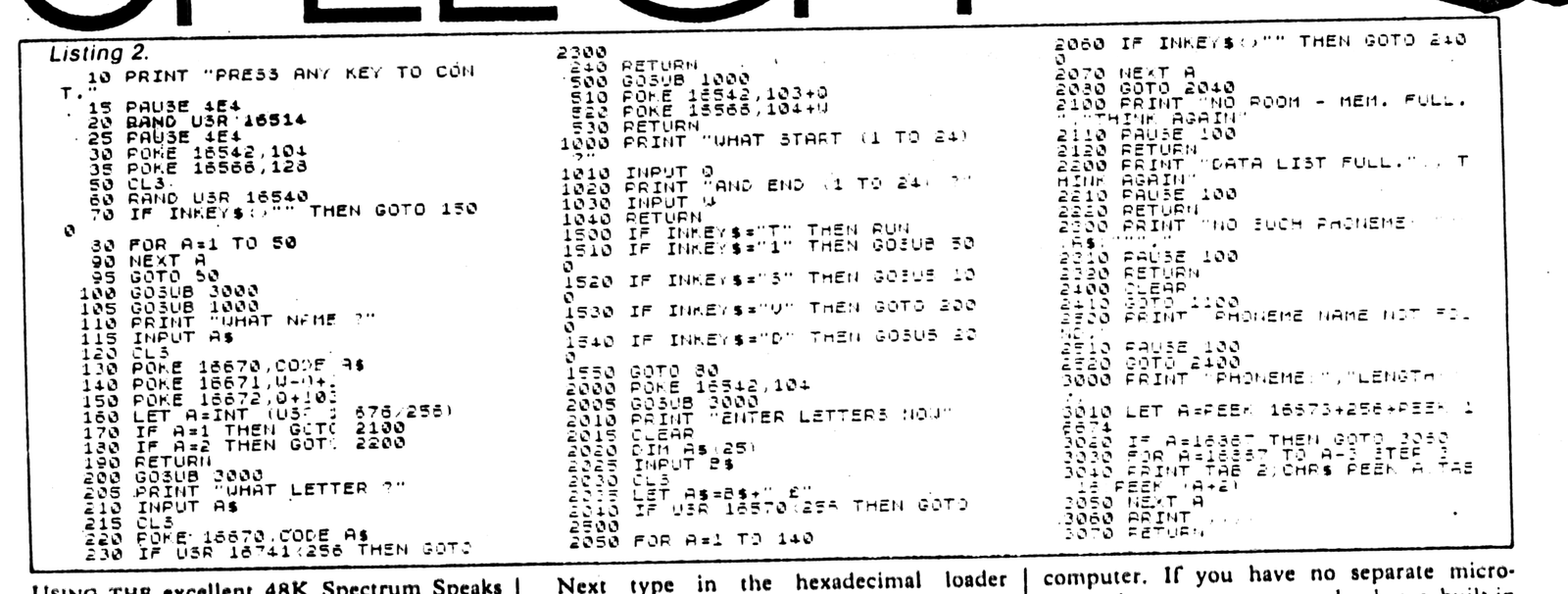
USING THE excellent 48K Spectrum Speaks article in the June 1983 edition of Your Computer, it is possible to make an actual speech processor on a 16K ZX-81.
This program uses a “ZX-81isation” of that routine as its basis. Manipulation of the data is, however, made far easier.
The sounds can be stored and retrieved so that it is possible to construct whole sentences phonetically by joining together the stored sounds. 16K RAM is very limiting for the amount of data necessary to make useful speed possible, but the program uses it to its best possible advantage.
To enter the program first set RAMtop to 19712 in the usual way by:
POKE 16389,77
NEW
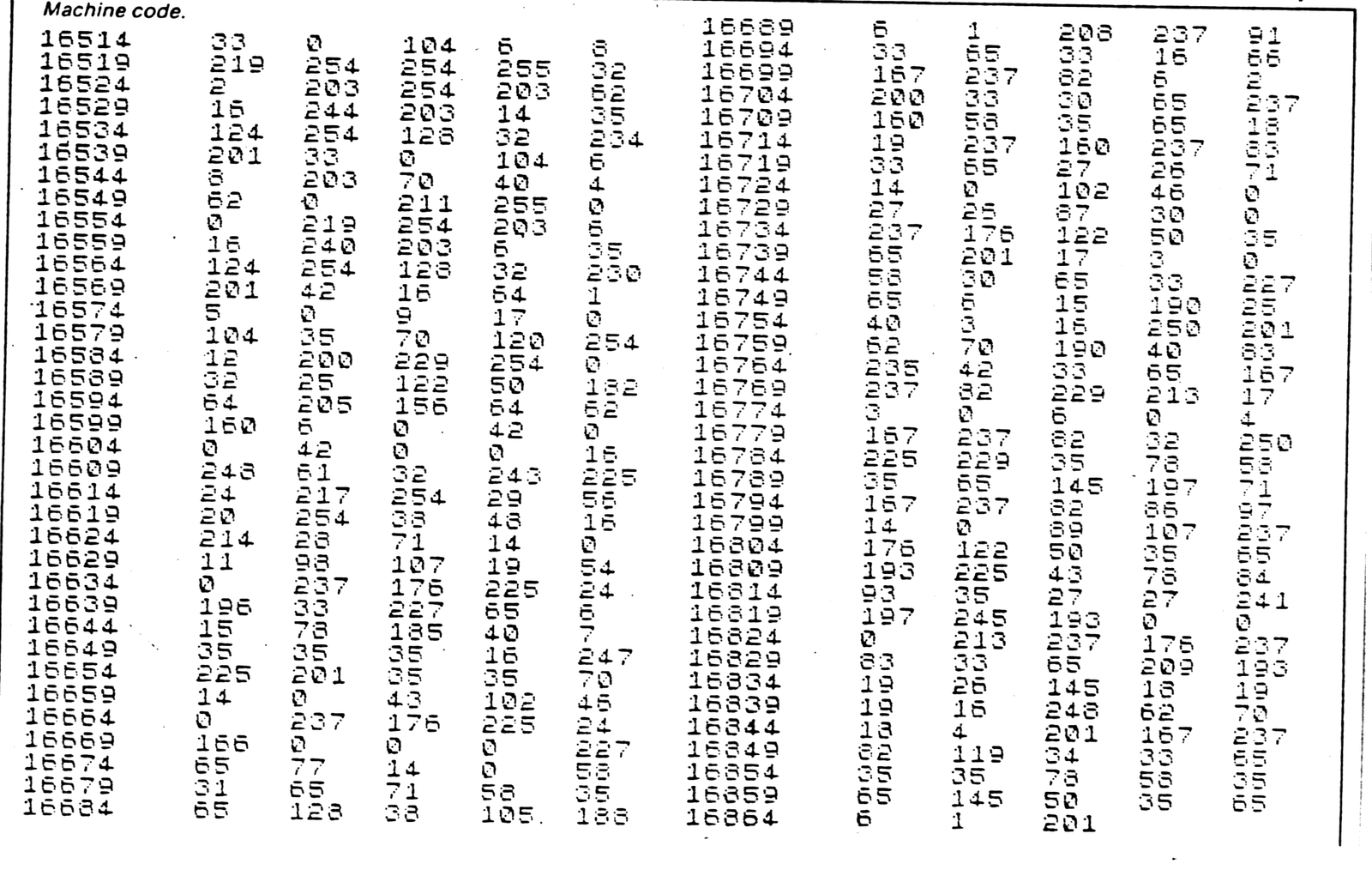
Next type in the hexadecimal loader program — listing 1 — and enter the machine code. When this is complete delete the loader program line-by-line and enter listing 2.
I suggest you now save it several times in case the machine code crashes when executed. A single error will generally cause a complete system reset, deleting everything, including any data above RAMtop.
Set up tape recorder
The next thing to do is to set up your tape recorder and ZX-81 as in figure 1. This works on the principle that almost all portable tape recorders have a monitor function during recording. This means that what is being recorded through the microphone can be put to an external loudspeaker or in this case to a computer. If you have no separate microphone but your tape recorder has a built-in one, then use that.
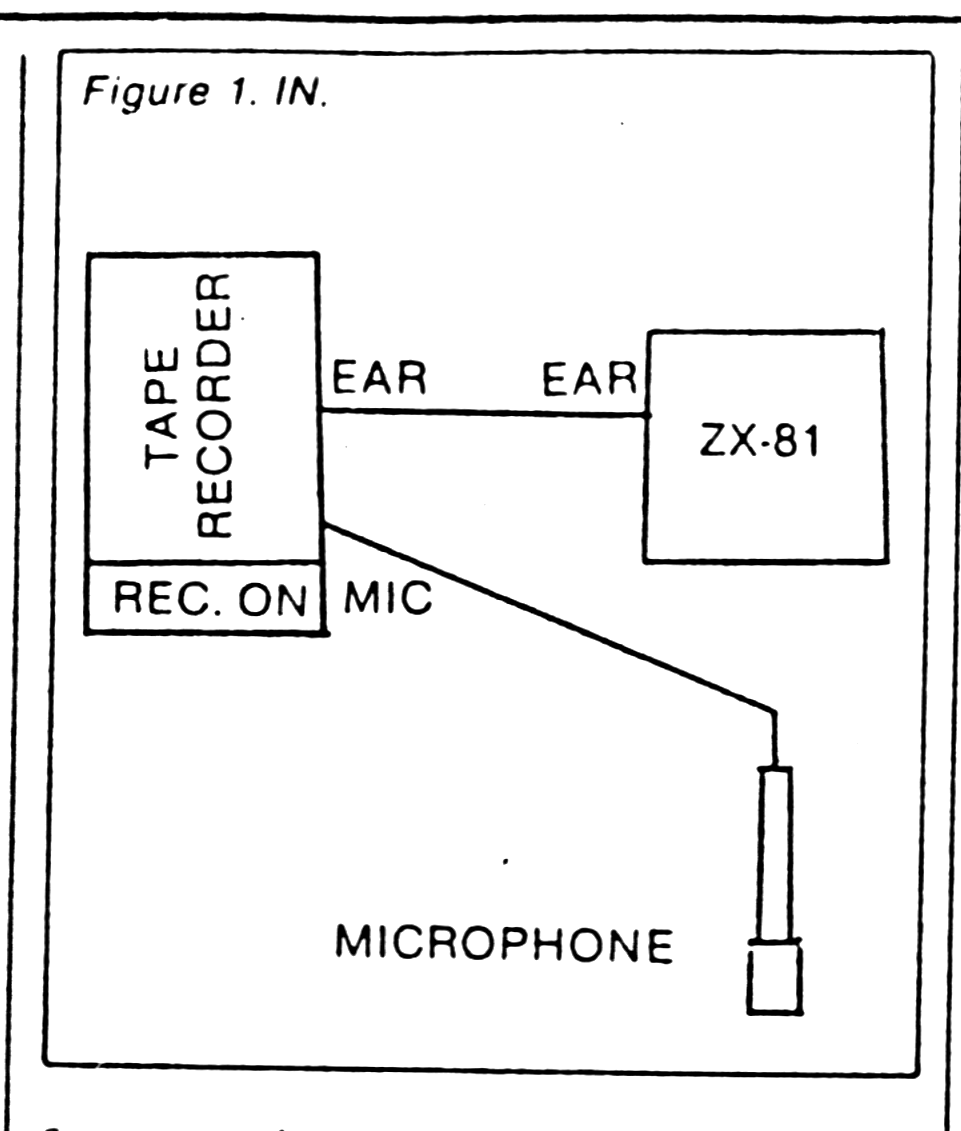
Set up the equipment, insert a fairly long blank tape — or one that can be overwritten — and start recording. Alternatively, you can play a recorded tape into the computer directly, without speaking, at about 1¼ times normal loading volume.
Set to Fast mode. Type Run and you will get a prompt. Decide what to say into the machine first, press Newline, and say it. If you make a mistake or over-run the time limit, hold down T when the prompt reappears. When it reappears for a second time it is ready to go again. If you have said the word correctly, just press Newline. The TV screen should then show a black screen with small white lines, which are the speech. If not, no sound is reaching the computer, in which case, check everything and rerun by pressing T.
Assuming the lines are there, disconnect the equipment and reconnect as in figure 2. An external loudspeaker is usually only necessary with tape recorders with built-in microphones. If Record is again actuated then the voice — or other sound — should be heard. If not, you have equipment problems.
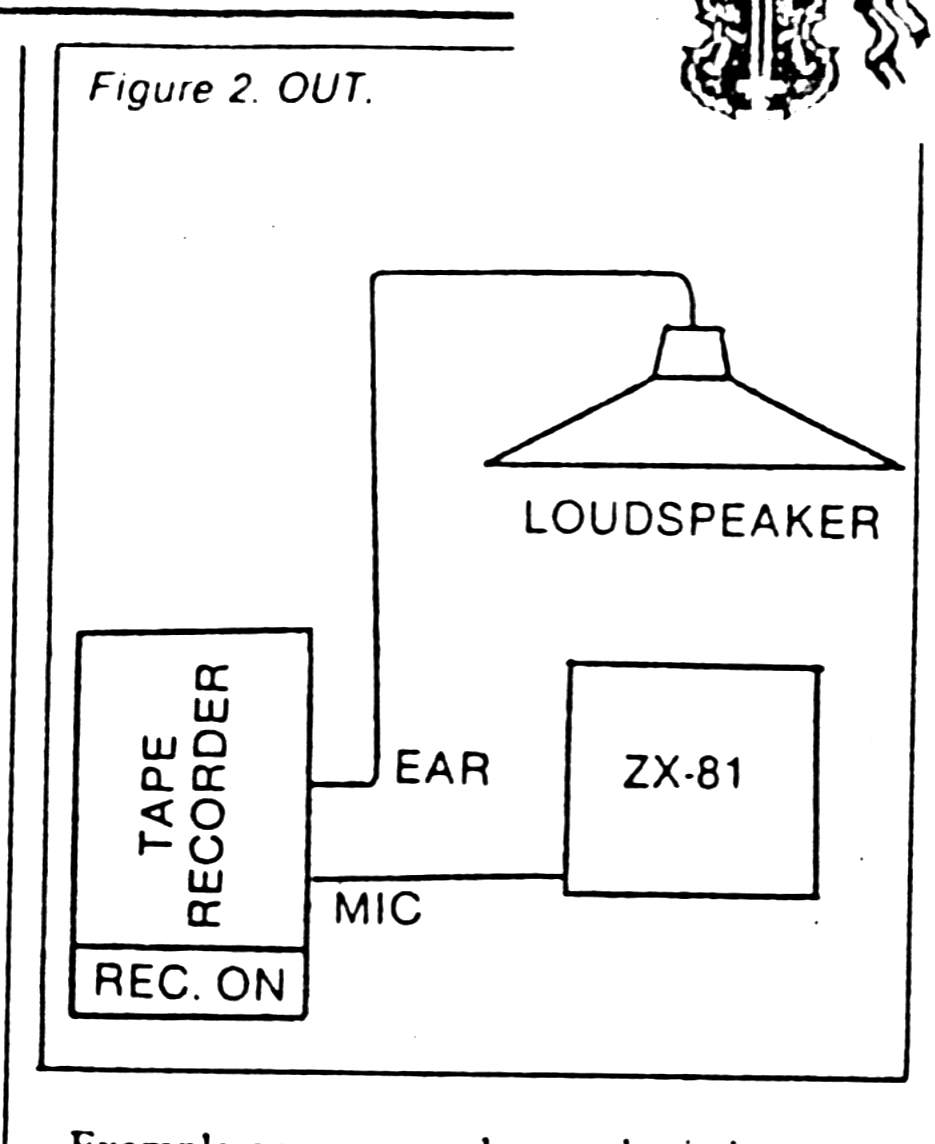
Once this stage is reached, one can move on to the more interesting aspects of the program. The complete sound input can be divided into 24 parts and they can be used singly or in groups, for hearing, storing and retrieving.
Press 1. You will be asked for a start-part — 1 to 24 inclusive is allowed. The end-part is similar but must be more than or equal to the start-part. If the end is the same then only that one part is output. Narrow down the parts, by inputting smaller and smaller sections of the sound, until you only hear the sound you wish to store, e.g., the B in Ball. Consonants are usually two parts long and vowels four parts long. If in doubt make consonants longer and vowels shorter.
To store a sound press S. You should input the limits you found to be the best and give it a single letter name. If storing a sound like P at the end of a word — as in help — store only the actual noise and not the silence which preceeds it, as this can be added later and is a waste of valuable memory. To delete a stored phoneme at any time, press D.
When you have stored all the sounds you want from a particular word in memory, press T to input another word — to get more sounds from — or, alternatively, press V to synthesize some speech.
The string input should consist of sets of named phonemes to make the words up. Separate the words by spaces — to generate the sound and to make a long delay — and you can use the numbers 1 to 9 to make short, timed delays at any point.
Example answers to the synthesis input:
“FLS SWIM QICLIF” — ‘eels swim quickly’
“HW NW BRWN CW” — ‘how now brown cow’
“TEL MF HF TIM PLFZ” — ‘tell me the time please’
“CELIP IS SLJM1F” — ‘kelp is slimy’
Note the repetition of sounds to save memory, the use of E and F as soft and hard E, and the use of 1 as a short delay. If a word overruns the memory a tone is generated.
From these basic principles large, complex words and phrases can be synthesized, within the confines of the memory. For example, using the fact that A, B, C, D etc. end in “ee”, it can even say a large part of the alphabet, if correctly programmed.
This program does all it can with the RAM available, but is still very limited. Nevertheiess, it gives a good demonstration of what can be done on a small microcomputer.
Machine code.
16514   33    0     104   6     8
16519   219   254   254   255   32
16524   2     203   254   203   62
16529   16    244   203   14    35
16534   124   254   128   32    234
16539   201   33    0     104   6
16544   8     203   70    40    4
16549   62    0     211   255   0
16554   0     219   254   203   6
16559   16    240   203   6     35
16564   124   254   128   32    230
16569   201   42    16    64    1
16574   5     0     9     17    0
16579   104   35    70    120   254
16584   12    200   229   254   0
16589   32    25    122   50    182
16594   64    205   156   64    62
16599   160   6     0     42    0
16604   0     42    0     0     16
16609   248   61    32    243   225
16614   24    217   254   29    56
16619   20    254   38    48    16
16624   214   28    71    14    0
16629   11    98    107   19    54
16634   0     237   176   225   24
16639   196   33    227   65    6
16644   15    78    185   40    7
16649   35    35    35    16    247
16654   225   201   35    35    70
16659   14    0     43    102   45
16664   0     237   176   225   24
16669   166   0     0     0     227
16674   65    77    14    0     58
16679   31    65    71    58    35
16684   65    128   38    105   188
16689   6     1     208   237   91
16694   33    65    33    16    66
16699   167   237   82    6     2
16704   200   33    30    65    237
16709   160   58    35    65    18
16714   19    237   160   237   83
16719   33    65    27    26    71
16724   14    0     102   46    0
16729   27    26    87    30    0
16734   237   176   122   50    35
16739   65    201   17    3     0
16744   58    30    65    33    227
16749   65    6     15    190   25
16754   40    3     16    250   201
16759   62    70    190   40    83
16764   235   42    33    65    167
16769   237   82    229   213   17
16774   3     0     6     0     4
16779   167   237   82    32    250
16784   225   229   35    78    58
16789   35    65    145   197   71
16794   167   237   82    86    97
16799   14    0     89    107   237
16804   176   122   50    35    65
16809   193   225   43    78    84
16814   93    35    27    27    241
16819   197   245   193   0     0
16824   0     213   237   176   237
16829   83    33    65    209   193
16834   19    26    145   18    19
16839   19    16    248   62    70
16844   18    4     201   167   237
16849   82    119   34    33    65
16854   35    35    78    58    35
16859   65    145   50    35    65
16864   6     1     201
Transcription note: The machine code as typed adds up to 1 short of the printed checksum, so one value is misread or misprinted.
Note: Type-in program listings on this website use ZMAKEBAS notation for graphics characters.