
My Sinclair 16K RAM does not work well with my ZX81; it takes about four on/off warm-ups, only to see black lines moving from bottom to top on my screen.
Yerach Lazarovitz, Brooklyn, NY
Horizontal black bars drifting vertically on the screen result from ripple in the 9V power pack. Your power unit should read 9.75 VDC 650mA on the bottom. Those reading 500 mA are inadequate. If you have the correct model, it may have failed. Try another 9 VDC source good for 650 mA or more.–KO
I found an error in Mastering Machine Code on Your ZX81 by Toni Baker. In Chapter 17, Toni gives an incorrect address for two routines used in floating point arithmetic. She calls them STACKA and STACKBC, used to put numbers on the calculator stack, and gives their respective addresses as 1519 and 151C (hex). Correct addresses: 151D and 1520. The error appears on pp. 159-162.
Kevin Bulgrien, Longview, TX
Other errors: on p. 158, 0.325 should read 0.375. On pp. 159-161, change CALL STACKA to CD1D15. Change the top of p. 160 to the following: ADD 1755, SUB 174C, MULT 17C6, DIV 1882. Make corrections in the programs following these items.
Clifford Efaw, Morton, WA
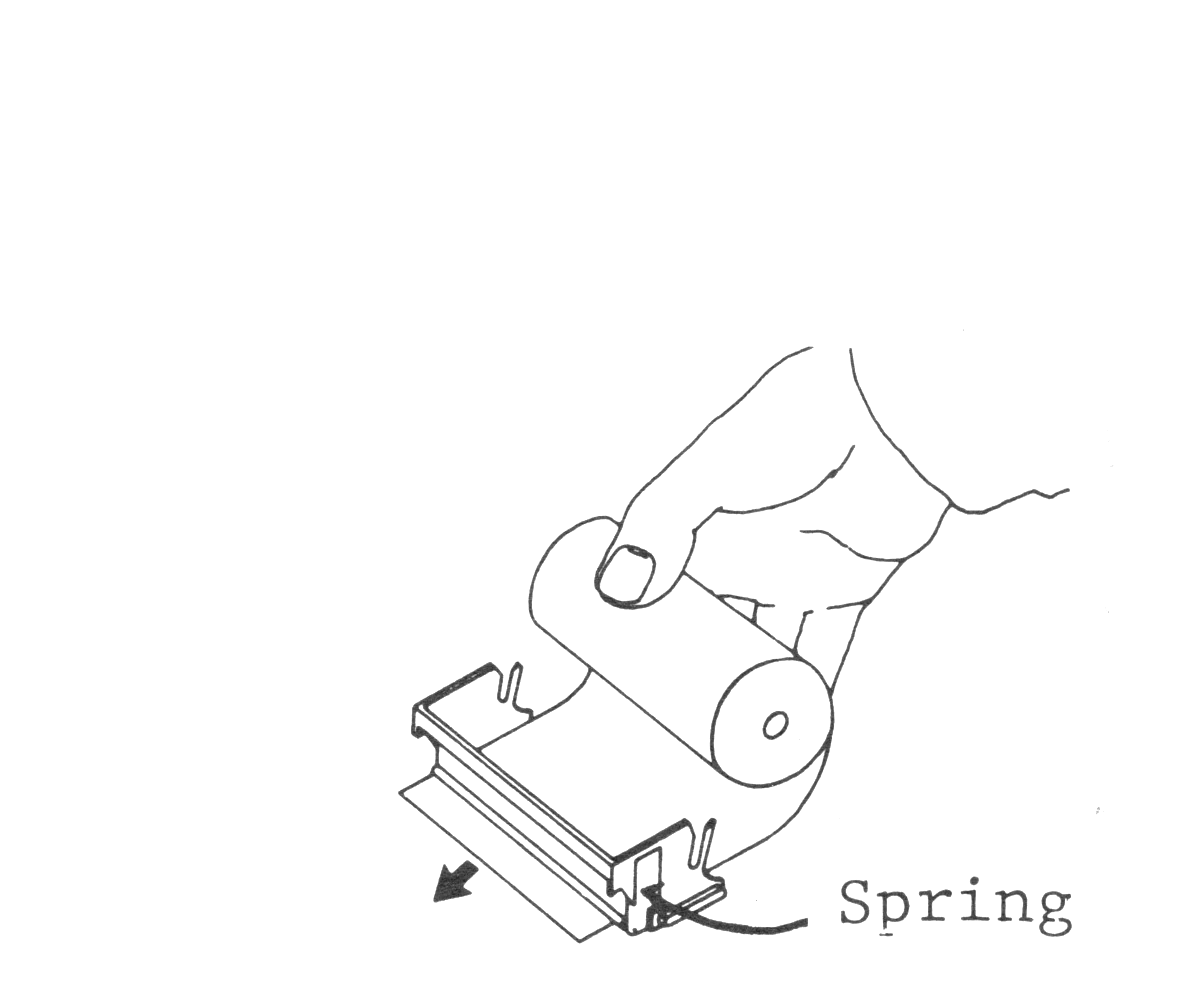
My ZX printer feeds paper incorrectly since I bought it. I corrected the problem after noticing the paper roller springs were too weak. I increased their tension by bending them forward slightly, fixing the problem.
Wayne Johnston, San Francisco, CA
I printed this letter on a BROTHER CE50 typewriter, after composing it with my MEMOTEXT Word Processor. When I tried to buy a CE50 typewriter to use with my ZX81, a mail order house told me they knew of no cable to fit my computer, even with my MEMOPAK Centronics Interface.
After noticing that a CE50 interface included the standard Centronics socket, I knew I could use my interface and cable. As you can see, my system gives me the same capabilities of a much higher priced system. Total cost to me: $800-900.
My only problem–locating daisy wheels and ribbons.
John K. Mitchell, Westwood, MA
John also sent a copy printed right-justified.–AZ
I typed a program from a booklet, More Software from Softsync, into my TS1000 and it does not run. I tried several fixes and still no run. Please help.
Lenore J. Brown, Euclid, OH
Ken Currier of Softsync says the program, Asteroids in Space, has no bugs. Whenever you enter printed programs, remember to enter keywords as keywords, not spelling them out. Also use 0 (zero) instead of O (the letter) for numbers. Some printed listings fail to slash zeros, making them hard to tell from the letter O.–KO
When I listen to tapes I SAVE on my Panasonic Slim Line recorder (model RQ-2739) I hear loud static noise in the background and in empty areas between recording starts and 5-second periods before programs. I don’t hear it using four C batteries; only with the AC power cord. I can’t LOAD programs I SAVEd. I can LOAD pre-recorded programs using either power source.
Bob Wildschuetz, Florissant, MO
Though you do not say so, it sounds like you get this problem only with a 16K RAM pack attached. It’s the classic RAM noise or hum and should go away if you use a Winky Board. Alternatives include opening the RAM pack and adding filtering to the power lines–the noise originates in the converter and feeds back to the recording output.–KO
Here’s a cheap and dirty method to add reset to ZX/TS machines for those who don’t want to void their warranty to add peripherals. Take two solid #24 or smaller insulated wires attached to a push button NO switch. Bare about 1/4″ of each wire, with the plug facing you. Insert one wire between case and prong 23. Tape it to the case so it’s out the way. The other wire sits between the case and prong 4B or 5B.
Clifford Efaw, Morton, WA
My 2K MicroAce with an added 8K ROM and video upgrade kit won’t work with my 32K Memopak. When I turn it on, the screen remains blank for about five seconds; then a white line appears down the right side of the screen. I built a regulated power supply, cleaned and tightened the edge connectors, and removed the extra 1K ROM and RAM select ICs to no avail. Help!
Fred Schobert, Du Quoin, IL
MicroAce machines used selected Z80 chips, some of which run at Z80*A* speeds. Adding more peripherals can stop the Z80. Try changing to a Z80A chip.–KO
I want to adapt my ZX81 RS232 board, printer and disk drive for my 16K Spectrum. Can you help?
John Cipolletti, Southfield, MI
You face two problems: adapting the connector and changing the software or firmware for these accessories. To make the connections, simply wire an adaptor that connects the ZX81-outputs of the Spectrum to appropriate pins and ignore the Spectrum outputs which lack ZX81 counterparts. To correct the software, track down the code changes between ASCII (for Spectrum) and ZX81 codes. Remember that the Z80 codes are identical, but the characters that produce them differ.–KO
I like my TS1000 but not its keyboard. Do you have information about rewiring a standard keyboard to fit the TS key matrix?
Carleton M. Hanson, Oshkosh, WI
SYNTAX published several articles about wiring standard keyboards for ZX/TS computers. See Syntax Quarterly, Winter 82, for a complete explanation, plus info on wiring single-function keys.–KO
What is the difference between a machine code compiler and a machine code assembler?
Ramsay Daly, Seattle, WA
MC compilers turn a BASIC program, or source code, into a machine-code program, or object code. Assemblers translate source code written in machine code mnemonics one-for-one into a machine-code program (object code). In each case the computer executes the object code directly and continuously.
To complete the picture, the ZX/TS BASIC interpreter translates each line of BASIC the computer runs, one at a time, into machine language, executes that sequence, and returns to examine the next line. Hence we call BASIC an interpreted language.
By compiling programs, you save the machine needing to interpret BASIC lines, thus your program runs faster.–KO
I want to expand my system but not sink a fortune into extra equipment. What system would best speed up load time and provide mass storage? Will equipment and software now available work on new TS computers the same as on my TS1000? In particular, will current software work with a color-producing TS? Finally, has Timex or Sinclair considered using magnetic cards?
Ronald Sherard, Hays, KS
Your choices are fast-loading tapes or disks. Tape systems offer better values although disks run faster. Mindware‘s system offers the most reliability.
Yes, TS2040 printers work with TS2068s; you don’t need memory expansions. Other devices need adaptors. TS1000 software will run on TS1500s, but not on color 2068s.
We presently know of no Timex, Sinclair or third-party plan to use magnetic cards.–KO