
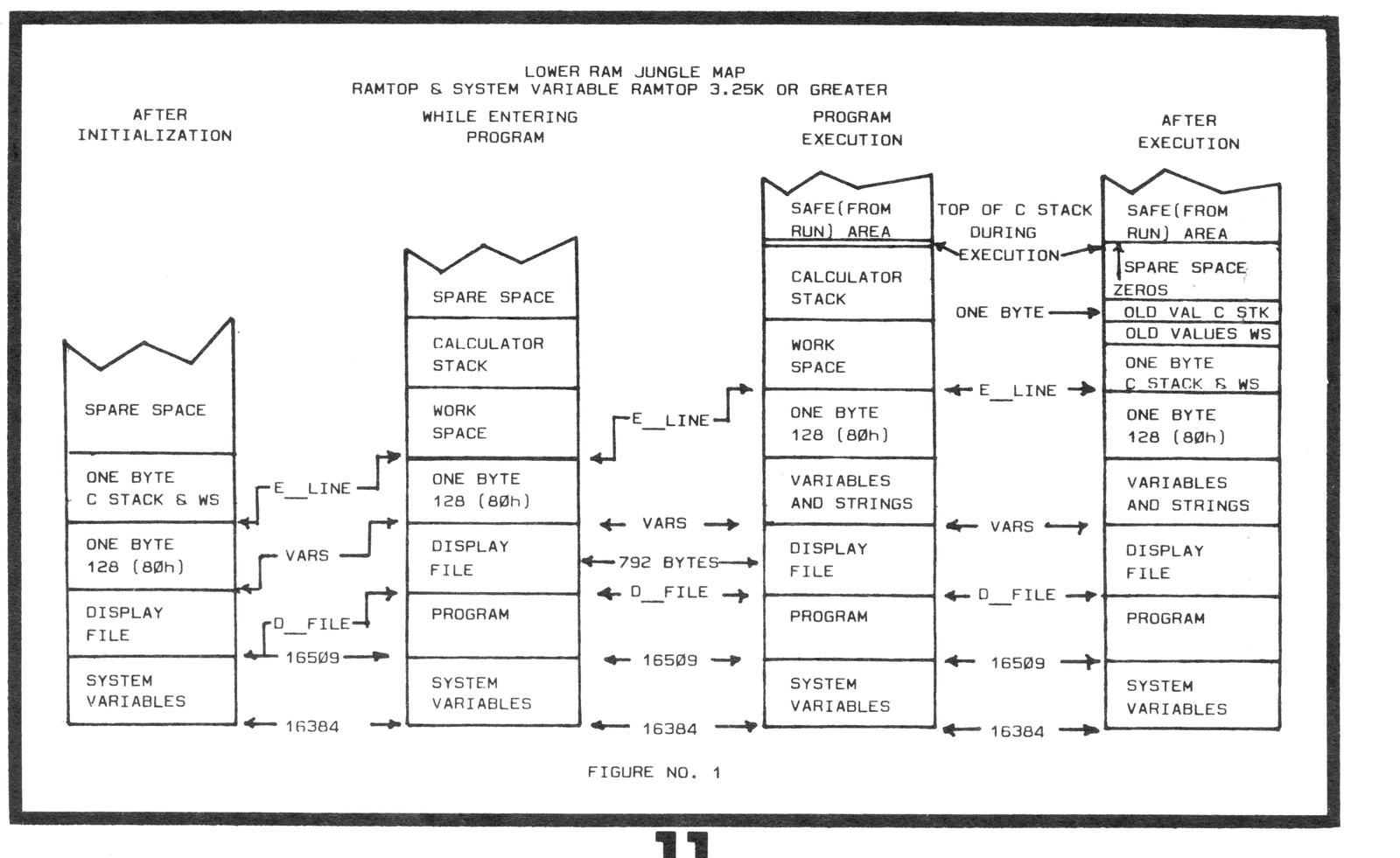
At the end of Part One of this article, published in the SEPTEMBER/OCTOBER issue, we emerged, unscathed by any “BUGS” from the upper RAM jungle onto the plateau of the safe area. We now descend into the lower RAM jungle where a giant bug lives, ready to devour the unwary. A map of the lower RAM jungle during its four major “Seasons” is illustrated in Figure No.1. Note the change in the “Landmarks” (addresses in the system variables) due to the expansion or contraction of the different areas during the different seasons. Just as all data below E_LINE is saved when recording the program on tape or other media, so must this data be saved whenever an area is expanded or contracted. This is done by actually moving the block of data that exists from the point of expansion or contraction to E_LINE (inclusive) moving it up or down in memory and writing over whatever existed in these addresses. All data in the system variables is adjusted to the new addresses.
Now that you have familiarized yourself with the map, I can proceed with some definitions. The minimum address to which you can actually set RAMTOP and the program will run, is the address of the top of the Calculator Stack (C Stack) during the execution of the program, plus the number of bytes in the combined GOSUB Stack (GS Stack) and Machine Stack (M Stack) during execution of the program, plus the 36 bytes of Spare Space required to avoid getting an “Out of Memory” error code. The number of bytes in the combined GS and M Stacks during the execution of the program is found by subtracting the upper limit of the safe area, determined, as we did in part one of this article, from the actual value of RAMTOP.
The lower limit of the safe (from the RUN command) area is the address+1 of the top of the C Stack during execution of the program. The lower limit of the safe (from any other direct command) area is the address+1 of the top of the C Stack after the program execution, and upon entry of the direct command. You can see from the definition that the lower limit of the safe area is a floating value which depends upon what direct command will be entered into the computer after program execution.
Entering a direct command can have two effects on the C Stack. The first is to access work space which moves the C Stack up in memory. The second possible effect is to expand the C Stack. Can we determine how far a direct command moves the bottom of the C Stack? It should move the C Stack the same amount as there are bytes in the same command, entered as a program line, less four bytes containing the line number and the number of bytes in the command itself. To find the number of bytes in a direct command, enter it into the computer with a line number. Then enter the direct commands PRINT PEEK 16511 to find the low byte and PRINT PEEK 16512 to find the high byte of the length of the command. For example, enter the double PRINT PEEK n command with a line number:
10 PRINT PEEK 16410+256*PEEK 16411Peeking 16511 and then 16512 you should get 37 for an answer. Now enter the single PRINT PEEK n command with the same line number:
10 PRINT PEEK 16410Peeking 16511 and 16512 you should get 14 for an answer.
The following portion of the article is for 3.25k or more of RAM. If you have less than that, just follow along until RAMTOP is poked to 18432 in the conclusion of this series of articles, as the results of the examples would be completely different. If you have more than 16k RAM, set RAMTOP to 32768 by poking 16388,0 and 16389,128. Then press NEW and ENTER.
Can we find the top of the C Stack during the program execution by inserting a line to peek the system variable STKEND? To find out enter the following lines into the computer:
10 FOR N=1 TO 48
20 NEXT N
30 PRINT PEEK 16412+256*PEEK 16413;" ";
Yes there is a space between the quotes. Now RUN the program. The value printed should be 17654. Enter NEW and let us try inserting the double peek line in the loop. Do not run …save this program on tape, using SAVE “ONE”.
10 FOR N=1 TO 48
20 PRINT PEEK 16412+256*PEEK 16413;" ";
30 NEXT N
I will call this Program One in the rest of the article. After saving the program, enter NEW, rewind the tape, load the program and enter RUN. The program will print the value 17654 on the screen forty-eight times. Since we will be doing things to the program that could change the location of the bottom of the M Stack, we must find the upper limit of the safe area first. Proceeding as we did in Part One of this article, peek the addresses under RAMTOP-50 and working down in memory until you find only zeros. This occurs at address 32715. Therefore the bottom of the M Stack is 32716 and the upper limit of the safe area is 32715 for this program.
If we peek STKEND using the direct double peek command:
PRINT PEEK 16412+256*PEEK 16413and then peek STKBOT (bottom of the C Stack) using the direct double peek command:
PRINT PEEK 16410+256*PEEK 16411we get the same value, 17435. This is because the C Stack is collapsed by the ROM routines at the end of the program execution. But is 17435 the actual location of the bottom of the C Stack during program execution? To find out, change line 20 of Program One to read:
20 PRINT PEEK 16410+256*PEEK 16411;" ";Now RUN the program and it will print the value 17398 on the screen forty-eight times. If you peek STKEND and STKBOT using direct double peek commands, you will again get 17435 which is a difference of 37 for the double peek commands. Now enter the following direct single peek commands:
PRINT PEEK 16410
this prints 4
PRINT PEEK 16411
this prints 68
and 4+256*68=17412 which is the difference of 14 from 17398. You get these differences from the 17398 because a direct command will access work space, moving the collapsed C Stack up in memory by resetting the system variables STKBOT and STKEND. The expanding work space and expanding C Stack write over whatever was in the addresses above E_LINE. After the direct command has been executed, the C Stack is collapsed and moved back down to E_LINE merely by resetting the system variables of the C Stack to the address of E_LINE. The address immediately below E_LINE always contains the decimal value 128 (80h). The addresses occupied by the expanded C Stack are then cleared by placing zeros into them, precluding us from seeing where the top of the C Stack was during expansion. Referring to Figure No. 1, you can see the same thing happens to the spare space the expanded portion of the C Stack occupied during the execution of the program. Foiled by the Wicked Wizard of ROM.
For example, enter NEW, load and run Program One. Enter the immediate command:
PRINT PEEK 17397you will get 128. Now enter CLEAR which will move E_LINE down by deleting the variable N. Delete the program lines 30, 10 and 20 which will move E_LINE (and the collapsed C Stack) even further down in memory, so that entering another peek command will not write over where the work space and C Stack were during the peek to 17397. Now peek the address from where E_LINE was immediately after running the program (17398), upwards in memory. After address 17412 you will find only zeros. If you wish, you can repeat the procedure starting with entering NEW and using the direct double peek command. You will find nothing but zeros above address 17435. Since the peek commands contain numerical values which must be changed into floating point, using C Stack, then we know that the expanded portion of the C Stack was wiped out with zeros after the command was executed.
When we ran Program One, we found that 17654 was the address stored in STKEND during the execution of the program. Is this the actual top of the C Stack during the execution of the program? To find out, we must lay down some sticky fly-paper to trap the top of the C Stack. Press NEW and ENTER. Then type in the following:
10 FOR N=17398 TO 17654
20 POKE N,5
30 NEXT N
DO NOT RUN YET. Save this program on tape using SAVE “TWO”. I will call this Program Two in the rest of this article. Run the program which will lay down the fly-paper consisting of a 5 in each address from 17398 to 17654. The fives will be changed to a different value when the C Stack expands during the execution of Program One or when they are written over by entering a direct command that moves and expands the C Stack above the address of the top of the C Stack during program execution. Enter CLEAR, load Program One from tape, and RUN. If you refer to the map (Figure No. 1), you will see that entering a program line also uses work space and expands the C Stack when numerical values are involved. This is why we put Program One on tape. Now enter CLEAR and delete lines 30, 10 and 20. Peek the address 17654 and the address immediately below 17654. As you can see, the fives have not been erased or changed. Therefore, we cannot determine the address of the top of the C Stack by adding a line to print STKEND into a program. This is due to the use of STKEND for some other purpose than marking the top of the C Stack by the Wicked Wizard of ROM, leaving us with that giant Bug to contend with. You can continue to peek down in memory and find the top of the C Stack because a different value will have been substituted for the 5 during the running of the program. This occurs at address 17417. Therefore the lower limit of the safe (from RUN) area is 17418.
To find the lower limit of the safe (from PRINT PEEK n) area:
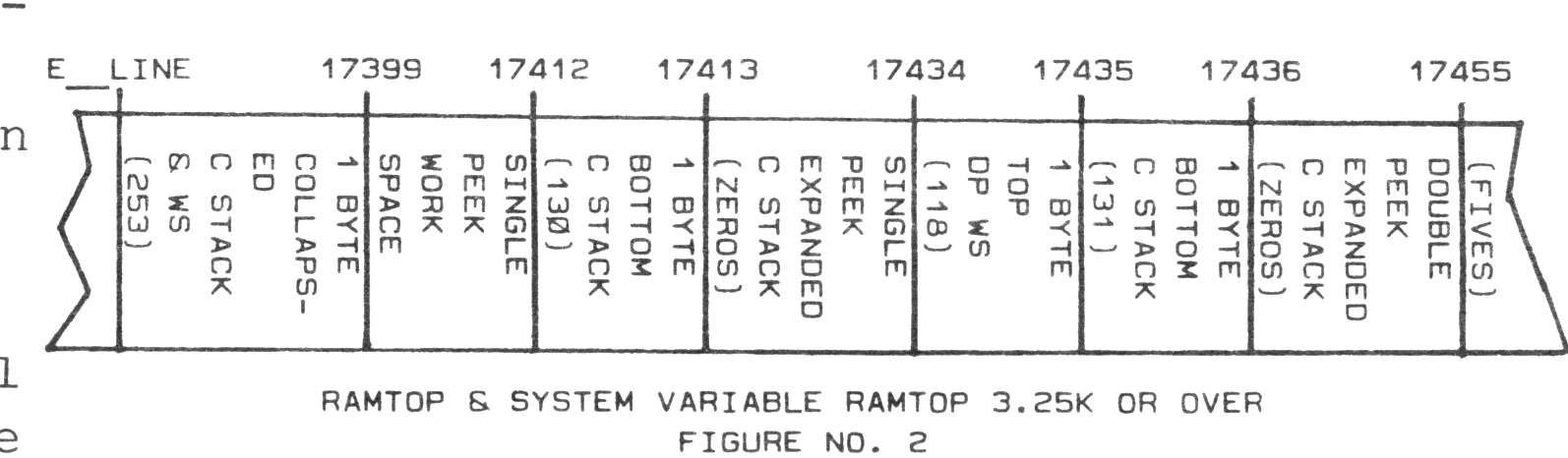
Enter NEW. Load Program Two from tape and run it. Then enter CLEAR. Load Program One from tape and run it. Enter PRINT PEEK 17397 and then enter CLEAR. Delete program lines 30, 10 and 20. Peeking addresses 17398 upwards in memory, you will find the values that were in the work space up to the 118 at address 17411. Then you find the value 130 in address 17412 which is the bottom byte of the C Stack. From 17413 to the top of the C Stack at 17431 you will find only zeros. At address 17432 you will find the first five. You will find only fives in the address above that and on up to 17654. Therefore the lower limit of the safe (from PRINT PEEK n) is 17432. Proceeding in a similar manner, you will find that the lower limit of the safe (from PRINT PEEK 16412+256*PEEK 16413) area is 17455.
To prove when RAMTOP and the system variable RAMTOP are set to 3.25K or over:
1. The fives once written over are not transferred back again.
2. Only the addresses in the expanded portion of the C Stack are filled with zeros after the execution of a basic command.
3. The zeros are actually generated by the ROM routine.
Proceed as follows:
Enter NEW, load Program Two, and RUN
Enter CLEAR, load Program One and RUN
Enter PRINT PEEK 16412+256*PEEK 16413
Enter PRINT PEEK 17397
Enter Clear and delete program lines. Now peek addresses 17455 down to 17398. Your results should agree with Figure No. 2.
To calculate the address to which we can set RAMTOP for Program One:
The number of bytes in the combined GS and M Stacks is RAMTOP minus the upper limit of the safe area or 32768-32715=53 bytes. The address of the top of the C Stack during the execution of the program was 17417. Adding the 53 bytes to 17417 we get 17470. As this is less than 19712, we can set RAMTOP to this value and the program will run. The reason you do not have to add 36 if RAMTOP will be set below 19712, is that a minimum display file is set up consisting of 25 enter codes. Even if the full 22 lines of the screen are used in the program, you would still have an extra 64 bytes available.
The lower limit of the safe area from the new command is 1+ the address to which we can lower RAMTOP and still have the program operate. Of course the system variable RAMTOP must have been poked to this address before executing NEW.
Normally, we want to find the absolute minimum address to which we can lower RAMTOP so that we will have the maximum storage space possible above RAMTOP. Among other mysteries, you will learn how to do this for Program One in the conclusion of this series of articles.
Note: Type-in program listings on this website use ZMAKEBAS notation for graphics characters.