
Vidio Artist is a comprehensive drawing program that provides multiple input modes including pixel-level plotting, character-based “graphic” plotting, circle drawing, line drawing with arc support, rectangle/square drawing, and text entry — all controlled through two-letter instruction codes entered at a menu prompt. The program uses STICK to read a joystick for freehand cursor movement and the fire button (STICK 2) to toggle between draw and erase modes using OVER 1 XOR plotting. A string variable f$ pre-builds an AT/INK escape sequence used repeatedly to position status readouts on the bottom lines of the screen without disturbing the drawing area. The magnified character print routines (pr8 and prm) decode the ROM character set directly from address 15616 by PEEKing each character’s 8-byte bitmap and rendering each pixel as a filled block using DRAW commands scaled by a multiplier of 1×, 2×, 3×, or 4×. User-defined graphics can be loaded from tape via a companion program called AUTOGRAFIX, stored in a 21×8 array and POKEd into UDG memory.
Program Structure
The program is organized as a command dispatcher centered on lines 100–300. After initialization and a splash/intro sequence, the user enters two- to five-letter instruction codes at an INPUT prompt. Each code branches to a self-contained subroutine block:
| Code | Line | Function |
|---|---|---|
| pl | 500 | Pixel plot with joystick |
| gr | 1000 | Character-stamp plot with joystick |
| ci | 1500 | Circle drawing |
| li | 2000 | Line/arc drawing |
| sq | 2500 | Pixel rectangles |
| gs | 3000 | Character rectangles |
| pr | 5000 | On-screen text entry |
| pr8 | 6000 | 8× magnified character render |
| prm | 7000 | 2–4× magnified character render |
| bo | 350 | Border color change |
| sv | 400 | SAVE SCREEN$ |
| ld | 430 | LOAD SCREEN$ |
| ldg | 460 | Load UDG data array |
| co | 190 | COPY to printer (inline) |
| pi | 8900 | Print instructions |
| clear | 180 | CLS (inline) |
Status Bar Technique
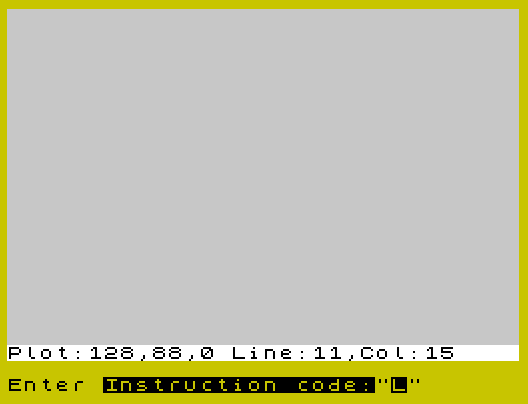
The variable f$ is initialized at line 22 as a pre-built escape string: CHR$ 22 + CHR$ 21 + CHR$ 0 + CHR$ 19 + CHR$ 1. This encodes AT 21,0 followed by INK 1, positioning the cursor at the bottom status line. By PRINTing f$ as a prefix, every routine can update the status display cheaply without a full AT calculation each time. A double PRINT f$,, scrolls past the status area to leave the drawing untouched.
Joystick-Driven Movement
The shared movement subroutine at lines 800–960 (for pixel mode) and 1400–1490 (for character mode) reads STICK(1,1) into s and uses boolean arithmetic to update coordinates. For example:
LET x=x+(s=9)+(s=8)+(s=10)-(s=4)-(s=5)-(s=6)— each parenthesized comparison evaluates to 1 (true) or 0 (false), so direction is accumulated without IF statements.- STICK(2,1) is polled in the draw loop to detect the fire button, toggling between OVER 0 (draw) and OVER 1 (erase) modes.
Coordinate clamping is handled by a chain of IF guards after movement (lines 920–950 and 1480–1486).
Bitmap Magnification Routines
The pr8 routine (line 6000) and prm routine (line 7000) both decode ROM character bitmaps directly from address 15616 using PEEK. For each character, the 8-byte font data is extracted and each bit tested against a descending power-of-two mask (v, halved each step). A set bit causes a filled block to be drawn; a clear bit prints a space.
In pr8, each pixel is rendered as a single inverse block graphic character ("\::" — a full block) at the corresponding AT position, producing an 8× grid fill. In prm, each pixel is rendered by a subroutine dispatched via computed GO SUB: GO SUB 7600+(10*ml), selecting line 7620, 7630, or 7640 for multipliers 2, 3, or 4. Each of these subroutines draws a pixel-sized filled square using a sequence of PLOT and DRAW commands sized to the multiplier.
ON ERR Usage
The program uses ON ERR RESET at line 105 as a global error trap at the top of the main menu loop. Individual routines that risk errors (such as CIRCLE with out-of-range radii or LOAD from tape) install local handlers with ON ERR GO TO, redirecting to safe recovery points (e.g., line 100 or line 1570). This layered error handling prevents the program from crashing during tape operations or bad drawing parameters.
Text Entry Subsystem (pr)
The pr routine (lines 5000–5600) implements a rudimentary word-processor-style text editor. It maintains a 2D string array p$(23,33) storing the typed characters, and reads keystrokes via INKEY$ in a tight loop. Cursor movement is handled by checking character codes: code 8 (backspace), 9 (tab right), 10 (cursor down), 11 (cursor up), 12 (delete), 13 (enter). Wrapping from the right border to the next line and backtracking across line boundaries is implemented at lines 5550–5560. Notably, the code checks z$="AT " (SYMBOL SHIFT+I = INPUT token) and z$=" OR " (SYMBOL SHIFT+U = IF token) as triggers for changing INK and PAPER colors respectively, exploiting keyword tokens as control characters.
UDG Loading
The ldg routine (lines 460–490) loads a 21×8 numeric array a() from tape, then iterates over all 21 UDG slots. For each slot, it computes CHR$(code+64) (yielding “A” through “U”) and uses POKE USR x$+n, a(code,n+1) to install the 8-byte bitmap. This expects data saved by a companion program called AUTOGRAFIX.
Rectangle Drawing
Both the pixel rectangle (sq, line 2500) and the character rectangle (gs, line 3000) routines support two input modes: coordinate entry (“C”) and plot-centered sizing (“P”). The pixel rectangle is drawn by a chain of PLOT + four DRAW commands forming a closed path (lines 2630–2632). The character rectangle uses nested FOR loops printing the border character at each edge position (lines 3120–3170), with corner fixup applied during erase (line 3175).
Notable Anomalies
- Line 2700 in the
sqroutine is referenced byGO TO 2700from line 2520, but the actual plot-mode entry code begins at line 2710. Line 2700 does not exist, so execution falls through to 2710 — this is an intentional technique. - Line 3200 is similarly referenced but absent; execution falls through to 3210, the plot-mode entry for the graphic square routine.
- The
prmerase branch at line 7235 checksIF a$="e", but at that point in the flowa$holds the result of an earlier INPUT unrelated to erase — the erase prompt is actually at line 7240. The condition at 7235 will rarely trigger as intended. - The INK color prompt in the
prroutine at line 5040 accepts values 0–8 (8 is BRIGHT), which is non-standard but consistent with how the program uses it elsewhere in that routine. - Line 9999 (
CLEAR : SAVE "DRAW" LINE 1) is an auto-save/autostart line never reached during normal execution.
Image Gallery
Source Code
   10 REM Program "draw" Updated   3/16/84 by James G. DuPuy
   12 PAPER 7: INK 0: BORDER 1: CLS
   15 POKE 23609,20
   20 LET m=3.14: LET p=7: LET i=0: LET x=128: LET y=88: LET zd=i: LET l=11: LET c=15: LET b=6: LET xd=zd: LET yd=zd
   22 DIM a(21,8): LET f$=CHR$ 22+CHR$ 21+CHR$ 0+CHR$ 19+CHR$ 1
   26 LET g$="": LET h$=""
   29 BEEP .5,20
   30 CLS : PRINT FLASH 1;"       STOP TAPE!!!",''''''''"   Program- ""VIDIO ARTIST"" by:",,,''"     James G. DuPuy 3/16/84",
   40 PAUSE 300: CLS
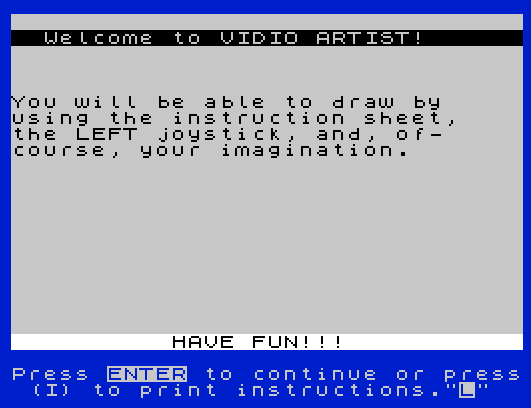
   50 PRINT '' FLASH 1;"  Welcome to VIDIO ARTIST!",
   60 PRINT ''''"You will be able to draw by"'"using the instruction sheet,"'"the LEFT joystick, and, of-"'"course, your imagination.";f$;"          HAVE FUN!!!",
   70 INPUT "Press ENTER to continue or press (I) to print instructions.";a$: CLS : IF a$="i" THEN GO SUB 9000
   80 BORDER b
  100 REM Intruction detect
  101 PRINT f$,,
  103 BEEP .1,30
  105 ON ERR RESET
  107 PRINT f$;"Plot:";x;",";y;",";zd;" Line:";l;",Col:";c
  110 INPUT "Enter Instruction code:";a$: IF a$=" STOP " THEN STOP
  120 IF a$="pl" THEN GO TO 500
  130 IF a$="gr" THEN GO TO 1000
  140 IF a$="ci" THEN GO TO 1500
  150 IF a$="bo" THEN GO SUB 350
  160 IF a$="sv" THEN GO SUB 400
  170 IF a$="ld" THEN GO SUB 430
  175 IF a$="ldg" THEN GO SUB 460
  180 IF a$="clear" THEN CLS : GO TO 100
  190 IF a$="co" THEN INPUT "HOW MANY COPIES?:";copy: FOR n=1 TO copy: PRINT f$,,: COPY : LPRINT ''': PAUSE 0: NEXT n
  200 IF a$="li" THEN GO TO 2000
  210 IF a$="sq" THEN GO TO 2500
  220 IF a$="gs" THEN GO TO 3000
  230 IF a$="pr8" THEN GO TO 6000
  240 IF a$="pr" THEN GO TO 5000
  250 IF a$="prm" THEN GO TO 7000
  260 IF a$="pi" THEN GO SUB 8900
  290 PRINT f$;"Plot:";x;",";y;",";zd;" Line:";l;",Col:";c
  300 GO TO 100
  350 INPUT "Enter Border color:";b
  360 IF b>7 THEN GO TO 350
  370 BORDER b: RETURN
  400 INPUT "DRAWING name?";n$: IF LEN n$>10 THEN GO TO 400
  410 SAVE n$SCREEN$
  420 RETURN
  430 INPUT "Drawing Name?";n$: IF LEN n$>10 THEN GO TO 430
  435 ON ERR GO TO 100
  440 CLS : LOAD n$SCREEN$
  450 RETURN
  460 ON ERR GO TO 100
  465 INPUT "UDG set name?";n$: IF LEN n$>10 THEN GO TO 465
  468 PRINT AT 20,0;
  470 LOAD n$ DATA a()
  475 FOR z=1 TO 21: LET code=z: LET x$=CHR$ (code+64)
  478 FOR n=0 TO 7: POKE USR x$+n,a(code,n+1): NEXT n
  480 NEXT z
  490 RETURN
  500 REM Plot Routine
  510 INPUT "New coor.?(Y/ENT):";a$: IF a$="n" OR a$="" THEN GO TO 530
  520 INPUT "Enter X then Y:";x;"-";y: IF x<0 OR x>255 OR y<8 OR y>175 THEN GO TO 520
  530 PRINT f$,,
  550 PRINT AT 21,27; BRIGHT 1;" DRAW"
  555 PLOT OVER 0; INK i; PAPER p;x,y
  560 GO SUB 800
  565 IF INKEY$="m" THEN GO TO 100
  570 IF STICK (2,1) THEN PAUSE 10: GO TO 700
  580 PLOT OVER 1; INK i; PAPER p;x,y: PAUSE 1
  590 GO TO 555
  700 PRINT AT 21,27; BRIGHT 1;"ERASE"
  705 PLOT OVER 1; INK i;x,y: GO SUB 800
  710 IF INKEY$="m" THEN GO TO 100
  720 IF STICK (2,1)=1 THEN PAUSE 10: GO TO 550
  740 PLOT OVER 0; INK i;x,y: PAUSE 1
  750 GO TO 705
  800 LET s= STICK (1,1)
  820 LET x=x+(s=9)+(s=8)+(s=10)-(s=4)-(s=5)-(s=6)
  830 LET y=y+(s=1)+(s=5)+(s=9)-(s=2)-(s=6)-(s=10)
  840 IF INKEY$="i" THEN INPUT "Enter Ink color:";i
  845 IF INKEY$="p" THEN INPUT "Enter Paper color:";p
  850 IF INKEY$="x" THEN INPUT "Enter X coor.(0-255):";x
  860 IF INKEY$="y" THEN INPUT "Enter Y coor.(8-175):";y
  920 IF x<0 THEN LET x=0
  930 IF x>255 THEN LET x=255
  940 IF y<8 THEN LET y=8
  950 IF y>175 THEN LET y=175
  955 PRINT f$;"X=";x;",Y=";y;"  PLOT      "
  960 RETURN
 1000 REM Graphic PLOT Routine
 1005 LET ig=i: LET pg=p
 1010 INPUT "New Coor.?(Y/ENT):";a$: IF a$="" THEN GO TO 1030
 1020 INPUT "Enter LINE then COL:";l;"-";c: IF l<0 OR l>20 OR c<0 OR c>31 THEN GO TO 1020
 1030 PRINT f$,,
 1031 IF g$="" THEN GO TO 1035
 1032 PRINT f$;"      Character: ";g$
 1033 INPUT "Use Same CHAR.?(ENT/N):";a$: IF a$="" THEN GO TO 1050
 1035 INPUT "Enter Character:";g$: IF LEN g$=0 THEN GO TO 1035
 1050 PRINT AT 21,27; BRIGHT 1;" DRAW"
 1060 PRINT AT l,c; OVER 0; PAPER pg; INK ig;g$
 1070 IF STICK (2,1)=1 THEN PAUSE 15: GO TO 1200
 1080 GO SUB 1400
 1090 IF INKEY$="m" THEN GO TO 100
 1110 PRINT AT l,c; OVER 1; PAPER pg; INK ig;g$: PAUSE 2
 1120 GO TO 1060
 1200 PRINT AT 21,27; BRIGHT 1;"ERASE"
 1210 PRINT AT l,c; OVER 1; INK ig;g$
 1220 IF STICK (2,1)=1 THEN PAUSE 15: GO TO 1050
 1240 GO SUB 1400
 1260 IF INKEY$="m" THEN GO TO 100
 1290 PRINT AT l,c; OVER 0; INK ig;g$: PAUSE 2
 1300 GO TO 1210
 1400 LET s= STICK (1,1)
 1410 LET l=l+(s=2)+(s=6)+(s=10)-(s=1)-(s=5)-(s=9)
 1420 LET c=c+(s=8)+(s=9)+(s=10)-(s=4)-(s=5)-(s=6)
 1430 IF INKEY$="i" THEN INPUT "Enter INK color(0-7):";ig
 1435 IF INKEY$="p" THEN INPUT "Enter PAPER color(0-7):";pg
 1440 IF INKEY$="l" THEN INPUT "Enter LINE(0-20):";l
 1450 IF INKEY$="c" THEN INPUT "Enter COLUMN(0-31):";c
 1460 IF INKEY$="g" THEN INPUT "Enter New CHARACTER:";g$
 1480 IF l<0 THEN LET l=0
 1482 IF l>20 THEN LET l=20
 1484 IF c<0 THEN LET c=0
 1486 IF c>31 THEN LET c=31
 1488 PRINT f$;"Line:";l;", COL:";c;" GRAPHIC   "
 1490 RETURN
 1500 REM CIRCLE  Routine
 1510 INPUT "Use Plot COOR.?(ENT/N):";a$: IF a$="" OR a$="y" THEN LET xc=x: LET yc=y: GO TO 1530
 1520 INPUT "Enter X then Y :";xc;"-";yc
 1530 INPUT "Enter Diameter(2-167):";r: IF r>167 THEN GO TO 1530
 1535 LET r=r/2
 1536 LET ic=i: LET pc=p
 1540 INPUT "Use same INK color(ENT/N):";a$: IF a$="n" THEN INPUT "Enter INK color(0-7):";ic
 1550 INPUT "Use same PAPER color(ENT/N):";a$: IF a$="n" THEN INPUT "Enter PAPER color(0-7):";pc
 1555 ON ERR GO TO 1570
 1560 CIRCLE OVER 0; PAPER pc; INK ic;xc,yc,r
 1570 INPUT "Circle OK(ENT),ERASE(E):";a$: IF a$="e" THEN CIRCLE OVER 1; PAPER pc; INK ic;xc,yc,r
 1580 INPUT "Another Circle?(ENT/N):";a$: IF a$<>"n" THEN GO TO 1510
 1600 GO TO 100
 2000 REM DRAW LINE Routine
 2002 LET xd=0: LET yd=xd
 2010 INPUT "Use Same Plot Coor.(ENT/N):";a$: IF a$="y" OR a$="" THEN LET xl=x: LET yl=y: GO TO 2025
 2020 INPUT "Enter new X then Y:";xl;"-";yl: IF xl>255 OR yl>175 OR yl<8 THEN GO TO 2020
 2025 IF xd=0 AND yd=0 THEN GO TO 2040
 2030 INPUT "Same DRAW coor.?(ENT/N):";a$: IF a$<>"n" THEN GO TO 2050
 2040 INPUT "Where to?(X then Y):";xd;",";yd
 2050 INPUT "Want an ARC?(ENT/N):";a$: IF a$="n" THEN LET zd=0: GO TO 2062
 2052 IF zd=0 THEN GO TO 2060
 2055 INPUT "Same ARC?(ENT/N):";a$: IF a$="" THEN GO TO 2070
 2060 INPUT "Enter ARC (m=PI):";zd
 2062 LET id=i
 2065 INPUT "Change INK color?(Y/ENT):";a$: IF a$="y" THEN INPUT "Enter INK color:";id
 2070 PRINT f$;"Plot:";xl;",";yl;" Draw:";xd;",";yd;",";zd,
 2075 ON ERR GO TO 2100
 2080 PLOT OVER 0; INK id;xl,yl
 2090 DRAW OVER 0; INK id;xd,yd,zd
 2100 INPUT "Line OK(ENT)?,Erase(E):";a$: IF a$="e" THEN PLOT OVER 1; INK id;xl,yl: DRAW OVER 1; INK id;xd,yd,zd
 2105 INPUT "MOVE PLOT-end-LINE(Y/ENT)";a$: IF a$="y" THEN LET x=xl+xd: LET y=yl+yd
 2110 INPUT "Another LINE?(ENT/N):";b$: IF b$="n" THEN GO TO 100
 2120 INPUT "From Last line?(ENT/N):";b$: IF b$="" AND a$<>"e" THEN LET xl=xl+xd: LET yl=yl+yd: GO TO 2030
 2130 IF b$="" AND a$="e" THEN GO TO 2030
 2140 GO TO 2010
 2500 REM Squares & Rectangles
 2510 INPUT "Use PLOT(P),or COOR.(C):";a$: IF a$="c" THEN GO TO 2540
 2520 IF a$="p" THEN GO TO 2700
 2530 GO TO 2510
 2540 INPUT "Enter LEFT edge(0-254):";xls: IF xls>254 THEN GO TO 2540
 2550 INPUT "Enter RIGHT edge(1-255):";xrs: IF xrs>255 OR xls>=xrs THEN GO TO 2550
 2560 INPUT "Enter UPPER edge(9-175):";yus: IF yus<9 OR yus>175 THEN GO TO 2560
 2570 INPUT "Enter LOWER edge(8-174):";yds: IF yds<8 OR yds>=yus THEN GO TO 2570
 2580 PRINT f$;"LFT:";INT xls;",RT:";INT xrs;",UP:";INT yus;",DN:";INT yds,
 2590 INPUT "COOR. OK?(ENT/N):";a$: IF a$="n" THEN GO TO 2510
 2600 LET is=i
 2610 INPUT "Change INK color?(Y/ENT):";a$: IF a$="y" THEN INPUT "Enter INK color:";is
 2620 LET o=0
 2630 PLOT OVER o; INK is;xls,yds: DRAW OVER o; INK is;xrs-xls,0: DRAW OVER o; INK is;0,yus-yds: DRAW OVER o; INK is;xls-xrs,0: DRAW OVER o; INK is;0,yds-yus
 2632 PLOT OVER o; INK is;xls,yds
 2635 IF o=1 THEN GO TO 2650
 2640 INPUT "OK(ENT), ERASE(E):";a$: IF a$="e" THEN LET o=1: GO TO 2630
 2650 INPUT "Another SQUARE?(ENT/N):";a$: IF a$="" THEN GO TO 2500
 2660 GO TO 100
 2710 INPUT "Enter HORZ(up-dn)length:";h: LET yus=y+(h/2): LET yds=y-(h/2): IF yus>175 OR yds<8 THEN GO TO 2710
 2720 INPUT "Enter VERT(lft-rt)length:";v: LET xls=x-(v/2): LET xrs=x+(v/2): IF xls<0 OR xrs>255 THEN GO TO 2720
 2730 GO TO 2580
 3000 REM Graphic SQUARE Routine
 3005 LET h$=g$
 3010 INPUT "PLOT(P), or COOR.(C):";a$: IF a$="c" THEN GO TO 3040
 3020 IF a$="p" THEN GO TO 3200
 3030 GO TO 3010
 3040 INPUT "Enter LEFT edge(0-30):";cl: IF cl>30 THEN GO TO 3040
 3050 INPUT "Enter RIGHT edge(1-31):";cr: IF cr>31 OR cr<=cl THEN GO TO 3050
 3060 INPUT "Enter UPPER edge(0-19):";lu: IF lu>19 THEN GO TO 3060
 3070 INPUT "Enter LOWER edge(1-20):";ld: IF ld>20 OR ld<=lu THEN GO TO 3070
 3080 PRINT f$,,f$;"LFT:";INT cl;",RT:";INT cr;",UP:";INT lu;",DN:";INT ld;", CH:";h$
 3090 INPUT "COOR. OK?(ENT/N):";a$: IF a$="n" THEN GO TO 3010
 3095 LET is=i
 3096 IF h$="" THEN GO TO 3098
 3097 INPUT "Use Same CHAR.?(ENT/N):";a$: IF a$="" THEN GO TO 3100
 3098 INPUT "Enter 1 CHAR. to be used:";h$: IF h$="" THEN GO TO 3098
 3100 INPUT "Change INK color?(Y/ENT):";a$: IF a$="y" THEN INPUT "Enter INK color(0-7):";is
 3110 LET o=0
 3120 FOR n=cl TO cr
 3130 PRINT AT lu,n; OVER o; INK is;h$;AT ld,n; OVER o; INK is;h$
 3140 NEXT n
 3150 FOR n=lu TO ld
 3160 PRINT AT n,cl; OVER o; INK is;h$;AT n,cr; OVER o; INK is;h$
 3170 NEXT n
 3175 IF o=1 THEN PRINT AT lu,cl; OVER o; INK is;h$;AT lu,cr;h$;AT ld,cl;h$;AT ld,cr;h$
 3176 IF o=1 THEN GO TO 3190
 3180 INPUT "G-Square OK?(ENT),ERASE(E):";a$: IF a$="e" THEN LET o=1: GO TO 3120
 3190 INPUT "Another G-Square?(ENT/N):";a$: IF a$="" THEN GO TO 3010
 3195 GO TO 100
 3210 INPUT "Enter HORZ(up-dn):";h: LET lu=l-(h/2): LET ld=l+(h/2): IF ld>20 OR lu<0 THEN GO TO 3210
 3220 INPUT "Enter VERT(LFT-RT):";v: LET cl=c-(v/2): LET cr=c+(v/2): IF cl<0 OR cr>31 THEN GO TO 3220
 3230 GO TO 3080
 5000 REM Printing Routine
 5002 DIM p$(23,33)
 5010 INPUT "Enter LINE then COLUMN:";li;"-";co: IF li>20 OR co>31 THEN GO TO 5010
 5012 LET ub=li
 5015 LET bl=co
 5017 INPUT "Enter RIGHT border(1-31):";br: IF br>31 OR br<=bl THEN GO TO 5017
 5030 PRINT f$,,
 5040 INPUT "Change INK color?(Y/ENT):";a$: LET ip=0: IF a$="y" THEN INPUT "Enter INK color(0-8):";ip
 5045 INPUT "Change PAPER color(Y/ENT):";a$: LET pp=7: IF a$="y" THEN INPUT "Enter PAPER color(0-7):";pp
 5047 PAUSE 30
 5050 PRINT AT li,co; FLASH 1; INK 0;p$(li+1,co+1)
 5052 PRINT f$;"LINE-";li;", COLUMN-";co;"   "
 5055 LET z$=INKEY$
 5060 IF z$<>"" THEN BEEP .01,40
 5065 IF z$="" THEN GO TO 5055
 5070 IF CODE z$>123 OR CODE z$<14 THEN GO SUB 5500
 5075 IF CODE z$>13 AND CODE z$<123 THEN LET p$(li+1,co+1)=z$: PRINT AT li,co; PAPER pp; INK ip;p$(li+1,co+1): LET co=co+1
 5080 IF INKEY$<>"" THEN PAUSE 5
 5085 IF co>br THEN LET co=bl: LET li=li+1: IF li>20 THEN LET li=20
 5090 GO TO 5050
 5500 PRINT AT li,co; PAPER pp; INK ip;p$(li+1,co+1)
 5505 IF CODE z$=13 AND li<20 THEN LET li=li+1: LET co=bl
 5510 IF CODE z$=8 AND co>bl THEN LET co=co-1
 5520 IF CODE z$=9 AND co<br THEN LET co=co+1
 5530 IF CODE z$=10 AND li<20 THEN LET li=li+1
 5540 IF CODE z$=11 AND li>0 THEN LET li=li-1
 5550 IF CODE z$=12 THEN LET co=co-1: IF co>=bl THEN LET p$(li+1,co+1)=" "
 5555 IF co<bl AND li>ub THEN LET co=br: LET li=li-1: LET p$(li+1,co+1)=" "
 5560 IF co<bl THEN LET co=bl
 5565 IF CODE z$=7 THEN GO TO 5010
 5570 IF z$="AT " THEN INPUT "Enter INK color(0-8):";ip: IF ip>8 THEN GO TO 5570
 5575 IF z$=" OR " THEN INPUT "Enter PAPER color(0-7):";pp: IF pp>7 THEN GO TO 5575
 5580 IF z$=" AND " THEN GO TO 100
 5600 RETURN
 6000 REM Printing 8X Routine
 6005 LET i8=0
 6010 INPUT "Coor.(C),G-plot(G):";a$: IF a$="c" THEN GO TO 6018
 6012 IF a$="g" THEN LET l8=l: LET c8=c: IF l8>13 THEN LET l8=13
 6014 IF a$="g" AND c8>24 THEN LET c8=24
 6016 IF a$="g" THEN GO TO 6030
 6017 GO TO 6010
 6018 INPUT "Enter LINE Coor.(0-13):";l8: IF l8>13 THEN GO TO 6018
 6020 INPUT "Enter COLUMN Coor.(0-24):";c8: IF c8>24 THEN GO TO 6020
 6030 INPUT "Enter 1 Character:";r$: IF CODE r$>127 OR CODE r$<32 THEN GO TO 6030
 6040 INPUT "Change INK color?(Y/ENT):";a$: IF a$="y" THEN INPUT "Enter INK color(0-7)";i8: IF i8>7 THEN GO TO 6040
 6050 LET d8=15616+(CODE r$-32)*8
 6060 FOR h=0 TO 7
 6070 LET p8=PEEK (d8+h): LET v=128
 6080 FOR g=0 TO 7
 6090 IF p8<v THEN GO TO 6130
 6100 PRINT AT h+l8,g+c8; PAPER i8;"\::"
 6110 LET p8=p8-v
 6120 GO TO 6140
 6130 PRINT AT h+l8,g+c8; PAPER p;" "
 6140 LET v=v/2
 6150 NEXT g
 6155 NEXT h
 6157 PRINT f$,,
 6158 PRINT f$;"UP:";INT (l8/8);",DN:";INT ((20-l8)/8);",LFT:";INT (c8/8);",RT:";INT ((31-c8)/8);",LN:";l8;",CO:";c8
 6161 INPUT "OK(ENT),ERASE(E):";a$: IF a$="e" THEN FOR n=l8 TO l8+7: PRINT AT n,c8; PAPER p;"        ": NEXT n
 6162 IF a$="" THEN GO TO 6170
 6163 INPUT "CHAR(ENT),COOR(C),END(E)";a$: IF a$="c" THEN GO TO 6010
 6164 IF a$="e" THEN GO TO 100
 6165 GO TO 6030
 6170 INPUT "Another CHAR.after?(ENT/N)";a$: IF a$="n" THEN GO TO 6200
 6180 IF c8<24 THEN LET c8=c8+8: GO TO 6030
 6190 INPUT "NO room,COOR(C),END(E)";a$: IF a$="c" THEN GO TO 6010
 6192 IF a$="" THEN GO TO 6200
 6195 GO TO 100
 6200 IF l8<7 THEN INPUT "New Line(ENT/N):";a$: IF a$="" THEN LET l8=l8+8: LET c8=0: GO TO 6030
 6210 INPUT "Coor(C),End(ENT):";a$: IF a$="c" THEN GO TO 6010
 6220 GO TO 100
 7000 REM PRINT Magnify Routine
 7002 LET i4=0
 7005 INPUT "Enter Char. MULTIPLE(2-4):";ml: IF ml>4 OR ml<2 THEN GO TO 7005
 7010 INPUT "COOR(C),PLOT(P):";a$: IF a$="c" THEN GO TO 7065
 7020 IF a$<>"p" THEN GO TO 7010
 7030 LET xl=x: LET yl=y
 7040 IF xl>255-(ml*8+ml) THEN LET xl=255-(ml*8-ml)
 7050 IF yl<ml*8+8+ml THEN LET yl=ml*8+8+ml
 7060 GO TO 7075
 7065 INPUT "Enter X COOR.:";xl: IF xl>255-(8*ml+ml) THEN GO TO 7065
 7070 INPUT "Enter Y COOR.:";yl: IF yl>175 OR yl<(8+ml+ml*8) THEN GO TO 7070
 7075 LET x4=xl
 7080 PRINT f$,,
 7090 PRINT f$;"LFT:";INT (xl/(8*ml));",RT:";INT ((256-xl)/(ml*8));",UP:";INT ((175-yl)/(ml*8));",DN:";INT ((yl-8)/(ml*8))
 7100 INPUT "Enter 1 CHARACTER:";r$: IF CODE r$>127 OR CODE r$<32 THEN GO TO 7100
 7130 LET oo=0
 7140 LET d4=15616+(CODE r$-32)*8
 7150 FOR h=0 TO 7
 7160 LET p4=PEEK (d4+h): LET v=128
 7170 FOR g=0 TO 7
 7180 IF p4<v THEN GO TO 7210
 7190 GO SUB 7600+(10*ml)
 7200 LET p4=p4-v
 7210 LET v=v/2
 7220 NEXT g
 7230 NEXT h
 7235 IF a$="e" THEN INPUT "Char(ENT),Cont.(c):";a$: IF a$="" THEN GO TO 7100
 7240 INPUT "OK(ENT),ERASE(E):";a$: IF a$="e" THEN LET oo=1: GO TO 7150
 7250 INPUT "Another CHAR. after(ENT/N)";a$: IF a$="n" THEN GO TO 7280
 7260 IF xl<255-(ml*8) THEN LET xl=xl+(ml*8): GO TO 7080
 7280 INPUT "New Line?(ENT/N):";a$: IF a$="" AND yl>8+(ml*8) THEN LET yl=yl-(ml*8): LET xl=x4: GO TO 7080
 7290 INPUT "END(E),COOR.(C):";a$: IF a$="e" THEN GO TO 100
 7295 IF a$<>"c" THEN GO TO 7290
 7300 GO TO 7000
 7620 PLOT OVER oo;g*ml+xl,yl-h*ml: DRAW OVER oo;1,0: DRAW OVER oo;0,-1: DRAW OVER oo;-1,0: RETURN
 7630 PLOT OVER oo;g*ml+xl,yl-h*ml: DRAW OVER oo;2,0: DRAW OVER oo;0,-2: DRAW OVER oo;-2,0: DRAW OVER oo;0,1: DRAW OVER oo;1,0: RETURN
 7640 PLOT OVER oo;g*ml+xl,yl-h*ml: DRAW OVER oo;3,0: DRAW OVER oo;0,-3: DRAW OVER oo;-3,0: DRAW OVER oo;0,2: DRAW OVER oo;2,0: DRAW OVER oo;0,-1: DRAW OVER oo;-1,0: RETURN
 8900 PRINT AT 21,0;"If inst. go on the screen, your"
 8910 INPUT "drawing will clear!>Press ENT"; LINE a$
 9000 REM Print instructions
 9001 INPUT "INST. to screen>S,TO printer>P"; LINE a$: IF a$="p" THEN GO TO 9005
 9002 GO TO 9020
 9005 OPEN #2,"p"
 9010 INPUT "Turn PRINTER on, Press ENT:";a$
 9020 PRINT '"This is the instructions to use the program: DRAW.   \* 3/17/84  By  James G. DuPuy 216-661-4105 "
 9030 PRINT ''"When the Prompt asking for an   INSTRUCTION CODE is present, thefollowing CODES in LOWER case   will do the following."
 9040 PRINT ''"PL - To draw THIN lines useing  LEFT JOYSTICK. Pressing the FIREbutton will alternately allow   you to DRAW or ERASE."
 9050 PRINT '"Pressing""M"" will go back to"'"the MENU (Instruction codes)"
 9060 PRINT """X"" for new X COOR.,""Y"" for new"'"Y COOR., ""I""for new INK color"'"""P"" for new PAPER color."
 9070 PRINT ''"GR - To draw THICK lines using aCHAR(character) of your choice."''"""M"",""I"",""P"", and the FIRE button"'"are the same as PLOT ROUTINE."
 9080 PRINT """C"" for new COLUMN, ""L"" for new"
 9090 PRINT "LINE, ""G"" for new GRAPHIC CHAR."
 9100 PRINT ''"BO - to change BORDER color."
 9110 PRINT '"CI - To Draw CIRCLES. Just obey the prompts at the bottom."
 9120 PRINT '"LI - to QUICKLY draw THIN lines.Follow the prompts."
 9130 PRINT '"SQ - To QUICKLY draw SQARES or  RECTANGLES. Follow prompts."
 9140 PRINT '"GS - to QUICKLY draw GRAPHIC    SQARES or RECTANGLES. Follow theprompts and use only ONE CHAR."
 9150 PRINT '"CLEAR - to CLEAR the drawing."
 9160 PRINT '"CO - To COPY your drawing on theT/S-2040 PRINTER."
 9170 PRINT '"SV - to SAVE your drawing on    TAPE. Follow the prompts and youcan't use over 10 CHAR for NAME."
 9180 PRINT '"LD - To LOAD a drawing from     TAPE. Have tape ready. If you   don't remember the name, just   press ENTER for the name."
 9182 PRINT '"LDG - To LOAD a set of USER DEFINED   GRAPHICS as set up on tape by   the program AUTOGRAFIX."
 9185 PRINT '"PI - To PRINT the INSTRUCTIONS  on the T/S-2040 printer."
 9190 PRINT ''"PR - To PRINT in the drawing.   You will be prompted to enter   LINE,& COLUMN, and-RIGHT BORDER.This will be the limit where theprinting will stop and go to thenext line. Left border is the   COLUMN coor."
 9200 PRINT '"Using CAPS SHIFT and the ARROW  keys will move thecursor in thatdirection. DELETE will backspaceand erase. EDIT will ask for newCoor. SYMBL SHIFT and:"
 9210 PRINT "Y(RETRN) will go back to MENU.  I(INPUT) will ask for new INK.  U(IF) will ask for new PAPER."
 9212 PRINT '"PR8 - Will print at 8 times     normal size. Just follow the    prompts. When you enter COOR or from PLOT you will be at the    upper left corner."
 9214 PRINT '"PRM - Will print at multples of 2,3,or 4. Follow the prompts."
 9220 PRINT ''"To STOP the program, just push  SYMBL SHIFT and the ""A""key(STOP)"
 9225 PRINT '"If the program STOPS at any timewith an ERROR code, just type:  GOTO 100"
 9230 PRINT '''
 9240 CLOSE #2
 9300 RETURN
 9999 CLEAR : SAVE "DRAW" LINE 1
Note: Type-in program listings on this website use ZMAKEBAS notation for graphics characters.