
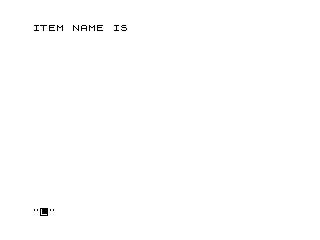
This program calculates the unit price of an item by dividing the total price paid by the quantity purchased. The user enters an item name (as a string), a quantity, and a total price, and the program displays the computed unit price formatted as a dollar amount. After displaying results, it waits for a keypress using a busy-loop on INKEY$ before clearing the screen and looping back to accept another item. Lines 275–400 are unreachable during normal execution, serving as a save/run block appended below the program’s logical end at line 250.
Program Analysis
Program Structure
The program is organized as a straightforward input-process-output loop. Execution begins at line 10 and cycles continuously through data entry, calculation, display, and a keypress wait before clearing the screen and repeating. The logical program ends at line 250 (GOTO 10), making lines 275–400 permanently unreachable during normal execution.
- Lines 10–105: Initialize
U, prompt for and echo item name (N$), quantity (Q), and price (P). - Line 110: Core calculation —
U = P / Q. - Lines 120–250: Display result, prompt user, wait for keypress, clear screen, loop.
- Lines 275–400: Unreachable tail block containing
CLEAR,SAVE, andRUN.
Key BASIC Idioms
The keypress wait at line 230 uses the standard busy-loop idiom IF INKEY$="" THEN GOTO 230, which spins until any key is pressed. This is the conventional non-blocking wait technique in the absence of a PAUSE statement with key detection.
Each INPUT statement is immediately followed by a PRINT of the entered value (lines 70, 100, 40). This echoes input back to the screen since the system’s own input prompt line is overwritten or scrolled away after entry, giving the user a confirmation of what was typed.
Variables
| Variable | Purpose |
|---|---|
U | Computed unit price (total ÷ quantity) |
N$ | Item name entered by user |
Q | Quantity of items |
P | Total price paid |
Notable Techniques and Anomalies
- Initialization of
U: Line 10 setsU=0explicitly, though this is redundant sinceUis always assigned at line 110 before it is used. This may reflect cautious coding style. - No division-by-zero guard: If the user enters
Q=0, the division at line 110 will produce an error. There is no input validation to prevent this. - No currency formatting: The unit price
Uis printed as a raw floating-point number. Values will display with the system’s default numeric formatting, which may show more decimal places than is typical for currency display. - Blank PRINT statements: Lines 45, 75, 105, 200, and 210 are bare
PRINTstatements used solely for vertical spacing, a common formatting technique. - Unreachable lines 275–400: The
CLEAR,SAVE, andRUNcommands beyond line 250 are never reached during execution; they exist as a program-save and auto-restart footer outside the runtime loop.
Image Gallery
Source Code
   5 REM **UNIT PRICE**
  10 LET U=0
  20 PRINT "ITEM NAME IS ";
  30 INPUT N$
  40 PRINT N$
  45 PRINT
  50 PRINT "QUANTITY OF ITEMS =  ";
  60 INPUT Q
  70 PRINT Q
  75 PRINT
  80 PRINT "TOTAL PRICE PAID FOR  ITEMS = $ ";
  90 INPUT P
 100 PRINT P
 105 PRINT
 110 LET U=P/Q
 120 PRINT N$;" UNIT PRICE = $ ";U
 200 PRINT
 210 PRINT
 220 PRINT "FOR MORE,PRESS ANY KEY"
 230 IF INKEY$="" THEN GOTO 230
 240 CLS
 250 GOTO 10
 275 CLEAR
 300 SAVE "1001%3"
 400 RUN
Note: Type-in program listings on this website use ZMAKEBAS notation for graphics characters.