
Twiddler is a utility that scans the screen attribute file and replaces every occurrence of one attribute byte with another, allowing colors of already-printed text and graphics to be changed without knowing their original PRINT AT coordinates. The core machine code routine, embedded inside a REM statement at line 2001, is self-relocating: line 2000 calculates its current address dynamically using PEEK 23637 and PEEK 23638 (the PROG system variable), so the routine remains callable even if lines are added or deleted. Two variables, `before` and `after`, are POKEd into the machine code immediately before each RANDOMIZE USR call to specify the source and target attribute bytes. The attribute file at address 22528 (0x5800) spans 768 bytes covering the full 24×32 display; the routine iterates over this region comparing and substituting. A separate introductory loader routine at line 9900 uses its own embedded machine code (in a REM at line 9910) to display a flashing “STOP THE TAPE” banner, also located via the PROG pointer.
Program Analysis
Program Structure
The program divides into several distinct functional sections:
- Lines 10, 9900–9920: Tape-stop alarm subroutine with its own embedded machine code in the REM at line 9910.
- Lines 50–230: Animated introduction demonstrating the color-rotation effect.
- Lines 240–330: Tutorial section with live demonstrations of attribute swapping (white↔blue, cyan↔magenta, dull↔bright, white↔black).
- Lines 350–410: Final menu offering replay or quit.
- Lines 500–1030: Commented utility stubs including a manual POKE-to-fixed-address variant and attribute calculation helper.
- Lines 1999–2001: The core relocatable machine code subroutine, embedded in the REM at line 2001.
- Line 9999: SAVE with autostart.
Machine Code Routine (Line 2001)
The primary machine code is stored inside the REM statement at line 2001. Because a REM occupies a fixed position in the BASIC program area whose actual RAM address shifts whenever lines are added or deleted, line 2000 calculates its current address at runtime:
2000 LET code= PEEK 23637+256* PEEK 23638+6System variables 23637–23638 hold PROG, the start address of the BASIC program. Adding 6 skips past the line header (2 bytes line number, 2 bytes length, 1 byte REM token, 1 byte space) to reach the first byte of executable machine code. The routine is therefore fully relocatable and requires no fixed load address.
The equivalent routine for a user-chosen fixed address is given in DATA form at line 1020:
| Offset | Byte | Z80 Instruction | Purpose |
|---|---|---|---|
| 0 | 62, 0 | LD A, 0 | Load ‘before’ value (POKEd at offset+1) |
| 2 | 22, 0 | LD D, 0 | Load ‘after’ value (POKEd at offset+3) |
| 4 | 1, 3, 0 | LD BC, 3 | Byte count low byte (768 = 0x300) |
| 7 | 33, 0, 88 | LD HL, 22528 | Start of attribute file (0x5800) |
| 10 | 190 | CP (HL) | Compare attribute with ‘before’ |
| 11 | 32, 1 | JR NZ, +1 | Skip if no match |
| 13 | 114 | LD (HL), D | Write ‘after’ value |
| 14 | 35 | INC HL | Advance pointer |
| 15 | 16, 249 | DJNZ -7 | Loop (uses B as counter) |
| 17 | 13 | DEC C | Decrement high byte of count |
| 18 | 32, 246 | JR NZ, -10 | Outer loop |
| 20 | 201 | RET | Return to BASIC |
The routine uses a BC-split loop (DJNZ for the low byte, DEC C / JR NZ for the high byte) to iterate all 768 attribute bytes, comparing each against A (‘before’) and replacing matches with D (‘after’).
Attribute Byte Encoding
The attribute byte encodes display properties in a single byte: bits 0–2 = INK color, bits 3–5 = PAPER color, bit 6 = BRIGHT, bit 7 = FLASH. The demo at line 600 shows a convenient technique: set colors with normal BASIC commands, then read PEEK 23693 (the permanent attribute system variable) to obtain the corresponding attribute byte. Several specific values used in the demos:
15= white INK, black PAPER (INK 7, PAPER 0 + BRIGHT 0 = 0b00000111)56= black INK, white PAPER (INK 0, PAPER 7 = 0b00111000)5= cyan INK, black PAPER3= magenta INK, black PAPER70= BRIGHT + cyan INK, black PAPER64= FLASH bit set on its own (used to toggle FLASH messages)71= FLASH off (clearing bit 7)
Tape-Stop Alarm (Lines 9900–9920)
The introductory subroutine uses a second machine code fragment embedded in the REM at line 9910, located via PEEK 23637+256*PEEK 23638+5. It fills the screen with alternating flashing colored stripes spelling “STOP THE TAPE” and calls RANDOMIZE USR woop repeatedly until a key is pressed. The loop at lines 9913–9915 swaps INK and PAPER colors between two variables a and b on each row to produce the alternating stripe effect.
Key BASIC Idioms
- Keypress wait: The pattern
IF INKEY$="" THEN GO TO nnnis used throughout to pause execution until a key is pressed, while a precedingIF INKEY$<>"" THEN GO TO nnnflushes any held key first (debounce). - RANDOMIZE USR: Used in preference to bare
USRin a LET statement; the return value is discarded and no error is raised if the routine returns a non-zero value in BC, since RANDOMIZE treats it as a seed. - Color rotation loop (lines 200, 380): A FOR loop steps the attribute index from 4 to 7 (or 7 to 4), POKEing consecutive palette values into the machine code’s operand bytes to animate a smooth color rotation across the entire screen.
- FOR loop with early exit:
IF INKEY$="" THEN NEXT ikeeps looping while no key is pressed; falling through exits the FOR loop without triggering a NEXT-without-FOR error, a common ZX Spectrum BASIC technique.
Alternative Fixed-Address Usage (Lines 999–1030)
Lines 999–1030 provide a self-contained alternative for users who want the machine code at a fixed, user-chosen address rather than inside a REM. The DATA at line 1020 contains the identical 21-byte routine; the user POKEs a target address into YourAddress, runs the RESTORE/FOR/READ/POKE loop, and receives back pre-calculated before and after pointer variables. These lines are prefixed with REM : effectively disabling them from the normal flow.
Anomalies and Notes
- Line 395 offers a QUIT option that executes
LOAD ""after printing a message; this is intended to load the B-side of the tape rather than a true clean exit. - The DJNZ inner loop at offset 15 in the machine code uses a displacement of −7 (byte value 249 = 256−7), but the outer DEC C / JR NZ at offset 18 uses −10 (byte value 246 = 256−10). This correctly re-enters at the INC HL instruction to advance past the just-written byte before the next outer iteration begins — the loop structure is intentional and correct.
- Line 325 calls
RANDOMIZE USR 3438, a direct call to the ZX Spectrum ROM routine that clears the lower screen, used here to clean up the demo area before printing the “PRESS A KEY” prompt.
Image Gallery
Source Code
   10 GO SUB 9900
   50 BORDER 0:PAPER 0:INK 9:CLS
   60 PRINT AT 10,5;"WIZARD PRANG PRESENTS"''" THE ATTRIBUTE TWIDDLER UTILITY"
   70 IF INKEY$ <>"" THEN GO TO 70
   80 IF INKEY$="" THEN GO TO 80
  100 CLS
  110 IF INKEY$ <>"" THEN GO TO 110
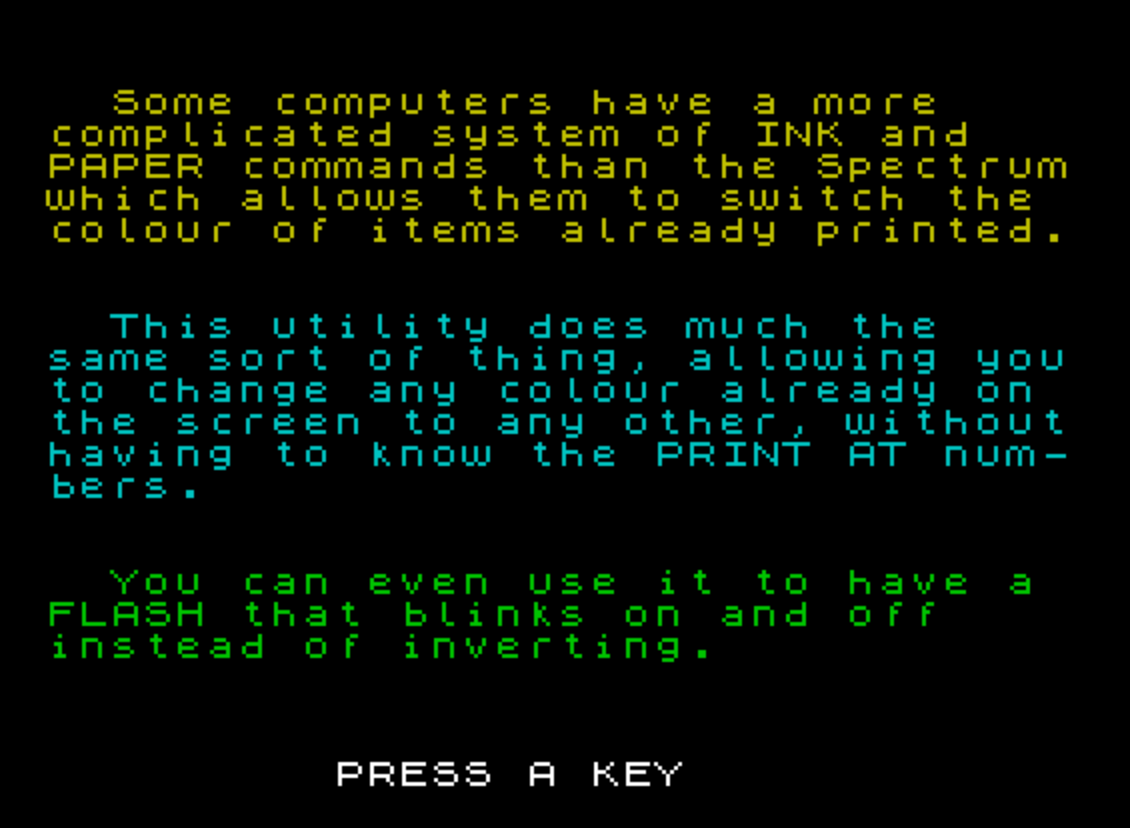
  120 PRINT INK 6;''"  Some computers have a more    complicated system of INK and   PAPER commands than the Spectrumwhich allows them to switch the colour of items already printed."
  130 PRINT INK 5;''"  This utility does much the    same sort of thing, allowing youto change any colour already on the screen to any other, withouthaving to know the PRINT AT num-bers."
  140 PRINT INK 4''"  You can even use it to have a FLASH that blinks on and off    instead of inverting."
  150 PRINT #1; BRIGHT 1;"         PRESS A KEY"
  190 LET j=1
  199 REM GOSUB 2000 TO FIND THE  ADDRESS OF THE CODE ROUTINE     WHICH IS IN A REM, AND HENCE    MOVES AROUND IN MEMORY AS LINES ARE ADDED OR DELETED - NEXT BIT CHANGES COLOURS IN ROTATION
  200 GO SUB 2000:FOR i=7 TO 4 STEP -1:POKE before,i-1:POKE after,i:RANDOMIZE USR code
  210 IF j=-1 THEN POKE before,64:POKE after,71:RANDOMIZE USR code:REM  TURN ON FLASH MESSAGE
  220 IF j=1 THEN POKE before,71:POKE after,64:RANDOMIZE USR code:REM  TURN OFF FLASH MESSAGE
  225 POKE before,7:POKE after,3:RANDOMIZE USR code
  230 LET j=-j:IF INKEY$="" THEN NEXT i:GO TO 200
  235 IF INKEY$ <>"" THEN GO TO 235
  240 CLS :PRINT INK 9;''"  You can change "; PAPER 1;"PAPER"; PAPER 0;", INK, or BRIGHT, or all three at once    with each USR call. First you   POKE your chosen 'before' attri-bute (the colour you want to    change) into the routine, then  you POKE the 'after' attribute, then make the call."
  250 PRINT ''"  The routine ignores all the   attributes that don't match yourchoice, changing only those thatdo."
  299 REM  CHANGE WHITE ON BLUE   TO BLACK ON WHITE, AND BACK
  300 GO SUB 2000:FOR i=1 TO 10:POKE before,15:POKE after,56:RANDOMIZE USR code:PAUSE 6:POKE before,56:POKE after,15:RANDOMIZE USR code:PAUSE 6:IF INKEY$="" THEN NEXT i
  309 REM  CHANGE CYAN ON BLACK   TO MAGENTA ON BLACK, AND BACK
  310 GO SUB 2000:FOR i=1 TO 10:POKE before,5:POKE after,3:RANDOMIZE USR code:PAUSE 6:POKE before,3:POKE after,5:RANDOMIZE USR code:PAUSE 6:IF INKEY$="" THEN NEXT i
  319 REM  CHANGE DULL ON BLACK   TO BRIGHT ON BLACK, AND BACK
  320 GO SUB 2000:FOR i=1 TO 10:POKE before,6:POKE after,70:RANDOMIZE USR code:PAUSE 6:POKE before,70:POKE after,6:RANDOMIZE USR code:PAUSE 6:IF INKEY$="" THEN NEXT i
  325 RANDOMIZE USR 3438:PRINT #1;"          PRESS A KEY"
  329 REM  CHANGE WHITE ON BLACK  TO BLACK ON BLACK, AND BACK
  330 GO SUB 2000:FOR i=1 TO 10:POKE before,7:POKE after,0:RANDOMIZE USR code:PAUSE 6:POKE before,0:POKE after,7:RANDOMIZE USR code:PAUSE 6:IF INKEY$="" THEN NEXT i:GO TO 300
  340 IF INKEY$ <>"" THEN GO TO 340
  350 CLS :PRINT '''"  There are plenty of REMs in   the listing to help you work outhow to use it."''''''"    Press R to read again"'"        or Q to Quit"
  379 REM  ROTATE COLOURS
  380 GO SUB 2000:FOR i=4 TO 7:POKE before,i-1:POKE after,i:RANDOMIZE USR code:PAUSE 6
  385 IF INKEY$="" THEN NEXT i
  390 POKE before,7:POKE after,3:RANDOMIZE USR code
  395 IF INKEY$="q" OR INKEY$="Q" THEN CLS :PRINT AT 10,10;"SWITCH OFF  "; TAB 9;"TURN THE TAPE"; TAB 8;"PLAY OTHER SIDE":LOAD ""
  400 IF INKEY$="r" OR INKEY$="R" THEN GO TO 100
  410 GO TO 380
  500 STOP
  600 REM  EASY WAY TO CALCULATE  ATTRIBUTES- SET INK, PAPER, AND SO ON WITH USUAL COMMANDS,THEN  PEEK 23693 WILL GIVE THE ATTRI- BUTE NUMBER FOR THE COLOURS YOU HAVE SET
  610 PAPER 2:INK 7:BRIGHT 1:POKE before, PEEK 23693:REM THIS  ATTRIBUTE NUMBER IS 87
  620 STOP
  999 REM  USE NEXT FEW LINES TO  PUT CODE AT YOUR OWN CHOICE OF  ADDRESS
 1000 REM :LET YourAddress=????
 1005 RESTORE 1000:FOR i=0 TO 20:READ a:POKE YourAddress+i,a:NEXT i
 1010 LET before=YourAddress+1:LET after=YourAddress+3:STOP
 1020 DATA 62,0,22,0,1,3,0,33,0,88,190,32,1,114,35,16,249,13,32,246,201
 1030 STOP :REM END
 1999 REM  FIND USR ADDRESS OF    CODE IN LINE 2001 (ALLOWS FOR   MOVEMENT) CODE IS RELOCATABLE   AND WILL WORK ANYWHERE
 2000 LET code= PEEK 23637+256* PEEK 23638+6:LET before=code+1:LET after=code+3:RETURN
 2001 REM >!XPEEK  r#RANDOMIZE
 9900 REM *STOP TAPE ALARM*
 9909 LET woop= PEEK 23637+256* PEEK 23638+5
 9910 REM ddRETURN :H\NEW o AND gGO SUB i{= CLEAR GO SUB a{= CLEAR  LIST d RETURN :H\NEW o AND gGO SUB i{= CLEAR GO SUB a{= CLEAR  LIST <>oo
 9912 BORDER 5:PAPER 5:LET a=2:LET b=7:CLS
 9913 FOR i=0 TO 21
 9914 PRINT AT i,8; INK a; PAPER b; FLASH 1;" STOP THE TAPE "
 9915 LET c=a:LET a=b:LET b=c:NEXT i
 9916 PRINT #1; AT 1,0; INK 9;"   PRESS ANY KEY TO TURN PAGE   "
 9917 RANDOMIZE USR woop
 9918 IF INKEY$="" THEN GO TO 9917
 9920 RETURN
 9999 SAVE "twiddler" LINE 1
Note: Type-in program listings on this website use ZMAKEBAS notation for graphics characters.