
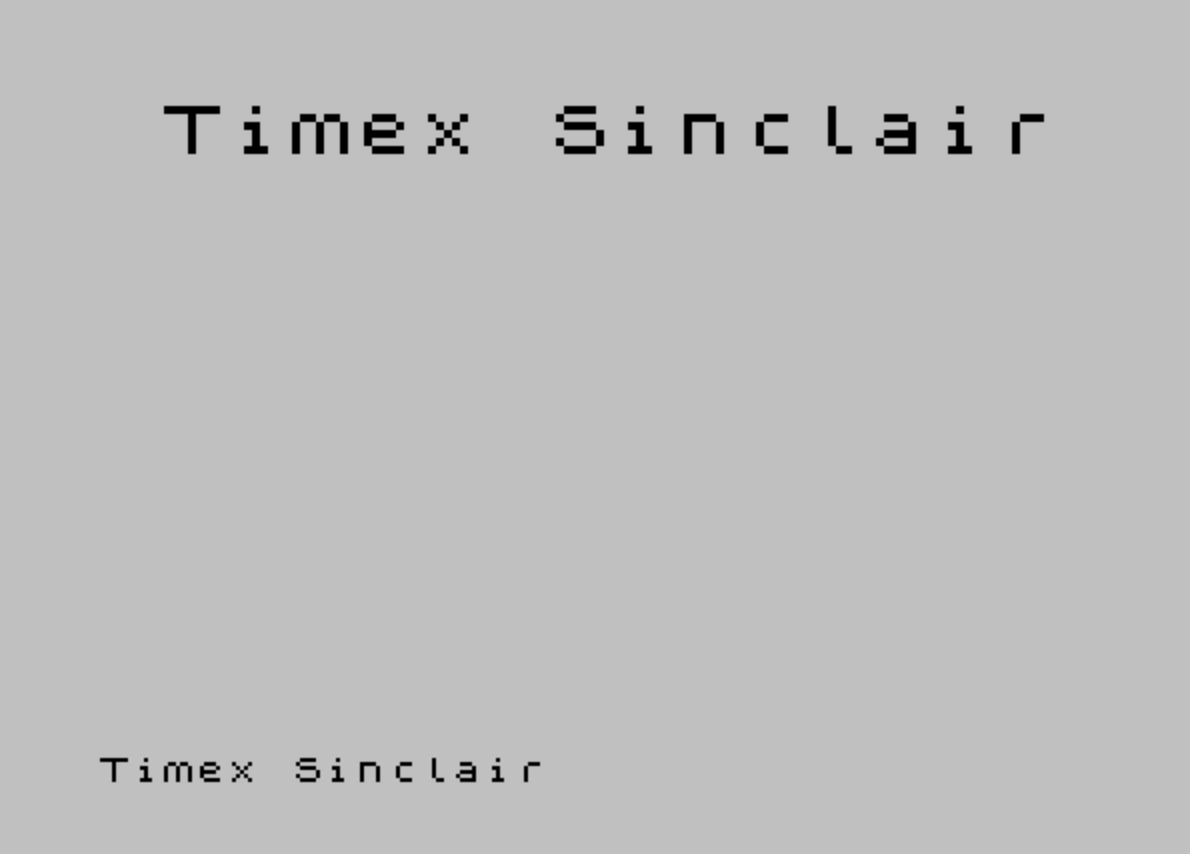
Titlemaker is a TS2068 BASIC subroutine that renders user-entered text at double size by exploiting the POINT function to read pixel data from a string printed off-screen at line 21. For each pixel set in the standard-size text, the routine uses nested loops to PLOT a 2×2 block at a calculated screen position, effectively doubling both horizontal and vertical resolution. The title is centered horizontally using a formula based on the string length and a fixed X origin of 128. Input is validated to reject empty strings and strings longer than 16 characters before rendering.
Program Structure
The program is organized into a short main loop and a single subroutine:
- Lines 10–60: Main loop — clears the screen, accepts input, validates length, calls the rendering subroutine, then repeats.
- Lines 70–170: The core double-size rendering subroutine.
- Line 180: A
SAVEstatement with autostart at line 10. - Line 190: A
REMcomment describing the program and its author.
Input and Validation
Lines 20–40 handle user input. An empty string causes a loop back to line 20 via IF t$="" THEN GO TO 20. The string is copied to y$ at line 30, and if its length exceeds 16 characters, line 40 sends control back to line 20. The 16-character limit is practical: each character renders as 16 pixels wide when doubled, so 16 characters fills 256 pixels — exactly the screen width.
Rendering Technique
The double-size effect is achieved without machine code by using the built-in POINT function as a pixel-level reader. At line 80, the title string y$ is printed at row 21 (the bottom line of the display), placing it in a region used as a temporary pixel buffer. The outer loops then scan each pixel of the rendered text:
a(line 90): iterates rows from 7 down to 0 — the 8 pixel rows of a character cell.b(line 100): iterates columns from 0 to8 * LEN y$ - 1, covering every pixel column across all characters.- Line 110 uses
POINT (b, a)to test whether that pixel is lit. The coordinate origin ofPOINTis at the bottom-left of the screen, so row 21 characters correspond toavalues 0–7. - If the pixel is set, inner loops
candd(lines 120–150) each run 0 to 1, andPLOTplaces a 2×2 block of pixels at the scaled destination.
Coordinate Calculations
The destination X coordinate in line 140 is x - (8 * LEN y$) + 2*b + c, where x = 128. This centers the doubled text: 8 * LEN y$ is half the total pixel width of the doubled string (since each source pixel becomes 2 pixels wide), so subtracting it from 128 (the horizontal midpoint) gives a left-aligned start that results in centering. The Y coordinate is y + 2*a - d, where y = 157, placing the doubled title roughly in the upper-center of the screen and scaling vertically by 2.
Cleanup and Reuse
Line 170 uses PAUSE b as a brief delay (the value of b after the loop exits is 8 * LEN y$, providing a pause proportional to the string length). The PRINT AT 21,0,; then clears the temporary buffer line before returning, leaving the double-size plot visible. The routine is structured as a proper subroutine (ending with RETURN), so it can be called from external programs.
Notable Techniques and Anomalies
- Using
POINTto read back pixels that were just printed is an elegant workaround for lack of direct character font data access in BASIC. - The variable
y$is redundant —t$is copied toy$at line 30 but could be used directly; this may be a remnant of earlier development. - The
PAUSE bat line 170 reuses the loop variable rather than a literal, giving a variable-length pause as an unintentional but functional side effect. - The centering formula assumes the doubled text should be horizontally centered at pixel column 128. This works for strings up to 16 characters; longer strings are rejected by the input validation.
- The loop at line 90 iterates
afrom 7 down to 0. SincePOINTuses screen coordinates with Y=0 at the bottom,a=0is the bottom pixel row of the character anda=7is the top — the downward iteration produces correct top-to-bottom rendering in the doubled output due to the2*ascaling.
Image Gallery
Source Code
  10 CLS :LET x=128:LET y=157
  20 INPUT "Enter title (<=16 characters - ";t$:IF t$="" THEN GO TO 20
  30 LET y$=t$
  40 IF LEN y$>16 THEN GO TO 20
  50 GO SUB 70
  60 GO TO 10
  70 REM PRINT double size
  80 PRINT AT 21,0;y$
  90 FOR a=7 TO 0 STEP -1
 100 FOR b=0 TO 8* LEN y$-1
 110 IF POINT (b,a)=0 THEN GO TO 160
 120 FOR c=0 TO 1
 130 FOR d=0 TO 1
 140 PLOT x-(8* LEN y$)+2*b+c,y+2*a-d
 150 NEXT d:NEXT c
 160 NEXT b:NEXT a
 170 PAUSE b:PRINT AT 21,0,,:RETURN
 180 SAVE "Titlemaker" LINE 10
 190 REM     TITLE MAKER        A subroutine to create centered titles in double size print.    by D.J. Currie
Note: Type-in program listings on this website use ZMAKEBAS notation for graphics characters.