
The Coupon Manager is a household coupon organizer that stores up to 10 coupons each across 18 product categories, recording store name, brand description, start date, and expiration date for each coupon. Data is held in a 180-row by 46-column string array T$, with a parallel 18-element C$ array holding category names. The program embeds Z80 machine code in the REM statement at line 100, invoked via USR 16720, which appears to implement a custom display or memory-clear routine; additional POKE sequences at addresses 16707–16712 configure machine code parameters before each USR call. Coupons can be retrieved either by category or by store name, with a linear search through T$ comparing entered store names against stored records. The program includes tape save functionality, writing the entire program (including the T$ data array) to cassette using the SAVE command.
Program Analysis
Program Structure
The program is organized into clearly delineated functional blocks accessed via GOSUB. The main loop runs from line 500 through 580, repeatedly calling menu and function-selection routines. The overall flow is:
- Lines
300–320: Declare the two primary arrays (C$andT$). - Lines
500–580: Main control loop — initialize display, load categories, show splash, display master menu, display function menu, dispatch to add/delete/display. - Lines
1000–1180: Display utility routines (machine code invocation with POKE configurations). - Lines
1200–1299: Splash/title screen. - Lines
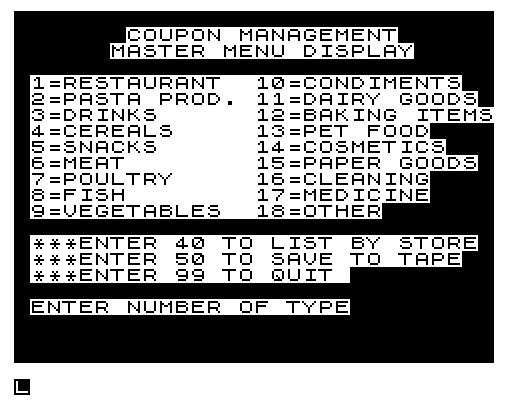
1300–1399: Master menu with 18 categories plus special entries for store listing, save, and quit. - Lines
1400–1499: Function selection menu (add, delete, display). - Lines
2000–2999: Coupon add logic, including slot-finding subroutine at2500. - Lines
3000–3499: Delete logic. - Lines
3500–3590: Display-all-of-type logic. - Lines
8000–8050: Populate category name arrayC$. - Lines
8500–8520: Quit confirmation. - Lines
9000–9060: Tape save routine. - Lines
9100–9240: Search and display by store name.
Data Model
Two string arrays carry all persistent data:
| Array | Dimensions | Purpose |
|---|---|---|
C$(18,12) | 18 rows × 12 chars | Category names (e.g., “RESTAURANT”, “MEAT”) |
T$(180,46) | 180 rows × 46 chars | Coupon records, 10 per category |
Each row of T$ uses fixed-width substring slices:
| Columns | Field |
|---|---|
| 1–2 | Category number (zero-padded) |
| 3–5 | Record number (zero-padded) |
| 6–15 | Store/place of usage (10 chars) |
| 16–30 | Brand name / description (15 chars) |
| 31–38 | Start date MM/DD/YY (8 chars) |
| 39–46 | Expiration date MM/DD/YY (8 chars) |
Category A uses rows A*10-9 through A*10, giving exactly 10 slots per category for a total of 180 records.
Machine Code Usage
Line 100 contains a large block of Z80 machine code embedded in a REM statement. The entry point is at address 16720 (decimal), called via USR 16720 at lines 1070 and 1170. Before each call, six consecutive memory locations (16707–16712) are POKEd with either 128 (lines 1010–1060, routine at 1000) or 0 (lines 1110–1160, routine at 1100). The machine code likely uses these bytes as parameters to control the display — possibly toggling a custom display driver or clearing/setting a screen region. The REM data also includes what appear to be multiple independent routines at different offsets within the block, given the presence of several C9 (RET) opcodes interspersed throughout.
Key BASIC Idioms
- Fixed-width substring assignment: Fields are stored by writing into specific column slices of
T$(X, col TO col). Because BASIC string arrays are fixed-width, this acts as a simple flat-file record format. - Zero-padding: Lines
2212–2218manually prepend “0” characters to category and record numbers when they are less than 10 or 100, respectively, ensuring consistent 2- and 3-digit file numbers for reliable string comparison during search. - Linear search: The delete routine (line
3090–3150) and the store-name search (line9182–9200) both useFOR N=1 TO 180loops with conditional branching — a straightforward sequential scan. - Delay loops: Empty
FOR/NEXTloops (e.g., lines1230–1235,2820–2840) serve as timing delays for display pauses.
Notable Techniques
The tape save at line 9050 uses SAVE "COUPO%N" — the %N renders as an inverse-video “N” in the filename. Saving the program with its data arrays intact means the entire coupon database is preserved on tape alongside the code, providing a simple persistence mechanism without needing a separate data file.
Lines 150 and 270 interact in a noteworthy way: line 150 jumps to 270, but line 270 does not exist in the listing. This is used as a technique to skip over the INPUT/POKE loader utility at lines 200–260 during normal execution, while still allowing those lines to be accessed manually if needed.
The store-name search at line 9184 compares D$ against T$(N,6 TO D) where D=5+LEN D$. This dynamically sizes the comparison window to match the entered store name length, avoiding false mismatches due to trailing spaces — a careful approach to variable-length string matching within a fixed-width field.
Bugs and Anomalies
- Delete uses wrong variable: Line
3410writes the blank string toT$(X), but the correct variable found during the search loop (line3100) isN, notX.Xis the add-routine’s slot pointer and may hold an unrelated value, so the wrong record could be blanked. - C$(13) out of sequence: In the category initialization block (lines
8000–8044),C$(13)(“PET FOOD”) is assigned at line8040, afterC$(14)throughC$(17). This is cosmetically inconsistent but functionally harmless. - Category 13 missing from add/display: No
C$(13)row is declared betweenC$(12)andC$(14)in sequential order, but the array is populated correctly at line8040; the master menu does list “13=PET FOOD”, so this is not a real omission. - Instructions branch unreachable: Lines
1241–1250(the “DO YOU NEED INSTRUCTIONS?” prompt) are skipped by an unconditionalGOTO 1299at line1240, making the instruction pathway dead code. Line7000, which would contain the instructions, does not appear in the listing at all. - B=4 accepted silently: The function menu guard at line
1450rejectsB<1 OR B>4, meaningB=4passes through but has no correspondingIF B=4handler in the dispatch block (lines570–578), causing it to loop back to560doing nothing.
Content
Image Gallery

Source Code
 100 REM 2AC40231591ED4A3680C900002AC40231591ED4A6F36802B5C29D402AC40231591ED4A6F3680235C2AF40C900000000000002AC402312A1ED4A6F3680235C2CF40C9000000000E162AC402311210620ED5A22FF403688235C2F0402AFF40DC2E940C95610000000002AC40231F011210ED4AE15ED5A3680DC21841C9000000000000000000000000000795C600108080808080800000000ED5BC4013ED533C413E6323E413E163240413E5324141ED4B3E41214341EDB03A41413DC265412A3C4111210ED5A223C41EB3A40413D3240413C475C26341C9000000000000000000000000000000000000000000000000000000000000000000000000000000000000000000000000000000000000000000000000000000000000000000000000000000000000000000000000000000000000000000000000000000000000000000000000000000000000000000000000000000000000000000000000000000000000000000000000000000000000000000000000
 150 GOTO 270
 200 INPUT A
 220 INPUT B
 230 PRINT B
 240 POKE A,B
 250 LET A=A+1
 260 GOTO 220
 300 DIM C$(18,12)
 320 DIM T$(180,46)
 500 GOSUB 1000
 505 GOSUB 8000
 510 GOSUB 1200
 520 GOSUB 1000
 550 GOSUB 1300
 560 GOSUB 1400
 570 IF B=1 THEN GOSUB 2000
 576 IF B=2 THEN GOSUB 3000
 578 IF B=3 THEN GOSUB 3500
 580 GOTO 560
 999 STOP
 1000 REM
 1010 POKE 16707,128
 1020 POKE 16708,128
 1030 POKE 16709,128
 1040 POKE 16710,128
 1050 POKE 16711,128
 1060 POKE 16712,128
 1070 LET C=USR 16720
 1080 RETURN
 1100 REM
 1110 POKE 16707,0
 1120 POKE 16708,0
 1130 POKE 16709,0
 1140 POKE 16710,0
 1150 POKE 16711,0
 1160 POKE 16712,0
 1170 LET C=USR 16720
 1180 RETURN
 1200 REM
 1210 PRINT AT 10,12;"COUPON"
 1220 PRINT AT 11,10;"MANAGEMENT"
 1230 FOR N=1 TO 50
 1235 NEXT N
 1240 GOTO 1299
 1241 PRINT AT 1,1;"DO YOU NEED INSTRUCTIONS ?"
 1244 INPUT A$
 1246 PRINT AT 3,1;A$
 1248 IF A$="N" THEN GOTO 550
 1250 GOTO 7000
 1299 RETURN
 1300 REM
 1310 GOSUB 1000
 1320 PRINT AT 1,7;"COUPON MANAGEMENT"
 1330 PRINT AT 2,6;"MASTER MENU DISPLAY"
 1340 PRINT AT 18,1;"ENTER NUMBER OF TYPE"
 1350 PRINT AT 4,1;"1=RESTAURANT  10=CONDIMENTS"
 1352 PRINT AT 5,1;"2=PASTA PROD. 11=DAIRY GOODS"
 1354 PRINT AT 6,1;"3=DRINKS      12=BAKING ITEMS"
 1356 PRINT AT 7,1;"4=CEREALS     13=PET FOOD"
 1358 PRINT AT 8,1;"5=SNACKS      14=COSMETICS"
 1360 PRINT AT 9,1;"6=MEAT        15=PAPER GOODS"
 1362 PRINT AT 10,1;"7=POULTRY     16=CLEANING"
 1364 PRINT AT 11,1;"8=FISH        17=MEDICINE"
 1366 PRINT AT 12,1;"9=VEGETABLES  18=OTHER"
 1367 PRINT AT 14,1;"***ENTER 40 TO LIST BY STORE"
 1368 PRINT AT 15,1;"***ENTER 50 TO SAVE TO TAPE"
 1369 PRINT AT 16,1;"***ENTER 99 TO QUIT "
 1370 INPUT A
 1372 PRINT AT 19,1;A
 1377 IF A=40 THEN GOTO 9100
 1380 IF A=99 THEN GOTO 8500
 1382 IF A=50 THEN GOTO 9000
 1384 IF A<1 OR A>99 THEN GOTO 550
 1399 RETURN
 1400 REM
 1410 GOSUB 1000
 1420 PRINT AT 1,8;"FUNCTION DISPLAY"
 1422 PRINT AT 3,1;"ENTER NUMBER FOR FUNCTION"
 1424 PRINT AT 4,1;"YOU WISH TO PERFORM"
 1425 PRINT AT 6,5;"TYPE= ";C$(A)
 1426 PRINT AT 10,4;"1=ADD A COUPON"
 1428 PRINT AT 12,4;"2=DELETE A COUPON"
 1440 PRINT AT 14,4;"3=DISPLAY ALL OF TYPE ";A
 1442 PRINT AT 18,4;"99=QUIT THIS SECTION"
 1444 INPUT B
 1446 PRINT AT 20,1;B
 1448 IF B=99 THEN GOTO 550
 1450 IF B<1 OR B>4 THEN GOTO 560
 1499 RETURN
 2000 REM ADD LOGIC
 2010 GOSUB 1000
 2020 PRINT AT 1,5;"COUPON ADD DISPLAY"
 2030 PRINT AT 2,5;"FOR TYPE ";C$(A)
 2040 PRINT AT 5,0;"ENTER PLACE OF USAGE"
 2045 INPUT P$
 2048 PRINT P$
 2049 PRINT
 2050 PRINT "ENTER BRAND NAME OR DESCRIPT."
 2060 INPUT D$
 2062 PRINT D$
 2063 PRINT
 2064 PRINT "ENTER START DATE--MM/DD/YY"
 2066 INPUT S$
 2068 PRINT S$
 2069 PRINT
 2070 PRINT "ENTER EXPIRE DATE--MM/DD/YY"
 2072 INPUT E$
 2074 PRINT E$
 2100 PRINT AT 20,1;"ALL ABOVE CORRECT ? Y/N"
 2110 INPUT Y$
 2120 PRINT Y$
 2130 IF Y$="N" THEN GOTO 2000
 2150 LET X=A*10-9
 2152 GOSUB 2500
 2200 LET T$(X,6 TO 15)=P$
 2202 LET T$(X,16 TO 30)=D$
 2204 LET T$(X,31 TO 38)=S$
 2206 LET T$(X,39 TO 46)=E$
 2208 LET T$(X,1 TO 2)=STR$ A
 2210 LET T$(X,3 TO 5)=STR$ X
 2212 IF A<10 THEN LET T$(X,1 TO 1)="0"
 2214 IF A<10 THEN LET T$(X,2 TO 2)=STR$ A
 2216 IF X<100 THEN LET T$(X,3 TO 3)="0"
 2218 IF X<100 THEN LET T$(X,4 TO 5)=STR$ X
 2220 GOSUB 1000
 2225 PRINT AT 2,2;"NUMBER ASSIGNED IS  ";T$(X,1 TO 5)
 2227 PRINT "FILE BY THIS NUMBER"
 2229 PRINT
 2232 PRINT "HIT ENTER KEY WHEN READY"
 2234 INPUT G$
 2236 GOSUB 1000
 2499 RETURN
 2500 REM
 2510 IF X>A*10 THEN GOTO 2800
 2515 IF T$(X,1 TO 2)<>"  " THEN GOTO 2700
 2520 RETURN
 2700 LET X=X+1
 2710 GOTO 2510
 2800 GOSUB 1000
 2810 PRINT AT 2,2;"NO MORE ROOM IN ";C$(A)
 2815 PRINT "YOU MUST DELETE ONE"
 2817 PRINT "TO MAKE ROOM"
 2820 FOR N=1 TO 40
 2840 NEXT N
 2850 GOTO 560
 2999 RETURN
 3000 REM
 3010 GOSUB 1000
 3020 PRINT AT 2,8;"DELETE SCREEN"
 3030 PRINT
 3040 PRINT AT 4,8;"TYPE IS ";C$(A)
 3050 PRINT AT 6,2;"ENTER FILE NUMBER"
 3060 INPUT Q$
 3070 PRINT AT 15,2;Q$
 3080 LET V$=Q$
 3084 LET S1=LEN V$
 3086 IF S1<5 THEN LET V$=V$+" "
 3090 FOR N=1 TO 180
 3100 IF V$=T$(N,1 TO 5) THEN GOTO 3400
 3150 NEXT N
 3170 PRINT AT 18,2;"COUPON NOT ON FILE"
 3180 FOR N=1 TO 40
 3190 NEXT N
 3200 GOSUB 1000
 3210 RETURN
 3400 LET Z$="                                             "
 3410 LET T$(X)=Z$
 3412 PRINT AT 17,2;"COUPON DELETED"
 3415 FOR N=1 TO 30
 3420 NEXT N
 3499 RETURN
 3500 REM
 3510 GOSUB 1100
 3515 CLS
 3530 FOR N=A*10-9 TO A*10
 3531 IF T$(N,1 TO 5)="     " THEN GOTO 3565
 3535 PRINT "STORE ";T$(N,6 TO 15)
 3540 PRINT "BRAND ";T$(N,16 TO 30)
 3545 PRINT "START ";T$(N,31 TO 38)
 3550 PRINT "END ";T$(N,39 TO 46)
 3555 PRINT "FILE ";T$(N,1 TO 5)
 3560 PRINT
 3565 NEXT N
 3570 PRINT "HIT ENTER KEY WHEN READY"
 3580 INPUT Y$
 3590 GOTO 560
 8000 REM
 8010 LET C$(1)="RESTAURANT"
 8012 LET C$(2)="PASTA PROD."
 8014 LET C$(3)="DRINKS"
 8016 LET C$(4)="CEREALS"
 8018 LET C$(5)="SNACKS"
 8020 LET C$(6)="MEAT"
 8022 LET C$(7)="POULTRY"
 8024 LET C$(8)="FISH"
 8026 LET C$(9)="VEGETABLES"
 8028 LET C$(10)="CONDIMENTS"
 8030 LET C$(11)="DAIRY PRODUCTS"
 8032 LET C$(12)="BAKING ITEMS"
 8034 LET C$(14)="COSMETICS"
 8036 LET C$(15)="PAPER GOODS"
 8038 LET C$(16)="CLEANING"
 8040 LET C$(13)="PET FOOD"
 8042 LET C$(17)="MEDICINE"
 8044 LET C$(18)="OTHER"
 8050 RETURN
 8500 GOSUB 1000
 8510 PRINT AT 2,2;"ARE YOU SURE QUIT IS"
 8512 PRINT AT 3,2;"WHAT YOU WANT ?   Y/N"
 8514 INPUT L$
 8516 PRINT AT 5,2;L$
 8517 IF L$="Y" THEN STOP
 8520 GOTO 550
 9000 REM
 9010 GOSUB 1000
 9020 PRINT AT 2,2;"SET RECORDER FOR SAVE MODE"
 9030 PRINT AT 4,2;"WHEN READY HIT ENTER KEY"
 9040 INPUT L$
 9050 SAVE "COUPO%N"
 9060 GOTO 500
 9100 REM
 9110 GOSUB 1000
 9120 PRINT AT 2,2;"ENTER STORE NAME DESIRED"
 9130 INPUT D$
 9140 PRINT AT 4,8;D$
 9150 LET D=5+LEN D$
 9160 FOR N=1 TO 20
 9170 NEXT N
 9174 GOSUB 1100
 9176 PRINT AT 1,2;D$
 9178 PRINT
 9180 PRINT "BRAND             FILE NO."
 9182 FOR N=1 TO 180
 9184 IF D$<>T$(N,6 TO D) THEN GOTO 9200
 9186 PRINT T$(N,16 TO 30);"    ";T$(N,1 TO 5)
 9190 PRINT
 9200 NEXT N
 9220 PRINT "HIT ENTER WHEN READY"
 9230 INPUT Y$
 9240 GOTO 550
Note: Type-in program listings on this website use ZMAKEBAS notation for graphics characters.