
TechDraw Jr 1.3 is a loader and configuration utility for a technical drawing application, responsible for bootstrapping the main machine code module (“dcode”) and setting up printer and interface options. The program supports three storage devices — cassette tape, A&J Microdrive, and JLO disk drive — detected and selected at runtime, with the device type stored via a POKE/PEEK trick to survive across LOAD operations. Printer configuration covers six 80-column dot-matrix models (Epson, Gemini, Memotech, Panasonic, Seikosha, Prowriter) paired with five Centronics interface options (Aerco, Tasman, A&J, FDD-RS232), each configured by calling specific machine code routines via RANDOMIZE USR. The FDD-RS232 interface path additionally uses channel formatting and OPEN/CLOSE stream operations, and the main drawing engine is launched by jumping to the machine code entry point at address 50530.
Program Structure
The program is organized into several distinct functional phases executed in sequence:
- Initialization and machine code load (lines 10–52): Sets display attributes, uses a POKE/PEEK idiom to preserve the device type across a LOAD, then loads the “dcode” machine code binary.
- Device selection menu (lines 52–64): Presents a three-option storage device menu and calls machine code initialization routines for the chosen device.
- Main menu (lines 70–98): Offers Run, Customize Printer, and Customized Backup options.
- Printer and interface configuration (lines 202–920): Two-level menus select the printer model and Centronics interface, each dispatching to a machine code setup routine.
- Backup save routines (lines 9910–9930): Save both the BASIC loader and the machine code block back to the selected storage device.
Device Persistence Trick
Line 10 uses a classic technique to preserve state across a LOAD operation: POKE 65535,dev writes the current device number to the top of RAM before loading, then LET dev=PEEK 65535 reads it back immediately after. On first run, dev is uninitialized (evaluates to 0), so the POKE stores 0, which is harmless. This allows the program to remember which device was used to load “dcode” without requiring a separate data file.
Machine Code Integration
The program makes heavy use of RANDOMIZE USR to call machine code subroutines embedded in the loaded “dcode” block. Key entry points include:
| Address | Purpose |
|---|---|
55259 | Initialize A&J Microdrive I/O |
55235 | Initialize JLO disk I/O |
55291 | Initialize cassette tape I/O |
50530 | Launch main TechDraw drawing engine |
63012–63042 | Centronics interface setup (various) |
63024–63039 | Printer model initialization (various) |
The machine code block is loaded to address 30036 and spans 35400 bytes, occupying a substantial portion of the address space above the BASIC program (which is CLEARed to 30035).
Printer Configuration Architecture
Printer setup follows a two-level dispatch pattern. Lines 202–240 select the printer model and jump to a model-specific stub (lines 400–920), each of which calls a machine code routine to configure that printer’s escape sequences, then falls through to line 300. Line 300 then presents the Centronics interface menu, dispatching to the appropriate interface machine code routine at lines 382–389. This separates printer-model concerns from interface-hardware concerns cleanly.
The REM statements at lines 400, 500, 600, 700, 800, and 900 contain embedded control characters (character codes 20, 1, and 0) that appear to be section labels or flags embedded in the token stream, possibly used by an external tool or editor.
FDD-RS232 Special Handling
The FDD-RS232 interface path (line 389) is notably more complex than the others. After calling its machine code initializer at 63042, it displays a parameter settings header with INVERSE 1, manipulates stream 3 with POKE 23729,255 and CLOSE #*3/POKE 23729,0 to reset the channel system, then uses FORMAT and OPEN #*3 to attach the RS-232 channel. The variable o (uninitialized, so 0) is passed as the OPEN parameter.
Key BASIC Idioms
LET k=CODE INKEY$at line 57, with a busy-wait loop at line 58, is used to poll for a keypress and validate it against ASCII codes 49–51 (‘1’–’3’).- Line 82 uses
IF i>90 THEN LET i=i-32to convert lowercase ASCII to uppercase, enabling case-insensitive menu input without a separate function. - The backup save routines at lines 9910–9930 are only reachable via
GO TO 9900from line 90, keeping them well out of the normal flow. Note that line 9900 itself is absent — the GO TO targets a non-existent line, so execution falls through to line 9910, which is a deliberate technique. - Multiple
PRINT ,,,,,constructs are used to push output down the screen withoutATcoordinates, relying on the comma separator to advance print positions.
Anomalies and Notes
- Line 44 (cassette fallback load) has no
GO TO 52after it, unlike lines 42 and 43. This is intentional — execution naturally falls through to line 52. - The linefeed configuration at lines 392–393 POKEs either 0 or 10 into address
63122, directly patching the machine code’s linefeed byte rather than using a BASIC variable. - Line 380 validates the interface selection with
IF p<1 OR p>5 THEN GO TO 379, but the INPUT at line 379 would cause an error if a non-numeric value is entered, as there is no error trapping. - The “Gorrilla Banana” printer name at line 224 is a misspelling of “Gorilla Banana,” a known third-party printer brand of the era.
Image Gallery
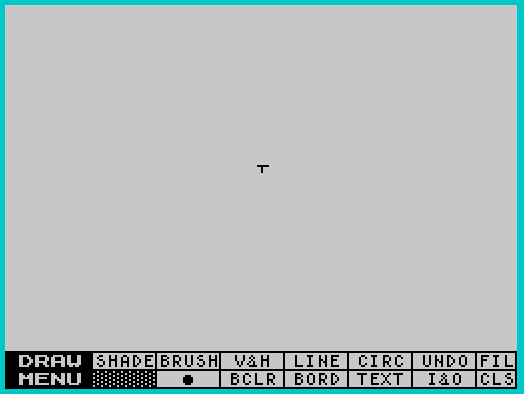
Source Code
   10 INK 6:PAPER 1:BORDER 1:POKE 65535,dev:CLEAR 30035:LET dev= PEEK 65535
   20 PRINT AT 3,7;"TechDraw Junior 1.3"
   40 PRINT AT 9,8;"Copyright \* 1985"; AT 10,7;"ZEBRA SYSTEMS, INC."; FLASH 1; AT 16,10;" NOW LOADING "
   42 IF dev=3 THEN INK 1:LOAD "dcode"CODE :INK 6:GO TO 52
   43 IF dev=2 THEN INK 1:LOAD "@dcode"CODE :INK 6:GO TO 52
   44 INK 1:LOAD "dcode"CODE :INK 6
   52 CLS :PRINT AT 3,5; FLASH 1;"  SELECT STORAGE DEVICE  "
   54 PRINT ,,,,,,"      1 - Cassette tape deck"
   55 PRINT ,,"      2 - A&J micro drive"
   56 PRINT ,,"      3 - JLO disk drive"
   57 LET k= CODE INKEY$
   58 IF k <>49 AND k <>50 AND k <>51 THEN GO TO 57
   61 IF k=50 THEN RANDOMIZE USR 55259:LET dev=2:REM a&j I/O
   62 IF k=51 THEN RANDOMIZE USR 55235:LET dev=3:REM disk I/O
   63 IF k=49 THEN RANDOMIZE USR 55291:LET dev=1:REM tape I/O
   64 FOR n=1 TO 6:BEEP .1,30:NEXT n:CLS
   70 CLS
   72 PRINT AT 10,4;"""R"" to RUN TechDraw Junior"
   73 PRINT AT 12,4;"""C"" to Customize Printer"
   74 PRINT AT 14,4;"""B"" for Customized Backup"
   80 LET i= CODE INKEY$:IF i=0 THEN GO TO 80
   82 IF i>90 THEN LET i=i-32
   90 IF i=66 THEN GO TO 9900
   94 IF i=67 THEN GO TO 200
   96 IF i <>82 THEN GO TO 80
   98 INK 0:PAPER 7:BORDER 7:CLS :PRINT #0;"                                                                "
   99 RANDOMIZE USR 50530
  202 CLS
  206 PRINT ,,,,,,"  * 80 Column Printer *"
  207 PRINT "  ---------------------"
  208 PRINT ,,
  210 PRINT "Epson RX/FX ...........1"
  212 PRINT "Gemini 10X ............2"
  214 PRINT "Gemini SG10 ...........2"
  216 PRINT "Memotech DMX80 ........3"
  218 PRINT "Panasonic 1090/1091 ...3"
  220 PRINT "Spirit 80 .............3"
  222 PRINT "Seikosha 250 ..........4"
  224 PRINT "Gorrilla Banana .......5"
  226 PRINT "Seikosha 100 ..........5"
  227 PRINT "Prowriter 8510 ........6"
  228 INPUT "Select (1 - 6) ";p
  230 IF p=1 THEN GO TO 400
  232 IF p=2 THEN GO TO 500
  234 IF p=3 THEN GO TO 600
  236 IF p=4 THEN GO TO 700
  238 IF p=5 THEN GO TO 800
  239 IF p=6 THEN GO TO 900
  240 GO TO 228
  300 CLS
  310 PRINT ,,,,,,"* Centronics Interface *"
  320 PRINT "-----------------------"
  330 PRINT ,,
  340 PRINT "Aerco ..........1"
  350 PRINT "Tasman-b .......2"
  360 PRINT "Tasman-c .......3"
  370 PRINT "A & J ..........4"
  372 PRINT "FDD-RS232 ......5"
  379 INPUT "Select (1 - 5) ";p
  380 IF p<1 OR p>5 THEN GO TO 379
  382 IF p=1 THEN RANDOMIZE USR 63018
  384 IF p=2 THEN RANDOMIZE USR 63012
  386 IF p=3 THEN RANDOMIZE USR 63015
  388 IF p=4 THEN RANDOMIZE USR 63021
  389 IF p=5 THEN RANDOMIZE USR 63042:CLS :PRINT AT 0,0; INVERSE 1;" FDD-RS232 PARAMETER SETTINGS  ":POKE 23729,255:CLOSE #*3:POKE 23729,0:FORMAT *":ch_a":OPEN #*3;":ch_a";o
  390 CLS :INPUT "Do you want LineFeed codes sent (Y or N)? ";k$
  392 IF k$="N" OR k$="n" THEN POKE 63122,0
  393 IF k$="Y" OR k$="y" THEN POKE 63122,10
  394 GO TO 70
  400 REM \{20}\{1} epson \{20}\{0}
  410 RANDOMIZE USR 63024
  420 GO TO 300
  500 REM \{20}\{1} gemini \{20}\{0}
  510 RANDOMIZE USR 63027
  520 GO TO 300
  600 REM \{20}\{1} panasonic \{20}\{0}
  610 RANDOMIZE USR 63039
  620 GO TO 300
  700 REM \{20}\{1}\{20}\{1} seik250 \{20}\{0}
  710 RANDOMIZE USR 63033
  720 GO TO 300
  800 REM \{20}\{1} seik100 \{20}\{0}
  810 RANDOMIZE USR 63030
  820 GO TO 300
  900 REM \{20}\{1} prowrit \{20}\{0}
  910 RANDOMIZE USR 63036
  920 GO TO 300
 9910 IF dev=1 THEN SAVE "draw" LINE 10:SAVE "dcode"CODE 30036,35400:CLS :GO TO 70
 9920 IF dev=2 THEN SAVE "@1,draw" LINE 10:SAVE "@2,dcode"CODE 30036,35400:CLS :GO TO 70
 9930 SAVE "draw" LINE 10:SAVE "dcode"CODE 30036,35400:CLS :GO TO 70
Note: Type-in program listings on this website use ZMAKEBAS notation for graphics characters.