
STOP IT is a reaction-timing game in which a character slides across the screen from left to right and the player must press a key at the precise moment to “stop” it under one of five labeled columns. Difficulty is selectable from 1 to 3, which adjusts the delay loop length (`d = 10 – 3*di`) controlling how fast the character moves. Column detection uses the formula `INT((c1-15)/3) <> c` to map the character’s final horizontal position back to one of the five column zones. The game tracks hits versus total turns and displays a running score after each attempt. Up to a chosen number of turns is played before the program halts.
Program Structure
The program is compact at 18 lines and falls into three natural phases:
- Initialization (lines 10–40): Variables are set, difficulty and turn count are collected via
INPUT. - Screen setup (lines 50–70): Five column headers are drawn using a loop, clearing each column’s vertical strip and printing its label character from
t$. - Game loop (lines 80–160): Each turn selects a random target column, launches the sliding character, detects a keypress or end-of-row, scores the result, and repeats until the turn limit is reached.
Key Variables
| Variable | Purpose |
|---|---|
t$ | Five-character string “abcd ” used both as column labels and to randomly select a target character |
di | Difficulty level (1–3) entered by the player |
d | Delay loop count: 10 - 3*di (7, 4, or 1 iterations) |
tu | Turn counter |
hi | Hit (score) counter |
r | Row for the sliding character (randomized to even rows 2–16) |
c1 | Current horizontal print position of the moving character |
c | Target column index (1–4, matching position in t$) |
b$ | The character being slid across the screen |
Animation and Input Detection
The sliding effect is achieved on lines 100–110. Line 100 prints a space followed by b$ at the current column c1, erasing the previous position while drawing the new one. The inner FOR i=1 TO d: NEXT i loop provides a software delay whose length is inversely proportional to difficulty. Line 110 increments c1 and loops back to line 100 only if the character has not yet reached column 31 and INKEY$ is empty, so any keypress breaks the animation.
Column Hit Detection
Line 120 contains the core scoring logic. After the loop ends (either by keypress or reaching the right edge), the stopped position c1 is mapped to a column zone using INT((c1-15)/3). This is compared to the target column index c. A second condition, c1 = 17+3*c, explicitly excludes the left boundary of the target zone, preventing an off-by-one from counting as a hit when the character is still one cell to the left of the column header. If both conditions pass, line 130 awards the point with a high-pitched beep; otherwise line 140 signals a miss with a lower beep.
Difficulty Scaling
The delay value d = 10 - 3*di yields loop counts of 7 (easy), 4 (medium), and 1 (hard). At difficulty 3 the inner loop executes only once per position, making the character move as fast as the BASIC interpreter allows, while at difficulty 1 seven iterations provide a meaningful pause between steps. This is a simple but effective technique for speed control without requiring machine code.
Notable Idioms and Anomalies
- The
t$string ends with a space as its fifth element; sincecis chosen fromINT(RND*4+1)(range 1–4), the space character is never selected as a target, but it does serve as a blank placeholder in the column header row. INKEY$is polled directly inside the movement condition on line 110 with no debounce; a held key will stop the character immediately at whatever column it happens to occupy.- Line 140 reads
INKEY$intod$but never usesd$again — this appears to be a vestigial variable, possibly left over from an earlier version that tracked which key was pressed. - The score display on line 150 is printed at row 20, outside the 16-row play area, giving a clean status bar effect.
- The program ends with
STOPon line 170 rather than simply falling through, which halts execution cleanly after all turns are completed.
Image Gallery
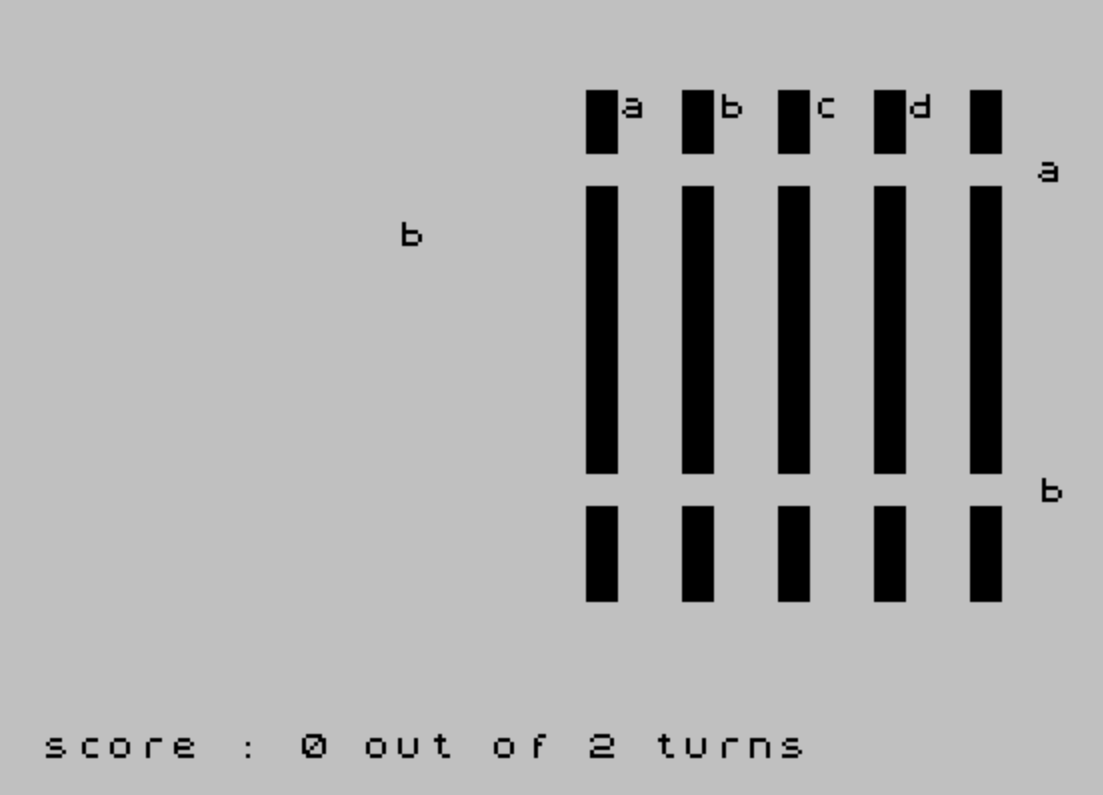
Source Code
  10 CLS :REM STOP IT
  20 LET t$="abcd ":LET tu=0:LET hi=tu
  30 INPUT "difficulty (1-3): ";di:LET d=10-3*di
  40 INPUT "number of turns: ";nt
  50 FOR c=1 TO 5
  60 FOR r=0 TO 15:PRINT AT r,14+3*c; PAPER 0;" ";:NEXT r
  70 PRINT AT 0,15+3*c;t$(c):NEXT c
  80 LET c= INT (RND*4+1):LET b$=t$(c)
  90 LET tu=tu+1:LET r=2+2* INT (RND*7):LET c1=0
 100 PRINT AT r,c1;" ";b$:FOR i=1 TO d:NEXT i
 110 LET c1=c1+1:IF (c1<31) AND (INKEY$="") THEN GO TO 100
 120 IF (INT ((c1-15)/3) <>c) OR (c1=17+3*c) THEN GO TO 140
 130 BEEP 1,7:LET hi=hi+1:GO TO 150
 140 BEEP 1,4:LET d$= INKEY$
 150 PRINT AT 20,0;"score : ";hi;" out of ";tu;" turns"
 160 IF tu<nt THEN GO TO 80
 170 STOP
 180 SAVE "STOP IT" LINE 10
Note: Type-in program listings on this website use ZMAKEBAS notation for graphics characters.