
Stamp Inventory is a menu-driven stamp collection management program that supports up to 150 stamps, storing each stamp’s name (up to 15 characters) and quantity in parallel arrays. It offers seven functions: starting a fresh list, searching by name, browsing the full listing, adding new entries, adjusting quantities with signed increments, deleting stamps with automatic array compaction, and exiting with a tape-save prompt. The delete routine shifts all subsequent array elements down one position to close gaps, maintaining a contiguous list. The search function uses a dynamically dimensioned temporary string array sized to the search term length for substring-matched comparison.
Program Structure
The program is organized as a main menu dispatcher with dedicated subroutines branched via GO TO. Lines 40–260 form the main menu and input loop. The core functional blocks are:
| Lines | Function |
|---|---|
| 290–620 | Start a new stamp list |
| 630–780 | Check (browse) stamp list |
| 790–1100 | Add a new stamp |
| 1110–1370 | Change quantity of a stamp |
| 1380–1830 | Delete (erase) a stamp |
| 1840–1920 | Exit with tape-save prompt |
| 1930–2120 | Search for a stamp by name |
| 2130 | SAVE with auto-run |
Two utility subroutines are defined at lines 270 and 280. Line 270 prints a decorative separator line of asterisks. Line 280 prints a formatted row showing stamp number, name, and quantity using TAB stops.
Data Storage
Stamp data is held in two parallel structures declared at lines 320–330:
DIM I$(151,15)— a string array of 151 entries, each 15 characters wide, holding stamp names.DIM Q(151)— a numeric array of 151 entries holding quantities.
The variable N tracks the current count of stamps in the list, acting as a logical end-of-file marker. Only indices 1 through N are considered active. The arrays are dimensioned to 151 to give one extra slot beyond the stated 150-stamp limit, though index 0 is unused in BASIC’s 1-based convention here.
Key BASIC Idioms
The program uses several idiomatic patterns common in BASIC of this era:
- The
TAB PIexpression in the subroutine at line 280 evaluates toTAB 3(sinceINT PI = 3), a compact way to achieve a fixed indent without writing a literal integer. - Menu options use embedded
\\{18}\\{0}and\\{18}\\{1}escape sequences (PAPER/INK attribute control codes within PRINT statements) to highlight option numbers in inverse or contrasting color. - The
INPUT C$followed byIF C$="C"pattern is used in multiple places (add stamps, exit) to detect a sentinel string that triggers a mode change. POKE 23658,8at line 10 enables CAPS LOCK, ensuring uppercase input for the string comparisons used in stamp name matching and command detection.
Delete with Array Compaction
The erase routine (lines 1380–1830) is the most algorithmically complex section. When the user marks a stamp for deletion with “D”, lines 1710–1770 shift all subsequent elements down one index position:
LET I$(B)=I$(B+1)andLET Q(B)=Q(B+1)are executed in aFOR B=Y TO 150loop, effectively closing the gap left by the deleted entry.Nis decremented at line 1780 to reflect the reduced count.- The loop variable
Yrecords the position of the deleted stamp andXis used to resume display iteration correctly after the shift.
Search Function
The search (lines 1930–2120) accepts a full stamp name via INPUT C$, then at line 1980 dynamically dimensions a temporary array DIM M$(151,J) where J = LEN C$. Each entry of I$ is copied into M$ and compared to C$. Because fixed-length string arrays in BASIC pad entries with spaces, truncating the comparison width to match the search term length via the M$ dimension is an effective workaround for exact-match searching against padded strings. Only the first matching entry is found; the loop does not continue to find duplicates.
Bugs and Anomalies
- The “Start New List” routine at line 310 prompts for the number of stamps to list, storing this in
N, but then theFOR B=1 TO 151loop at line 390 iterates up to 151 regardless. TheIF X=N THEN GO TO 500guard at line 480 exits at the right count, but only ifNis within range. IfN > 150is entered, the loop runs to 151. - The browse loop at line 670 iterates
FOR B=1 TO 300, well beyond the array bounds of 151. IfNis never equal toBwithin that range (e.g., due to a corruptedN), an out-of-bounds subscript error would occur. - Line 610 reads
IF P=1 THEN GO TO 240, which branches to the “Erase a Stamp” section rather than the intended re-do of the new stamp list; the intent was likelyGO TO 290. The fallthrough at line 620 returns to the main menu correctly for any other value. - The exit routine at line 1910 branches to line 2130 on input “C” to save the program. This
SAVE "STAMPS" LINE 1saves the entire program with auto-run, which also re-executesDIM I$andDIM Q, erasing the data arrays on reload — data is not saved separately from the program. - Lines 1820–1830 (
LET N=N-1 : GO TO 1650) appear unreachable; no code path leads to line 1820 via normal execution.
Image Gallery
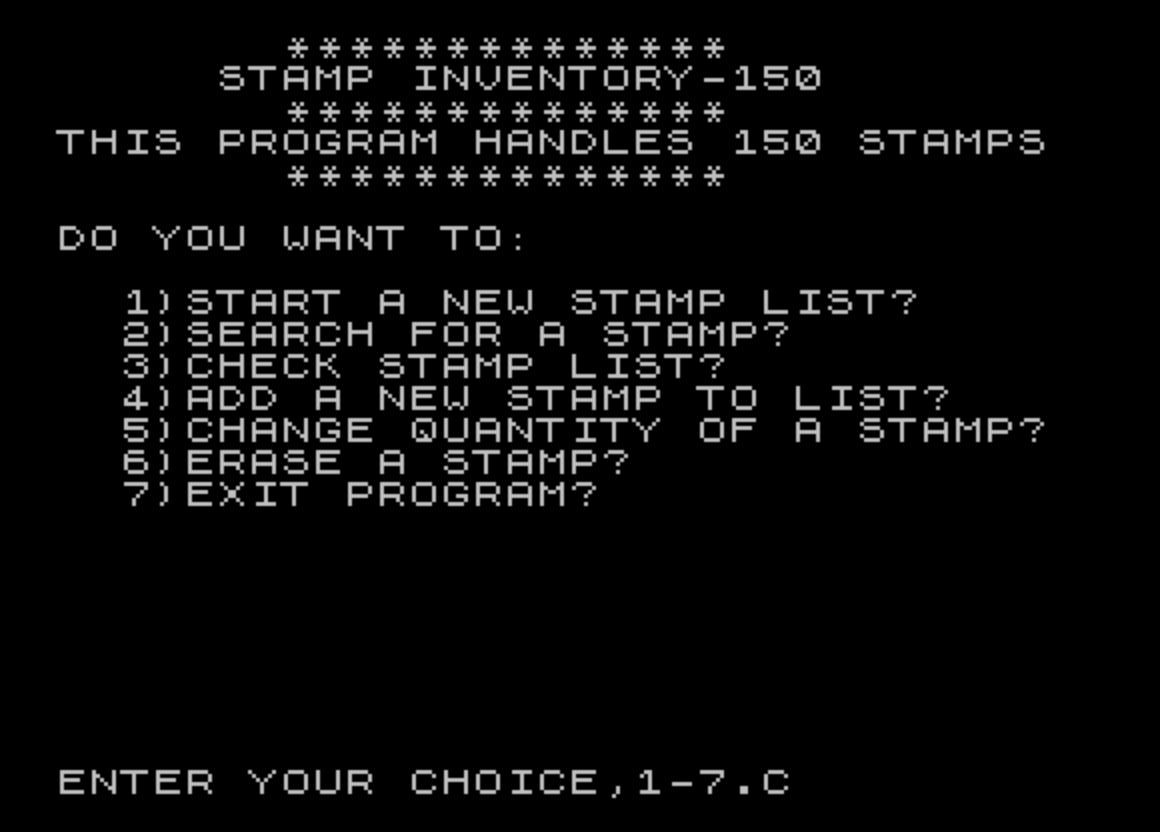
Source Code
   10 BORDER 0:PAPER 0:INK 7:CLS :POKE 23658,8
   20 REM STEPHEN A. JUSTHAM                 8-5-81
   30 REM "STAMP INVENTORY-150"
   40 CLS :PRINT TAB 7;"**************     "
   50 PRINT "     STAMP INVENTORY-150"
   60 PRINT TAB 7;"**************     "
   70 PRINT "THIS PROGRAM HANDLES 150 STAMPS"
   80 PRINT TAB 7;"**************     "
   90 PRINT '"DO YOU WANT TO:"
  100 PRINT '"  \{18}\{0}\{18}\{1}1\{18}\{0})START A NEW STAMP LIST?"
  110 PRINT "  \{18}\{1}2\{18}\{0})SEARCH FOR A STAMP?"
  120 PRINT "  \{18}\{1}3\{18}\{0})CHECK STAMP LIST?"
  130 PRINT "  \{18}\{1}4\{18}\{0})ADD A NEW STAMP TO LIST?"
  140 PRINT "  \{18}\{1}5\{18}\{0})CHANGE QUANTITY OF A STAMP?"
  150 PRINT "  \{18}\{1}6\{18}\{0})ERASE A STAMP?"
  160 PRINT "  \{18}\{1}7\{18}\{0})EXIT PROGRAM?"
  170 INPUT "ENTER YOUR CHOICE,1-7.";A
  180 CLS
  190 IF A=1 THEN GO TO 290
  200 IF A=2 THEN GO TO 1930
  210 IF A=3 THEN GO TO 630
  220 IF A=4 THEN GO TO 790
  230 IF A=5 THEN GO TO 1110
  240 IF A=6 THEN GO TO 1380
  250 IF A=7 THEN GO TO 1840
  260 GO TO 170
  270 PRINT "********************************":RETURN
  280 PRINT TAB PI;B; TAB 11;I$(B); TAB 26;Q(B)
  290 CLS :PRINT "   START A NEW STAMP LIST"
  300 GO SUB 270
  310 PRINT '"HOW MANY STAMPS TO BE LISTED?"
  320 DIM I$(151,15)
  330 DIM Q(151)
  340 INPUT N
  350 CLS
  360 PRINT '"STAMP "
  370 PRINT " NO. "
  380 PRINT
  390 FOR B=1 TO 151
  400 PRINT "   ";B;
  410 PRINT " STAMP NAME? = ";
  420 INPUT I$(B)
  430 PRINT I$(B);
  440 PRINT "     HOW MANY?   = ";
  450 INPUT Q(B)
  460 PRINT Q(B)
  470 LET X=B
  480 IF X=N THEN GO TO 500
  490 NEXT B
  500 CLS
  510 PRINT '"ITEM NO.  ITEM NAME      QUANT."
  520 FOR B=1 TO 150
  530 GO SUB 280
  540 LET X=B
  550 IF X=N THEN GO TO 570
  560 NEXT B
  570 PRINT '"END OF FILE."
  580 PRINT '"TYPE 1) TO RE-DO THE STAMP LIST,     2) TO RETURN  TO START."
  590 INPUT P
  600 CLS
  610 IF P=1 THEN GO TO 240
  620 IF P <>1 THEN GO TO 40
  630 CLS :PRINT TAB 7;"STAMP LISTING"
  640 GO SUB 270
  650 PRINT ''"ITEM NO.  ITEM NAME      QUANT."
  660 PRINT
  670 FOR B=1 TO 300
  680 LET X=B
  690 GO SUB 280
  700 IF X <>N THEN GO TO 730
  710 PRINT '"END OF FILE."
  720 GO TO 740
  730 NEXT B
  740 PRINT '"TYPE 1) TO EXAMINE LIST,             2) TO  RETURN  TO START."
  750 INPUT D
  760 CLS
  770 IF D=1 THEN GO TO 630
  780 IF D <>1 THEN GO TO 40
  790 CLS :PRINT TAB 6;"ADD STAMP TO INVENTORY"
  800 GO SUB 270
  810 PRINT '"WHEN YOU WISH TO END NEW ENTRIES,TYPE ""RETURN ."""
  820 PRINT ''"ITEM NO.  ITEM NAME      QUANT."
  830 PRINT
  840 FOR B=1 TO 150
  850 GO SUB 280
  860 LET X=B
  870 LET G=N
  880 IF B=150 THEN GO TO 910
  890 IF X=N THEN GO TO 950
  900 NEXT B
  910 PRINT "SORRY,FILE IS FULL."
  920 PRINT "TYPE <\{18}\{1}C\{18}\{0}> TO RETURN  TO START."
  930 STOP
  940 GO TO 40
  950 LET B=B+1
  960 LET N=B
  970 IF G=B THEN GO TO 910
  980 PRINT '"STAMP NO.";B
  990 PRINT "   STAMP NAME? ";
 1000 INPUT C$
 1010 PRINT C$
 1020 LET I$(B)=C$
 1030 IF C$="C" THEN GO TO 1080
 1040 PRINT "   HOW MANY? ";
 1050 INPUT Q(B)
 1060 CLS
 1070 GO TO 950
 1080 CLS
 1090 LET N=B-1
 1100 GO TO 40
 1110 CLS :PRINT "   CHANGE QUANTITY OF A STAMP"
 1120 GO SUB 270
 1130 PRINT ''"SELECT STAMP TO BE CHANGED BY   <\{18}\{1}STAMP NO.\{18}\{0}>"
 1140 PRINT '"STAMP NO. STAMP NAME    QUANT."
 1150 PRINT
 1160 FOR B=1 TO 150
 1170 LET X=B
 1180 GO SUB 280
 1190 IF X <>N THEN GO TO 1220
 1200 PRINT '"END OF FILE."
 1210 GO TO 1230
 1220 NEXT B
 1230 PRINT ''"SELECT STAMP TO BE CHANGED BY   <\{18}\{1}STAMP NO.\{18}\{0}>"
 1240 INPUT B
 1250 CLS
 1260 PRINT "STAMP NO. ";B;" IS  ";I$(B);" WHICH CURRENTLY CONTAINS ";Q(B);"       STAMPS."
 1270 PRINT "USE A ""MINUS""SIGN TO REDUCE THE QUANTITY."
 1280 INPUT "INPUT QUANTITY CHANGE.";K
 1290 CLS
 1300 LET Q(B)=Q(B)+K
 1310 PRINT "STAMP NO. ";B;", ";I$(B);"    NOW HAS ";Q(B);" STAMPS.                      "
 1320 PRINT '"TYPE \{18}\{1}1\{18}\{0}) TO CHANGE ANOTHER STAMP      \{18}\{1}2\{18}\{0}) TO RETURN  TO START           \{18}\{1}3\{18}\{0}) TO REVIEW THIS LISTING."
 1330 INPUT R
 1340 CLS
 1350 IF R=1 THEN GO TO 1230
 1360 IF R=2 THEN GO TO 40
 1370 IF R=3 THEN GO TO 1110
 1380 CLS :PRINT TAB 2;"DELETE A STAMP FROM INVENTORY"
 1390 GO SUB 270
 1400 PRINT '"EACH STAMP WILL APPEAR ONE AT A TIME."
 1410 PRINT '"  1) TO SAVE TYPE  <\{18}\{1}S\{18}\{0}>."
 1420 PRINT '"  2) TO DELETE TYPE <\{18}\{1}D\{18}\{0}>."
 1430 PRINT '"  3) TO GO TO START TYPE <\{18}\{1}T\{18}\{0}>."
 1440 PRINT '"**********"
 1450 PRINT '"STAMP NAME"
 1460 PRINT
 1470 LET X=1
 1480 FOR B=X TO 300
 1490 IF I$(B)="" THEN GO TO 1630
 1500 LET Y=B
 1510 LET X=B
 1520 LET Z=N
 1530 PRINT TAB 3;I$(B);"#";
 1540 INPUT Z$
 1550 PRINT Z$
 1560 IF Z$="S" THEN GO TO 1630
 1570 IF Z$="D" THEN GO TO 1710
 1580 IF Z$="T" THEN GO TO 1610
 1590 CLS
 1600 GO TO 1400
 1610 CLS
 1620 GO TO 40
 1630 IF B=N THEN GO TO 1650
 1640 NEXT B
 1650 PRINT ''"END OF FILE."
 1660 PRINT '"TYPE ""1"" IF YOU WISH TO DELETEOTHER STAMPS,TYPE ""2 "" TO      RETURN  TO START OF PROGRAM."
 1670 INPUT W
 1680 CLS
 1690 IF W=1 THEN GO TO 1380
 1700 IF W <>1 THEN GO TO 40
 1710 LET I$(B)=""
 1720 LET Q(B)=0
 1730 FOR B=Y TO 150
 1740 LET I$(B)=I$(B+1)
 1750 LET Q(B)=Q(B+1)
 1760 IF Z=B THEN GO TO 1780
 1770 NEXT B
 1780 LET N=N-1
 1790 LET B=X
 1800 IF N=B THEN GO TO 1650
 1810 GO TO 1480
 1820 LET N=N-1
 1830 GO TO 1650
 1840 CLS :PRINT AT 6,0;"YOU HAVE INDICATED TO EXIT THIS PROGRAM."
 1850 PRINT '"IF YOU HAVE MADE ANY CHANGES"
 1860 PRINT ':GO SUB 270
 1870 PRINT "*DO NOT FORGET TO RE-LOAD TAPE*"
 1880 GO SUB 270
 1890 PRINT '"TO SAVE THIS PROGRAM AS CHANGED PREPARE THE TAPE RECORDER, BEGINRECORDING,AND TYPE ""C."""
 1900 INPUT X$
 1910 IF X$="C" THEN GO TO 2130
 1920 GO TO 40
 1930 CLS :PRINT TAB 7;"SEARCH FOR A STAMP"
 1940 GO SUB 270
 1950 PRINT '"TYPE THE NAME OF THE STAMP YOU  ARE SEARCHING FOR."
 1960 INPUT C$
 1970 LET J= LEN C$
 1980 DIM M$(151,J)
 1990 FOR B=1 TO 150
 2000 LET M$(B)=I$(B)
 2010 IF C$=M$(B) THEN GO TO 2050
 2020 NEXT B
 2030 PRINT '"NO SUCH STAMP HAS BEEN FOUND IN THE LISTING."
 2040 GO TO 2080
 2050 PRINT '''"THERE ARE  >> ";Q(B);" <<"
 2060 PRINT '"     ** ";C$;" **";
 2070 PRINT ''"LOCATED IN THE LISTING."
 2080 PRINT '''" \{18}\{1}1\{18}\{0}) TO SEARCH FOR ANOTHER ITEM,  \{18}\{1}2\{18}\{0}) TO RETURN  TO START."
 2090 INPUT U
 2100 CLS
 2110 IF U=1 THEN GO TO 1930
 2120 IF U <>1 THEN GO TO 40
 2130 SAVE "STAMPS" LINE 1
Note: Type-in program listings on this website use ZMAKEBAS notation for graphics characters.