
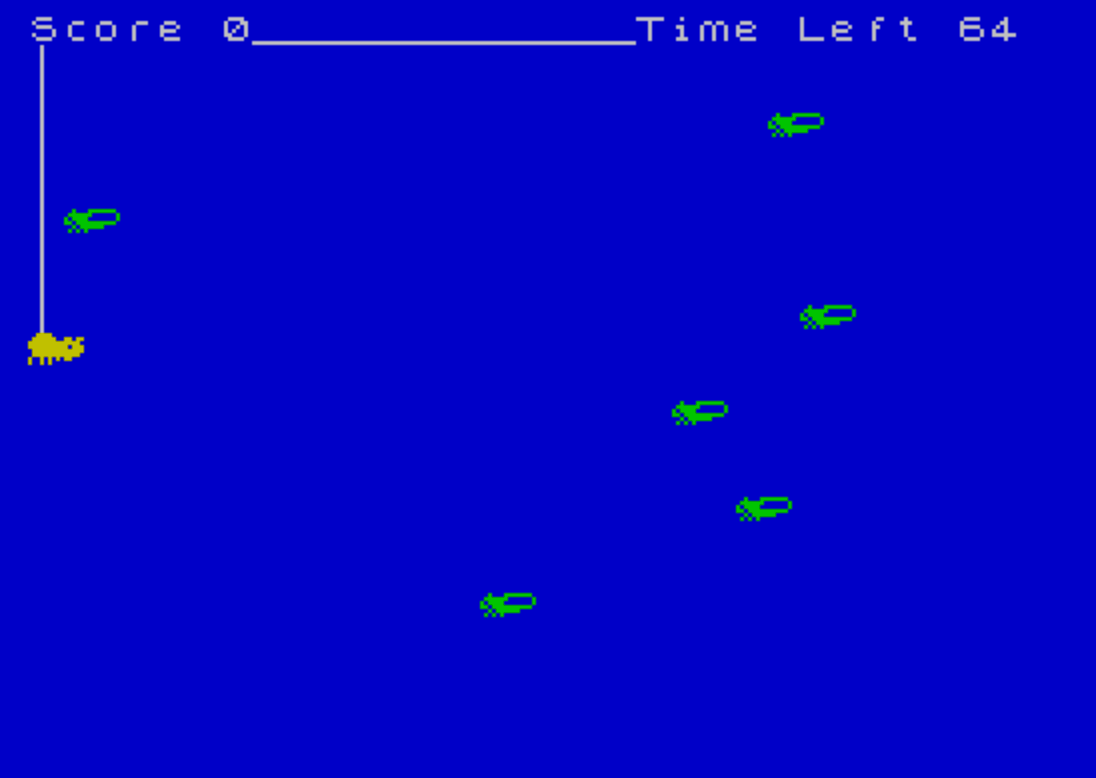
Spider & Fly is an arcade-style game in which the player controls a spider moving up and down the left edge of the screen, trying to catch flies that crawl from right to left across six rows. The spider is represented by a two-character UDG sprite, and each of the six flies is tracked by its own horizontal position stored in the array f(6). Joystick input is read using STICK to move the spider, and collision detection is performed with SCREEN$ to check whether the spider’s position overlaps a fly character. A countdown timer displayed in the top-right corner limits each round, and the highest score within the session is retained between games.
Program Structure
The program is organized into a main game loop and several subroutines accessed via GO SUB:
- Lines 10–140: Main game loop — initialization call, input, sprite drawing, fly movement, and timer check.
- Lines 150–170: Collision/scoring subroutine — awards points when the spider catches a fly.
- Lines 180–230: Game-over screen — displays score, updates high score, and waits for joystick input to restart.
- Lines 260–320: Game initialization subroutine — sets up the border, clears the screen, initializes variables, draws the spider’s track, and sets the timer.
- Lines 360–430: UDG (User Defined Graphics) loader subroutine — POKEs 40 bytes of shape data into UDG memory for the spider and fly sprites.
UDG Sprites
Five UDGs are defined using POKE USR "\\a"+a in a loop from a=0 to 39, loading 40 bytes total (five 8-byte characters). The REM at line 340 documents the layout: \\a\\b form the two-character spider body, \\c is a single-character element (used as the spider’s web/line on the left column), and \\d\\e form the two-character fly sprite. The DATA statements at lines 390–430 contain a mix of literal values and the token u, which in this context appears as an unrecognized keyword placeholder — likely representing the value 255 (all pixels set) in some tokenized encodings, producing solid rows in the UDG bitmaps.
Joystick Input and Spider Movement
Line 60 uses STICK (1,2) to read the joystick, moving the spider down when the stick reports 2 (and v<21) or up when it reports 1 (and v>2). The movement is expressed as a compact arithmetic expression rather than an IF/THEN branch, exploiting the fact that Boolean results evaluate to 1 or 0. The game-over restart check at line 220 similarly polls STICK (2,2)=1 in a tight loop.
Fly Movement and Collision Detection
Each fly’s horizontal position is stored in the array f(6), one entry per row (rows 1–6, displayed at screen rows a*3). On each pass through the main loop, line 110 subtracts INT (RND*2) from each fly’s column position, giving it a randomly variable leftward speed. When a fly reaches column 1 or less it is reset to column 28 and its old position is erased. Collision detection on line 70 reads SCREEN$ (v,2) — checking whether the character at the spider’s row in column 2 is non-space — which catches the moment a fly sprite overlaps the spider’s position.
Scoring and High Score
Each successful catch adds 2 to sc (line 150). After each game, line 200 compares sc to hi and updates the high score if exceeded. The high score is initialized once at line 20 (LET hi=0:GO SUB 360) before the game loop begins, so it persists across multiple plays in the same session.
Screen Layout
The left column (column 0) is used exclusively for the spider’s web line drawn with UDG \\c characters (line 300, FOR a=1 TO v-1), creating a vertical thread effect. The spider itself occupies columns 0–1 at its current row v. Flies move across columns 1–28 at every third screen row. A horizontal line is drawn with PLOT 0,168:DRAW 255,0 (line 310) to visually separate the score area from the play field.
Notable Techniques and Anomalies
- The spider’s trail (web line) is redrawn each frame only from row 1 to
v-1, rather than being updated incrementally, which could cause visual artifacts if the spider moves quickly — though the short loop is fast enough in practice. - Line 160 computes the fly array index as
v/3. Sincevis the spider’s screen row and flies are placed at rowsa*3fora=1..6(rows 3, 6, 9, 12, 15, 18), this division only yields an integer index when the spider is on one of those exact rows. A spider positioned between fly rows could produce a non-integer index; BASIC will truncate it, potentially resetting the wrong fly entry. - Line 240 (an
INPUT-based play-again prompt) is unreachable in normal flow because lines 220–230 loop indefinitely on joystick input — it appears to be a leftover from an earlier keyboard-based version. - The timer decrements by 0.5 each main-loop iteration rather than being time-based, so game speed is tied directly to loop execution speed.
- The
INKattributes on lines 90 and 120 color the spider yellow (INK 6) and the flies cyan (INK 4) against the red border/paper (BORDER 1, PAPER 1), giving strong visual contrast.
Image Gallery
Source Code
  10 REM Spider  &  fly
  20 LET hi=0:GO SUB 360
  30 GO SUB 260
  40 PRINT AT 0,0;"Score ";sc
  50 PRINT AT v,0;"  "
  60 LET v=v+(STICK (1,2)=2 AND v<21)-(STICK (1,2)=1 AND v>2)
  70 IF SCREEN$ (v,2) <>" " THEN GO SUB 150
  80 PRINT AT v-1,0;"\c"
  90 PRINT AT v,0; INK 6;"\a\b"
 100 FOR a=1 TO 6
 110 LET f(a)=f(a)- INT (RND*2):IF f(a)<1 THEN PRINT AT a*3,1;"  ":LET f(a)=28
 120 PRINT AT a*3,f(a); INK 4;"\d\e ":NEXT a
 130 PRINT AT 0,19;"Time Left "; INT time;" ":LET time=time-.5:IF time<0 THEN GO TO 180
 140 GO TO 50
 150 LET sc=sc+2:PRINT AT v,2;"  "
 160 LET f(v/3)=28
 170 PRINT AT 0,0; INK 7;"Score ";sc:RETURN
 180 PRINT AT 5,9;"GAME OVER!"
 190 PRINT '' TAB 6;"You Scored ";sc
 200 IF sc>hi THEN LET hi=sc
 210 PRINT ''"   Highest score today ";hi
 220 IF STICK (2,2)=1 THEN GO TO 30
 230 GO TO 220
 240 INPUT "Press \{18}\{1}ENTER\{18}\{0} to play again."; LINE a$:GO TO 30
 250 FOR a=1 TO 6:LET f(a)=28:NEXT a
 260 BORDER 1:PAPER 1:INK 7:CLS
 270 LET v=10:DIM f(6)
 280 FOR a=1 TO 6:LET f(a)=28:NEXT a
 290 LET sc=0:RANDOMIZE
 300 FOR a=1 TO v-1:PRINT AT a,0;"\c":NEXT a
 310 PLOT 0,168:DRAW 255,0
 320 LET time=99:RETURN
 330 REM        Graphics
 340 REM    ab=\a\b c=\c de=\d\e
 350 :
 360 FOR a=0 TO 39
 370 READ u:POKE USR "\a"+a,u
 380 NEXT a:RETURN
 390 DATA 60,126,255,u,127,u,149,148
 400 DATA 0,108,248,220,252,248,96,0
 410 DATA 16,u,u,u,u,u,u,u
 420 DATA 0,17,63,94,111,23,42,0
 430 DATA 0,252,2,u,252,224,0,u
 440 SAVE "spider" LINE 10
Note: Type-in program listings on this website use ZMAKEBAS notation for graphics characters.