
Solid Banner prints enlarged text banners on a connected printer by reading character bitmaps directly from the ROM. It peeks the ROM character set starting at address 15360 (offset by the ASCII code of each input character multiplied by 8) to extract the 8×8 pixel pattern for each glyph. The bit pattern is unpacked into a string array B$(8,8) using repeated integer division by 2, then the matrix is rotated 90 degrees before being output. Three scaling factors are supported: 1×, 2×, and 4× vertical height, achieved by repeating LPRINT lines and substituting block graphic characters (█) for set pixels.
Program Structure
The program is organized into a straightforward linear flow with a retry loop at the end:
- Lines 10–40: Initialization, dimension the character buffer array, display title screen.
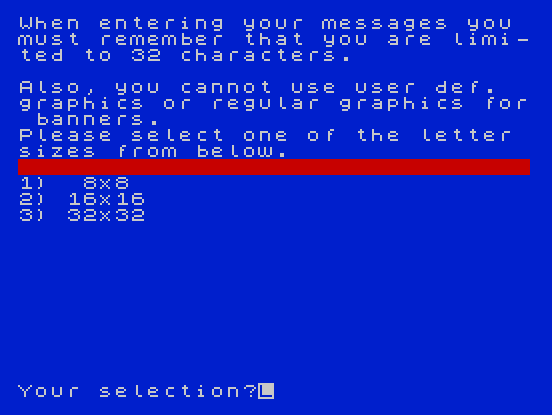
- Lines 50–110: User prompts — select letter size (
S= 1, 2, or 3) and enter message stringC$. - Lines 120–220: Outer loop over each character in
C$; inner loops decode the ROM bitmap into the 8×8 string arrayB$(). - Lines 230–430: Rotation loop rebuilds a print line
A$column by column, then LPRINTs scaled output. - Lines 440–500: Ask to repeat; branch back to size selection or message input as appropriate.
ROM Character Set Access
The core technique is reading glyph data directly from ROM. Line 130 computes the starting address as:
l = 15359 + (CODE C$(Z) * 8)
The ROM character bitmaps begin at address 15360 for the space character (ASCII 32). Because the formula multiplies the full ASCII code rather than the offset from 32, address 15359 + (32 × 8) = 15615 would be correct for space, but for printable characters the formula works in practice only if the ROM layout matches the assumption — effectively this relies on the character set starting at a base that makes CODE C$(Z) * 8 + 15359 land on the right scan line. The loop at line 170 then advances L by 1 for each of the 8 scan lines.
Bitmap Decoding
Lines 180–210 unpack each byte into individual bits using the classic repeated-halving idiom:
B$(X, 9-A) = CHR$(CODE "0" + D - 2*INT(D/2))extracts the least-significant bit and stores it as the character"0"or"1".D = INT(D/2)shifts right by one bit position.- Storing into column
9-Aautomatically reverses the bit order so that bit 7 (leftmost in the glyph) ends up at column 1.
The result is an 8×8 array of "0"/"1" characters representing the character’s pixel grid.
90-Degree Rotation
Lines 250–350 traverse the array with X going across columns 1–8 and Y going from row 8 down to 1 (STEP -1). This transposition with a reversed secondary index is equivalent to a clockwise 90-degree rotation of the 8×8 bitmap before printing, causing the banner characters to read left-to-right when printed on continuous paper fed vertically.
Scaling and LPRINT Output
Horizontal scaling is achieved by substituting multiple block graphic █ characters (\:: in zmakebas notation) per set pixel, or multiple spaces per clear pixel:
| Size (S) | Set pixel | Clear pixel | LPRINT repeats |
|---|---|---|---|
| 1 (8×8) | █ | 1 space | 1× |
| 2 (16×16) | ██ | 2 spaces | 2× |
| 3 (32×32) | ████ | 4 spaces | 4× |
Vertical scaling is handled in lines 370–390 by printing A$ once, twice, or four times on successive LPRINT lines using the multi-statement separator ' (which issues a newline in LPRINT context).
Notable Idioms and Techniques
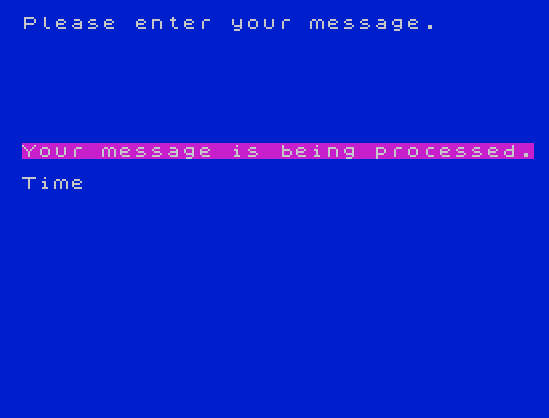
PRINT AT 12, PI(lines 360 and 400) usesPI(≈3.14159) as a column argument; BASIC truncates it to 3, placing the status message at column 3. This is a compact way to avoid typing the literal digit.PRINT PAPER 2,,at line 80 uses two commas to advance the print position without printing text, a spacing trick for formatting.- The input guard at line 110 silently truncates messages longer than 32 characters rather than rejecting them.
- Line 500
GO TO 50is unreachable after a “No” answer at line 440 branches to line 470; it appears to be a fallback ensuring the program loops if execution somehow reaches line 500 without having exited via line 470. - The
REMon line 10 serves as a comment crediting the typist — a common convention in type-in listings of the era.
Potential Bugs and Anomalies
- The ROM address formula
15359 + CODE C$(Z) * 8does not subtract 32 (the ASCII code of space, the first character in the Spectrum ROM font table). For a space character this yields address 15359 + 256 = 15615, which is 256 bytes past the intended start, reading garbage data. For visible ASCII characters (codes 33–127) the addresses are consistently offset by 32 × 8 = 256 bytes too high, landing well outside the 16K ROM — this will PEEK values from RAM rather than the ROM character table. A correct formula would be15360 + (CODE C$(Z) - 32) * 8. - Line 130 uses lowercase
las a variable name alongside uppercaseL(line 170 usesL); in Spectrum BASIC variable names are case-insensitive for numeric variables, so these are the same variable, but the inconsistency may confuse readers. - The “32 characters” limit warning in line 60 refers to the display width, not an inherent banner constraint; the actual loop at line 130 processes up to
LEN C$characters regardless.
Image Gallery
Source Code
  10 DIM B$(8,8):REM            This typed and included by       Jim Tedone  for LIST.
  20 PAPER 0:BORDER 0:INK 7:CLS
  30 PRINT AT 10,4;"Banner by Chris Raynak"; AT 12,2;"copied from TSH (12/84) No.10"
  40 PAUSE 300
  50 PAPER 1:BORDER 1:CLS
  60 PRINT "When entering your messages you must remember that you are limi-ted to 32 characters."
  70 PRINT '"Also, you cannot use user def.  graphics or regular graphics for banners."'"Please select one of the letter sizes from below."
  80 PRINT PAPER 2,,
  90 PRINT '"1)  8x8"'"2) 16x16"'"3) 32x32":INPUT "Your selection?";S:CLS
 100 PRINT "Please enter your message."
 110 INPUT C$:IF LEN C$>32 THEN LET C$=C$( TO 32)
 120 PRINT PAPER PI; AT 8,0;"Your message is being processed."
 130 FOR Z=1 TO LEN C$:PRINT AT 10,Z-1;C$(Z):LET l=15359+(CODE C$(Z)*8)
 140 REM ^Finds address of first   scan line.\{6}\{6}\{6}
 150 REM  Converts decimal # of the scanline of corresponding   character in the ROM to binary
 160 FOR X=1 TO 8
 170 LET L=L+1:LET D= PEEK L
 180 FOR A=1 TO 8
 190 LET B$(X,9-A)= CHR$ (CODE "0"+D-2* INT (D/2))
 200 LET D= INT (D/2)
 210 NEXT A
 220 NEXT X
 230 LET A$=""
 240 REM    Rotates letter 90         degrees to the right.
 250 FOR X=1 TO 8
 260 FOR Y=8 TO 1 STEP -1
 270 IF B$(Y,X)="1" THEN GO TO 320
 280 IF S=1 THEN LET A$=A$+" "
 290 IF S=2 THEN LET A$=A$+"  "
 300 IF S=3 THEN LET A$=A$+"    "
 310 GO TO 350
 320 IF S=1 THEN LET A$=A$+"\::"
 330 IF S=2 THEN LET A$=A$+"\::\::"
 340 IF S=3 THEN LET A$=A$+"\::\::\::\::"
 350 NEXT Y
 360 PRINT AT 12, PI; FLASH 1; INK 0; PAPER 7;"**PRINTER IN OPERATION**"
 370 IF S=1 THEN LPRINT A$
 380 IF S=2 THEN LPRINT A$'A$
 390 IF S=3 THEN LPRINT A$'A$'A$'A$
 400 PRINT AT 12, PI;"                        "
 410 LET A$=""
 420 NEXT X
 430 NEXT Z
 440 PRINT AT 13,0;"Would you like to print another message?":INPUT A$:IF A$(1)="N" OR A$(1)="n" THEN GO TO 470
 450 INPUT "Same letter size?";A$:IF A$(1)="N" OR A$(1)="n" THEN CLS :GO TO 80
 460 CLS :GO TO 100
 470 :
 480 REM Memory used=1905 bytes
 490 :
 500 GO TO 50
 510 SAVE "solidbaner" LINE 10
Note: Type-in program listings on this website use ZMAKEBAS notation for graphics characters.