
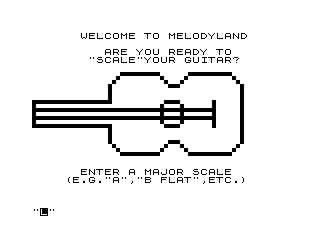
This program is a guitar major scale fingering reference tool that displays scale positions across the fretboard for all 12 keys. It first draws a pixel-level outline of a guitar body using individual PLOT commands, then accepts a key name (e.g., “A”, “B FLAT”, “C SHARP”) via INPUT and renders a fretboard diagram with left-hand fingering numbers (1–4) at the appropriate positions. The fretboard grid is constructed in a GOSUB at line 2000, drawing six horizontal fret lines and ten vertical string lines using FOR/NEXT loops with PLOT. After displaying the fingering chart, the program offers to COPY the screen to a printer and optionally loop back for another scale.
Program Analysis
Program Structure
The program divides cleanly into five functional sections:
- Lines 1–5: Welcome screen text.
- Lines 10–90: Guitar body outline drawn entirely with individual
PLOTcommands and shortFOR/NEXTloops. - Lines 110–180: Scale input and dispatch — reads a key name into
S$and branches to the appropriate scale routine. - Lines 200–1320: One routine per key (12 in total, spaced 100 lines apart), each calling the fretboard GOSUB at 2000, printing the key name and fingering numbers, then calling the interaction GOSUB at 5000.
- Lines 2000–4040: Fretboard drawing subroutine — six horizontal fret lines and ten vertical string lines, all via
PLOTloops. - Lines 5000–5045: Post-display interaction — offers printer copy and “another scale” loop.
Guitar Body Drawing (Lines 10–90)
The guitar outline is traced as a connected path of pixels using a mixture of loops and individual PLOT statements. Straight segments use FOR/NEXT, while curved waist sections (the characteristic double-bout indentations) are approximated with sequences of hand-coded coordinate pairs. The ZX81 pixel coordinate system places (0,0) at the bottom-left of the 64×44 pixel display, so the guitar is drawn in the lower portion of the screen. The body outline runs roughly from x=0 to x=52, y=11 to y=31, with the neck stub implied but not drawn in detail.
Fretboard Subroutine (Lines 2000–4040)
The subroutine starting at line 2000 draws a fretboard grid using PLOT loops. Six horizontal lines represent frets at y-coordinates 36, 32, 28, 24, 20, and 16 — evenly spaced 4 pixels apart, spanning x=8 to x=57. Ten vertical lines represent the strings and fret boundaries, plotted at x positions 8, 9, 15, 21, 27, 33, 39, 45, 51, and 57, each running from y=16 to y=36. Note that x=8 and x=9 are adjacent pixels, forming a thicker left edge to represent the nut. The RETURN statement is at line 4040, with the loop body crossing line boundaries (e.g., the loop opened at 2090 has its NEXT at 3000) — unusual formatting but syntactically valid.
Scale Fingering Display
Each of the 12 key routines prints fingering numbers (1–4) at specific AT row,col positions on the fretboard grid. The numbers represent left-hand fingers: 1=index, 2=middle, 3=ring, 4=little. Rows 3, 5, 7, 9, 11, and 13 correspond to the six strings; columns encode fret positions. All 12 chromatic keys are covered, including enharmonic equivalents handled with OR conditions in the dispatch (e.g., S$="C SHARP" OR S$="D FLAT").
Key Dispatch Table
| Key(s) | GOTO line |
|---|---|
| C | 200 |
| C SHARP / D FLAT | 300 |
| D | 400 |
| E FLAT | 500 |
| E | 600 |
| F | 700 |
| F SHARP / G FLAT | 800 |
| G | 900 |
| A FLAT | 1000 |
| A | 1100 |
| B FLAT | 1200 |
| B | 1300 |
Notable Techniques
- The program uses
FASTat line 1 to suppress the display during the slow pixel-by-pixel drawing phase, which would otherwise be very sluggish. - Multi-item
PRINT ATchains (e.g., line 210) place many fingering numbers in a single statement, reducing interpreter overhead compared to separatePRINTlines. - The
COPYcommand at line 5010 sends the screen contents to a ZX Printer, allowing the user to take away a hard-copy fingering chart. - After the interaction subroutine, each scale routine does
GOTO 10to redraw the guitar body from scratch —CLSis called at line 122 before the fretboard is drawn but not between the guitar body display and scale entry.
Bugs and Anomalies
- Lines 5015–5020: Line 5015 conditionally prints the “another scale?” prompt only if
C$="N", but line 5020 unconditionally prints the same prompt immediately afterward, overwriting it regardless of the copy response. This means the “another scale?” question always appears, even when the user chose to print. - No invalid-input handling: If the user types a key name that matches none of the
IFconditions (lines 125–180), execution falls through to line 200 (the C major routine) without warning, effectively treating any unrecognised input as C major. - D SHARP missing: The enharmonic pair D SHARP / E FLAT is handled only as “E FLAT”; entering “D SHARP” falls through to C major silently.
- Loop/line boundary split: The
FOR A=16 TO 36loop at line 2090 has itsNEXT Aat line 3000 — the loop body crosses a large line-number gap, which is legal but visually confusing.
Content
Image Gallery


Source Code
   1 FAST
   2 PRINT AT 1,6;"WELCOME TO MELODYLAND"
   3 PRINT AT 3,9;"ARE YOU READY TO"
   5 PRINT AT 4,7;"""SCALE""YOUR GUITAR?"
  10 FOR A=0 TO 19
  15 PLOT A,24
  16 NEXT A
  20 PLOT 19,25
  21 PLOT 19,26
  22 PLOT 19,27
  23 PLOT 19,28
  24 PLOT 20,29
  25 PLOT 21,30
  26 FOR A=22 TO 31
  27 PLOT A,31
  28 NEXT A
  29 PLOT 32,30
  30 PLOT 33,29
  31 PLOT 34,28
  32 PLOT 35,28
  33 PLOT 36,28
  34 PLOT 37,29
  35 PLOT 38,30
  36 FOR A=39 TO 49
  37 PLOT A,31
  38 NEXT A
  39 PLOT 50,30
  40 PLOT 51,29
  41 FOR A=28 TO 14 STEP -1
  42 PLOT 52,A
  43 NEXT A
  44 PLOT 51,13
  45 PLOT 50,12
  46 FOR A=49 TO 39 STEP -1
  47 PLOT A,11
  48 NEXT A
  49 PLOT 38,12
  50 PLOT 37,13
  51 PLOT 36,14
  52 PLOT 35,14
  53 PLOT 34,14
  54 PLOT 33,13
  55 PLOT 32,12
  56 FOR A=31 TO 22 STEP -1
  57 PLOT A,11
  58 NEXT A
  59 PLOT 21,12
  60 PLOT 20,13
  61 PLOT 19,14
  62 PLOT 19,15
  63 PLOT 19,16
  64 PLOT 19,17
  65 FOR A=19 TO 0 STEP -1
  66 PLOT A,18
  67 NEXT A
  68 FOR A=18 TO 24
  69 PLOT 0,A
  70 NEXT A
  71 FOR A=33 TO 36
  72 PLOT A,24
  73 NEXT A
  74 FOR A=23 TO 19 STEP -1
  75 PLOT 37,A
  76 NEXT A
  77 FOR A=36 TO 33 STEP -1
  78 PLOT A,18
  79 NEXT A
  80 FOR A=19 TO 23
  81 PLOT 32,A
  82 NEXT A
  83 FOR A=24 TO 18 STEP -1
  84 PLOT 45,A
  85 NEXT A
  86 FOR A=45 TO 0 STEP -1
  87 PLOT A,22
  88 NEXT A
  89 FOR A=45 TO 0 STEP -1
  90 PLOT A,20
  91 NEXT A
 110 PRINT AT 18,6;"ENTER A MAJOR SCALE"
 115 PRINT AT 19,4;"(E.G.""A"",""B FLAT"",ETC.)"
 120 INPUT S$
 122 CLS
 125 IF S$="C" THEN GOTO 200
 130 IF S$="C SHARP" OR S$="D FLAT" THEN GOTO 300
 135 IF S$="D" THEN GOTO 400
 140 IF S$="E FLAT" THEN GOTO 500
 145 IF S$="E" THEN GOTO 600
 150 IF S$="F" THEN GOTO 700
 155 IF S$="F SHARP" OR S$="G FLAT" THEN GOTO 800
 160 IF S$="G" THEN GOTO 900
 165 IF S$="A FLAT" THEN GOTO 1000
 170 IF S$="A" THEN GOTO 1100
 175 IF S$="B FLAT" THEN GOTO 1200
 180 IF S$="B" THEN GOTO 1300
 200 GOSUB 2000
 205 PRINT AT 1,15;"C"
 210 PRINT AT 13,12;"2";AT 13,18;"4";AT 11,9;"1";AT 11,12;"2";AT 11,18;"4";AT 9,9;"1";AT 9,12;"2";AT 9,18;"4";AT 7,9;"1";AT 7,15;"3";AT 7,18;"4";AT 5,12;"1";AT 5,18;"3";AT 5,21;"4";AT 3,12;"1";AT 3,18;"3"
 215 GOSUB 5000
 220 GOTO 10
 300 GOSUB 2000
 305 PRINT AT 1,8;"C SHARP/D FLAT"
 310 PRINT AT 13,6;"1";AT 13,9;"3";AT 13,15;"4";AT 11,6;"1";AT 11,12;"3";AT 11,15;"4";AT 9,6;"1";AT 9,12;"3";AT 9,15;"4";AT 7,6;"1";AT 7,12;"3";AT 5,6;"1";AT 5,9;"2";AT 5,15;"4";AT 3,6;"1";AT 3,12;"2";AT 3,15;"4"
 315 GOSUB 5000
 320 GOTO 10
 400 GOSUB 2000
 405 PRINT AT 1,15;"D"
 410 PRINT AT 13,9;"1";AT 13,12;"2";AT 13,18;"4";AT 11,9;"1";AT 11,15;"3";AT 11,18;"4";AT 9,9;"1";AT 9,15;"3";AT 9,18;"4";AT 7,9;"1";AT 7,15;"3";AT 5,9;"1";AT 5,12;"2";AT 5,18;"4";AT 3,9;"1";AT 3,12;"2";AT 3,18;"4"
 415 GOSUB 5000
 420 GOTO 10
 500 GOSUB 2000
 505 PRINT AT 1,11;"E FLAT"
 510 PRINT AT 13,12;"1";AT 13,15;"2";AT 13,21;"4";AT 11,12;"1";AT 11,18;"3";AT 11,21;"4";AT 9,12;"1";AT 9,18;"3";AT 9,21;"4";AT 7,12;"1";AT 7,18;"3";AT 5,12;"1";AT 5,15;"2";AT 5,21;"4";AT 3,12;"1";AT 3,15;"2";AT 3,21;"4"
 515 GOSUB 5000
 520 GOTO 10
 600 GOSUB 2000
 605 PRINT AT 1,15;"E"
 610 PRINT AT 13,9;"1";AT 13,15;"3";AT 13,18;"4";AT 11,9;"1";AT 11,15;"4";AT 9,6;"1";AT 9,9;"2";AT 9,15;"4";AT 7,6;"1";AT 7,9;"2";AT 7,15;"4";AT 5,9;"1";AT 5,15;"3";AT 5,18;"4";AT 3,9;"1";AT 3,15;"3";AT 3,18;"4"
 615 GOSUB 5000
 620 GOTO 10
 700 GOSUB 2000
 705 PRINT AT 1,15;"F"
 710 PRINT AT 13,12;"1";AT 13,18;"3";AT 13,21;"4";AT 11,12;"1";AT 11,18;"4";AT 9,9;"1";AT 9,12;"2";AT 9,18;"4";AT 7,9;"1";AT 7,12;"2";AT 7,18;"4";AT 5,12;"1";AT 5,18;"3";AT 5,21;"4";AT 3,12;"1";AT 3,18;"3";AT 3,21;"4"
 715 GOSUB 5000
 720 GOTO 10
 800 GOSUB 2000
 805 PRINT AT 1,8;"F SHARP/G FLAT"
 810 PRINT AT 13,9;"2";AT 13,15;"4";AT 11,6;"1";AT 11,9;"2";AT 11,15;"4";AT 9,6;"1";AT 9,12;"3";AT 9,15;"4";AT 7,6;"1";AT 7,12;"3";AT 7,15;"4";AT 5,9;"2";AT 5,15;"4";AT 3,6;"1";AT 3,9;"2";AT 3,15;"4"
 815 GOSUB 5000
 820 GOTO 10
 900 GOSUB 2000
 905 PRINT AT 1,15;"G"
 910 PRINT AT 13,12;"2";AT 13,18;"4";AT 11,9;"1";AT 11,12;"2";AT 11,18;"4";AT 9,9;"1";AT 9,15;"3";AT 9,18;"4";AT 7,9;"1";AT 7,15;"3";AT 7,18;"4";AT 5,12;"2";AT 5,18;"4";AT 3,9;"1";AT 3,12;"2";AT 3,18;"4"
 915 GOSUB 5000
 920 GOTO 10
 1000 GOSUB 2000
 1005 PRINT AT 1,11;"A FLAT"
 1010 PRINT AT 13,15;"2";AT 13,21;"4";AT 11,12;"1";AT 11,15;"2";AT 11,21;"4";AT 9,12;"1";AT 9,18;"3";AT 9,21;"4";AT 7,12;"1";AT 7,18;"3";AT 7,21;"4";AT 5,15;"2";AT 5,21;"4";AT 3,12;"1";AT 3,15;"2";AT 3,21;"4"
 1015 GOSUB 5000
 1020 GOTO 10
 1100 GOSUB 2000
 1105 PRINT AT 1,15;"A"
 1110 PRINT AT 13,9;"1";AT 13,15;"3";AT 13,18;"4";AT 11,9;"1";AT 11,15;"3";AT 11,18;"4";AT 9,9;"1";AT 9,15;"4";AT 7,6;"1";AT 7,9;"2";AT 7,15;"4";AT 5,9;"1";AT 5,12;"2";AT 5,18;"4";AT 3,9;"1";AT 3,15;"3";AT 3,18;"4"
 1115 GOSUB 5000
 1120 GOTO 10
 1200 GOSUB 2000
 1205 PRINT AT 1,11;"B FLAT"
 1210 PRINT AT 13,12;"1";AT 13,18;"3";AT 13,21;"4";AT 11,12;"1";AT 11,18;"3";AT 11,21;"4";AT 9,12;"1";AT 9,18;"4";AT 7,9;"1";AT 7,12;"2";AT 7,18;"4";AT 5,12;"1";AT 5,15;"2";AT 5,21;"4";AT 3,12;"1";AT 3,18;"3";AT 3,21;"4"
 1215 GOSUB 5000
 1220 GOTO 10
 1300 GOSUB 2000
 1305 PRINT AT 1,15;"B"
 1310 PRINT AT 13,9;"2";AT 13,15;"4";AT 11,6;"1";AT 11,9;"2";AT 11,15;"4";AT 9,6;"1";AT 9,9;"2";AT 9,15;"4";AT 7,6;"1";AT 7,12;"3";AT 7,15;"4";AT 5,9;"1";AT 5,15;"3";AT 5,18;"4";AT 3,9;"1";AT 3,15;"3"
 1315 GOSUB 5000
 1320 GOTO 10
 2000 FOR A=8 TO 57
 2005 PLOT A,36
 2010 NEXT A
 2015 FOR A=8 TO 57
 2020 PLOT A,32
 2025 NEXT A
 2030 FOR A=8 TO 57
 2035 PLOT A,28
 2040 NEXT A
 2045 FOR A=8 TO 57
 2050 PLOT A,24
 2055 NEXT A
 2060 FOR A=8 TO 57
 2065 PLOT A,20
 2070 NEXT A
 2075 FOR A=8 TO 57
 2080 PLOT A,16
 2085 NEXT A
 2090 FOR A=16 TO 36
 2095 PLOT 8,A
 3000 NEXT A
 3005 FOR A=16 TO 36
 3010 PLOT 9,A
 3015 NEXT A
 3020 FOR A=16 TO 36
 3025 PLOT 15,A
 3030 NEXT A
 3035 FOR A=16 TO 36
 3040 PLOT 21,A
 3045 NEXT A
 3050 FOR A=16 TO 36
 3055 PLOT 27,A
 3060 NEXT A
 3065 FOR A=16 TO 36
 3070 PLOT 33,A
 3075 NEXT A
 3080 FOR A=16 TO 36
 3085 PLOT 39,A
 3090 NEXT A
 3095 FOR A=16 TO 36
 4000 PLOT 45,A
 4005 NEXT A
 4010 FOR A=16 TO 36
 4015 PLOT 51,A
 4020 NEXT A
 4025 FOR A=16 TO 36
 4030 PLOT 57,A
 4035 NEXT A
 4040 RETURN
 5000 PRINT AT 15,7;"NUMBERS INDICATE"
 5001 PRINT AT 16,5;"LEFT HAND FINGERINGS"
 5002 PRINT AT 18,2;"WOULD YOU LIKE A COPY?(Y/N)"
 5005 INPUT C$
 5010 IF C$="Y" THEN COPY
 5015 IF C$="N" THEN PRINT AT 18,1;"HOW ABOUT ANOTHER SCALE?(Y/N)"
 5020 PRINT AT 18,1;"HOW ABOUT ANOTHER SCALE?(Y/N)"
 5025 INPUT X$
 5030 CLS
 5035 IF X$="Y" THEN RETURN
 5040 IF X$="N" THEN PRINT AT 11,6;"SEE YOU NEXT TIME"
 5045 STOP
Note: Type-in program listings on this website use ZMAKEBAS notation for graphics characters.