
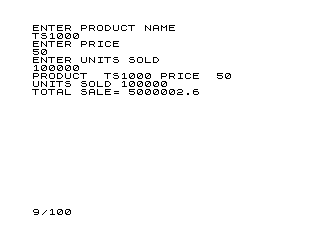
This program is a simple sales calculator that collects a product name, unit price, and quantity sold, then computes and displays a total sale amount. The total is calculated by multiplying price by units sold and adding a fixed 5.25% surcharge (likely a tax or fee) applied only to the unit price rather than the full sale subtotal. A notable quirk is that the tax term T is computed as 0.0525 × P rather than 0.0525 × (P × U), meaning the surcharge does not scale with quantity. Input values are echoed back immediately after entry using PRINT statements on lines 12, 22, and 32, a common pattern used when screen layout needs explicit control.
Program Analysis
Program Structure
The program is divided into three logical phases: data entry (lines 10–32), calculation (lines 33–40), and output (lines 60–100). A STOP at line 100 halts execution cleanly. Lines 110 and 120 are utility lines for saving and restarting the program and are never reached during normal execution.
- Input phase (10–32): Prompts for and reads product name (
N$), price (P), and units sold (U), echoing each value immediately after entry. - Calculation phase (33–40): Computes a surcharge term
Tand the total saleST. - Output phase (60–100): Prints a formatted summary of all values and the total.
Calculation Logic
Two formulae are used:
LET T=.0525*P— computes 5.25% of the unit price only.LET ST=P*U+T— adds that single-unit surcharge to the full quantity-scaled sale amount.
This is almost certainly a bug. The intended behaviour was likely ST = P*U * 1.0525 (i.e., 5.25% applied to the entire sale), but as written T does not scale with U. For a sale of 10 units at £2.00, the correct tax-inclusive total would be £21.05, but the program produces £20.105. The error grows proportionally with unit quantity.
Notable BASIC Idioms
Each INPUT statement is immediately followed by a PRINT of the same variable (e.g., lines 21–22, 31–32). This explicit echo pattern gives the programmer direct control over where the accepted value appears on screen, rather than relying on the system’s default input display behaviour.
Line numbering leaves deliberate gaps (lines 33, 40, then jumping to 60), which is a common practice to allow future lines to be inserted between existing ones without renumbering.
Output Formatting
Line 60 uses a trailing comma after the PRINT statement (PRINT "PRODUCT ";N$,), which advances the print position to the next tab column rather than issuing a newline. Line 70 then continues output on the same line. This achieves a two-column label/value layout for the product name and price on a single screen row.
Variable Summary
| Variable | Description |
|---|---|
N$ | Product name (string input) |
P | Unit price |
U | Units sold |
T | Surcharge (5.25% of unit price only) |
ST | Total sale amount |
Bugs and Anomalies
- Tax not quantity-scaled: As described above,
Tis calculated onPalone, notP*U, causing the surcharge to be under-applied for any quantity other than 1. - No input validation: There is no check for negative or zero values of
PorU, which could produce nonsensical results silently.
Image Gallery
Source Code
   5 REM SALE CALC
  10 PRINT "ENTER PRODUCT NAME"
  11 INPUT N$
  12 PRINT N$
  20 PRINT "ENTER PRICE"
  21 INPUT P
  22 PRINT P
  30 PRINT "ENTER UNITS SOLD"
  31 INPUT U
  32 PRINT U
  33 LET T=.0525*P
  40 LET ST=P*U+T
  60 PRINT "PRODUCT  ";N$,
  70 PRINT "PRICE  ";P
  80 PRINT "UNITS SOLD ";U
  90 PRINT "TOTAL SALE= ";ST
 100 STOP
 110 SAVE "1012%9"
 120 RUN
Note: Type-in program listings on this website use ZMAKEBAS notation for graphics characters.