
A text editor written in BASIC. You load a text file (a character array) by name, and the editor shows it 32 characters to a line, 22 lines to a screen, with a flashing cursor moved by the cursor keys 5–8. Key 1 opens an input line: anything typed there overwrites the text at the cursor, and short commands give Find, Replace, Move (copy a range of lines, optionally deleting the old ones), Delete a line, Page mode (whole screens up and down) and Save. Key 3 shows the current line number. The LLABLE command prints the file as mailing labels on the printer.
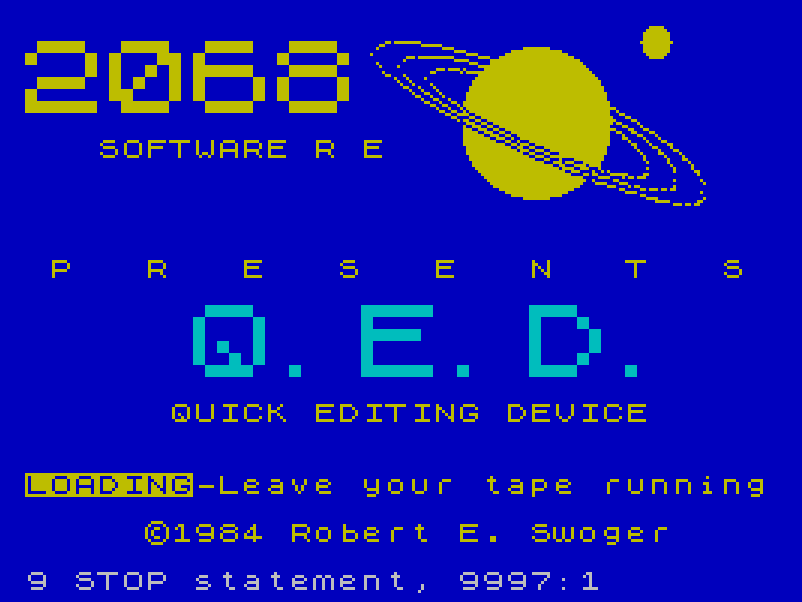
The title screen, saved as a SCREEN$, reads “2068 SOFTWARE PRESENTS … QUICK EDITING DEVICE” and “©1984 Robert E. Swoger”.
Development versions: QED Development is a tape of eight work-in-progress saves of the editor by Bob Swoger, named FLA, FLC, FLE, FLG, FLH, FLK, FLM and FLP.
What’s in the download
- QED: the editor
QED, its title screens, andDRCTRY, a character-array text file of about 18,800 characters to load into it. - QED Development Tape: the program
screen, which builds the title screen from block graphics and saves it ass, followed by three copies of the screen.
Program Analysis
Structure
- Lines 4–58: load the title screen, set system variables (key repeat, keyboard click, CAPS LOCK on) and define four UDGs: two drawn symbols and two arrows used in the page-mode prompt.
- Lines 101–109: ask for a file name and
LOAD F$ DATA A$(). - Lines 610–950: show the text from position
C, the command bar and the flashing cursor, and move the cursor; moving past the top or bottom row scrolls by one line (lines 3001–3020). - Lines 2010–2300: the command input. A typed entry that is not a command overwrites the text at the cursor with
LET A$(D TO D+LEN B$-1)=B$. - Lines 3901–8110: page mode, find, replace, mailing labels, move, delete line and line number.
- Lines 9981–9983:
SAVE F$ DATA A$()andVERIFY.
Mailing labels
LLABLE asks how many lines make up a label and how many characters to mask. It prints each 32-character line of the label in turn; on the last line it prints only the first part, skips the masked characters and prints the last five. When the file is finished it loads the next data file from tape and carries on.
Notable Techniques
- Cursor movement and limits are worked out with Boolean arithmetic in single
LETstatements, e.g.LET X=X+((X<23)*(I$="6"))-…. - The command bar is printed into the lower screen by setting
POKE 23659,0(DF SZ) and restoring it to 2 afterwards. - The text is one long string array, so screens, pages and line numbers are all slices of it in 32-character steps.
Potential Issues
- In line 800, key 7 subtracts
(X>1)and(X<>0), so the cursor moves up two rows at a time except near the top; line 900 does the same for key 5 and columns. - Replace (lines 5020–5040) writes the new string over the old one without shifting the text, so a replacement of a different length leaves stray characters or overwrites the text that follows.
- The mailing-label routine never ends: after the last label it waits for another data file from tape (line 6030).
- There is no option to start a new, empty file; a file must be loaded first.
GO TO 200,600and700point to lines that do not exist. Sinclair BASIC carries on at the next line (601, 601 and 720), so they work.
Image Gallery
Note: Type-in program listings on this website use ZMAKEBAS notation for graphics characters.