
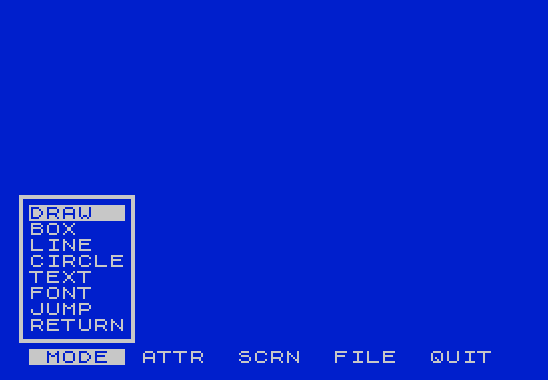
This program implements a joystick-driven popup menu system intended as a user interface framework for a drawing or graphics application. The menu bar displays five options (MODE, ATTR, SCRN, FILE, QUIT) across the bottom status line, with the active menu highlighted using inverse video via OVER Z. Selecting a menu item causes a popup window to appear, drawn using custom UDG characters that form box-drawing borders, with menu entries listed between top and bottom border strips built from the strings T$ and B$. The STICK keyword is used exclusively for navigation — left/right moves between menus, up/down scrolls through items within an open popup, and the fire button confirms a selection. UDG “o” through approximately “o”+47 are loaded from DATA at line 50 to provide the box-corner and border graphics used in rendering the popup frames.
Program Structure
The program divides cleanly into several functional regions:
- Initialization (lines 10–40): Sets up constants, UDGs, and string templates, then jumps to the main loop.
- UDG Data (lines 50–60): 48 bytes of pixel data for box-drawing characters loaded into UDG “o” onward.
- Input Subroutine (line 100–102): Polls
INKEY$,STICKfire, and directions; returns as soon as any input is detected. - Menu Input Handler (line 105–155): Draws the highlighted menu item, waits for joystick, and routes navigation accordingly.
- Popup Draw Subroutine (lines 160–165): READs positional and content data to render a bordered popup window.
- Popup Erase Subroutine (line 170): Clears the popup column by overprinting spaces.
- Menu DATA (lines 200–230): Packed strings encoding position, width, and item labels for each of the four active menus.
- Main Loop / Menu Dispatcher (lines 1003–1420): Renders the menu bar, dispatches to the correct DATA block per menu, and handles the QUIT menu specially.
Constants and Abbreviations
A notable idiom throughout is the use of Z= SGN PI (equals 1) and Y= NOT PI (equals 0) as compact substitutes for the literals 1 and 0. This saves a byte or two per use in the tokenized file. All GO TO and GO SUB targets are expressed as VAL "number" rather than bare literals, which is a known memory-saving technique in Sinclair BASIC. Similarly, INP, PRMN, and CINP hold the line numbers 100, 160, and 105 respectively, allowing GO SUB INP and GO TO CINP as shorthand.
UDG Usage
Lines 40–60 load 48 bytes of data into UDG “o” (and subsequent characters) to provide custom box-corner and border tile graphics. The DATA values contain the token k, which in context represents the BASIC keyword INK — this is likely a listing artifact where the tokenizer has stored the INK keyword byte (value 25 decimal / 0x19) in place of the intended numeric constant. This would be a data corruption bug in practice, causing incorrect UDG shapes unless the DATA were entered correctly with numeric values.
Popup Rendering
The popup window is built from two string templates. T$ (set in line 20) encodes a top border row, and B$ encodes a bottom border row, each using UDG block graphic characters. The subroutine at line 160 READs the row, column, width, and item count from the current DATA position, then prints the top border clipped to width, iterates item labels one per row with side borders, and finally prints the bottom border. Line 165 handles the bottom border print, and line 170 erases the popup by printing spaces over the same column range.
Navigation Logic
Within an open menu (lines 105–155), STICK directions are interpreted as follows:
ST=2— down: advances highlighted item, wraps from last to first.ST=1— up: retreats highlighted item, wraps from first to last.ST=4— left: decrementsMEN(active menu index), wraps at 1.ST=8— right: incrementsMEN, wraps at 5.- Fire button (
PB): jumps toOBJ, a line number set per menu to a stubREMwhere application-specific handling would be added.
Left and right navigation also erases the current popup (via GO SUB VAL "170") before returning to the main dispatcher at line 1003.
Menu Bar Highlight
The menu bar is printed on the lower status line (PRINT #Z) in line 1003. The active menu label is highlighted by overprinting a block of inverse video using OVER Z and the string C$ (six solid block characters), positioned at column (6*MEN)-5. This neat arithmetic places the highlight exactly over each six-character menu label slot.
QUIT Menu Handling
Menu 5 (QUIT) does not call the popup draw subroutine. Instead, lines 1400–1420 simply wait for joystick input: fire jumps to line 9999 (a non-existent line, causing the program to halt or error gracefully), left moves to menu 4, right wraps back to menu 1, and any other input loops.
Extensibility Design
Each menu’s selection handler is a stub REM line (1010, 1110, 1210, 1310) labeled with <><> comments indicating where application logic should be inserted. The variable OBJ holds the target line number, and the pattern LET OBJ= VAL "nnnn":GO TO CINP makes it straightforward to wire up real functionality by replacing each stub.
Anomalies
- Line 1003 tests
MEN <> Zbut the only value never dispatched to its own block isMEN=4(FILE menu, line 1300 falls through only whenMENis not 3 and not 5), so menu 4 is handled at line 1305–1310 by exclusion rather than explicit equality. - The variable
T(current highlighted row) is set locally inside the CINP block at line 105 but also modified at lines 125 and 130; its relationship toWandT2means the wrap logic depends onWbeing correctly set by the popup draw subroutine, which reads it from DATA.
Image Gallery
Source Code
    5 REM  Pop Up Menus  4-88               USE JOYSTICK                ATSU  by Mowgli Assor
   10 CLEAR VAL "65368":LET Z= SGN PI:LET Y= NOT PI:BORDER Z:PAPER Z:INK VAL "7":CLS
   20 LET INP= VAL "100":LET C$="\::\::\::\::\::\::":LET MOD=Z:LET X=Y:LET W=Y:LET ST=Y:LET PB=Y:LET K$="":LET T$="\q\o\o\o\o\o\o\o\o\o\o\r\p":LET B$="\s\o\o\o\o\o\o\o\o\o\o\t"
   30 LET NSD=Y:LET PRMN= VAL "160":LET CINP= VAL "105":POKE VAL "23675", VAL "88":POKE VAL "23676", VAL "255":LET MEN=Z
   40 RESTORE VAL "50":FOR C=Y TO VAL "47":READ K:POKE USR "o"+C,K:NEXT C:GO TO VAL "1003"
   50 DATA 0,k,k,255,k,0,k,k,24,k,k,k,k,k,k,k,0,k,k,31,k,24,k,k
   60 DATA 0,k,k,248,k,24,k,k,k,k,k,31,k,0,k,k,24,k,k,248,k,0,k,k
  100 LET K$= INKEY$:LET ST=STICK (Z,Z):LET PB=STICK (Z+Z,Z):IF K$ <>"" OR ST OR PB THEN RETURN
  102 GO TO VAL "100"
  105 LET X=X+Z:LET T=W+Z:LET T1=T1-Z-Z:LET D$=C$+C$( TO (T1- VAL "6"))
  110 PRINT AT T,X; OVER Z;D$
  115 GO SUB INP:IF NOT ST AND NOT PB THEN GO TO VAL "115"
  117 PRINT AT T,X; OVER Z;D$
  120 IF PB THEN GO TO OBJ
  125 IF ST= VAL "2" THEN LET T=T+Z:IF T=(T2+Z) THEN LET T=W+Z
  130 IF ST=Z THEN LET T=T-Z:IF T=(W) THEN LET T=T2
  135 IF (ST <>Z AND ST <>(Z+Z) AND NOT NSD) THEN GO SUB VAL "170":GO TO VAL "145"
  140 GO TO VAL "110"
  145 IF ST= VAL "4" THEN LET MEN=MEN-Z:IF MEN<Z THEN LET MEN= VAL "5"
  150 IF ST= VAL "8" THEN LET MEN=MEN+Z:IF MEN> VAL "5" THEN LET MEN=Z
  155 GO TO VAL "1003"
  160 READ K$:LET W= VAL K$:READ K$:LET X= VAL K$:READ K$:LET T1= VAL K$:READ K$:PRINT AT W,X;T$( TO (T1-Z));T$(VAL "12"):LET T5= VAL K$:FOR C=Z TO T5:READ K$
  165 PRINT AT W+C,X;T$(VAL "13");K$;T$(VAL "13"):NEXT C:PRINT AT VAL "21",X;B$( TO (T1-Z));B$(VAL "12"):RETURN
  170 FOR C=W TO VAL "21":PRINT AT C,X-Z;"            ":NEXT C:RETURN
  200 DATA "12","0","8","8","DRAW  ","BOX   ","LINE  ","CIRCLE","TEXT  ","FONT  ","JUMP  ","RETURN"
  210 DATA "15","4","12","5","NEW INK   ","NEW PAPER ","ALTER OVER","ALTER ATTR","RETURN    "
  220 DATA "14","12","8","6","BORDER","CLEAR ","SWITCH","MERGE ","INVERT","RETURN"
  230 DATA "13","17","11","7","LOAD UDG ","LOAD PIC ","SAVE PIC ","PRINT PIC","CATALOG  ","DRIVE    ","RETURN   "
 1003 LET NSD=Y:LET T2= VAL "20":PRINT #Z; AT Y,Y;"  MODE  ATTR  SCRN  FILE  QUIT  ";#Z; AT Y,(VAL "6"*MEN)- VAL "5"; OVER Z;C$:IF MEN <>Z THEN GO TO VAL "1100"
 1005 RESTORE VAL "200":GO SUB PRMN:LET OBJ= VAL "1010":GO TO CINP
 1010 REM <><>TAKE CARE OF ITEMS
 1100 IF MEN <> VAL "2" THEN GO TO VAL "1200"
 1105 RESTORE VAL "210":GO SUB PRMN:LET OBJ= VAL "1110":GO TO CINP
 1110 REM <><>HANDLE MENU 2 ITEMS
 1200 IF MEN <> VAL "3" THEN GO TO VAL "1300"
 1205 RESTORE VAL "220":GO SUB PRMN:LET OBJ= VAL "1210":GO TO CINP
 1210 REM <><>HANDLE MENU 3 ITEMS
 1300 IF MEN= VAL "5" THEN GO TO VAL "1400"
 1305 RESTORE VAL "230":GO SUB PRMN:LET OBJ= VAL "1310":GO TO CINP
 1310 REM <><>HANDLE MENU 4 ITEMS
 1400 GO SUB INP:IF NOT ST AND NOT PB THEN GO TO VAL "1400"
 1405 IF PB THEN GO TO VAL "9999"
 1410 IF ST= VAL "4" THEN LET MEN= VAL "4":GO TO VAL "1003"
 1415 IF ST= VAL "8" THEN LET MEN=Z:GO TO VAL "1003"
 1420 GO TO VAL "1400"
Note: Type-in program listings on this website use ZMAKEBAS notation for graphics characters.