
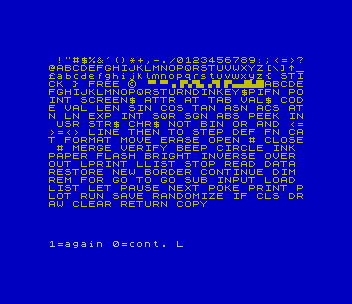
Compares two ways of changing the screen colours after something is already on it. The program prints the character set, then asks for PAPER and INK colours; the ordinary BASIC part sets them with a POKE to 23693 and reprints every line with OVER 1. The second part does the same with the Larken Extended BASIC PAPER and INK commands, which change the colours instantly.
The second part needs the Larken disk system’s ROM: on a TS2068 without it, RANDOMIZE USR 100 resets the computer.
Published in Sinc-Link January-February 1990 (Bob’s Notebook: Larken Extended BASIC example).
Image Gallery
Source Code
1 REM playing with colour
5 REM by Bob Mitchell
10 CLS : FOR i=32 TO 255: PRINT CHR$ i;: NEXT i
15 PRINT #0;AT 0,0;"Ordinary BASIC...": PAUSE 120
20 INPUT "paper 0-7 ";p
30 INPUT "ink 0-7 ";i
35 BORDER p
40 POKE 23693,p*8+i
100 OVER 1: PRINT AT 0,0;: FOR i=0 TO 21: PRINT ,,: NEXT i
110 OVER 0
120 INPUT "1=again 0=cont. ";as
130 IF as THEN GO TO 15
140 PRINT #0;AT 0,0;"Press a key": PAUSE 0
200 PRINT #0;AT 0,0;"Larken Extended BASIC...": PAUSE 120
210 INPUT "paper 0-7 ";p
220 INPUT "ink 0-7 ";i
230 BORDER p: RANDOMIZE USR 100: PAPER p: RANDOMIZE USR 100: INK i
240 INPUT "1=again 0=stop ";as
250 IF as THEN GO TO 200
260 STOP
300 RANDOMIZE USR 100: SAVE "colour.B1" LINE 1
Note: Type-in program listings on this website use ZMAKEBAS notation for graphics characters.