
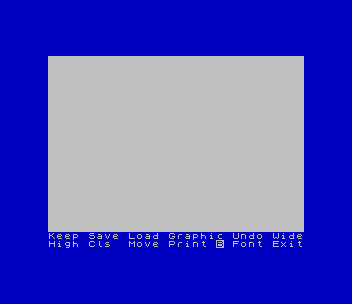
Composes a page column of text and graphics on screen for printing. Text is typed straight into the column in Standard, Bold, Modern or Italic lettering, or in a font loaded from tape, and SCREEN$-format graphics can be loaded into it. A menu line offers Keep, Save, Load, Graphic, Undo, Wide, High, Cls, Move, Print, Font and Exit, and Exit leaves the menu for typing. Version 2.0 changed MOVE so that T and B scroll the column by 64 pixel rows, t and b by 8 rows and THEN and TO by one, and added a BLOCK FUNCTION menu, reached with the inverse B on the menu line, that copies a block from one place to another, erases a block, and inserts or deletes pixel rows. The block functions have no undo.
The opening REM reads “PIXEL-PRINT ‘the Desktop Publisher’ © by S D Lemke 1987, Lemke Software Development”. Version 2.0 comes between Pixel Print v1 and Pixel Print PLUS 3.1, both also on this site. The details of the changes come from Lemke’s Pixel Print v2 upgrade sheet, which also says that columns saved by version 1.0 cannot be used in 2.0, that the Greeting Card icon utility from version 1 was dropped in favour of the ICON package, and that the original tape carried the Chancery font after the program, followed by a sample column. This copy is from SNUG library disk 19/20.
Program Analysis
Loading
Line 9000, the auto-start line, shows the PP-LOGO screen, then loads the title screen “PP 2.0 C” as CODE straight into the display at 16384, the main machine code (7,350 bytes) to 29000 and the block-function code (2,510 bytes) to 61961. Line 9100 does CLEAR 28999, line 9150 POKEs starting values into 35695–35700, and line 9200 starts the program with RANDOMIZE USR 29000.
Tape Operations
The editor runs in machine code and is re-entered at line 2000 with RANDOMIZE USR 31854. The BASIC lines handle the cassette: LOAD GRAPHICS (line 4000) loads a SCREEN$-format file to 16384 and calls USR 34964 to take it into the column, SAVE COLUMN and LOAD COLUMN (lines 5000 and 6000) save and load the 24,064-byte column at 37150, and LOAD FONT (line 7000) loads a 768-byte font to 36352. Each one asks you to press ENTER and goes back to the editor on any other key, and file names are limited to 10 characters.
Notable Techniques
- Prompts are printed to the lower screen with
PRINT #0, so the column on the main screen is left alone. - Pressing ENTER is tested with
PAUSE 0followed byCODE INKEY$<>13. - Only SAVE COLUMN insists on a name. The load prompts accept an empty name, which loads the next file of the right type on the tape.
- A font is 768 bytes, 96 characters of 8 bytes each, the same layout as the ROM character set.
Potential Issues
- No problems were found in the BASIC part; the machine code was not examined.
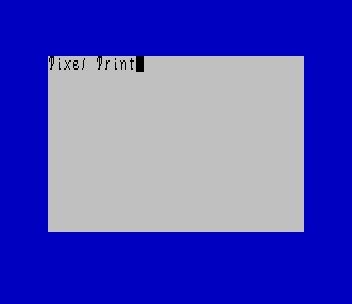
This program came from an Oliger (JLO SAFE) disk and was converted for tape. The only changes were to make the Oliger LOAD / and SAVE / commands plain tape commands. As on the original v2.0 tape, the Chancery font follows the program; the sample column is not included because it was not on the disk. It was tested in ZEsarUX: the menu screen, and the Chancery font loaded and used for typing.
Image Gallery
Source Code
 1000 REM            PIXEL-PRINT      "the Desktop Publisher"   * by     S D Lemke      1987      Lemke Software Development           2144 White Oak      Wichita,  Ks.   67207
 2000 RANDOMIZE USR 31854
 4000 PRINT #0,,"Press ENTER to LOAD GRAPHICS.",: PAUSE 0: IF CODE INKEY$<>13 THEN GO TO 2000
 4200 INPUT "File Name? "; LINE a$: IF LEN a$>10 THEN BEEP 1,1: GO TO 4200
 4300 GO SUB 8010: LOAD a$CODE 16384: RANDOMIZE USR 34964
 5000 PRINT #0,,"Press ENTER to SAVE a COLUMN.",: PAUSE 0: IF CODE INKEY$<>13 THEN GO TO 2000
 5150 INPUT "File Name? "; LINE a$: IF LEN a$>10 OR LEN a$<1 THEN BEEP 1,1: GO TO 5150
 5200 SAVE a$CODE 37150,24064: GO TO 2000
 6000 PRINT #0,,"Press ENTER to LOAD a COLUMN.",: PAUSE 0: IF CODE INKEY$<>13 THEN GO TO 2000
 6200 INPUT "File Name? "; LINE a$: IF LEN a$>10 THEN BEEP 1,1: GO TO 6200
 6300 GO SUB 8010: LOAD a$CODE 37150: GO TO 2000
 7000 PRINT #0,,"  Press ENTER to LOAD a FONT.",: PAUSE 0: IF CODE INKEY$<>13 THEN GO TO 2000
 7200 INPUT "Font Name? "; LINE a$: IF LEN a$>10 THEN BEEP 1,1: GO TO 7200
 7300 GO SUB 8010: LOAD a$CODE 36352,768: GO TO 2000
 8010 PRINT #0;" IF a LOAD ERROR occurs then:         TYPE RUN (ENTER)",: RETURN
 9000 LOAD "PP-LOGO"SCREEN$ : PAUSE 180: LOAD "PP 2.0 C"CODE 16384: LOAD "pp 2.0 mcC"CODE : LOAD "pp 2.0 mcD"CODE
 9100 PAUSE 180: CLEAR 28999
 9150 POKE 35695,0: POKE 35696,0: POKE 35697,7: POKE 35698,0: POKE 35699,1: POKE 35700,0
 9200 RANDOMIZE USR 29000
 9300 STOP
 9999 SAVE "PP 2.0" LINE 9000: SAVE "pp 2.0 mcC"CODE 29000,7350: SAVE "pp 2.0 mcD"CODE 61961,2510
Note: Type-in program listings on this website use ZMAKEBAS notation for graphics characters.