
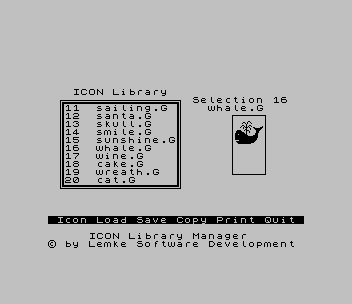
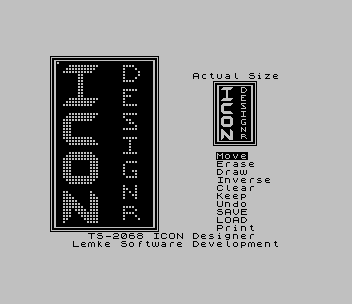
Three programs for working with icons, the small high-resolution pictures of 256 bytes each used with Pixel Print. The ICON Library Manager (PP-ICON-L) browses a library of up to 115 named icons; from its menu you can load and save single icons or a whole library, and copy an icon enlarged one to three times, with an optional box, either to a Pixel Print SCREEN$ file or to the printer. The ICON Designer (PP-ICON-D) is a joystick-driven editor with Move, Erase, Draw, Inverse, Clear, Keep, Undo, Save, Load and Print commands, and saves each icon as 256 bytes of CODE. The COLOSSUS Conversion utility (PP-ICON-C) turns a Greeting Card Designer graphic into a 386-byte low-resolution icon for COLOSSUS banners. Printing is for the TS2040 printer only.
The REMs credit Lemke Software Development of Wichita, Kansas, and S D Lemke, 1987. These programs are the utility half of Lemke’s commercial Icon Package. According to the package’s user guide, its first cassette held a loader with the Pixel Print logo and the three programs, and its second held more than 100 clip-art icons by Bill Ferrebee of Mountaineer Software; the guide also says the programs were compiled with the Timachine compiler. That icon collection is on this site separately as Clip Art Icon Lib V1, and the Icon Package user guide is on the site as a document. The machine code of the Library Manager is identical to that of the ICON-L on STING’s Pixel Print Graphics tape. This copy is from SNUG library disk 19/20.
The zip also holds a second tape with two more icon libraries from the same disk, PCICONS1 and PCICONS2. Each is a 30,959-byte block that loads at 33926, the same address as the package’s own 6,895-byte ICONS library. They contain pairs of left- and right-hand “double” icons, such as a stethoscope, the Mona Lisa, a bingo card and a robot.
Program Analysis
The Loader (PP-ICON)
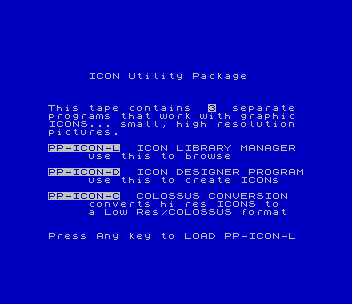
Shows the PP-LOGO screen, then an introduction naming the three programs, and loads PP-ICON-L when a key is pressed.
Icon Library Manager (PP-ICON-L)
- Line 7000, the auto-start line, does
CLEAR 29999, shows the logo, loads 3,884 bytes of machine code to 30000 and runs it. - Line 15 (repeated in line 7010) stores the machine code’s working addresses in
CA,C0,ptr,CNT,MAXandAA, andDEF FN a(x)reads a two-byte address from any of them. - The menu and the icon display are machine code (
RANDOMIZE USR 30747in line 20). The BASIC lines 1000, 3000, 4000, 5000 and 6000 do the tape work for loading an icon, saving an icon, saving a copy as a SCREEN$, quitting and loading a library. - Icon names are 10-character entries in memory from address 33954. Lines 8200–8230 rebuild the current icon’s name with
PEEKand offer to use it as the file name. - Line 5250 saves the library as
"ICONS" CODE, with the length worked out from the machine code’s pointers.
Icon Designer (PP-ICON-D)
Line 9000 loads 5,984 bytes of machine code to 59349 and a 256-byte starting icon to 58000, does CLEAR 57999 and runs the editor. When the editor hands back to BASIC, line 1010 checks a flag at 65337 to decide between loading an icon (line 2000) and saving one (line 1020); both take a name of up to 10 characters, use the 256 bytes at 58000, and return to the editor through RANDOMIZE USR 64312.
COLOSSUS Conversion (PP-ICON-C)
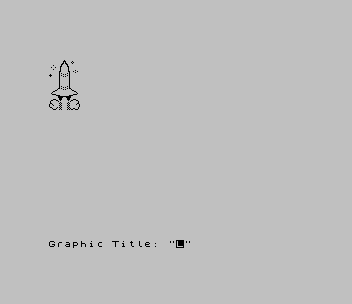
Loads 1,562 bytes of machine code to 63752, then takes the next CODE file on the tape to 40000 with LOAD ""CODE 40000, converts it with RANDOMIZE USR 63752, and saves the 386-byte result from 38998 under a title you type. It then loops for the next graphic.
Notable Techniques
- Constants are written as
VAL "35159"and similar, which takes less memory in the program than a plain number. DEF FN a(x)=256*PEEK (x+1)+PEEK xgives BASIC easy access to the pointers kept by the machine code.- The machine code does all the drawing and menu work, and BASIC is left to handle the cassette, with a reminder to type RUN if a load fails.
Potential Issues
- When you quit the Library Manager and answer Y to save the library first, line 5250 saves it and then goes back to the menu instead of stopping; you have to quit again and answer N.
This program came from an Oliger (JLO SAFE) disk and was converted for tape. The Oliger LOAD / and SAVE / commands became plain tape commands, and the JLO CAT statements that listed the disk before each file-name prompt (ICON-L line 8230, ICON-D lines 1020 and 2000) were removed. Because PP-ICON-L’s start line reloads the logo screen, a second copy of PP-LOGO follows it on the tape. A menu at the start of the tape loads the loader and Library Manager (1), the Icon Designer (2) or the COLOSSUS converter (3). The tape also carries the disk’s own small ICONS library, 21 named icons from bells.G to xmastree.G, with the individual .G icon files (grad.G could not be read from the disk), and a sample file called rocket for the converter. It was tested in ZEsarUX: the introduction screen, the library loaded and browsed, the Icon Designer’s start screen, and ICON-C converting the rocket sample. The designer needs a joystick and was not tested beyond its start screen.
Image Gallery
Source Code
    1 REM Pixel Print ICON Utility Package * by Lemke Software Development          2144 White Oak       Wichita,  Ks.  67207
    2 PAPER 1: INK 1: BORDER 1: CLS : LOAD "PP-LOGO"SCREEN$
    3 PAUSE 100: INK 7
    4 CLS : PRINT ''"     ICON Utility Package"
    5 PRINT '''"This tape contains  3  separate programs that work with graphic ICONS... small, high resolution pictures."''"PP-ICON-L  ICON LIBRARY MANAGER"'"     use this to browse"''"PP-ICON-D  ICON DESIGNER PROGRAM"'"     use this to create ICONs"''"PP-ICON-C  COLOSSUS CONVERSION"'"     converts hi res ICONS to        a Low Res/COLOSSUS format"
    6 PRINT #0;AT 0,0;"Press Any key to LOAD PP-ICON-L": PAUSE 0: PAPER 7: INK 0: BORDER 7: CLS : LOAD "PP-ICON-L"
 9999 SAVE "PP-ICON" LINE 1

    0 REM       ICON LIBRARY MANAGER  * Lemke Software Development           2144 White Oak      Wichita, Ks.  67207
   10 DEF FN a(x)=256*PEEK (x+1)+PEEK x
   15 LET CA=VAL "35159": LET C0=VAL "33884": LET ptr=VAL "33898": LET CNT=VAL "33906": LET MAX=VAL "33926": LET AA=VAL "33954"
   20 CLS : RANDOMIZE USR 30747
 1000 CLS : PRINT AT 5,0;"Press ENTER to LOAD an ICON.": PAUSE 0: IF CODE INKEY$=13 THEN GO TO 1200
 1100 GO TO 20
 1200 GO SUB 8200
 1300 GO SUB 8000: LOAD a$CODE FN A(CNT),256: GO TO 20
 3000 CLS : PRINT AT 5,0;"Press ENTER to SAVE your ICON.": PAUSE 0: IF CODE INKEY$=13 THEN GO TO 3150
 3100 GO TO 20
 3150 GO SUB 8200
 3200 SAVE a$CODE FN A(CNT),256: GO TO 20
 4000 LET p1=CA: GO SUB 8205
 4100 SAVE a$SCREEN$ : RANDOMIZE USR 32356
 5000 CLS : PRINT AT 5,5;"Press ENTER to QUIT.": PAUSE 0: IF CODE INKEY$=13 THEN GO TO 5150
 5100 GO TO 20
 5150 PRINT AT 8,0;"SAVE your Library first? (Y/N) ": PAUSE 0: IF INKEY$="Y" OR INKEY$="y" THEN GO TO 5250
 5200 STOP
 5250 SAVE "ICONS"CODE MAX,(10+FN A(C0)-MAX+256*PEEK MAX): GO TO 20
 6000 BEEP .01,20: CLS : PRINT AT 5,0;"Press ENTER to LOAD a Library.": PAUSE 0: IF CODE INKEY$=13 THEN GO TO 6200
 6100 GO TO 20
 6200 GO SUB 8000: LOAD "ICONS"CODE MAX: GO TO 20
 7000 PAPER 1: INK 1: BORDER 1: CLEAR 29999: LOAD "PP-LOGO"SCREEN$ : PAUSE VAL "100": LOAD "pp-icon-lC"CODE 30000
 7010 LET CA=VAL "35159": LET C0=VAL "33884": LET ptr=VAL "33898": LET CNT=VAL "33906": LET MAX=VAL "33926": LET AA=VAL "33954"
 7015 PAPER 7: BORDER 7: INK 0: CLS
 7020 RANDOMIZE USR 30000
 8000 PRINT AT 5,0;" IF a LOAD ERROR occurs then:         TYPE RUN [ENTER]": RETURN
 8200 LET p=FN A(PTR): LET p1=(p-1)*10+AA: LET p2=p1+9
 8205 LET p2=p1+9: LET a$="": FOR i=p1 TO p2: LET a$=a$+CHR$ PEEK i: NEXT i
 8210 PRINT ''"Retain this Program Name for    your LOAD/SAVE? ";a$: INPUT "Y/N ";y$
 8220 IF y$="y" OR y$="Y" THEN RETURN
 8230 INPUT "NEW file Name? ";a$: RETURN
 9999 SAVE "PP-ICON-L" LINE 7000: SAVE "pp-icon-lC"CODE 30000,3884

   10 REM             PIXEL-PRINT      "the Desktop Publisher"   * by     S D Lemke      1987      Lemke Software Development           2144 White Oak      Wichita,  Ks.   67207      ICON Designer Utility
   30 RANDOMIZE USR 64312
 1000 CLS
 1010 IF PEEK 65337=9 THEN GO TO 2000
 1020 PRINT AT 10,0;" Prepare to SAVE your new ICON.": INPUT "ICON Name? "; LINE a$: IF LEN a$>10 THEN BEEP .01,40: GO TO 1020
 1030 SAVE a$CODE 58000,256
 1060 GO TO 30
 2000 PRINT AT 10,0;" Prepare to LOAD an old ICON.": INPUT "ICON Name? "; LINE a$: IF LEN a$>10 THEN BEEP .01,40: GO TO 2000
 2010 PRINT AT 13,0;" IF a LOAD ERROR occurs then:         TYPE RUN (ENTER)",
 2030 LOAD a$CODE 58000: GO TO 30
 9000 LOAD "pp-icon-dC"CODE : LOAD "pp-icon-dD"CODE : PAPER 7: BORDER 7: INK 0: CLS
 9100 CLEAR 57999
 9200 RANDOMIZE USR 59349
 9300 GO TO 1000
 9999 SAVE "PP-ICON-D" LINE 9000: SAVE "pp-icon-dC"CODE 59349,5984: SAVE "pp-icon-dD"CODE 58000,256

    0 REM  Greeting Card Designer Graphic to COLOSSUS conversion utility   * by    S D Lemke       1987     Lemke  Software  Development           2144 White Oak     Wichita,  Ks.   67207
   10 LOAD "pp-icon-cC"CODE 63752,1562
   20 PAPER 7: BORDER 7: INK 0: CLS
   30 PRINT ''"  Play your GRAPHIC tape now.": LOAD ""CODE 40000
   40 CLS
   50 RANDOMIZE USR 63752
   60 BEEP 1,1: INPUT "Graphic Title: ";t$: SAVE t$CODE 38998,386
   70 GO TO 20
   80 SAVE "PP-ICON-C" LINE 1: SAVE "pp-icon-cC"CODE 63752,1562
Note: Type-in program listings on this website use ZMAKEBAS notation for graphics characters.