
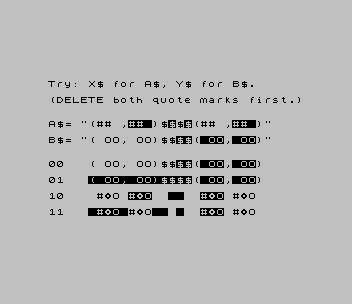
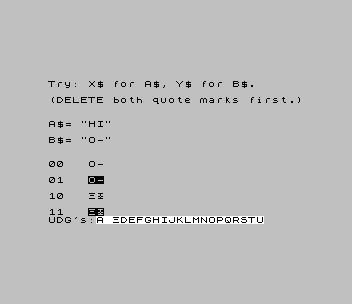
Shows on the screen what the four combinations of OVER and INVERSE do when one string is printed on top of another. A result can be stored as a user-defined graphic.
RUN it and type any two strings, or delete both quote marks at each prompt and enter X$ and Y$ to use the two test strings in the program. To store the character at the left of the 10 row, press BREAK, enter GO TO 2000 and give a letter from A to U. The inverse-video characters of X$ and Y$ follow the printed listing.
Published in LISTing December 1985 (Try These).
Image Gallery
Source Code
   1 REM 1985 William Pedersen
   2 REM
   4 REM     OVERPRINTING
   6 REM  This test demonstrates        the way the INVERSE and         OVER functions effect           what you can put on the         screen.
   8 REM
  10 REM  A$ represents what is          already there.
  12 REM
  14 REM  B$ is what you write           on top of it."
  16 REM
  18 REM  The binary number in           front of the results is         made up from the OVER           and INVERSE values.
  20 REM
  22 REM  If you like what you           get, you can BREAK and          GO TO 2000.  Then you           can assign it as a UDG.
  24 REM
  26 REM  Doubletake
  28 REM
1001 LET X$="(## ,\{20}\{1}## \{20}\{0})$\{20}\{1}$\{20}\{0}$\{20}\{1}$\{20}\{0}(## ,\{20}\{1}## \{20}\{0})"
1003 LET Y$="( OO, OO)$$\{20}\{1}$$\{20}\{0}(\{20}\{1} OO\{20}\{0},\{20}\{1} OO\{20}\{0})"
1005 CLS : PRINT '''"Try: X$ for A$, Y$ for B$."''"(DELETE both quote marks first.)"
1007 INPUT "A$=";A$'"B$=";B$
1009 PRINT ''"A$= """;A$;""""''"B$= """;B$;""""
1011 FOR o=0 TO 1: FOR i=0 TO 1
1013 PRINT AT 13+2*(i+o+o),0;o;i;"   ";A$
1015 PRINT AT 13+2*(i+o+o),5; OVER o; INVERSE i;B$;
1017 NEXT i: NEXT o
1019 PAUSE 0: GO TO 1005
1996 REM
1998 REM  Load=UDG
2000 REM
2001 INPUT "Which UDG character? ";a$
2003 LET Addr=USR a$
2005 FOR j=0 TO 7
2007 POKE Addr+j,PEEK (20517+256*j)
2009 NEXT j
2011 PRINT AT 20,0;"UDG's:"; BRIGHT 1;"\a\b\c\d\e\f\g\h\i\j\k\l\m\n\o\p\q\r\s\t\u"
2013 PAUSE 0: GO TO 1005
Note: Type-in program listings on this website use ZMAKEBAS notation for graphics characters.