
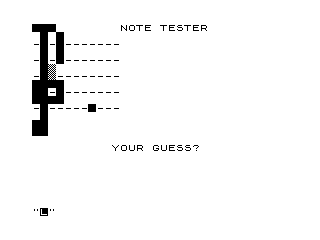
This program implements a musical note-reading quiz for a treble clef staff. It draws a five-line staff using dashes and prints a note head (represented by an inverse character) at a randomly chosen position, then prompts the player to type the note name. The correct answer is determined by mapping the random line/space position to an ASCII character code using the formula at line 220. Inverse video characters are used throughout to render the staff, clef symbol, and note head, exploiting the ZX81’s character attribute system for simple graphics.
Program Analysis
Program Structure
The program runs as a continuous loop via RUN at line 280, restarting from scratch each iteration. There is no explicit subroutine structure; the flow is strictly linear from initialisation through display, input, and feedback.
- Lines 1–50: Initialise variable
Ato column 7 and draw a five-line, eleven-character staff by printing"-"eleven times per line across five rows. - Lines 60–190: Overlay a treble clef and staff graphic using
PRINT AT 0,0to reposition the cursor, drawing the clef and ledger lines with inverse-video characters and block graphics. - Lines 200–220: Pick a random staff position, display a note head (inverse space
"% "), and compute the expected answer code. - Lines 230–270: Accept keyboard input, compare
CODE A$toB, and display “WRONG” or “RIGHT” in inverse video. - Lines 275–280: Clear screen and restart with
RUN.
Staff and Clef Rendering
The five staff lines are drawn in lines 10–50 by printing 11 dash characters per line. Lines 60–190 then use PRINT AT 0,0 to overwrite from the top-left, layering the treble clef symbol and note names. Inverse-video characters (%X escapes) are used extensively for the clef body and note-head marker. The block graphic \## appears at lines 110–120 to represent part of the clef curl.
Note Selection and Answer Mapping
Line 200 selects a random integer from 1 to 11, representing a staff row. Line 210 prints the note head at that row, column A (which was set to 7 at line 1 and may be overwritten by line 240’s INPUT A$ — see Bugs below). Line 215 folds positions above row 8 back by 7 to keep notes within the staff range. Line 220 computes the expected answer character code with:
LET B=(11-B)+34
This maps staff position to an ASCII/ZX81 character code. The player types a note letter (e.g. C, D, … B) and CODE A$ is compared directly to B.
Key BASIC Idioms
INT(RND*11)+1— standard idiom for a random integer in the range 1–11.CODE A$— extracts the character code of the first character of the input string, used as a compact way to compare a single typed letter to a precomputed code.PAUSE 4E4— pauses for approximately 40 000 display frames (around 10 minutes on a 50 Hz system), effectively waiting for the player to press a key or simply stalling long enough to read the result. On a ZX81PAUSEterminates on any key press.RUNat line 280 restarts the program completely, reinitialising all variables — a common technique to avoid writing an explicit reset routine.
Bugs and Anomalies
- Variable collision:
Ais set to column 7 at line 1 for use inPRINT AT B,A(line 210). However, line 240 usesINPUT A$, which on the ZX81 stores the result inA$(a string variable), notA. This is not a collision, but the programmer’s use of bothAandA$as closely named variables could cause confusion during maintenance. - Column not reset between rounds:
Ais initialised to 7 only at line 1. BecauseRUNreinitialises all variables, this is safe — but if the program were ever entered viaGOTOrather thanRUN,Amight hold a stale value. - Line 300: A second
RUNstatement at line 300 is unreachable dead code, never executed because line 280 already triggers a full restart. - Answer mapping coverage: The formula
(11-B)+34withBin range 1–11 produces codes 34–44. On the ZX81 character set these do not map neatly to the letters A–G, suggesting the mapping may produce incorrect or inconsistent note-name assignments for some staff positions.
Image Gallery
Source Code
   1 LET A=7
   8 PRINT
   9 PRINT
  10 FOR B=1 TO 5
  20 FOR N=0 TO 10
  30 PRINT "-";
  40 NEXT N
  45 PRINT
  46 PRINT
  50 NEXT B
  60 PRINT AT 0,0;"% % %         NOTE TESTER"
  70 PRINT " %  % "
  80 PRINT "-% -% "
  90 PRINT " %  % "
 100 PRINT "-% -% "
 110 PRINT " % \##"
 120 PRINT "-% \##"
 130 PRINT "% % % % "
 140 PRINT "% % -% "
 150 PRINT "% % % % "
 160 PRINT "-% "
 170 PRINT " % "
 180 PRINT "% % "
 190 PRINT "% % "
 200 LET B=INT (RND*11)+1
 210 PRINT AT B,A;"% "
 215 IF B>8 THEN LET B=B-7
 220 LET B=(11-B)+34
 230 PRINT AT 15,10;"YOUR GUESS?"
 240 INPUT A$
 250 IF CODE A$<>B THEN PRINT AT 15,10;"% % %W%R%O%N%G% % % % "
 260 IF CODE A$=B THEN PRINT AT 15,10;"% % % %R%I%G%H%T% % % % "
 270 PAUSE 4E4
 275 CLS
 280 RUN
 290 SAVE "1013%7"
 300 RUN
Note: Type-in program listings on this website use ZMAKEBAS notation for graphics characters.