
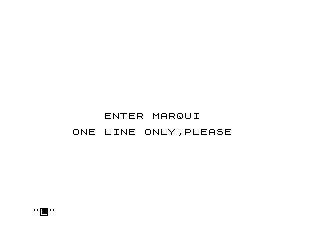
This program implements a scrolling marquee display that accepts a single line of text input and scrolls it repeatedly up the screen. The input string is centered on row 21 using the calculation at lines 12–14, which computes half the remaining space after subtracting the string length from 32 columns. Each display cycle uses a FOR/NEXT loop at lines 30–35 as a software delay proportional to the text length, followed by 22 SCROLL commands to push the line off the top of the screen. The program loops continuously until a keypress is detected, then prompts the user to run again or exit.
Program Analysis
Program Structure
The program is organised into five logical phases:
- Initialisation / Input (lines 5–10): Clears the screen, prompts the user, and accepts a one-line string into
A$. - Setup (lines 11–14): Computes the string length and a centring offset stored in
Z. - Marquee loop (lines 20–60): Prints the text at the bottom of the screen, pauses, scrolls 22 times, then checks for a keypress before repeating.
- Prompt / replay logic (lines 70–92): Asks “AGAIN? (Y/N)” and branches on the response.
- Exit (lines 120–130): Prints a goodbye message and halts.
Centring Calculation
Lines 12–14 calculate the print column for the entered text:
B = LEN A$— length of the input string.C = 32 - B— characters remaining on the 32-column display.Z = INT(C/2) - 1— left column for printing, with a one-column left bias introduced by the-1.
This is a standard centering idiom, though the -1 offset means the text will appear very slightly left of true centre for most string lengths.
Scrolling Mechanism
The marquee effect is achieved purely in BASIC. At line 20 the text is printed at row 21 (the second-to-last display row). The FOR/NEXT loop at lines 30–35 provides a software delay; the loop bound Q = B*3 scales the pause with the length of the string so that shorter messages do not disappear too quickly. Lines 40–50 then issue 22 consecutive SCROLL commands, which is enough to push any content off the 22-row visible area, effectively clearing the screen for the next pass.
Key Detection and Loop Control
The escape from the marquee loop at line 55 uses a simple INKEY$ poll: if any key is pressed during the scroll phase the program jumps to the “AGAIN?” prompt at line 70. The keypress-reading logic at lines 75–92 uses a short delay loop (lines 75–76) followed by a spin-wait at line 80 (IF INKEY$="" THEN GOTO 80) until a key is released and re-pressed, then captured into B$ at line 85. Any character other than “Y” or “N” falls through to line 92 which restarts the delay loop, preventing invalid input from proceeding.
Notable Techniques and Idioms
- Using
SCROLLin a counted FOR/NEXT loop as a full-screen clear-with-motion is a common BASIC trick that avoids a jarringCLS. - Scaling the delay loop bound to string length (
Q = B*3) is a simple but effective way to keep reading time roughly proportional to content length. - The double-check at lines 90–91 (explicit tests for both “Y” and “N”) with a fallback at 92 is a defensive input-validation pattern.
Anomalies and Minor Issues
| Line(s) | Issue |
|---|---|
| 95 | CLS at line 95 is never executed; the flow from line 91 jumps directly to line 100, bypassing it entirely. It appears to be dead code left over from an earlier version. |
| 14 | The -1 in Z = INT(C/2) - 1 introduces a slight left bias; for a string of length 1, Z could become 14 rather than 15. |
| 55 | The keypress check only fires once per full 22-scroll cycle, so the program may feel slow to respond to a keypress that occurs early in the scroll sequence. |
| 140–150 | Lines 140 and 150 are utility lines for saving and restarting the program; they are not part of normal execution flow. |
Image Gallery
Source Code
   5 CLS
   6 PRINT AT 11,9;"ENTER MARQUI"
   7 PRINT AT 13,5;"ONE LINE ONLY,PLEASE"
  10 INPUT A$
  11 CLS
  12 LET B=LEN A$
  13 LET C=32-B
  14 LET Z=INT (C/2)-1
  20 PRINT AT 21,Z;A$
  25 LET Q=B*3
  30 FOR V=1 TO Q
  35 NEXT V
  40 FOR X=1 TO 22
  45 SCROLL
  50 NEXT X
  55 IF INKEY$<>"" THEN GOTO 70
  60 GOTO 20
  70 PRINT AT 11,9;"AGAIN? (Y/N)"
  75 FOR U=1 TO 20
  76 NEXT U
  80 IF INKEY$="" THEN GOTO 80
  85 LET B$=INKEY$
  90 IF B$="N" THEN GOTO 120
  91 IF B$="Y" THEN GOTO 100
  92 GOTO 75
  95 CLS
 100 PRINT AT 11,7;"ONE MOMENT PLEASE"
 110 GOTO 5
 120 PRINT AT 13,11;"GOODBYE"
 130 STOP
 140 SAVE "1015%3"
 150 RUN
Note: Type-in program listings on this website use ZMAKEBAS notation for graphics characters.