
Label Maker is a utility that prints centered cassette tape labels on a full-size printer using LPRINT statements. The program collects up to four lines of text (each capped at 32 characters), centers each line using a TAB calculation of 16 minus half the string length, previews the layout on screen, then prints the requested number of copies with blank lines to simulate a label gap. Lines 200–290 form a self-contained documentation section that describes setup instructions, compatible printer interfaces, and label suppliers, which the user reaches by breaking out of the run-time flow. A POKE to system variable 23617 and repeated POKEs to 23692 (the scroll counter) manage display behavior during the informational section.
Program Structure
The program is divided into two logically separate sections. Lines 5–180 form the operational label-making loop, while lines 200–350 constitute a standalone documentation and setup guide that is only reached by manually breaking program execution and entering GO TO 200. This split means a normal run never visits the instructions block.
| Line Range | Purpose |
|---|---|
| 5 | Initialization: BORDER, PAPER, INK, CLS, POKE 23617 |
| 10–44 | Input four label lines with length validation and screen preview |
| 50–56 | Confirmation prompt with FLASH and keypress loop |
| 100–132 | LPRINT loop for requested number of copies |
| 140–154 | “More copies?” and “Another title?” decision trees |
| 160–180 | Exit messages and STOP statements |
| 200–290 | Documentation / instructions (manual entry only) |
| 300 | SAVE with LINE autorun, then VERIFY |
| 350 | REM placeholder for disc SAVE command |
Input and Validation
Each of the four label lines (a$, b$, c$, d$) is collected with INPUT … LINE, which accepts the full string including spaces without treating commas or colons as delimiters. After each INPUT, the length is tested against 32 characters — the practical maximum for a centered label on a 32-column-wide field — and control loops back to re-prompt if exceeded.
Line 30 embeds raw character codes \{17}\{3}\{17}\{2}\{17}\{7} inside the INPUT prompt string. These are INK and PAPER color-change control characters (17 = INK, 3 = magenta; 17 = PAPER, 2 = red; 17 = INK, 7 = white), adding a colored prompt for the third input field.
Centering Algorithm
All four lines are centered on both screen and printer using the same formula:
TAB 16-(LEN x$/2)
This assumes a 32-character-wide output medium (half = 16) and works correctly for even-length strings. For odd-length strings, integer division truncates the result, shifting the text one column to the right of true center — a minor cosmetic quirk inherent to integer BASIC arithmetic.
Keypress Handling and Confirmation Loop
Lines 50–56 implement a FLASH confirmation prompt. The idiom used is a tight INKEY$="" spin-loop at line 52 to wait for any key, followed by explicit checks for "n"/"N" and "y"/"Y". If neither matches, control returns to line 52. This same pattern is repeated at lines 140–154 for the “More copies?” and “Another title?” prompts, with PAUSE 5 calls inserted to debounce the keypress and prevent the same keystroke from immediately triggering the next prompt.
LPRINT Output
The printing section (lines 120–132) mirrors the screen layout exactly. Five blank LPRINT statements between the body lines and the bottom line simulate the blank space in the middle of a cassette label. Two additional blank lines after the bottom line provide inter-label spacing for continuous form-feed label stock.
System Variable POKEs
Two system variable POKEs are used:
POKE 23617,236at line 5 — address 23617 isBORDCR, setting the border color and also influencing the lower screen area’s paper/ink attributes.POKE 23692,255at lines 240, 260, 270 — address 23692 isSCR_CT, the scroll counter. Setting it to 255 suppresses the “scroll?” prompt during the lengthy documentation printout, allowing text to scroll freely without user intervention.
Documentation Section (Lines 200–290)
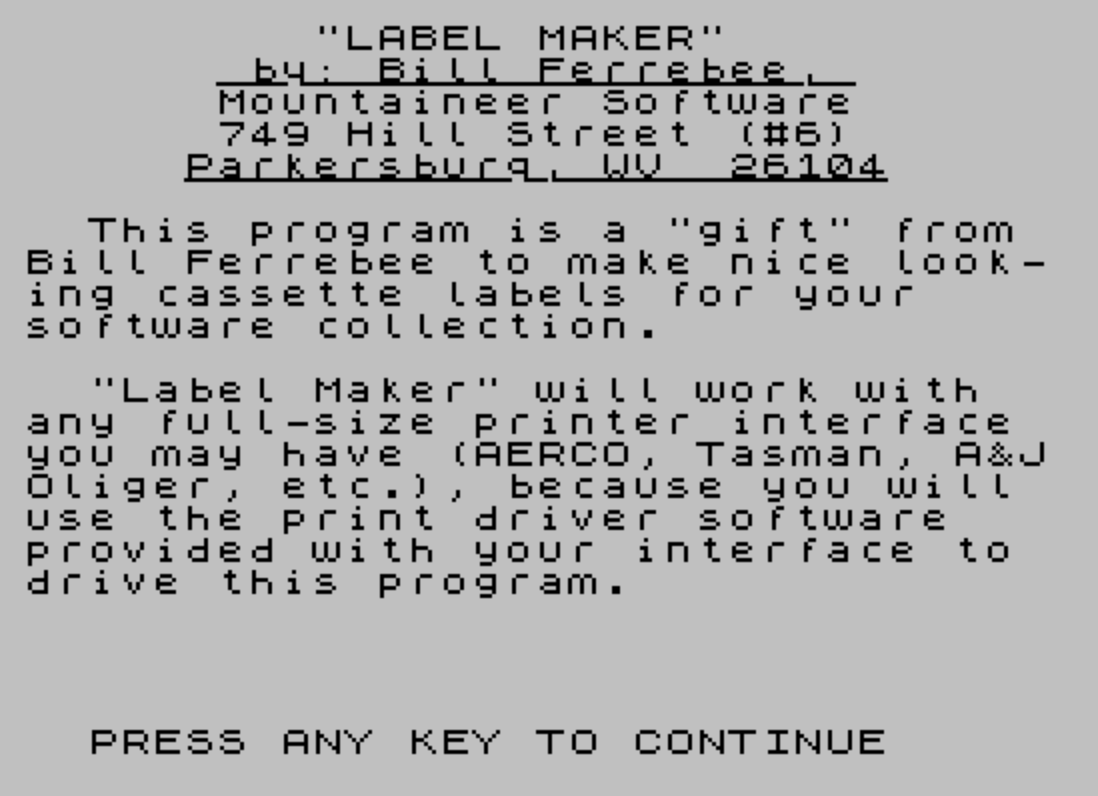
Lines 200–290 form a self-contained instruction manual displayed entirely in BASIC PRINT statements. It describes how to load a printer interface driver before this program, how to chain-save both programs to tape, and where to purchase form-feed cassette labels. Line 283 uses an overprint trick to draw an underline: a forward loop prints CHR$ 8 (backspace) five times, then uses OVER 1 to print CHR$ 95 (underscore) over existing text, simulating a formatting effect for the word “BREAK”.
SAVE and Disc Lines
Line 300 saves the program with LINE 200 and immediately verifies it, then jumps to 200 to redisplay the instructions. Line 350 is a REM statement containing a commented-out disc SAVE command (OUT 244,1:MOVE "Labels.BAS",200), suggesting AERCO disc interface syntax, preserved as a reminder for users with that hardware.
Notable Anomalies
- Lines 170 and 180 are redundant
STOPstatements that are never reached in any normal execution path. - The
INPUT ""at lines 240 and 275 acts as a “press ENTER to continue” pause alongsidePAUSE 0, providing a belt-and-suspenders approach to halting output. - The variable
Xis reused across multiple unrelatedFORloops in the documentation section (lines 200, 210, 283) without conflict since each loop completes before the next begins.
Image Gallery
Source Code
   1 REM      "LABEL MAKER"                 by: Bill Ferrebee
   2 REM      Reprinted from                  "T-S HORIZONS"                   Feb/Mar 1986                   (Issue No. 17)
   5 BORDER 7:PAPER 7:INK 0:CLS :POKE 23617,236
  10 CLS :INPUT "Program Title: "; LINE a$
  12 IF LEN a$>32 THEN GO TO 10
  14 PRINT TAB 16-(LEN a$/2);a$
  20 INPUT "Line #2 info: "; LINE b$
  22 IF LEN b$>32 THEN GO TO 20
  24 PRINT TAB 16-(LEN b$/2);b$
  30 INPUT "Line #3 info: ";\{17}\{3}\{17}\{2}\{17}\{7} LINE c$
  32 IF LEN c$>32 THEN GO TO 30
  34 PRINT TAB 16-(LEN c$/2);c$
  38 PRINT :PRINT :PRINT :PRINT :PRINT
  40 INPUT "Bottom line info: "; LINE d$
  42 IF LEN d$>32 THEN GO TO 40
  44 PRINT TAB 16-(LEN d$/2);d$
  50 PRINT AT 21,8; FLASH 1;"Correct? (y/n)"
  52 IF INKEY$="" THEN GO TO 52
  54 IF INKEY$="n" OR INKEY$="N" THEN GO TO 10
  56 IF INKEY$ <>"y" AND INKEY$ <>"Y" THEN GO TO 52
 100 PRINT AT 21,8;"              ":INPUT "Number of copies: ";x
 110 FOR i=1 TO x
 120 LPRINT TAB 16-(LEN a$/2);a$
 122 LPRINT TAB 16-(LEN b$/2);b$
 124 LPRINT TAB 16-(LEN c$/2);c$
 126 LPRINT :LPRINT :LPRINT :LPRINT :LPRINT
 128 LPRINT TAB 16-(LEN d$/2);d$
 130 LPRINT :LPRINT
 132 NEXT i
 140 PRINT #0; AT 0,0;"More? (y/n)":IF INKEY$="" THEN GO TO 140
 142 IF INKEY$="y" OR INKEY$="Y" THEN PAUSE 5:GO TO 100
 144 IF INKEY$ <>"n" AND INKEY$ <>"N" THEN PAUSE 5:GO TO 140
 150 PAUSE 5:PRINT #0; AT 0,0;"Another title? (y/n) ":IF INKEY$="" THEN GO TO 150
 152 IF INKEY$="y" OR INKEY$="Y" THEN PAUSE 5:GO TO 10
 154 IF INKEY$ <>"n" AND INKEY$ <>"N" THEN PAUSE 5:GO TO 150
 160 CLS :PRINT AT 10,8;"[Work Complete]":STOP
 170 STOP
 180 STOP
 200 BORDER 7:PAPER 7:INK 0:CLS :PRINT :PRINT "         ""LABEL MAKER""                 by: Bill Ferrebee,":PRINT AT 2,6;:FOR X=1 TO 20:PRINT OVER 1; CHR$ 95;:NEXT X
 210 PRINT AT 3,6;"Mountaineer Software","      749 Hill Street (#6)","     Parkersburg, WV  26104"; AT 5,5;:FOR X=1 TO 22:PRINT OVER 1; CHR$ 95;:NEXT X
 220 PRINT :PRINT :PRINT "  This program is a ""gift"" from Bill Ferrebee to make nice look-";"ing cassette labels for your","software collection."
 230 PRINT :PRINT "  ""Label Maker"" will work with","any full-size printer interface","you may have (AERCO, Tasman, A&J";"Oliger, etc.), because you will","use the print driver software","provided with your interface to","drive this program."
 240 PRINT #0;"  PRESS ANY KEY TO CONTINUE":PAUSE 0:INPUT "":POKE 23692,255
 250 PRINT :PRINT "  First, load the driver soft-","ware for your interface and save";"it to a blank tape.  DO NOT RE-","WIND THE TAPE!"
 260 POKE 23692,255:PRINT :PRINT "  Next, LOAD this program.  Then";"SAVE this on the tape immediate-";"ly following the driver program.";"Make sure to use the LINE com-","mand on the SAVE so that it will";"auto-run."
 270 POKE 23692,255:PRINT :PRINT "  Bill says that a great place","to buy form-feed cassette labels";"to use with your full size prin-";"ter (in case you can't find them";"locally) is: CUSTOM TAPE LOADERS";"8135 COX'S DRIVE, SUITE 209,","PORTAGE, MI 49081."
 275 PRINT :PRINT :PRINT #0;"  PRESS ANY KEY TO CONTINUE":PAUSE 0:INPUT "":POKE 23692,255
 280 PRINT "  CUSTOM TAPE LOADERS has the","labels in 4 colors (White, Yel-","low, Red or Blue),\{18}\{0} (@ $1.60 per","hundred, [according to Bill])."
 283 PRINT :PRINT :PRINT :PRINT "(BREAK";:FOR X=1 TO 5:PRINT CHR$ 8;:NEXT X:FOR X=1 TO 5:PRINT OVER 1; CHR$ 95;:NEXT X:PRINT " and:",,"(GOTO 300 to SAVE to tape)  or:","(GOTO 350 to SAVE to AERCO disc)"
 285 PRINT :PRINT
 290 PRINT #0;"  PRESS ANY KEY TO RUN PROGRAM":PAUSE 0:INPUT "":CLS :GO TO 5
 295 STOP
 300 SAVE "Labels" LINE 200:VERIFY "":GO TO 200
 350 REM OUT 244,1:MOVE "Labels.BAS",200:GO TO 200
Note: Type-in program listings on this website use ZMAKEBAS notation for graphics characters.