
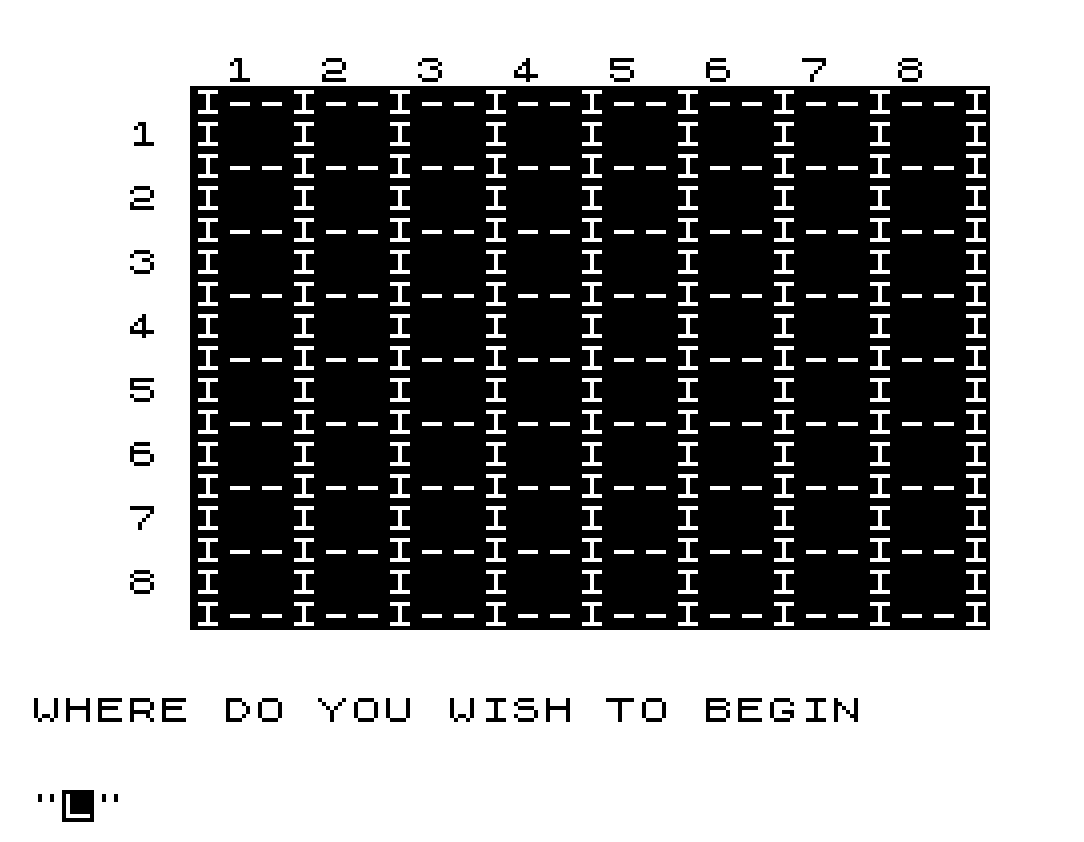
This program implements an interactive Knight’s Tour puzzle on an 8×8 chessboard, where the player attempts to visit every square exactly once using a chess knight’s movement pattern. The board is drawn using a grid of percent signs and pipe characters, with column numbers 1–8 displayed along the top and row numbers down the left side. Player input is accepted as a two-character string encoding row and column (e.g., “34” for row 3, column 4), and each visited square is marked with a sequential move counter. The subroutine at line 410 validates input length, range, and whether the square has already been visited, returning the sentinel value L=9 to signal an invalid entry. Knight move legality is checked using the classic (±1,±2)/(±2,±1) offset pairs at lines 370–380.
Program Structure
The program divides cleanly into four phases:
- Board drawing (lines 10–100): dimensions a 2D array, defines border and cell row strings, prints the grid using
FASTmode for speed. - Initialisation (lines 110–170): zeroes the
B(8,8)visited-square array and resets the move counterM. - Main game loop (lines 180–400): handles the first move separately (lines 180–270), then loops for subsequent moves with knight-validity and win checking.
- Input/validation subroutine (lines 410–480): shared by both the first-move prompt and the main loop; returns via sentinel
L=9on bad input.
Board Rendering
The board is built from two string constants. A$ (line 20) is a horizontal divider row consisting of %I repeated patterns, while B$ (line 30) forms the interior cell row with spaces for move-number display. The loop at lines 80–100 prints each rank by outputting B$ (the cell row) followed immediately by A$ (the separator), producing an 8×8 grid with borders. Column labels are printed with TAB 6 and row labels are embedded in the PRINT TAB 3;L call inside the loop.
Move numbers are placed onto the board at line 230 using AT L*2, C*3+3. Line 240 pads single-digit numbers with a trailing space (AT L*2,C*3+4;" ") so two-digit numbers overwrite cleanly later — a tidy approach to fixed-width display without string formatting.
Input and Validation Subroutine (lines 410–480)
The subroutine at line 410 is called from two points in the program and validates the player’s coordinate string C$:
- Line 420: rejects any input whose length is not exactly 2.
- Lines 430–440: extracts row (
L) and column (C) usingVAL C$(1)andVAL C$(2), taking single-character substrings. - Line 450: rejects coordinates outside the 1–8 range.
- Line 452: rejects squares already visited (
B(L,C)=1).
Invalid inputs set L=9, which acts as a sentinel; the callers check IF L=9 and loop back to re-prompt. This is a compact error-signalling convention that avoids a separate error flag variable.
Knight Move Validation
Lines 370–380 implement the knight’s L-shape rule by checking all eight possible offsets in two compound conditions:
- Line 370:
(L=L1-2 OR L=L1+2) AND (C=C1-1 OR C=C1+1)— two-square vertical, one-square horizontal. - Line 380:
(L=L1-1 OR L=L1+1) AND (C=C1-2 OR C=C1+2)— one-square vertical, two-square horizontal.
A valid move branches to line 220 to record it; otherwise “IMPOSSIBLE” is displayed and input is re-requested. Note that the already-visited check is handled in the subroutine (line 452), so there is no duplicate check here.
Win and Quit Conditions
Line 280 tests IF M<64 THEN GOTO 310; when M reaches 64 all squares have been visited and the congratulations message is shown. The player can also abort at any time by entering "0" at line 340. After either exit, line 490 waits for a newline input and replays from line 40 (redrawing the board and re-initialising), without reloading the program.
Notable Techniques and Anomalies
FAST/SLOW(lines 50 and 170) bracket the board-drawing phase to accelerate rendering, then restore normal display mode for interactive play — a standard ZX81 optimisation.- The initialisation loop (lines 110–150) manually zeros
B(8,8)even thoughDIMalready initialises numeric arrays to zero on first run. This is necessary on replay sinceDIMis not re-executed; control returns to line 40, not line 10. - The first move prompt (line 180) and subsequent move prompt (line 320) are subtly different strings, handled by separate code paths before and after the initial placement, sharing the same validation subroutine.
- There is a minor layout anomaly: line 310 clears 10 characters at row 19 with spaces before re-prompting, but the “IMPOSSIBLE” message at line 390/470 is also printed at row 19. The clearing at line 310 only runs on valid moves, so “IMPOSSIBLE” from the previous invalid attempt is erased at the start of the next valid-move cycle rather than immediately — which is functionally acceptable but slightly delayed.
Variable Summary
| Variable | Purpose |
|---|---|
B(8,8) | Visited-square flags (0=unvisited, 1=visited) |
A$ | Horizontal grid separator string |
B$ | Interior cell row string |
M | Move counter (1–64) |
L, C | Current target row and column |
L1, C1 | Previous knight position (row, column) |
C$ | Raw player input string |
Image Gallery
Source Code
 10 DIM B(8,8)
  20 LET A$="%I%-%-%I%-%-%I%-%-%I%-%-%I%-%-%I%-%-%I%-%-%I%-%-%I"
  30 LET B$="%I% % %I% % %I% % %I% % %I% % %I% % %I% % %I% % %I"
  40 CLS
  50 FAST
  60 PRINT TAB 6;"1  2  3  4  5  6  7  8"
  70 PRINT TAB 5;A$
  80 FOR L=1 TO 8
  90 PRINT TAB 3;L;" ";B$;TAB 5;A$
 100 NEXT L
 110 FOR L=1 TO 8
 120 FOR C=1 TO 8
 130 LET B(L,C)=0
 140 NEXT C
 150 NEXT L
 160 LET M=0
 170 SLOW
 180 PRINT AT 20,0;"WHERE DO YOU WISH TO BEGIN"
 190 INPUT C$
 200 GOSUB 410
 210 IF L=9 THEN GOTO 180
 220 LET M=M+1
 230 PRINT AT L*2,C*3+3;M
 240 IF M<10 THEN PRINT AT L*2,C*3+4;" "
 250 LET L1=L
 260 LET C1=C
 270 LET B(L,C)=1
 280 IF M<64 THEN GOTO 310
 290 PRINT AT 20,0;"CONGRATULATIONS"
 300 GOTO 490
 310 PRINT AT 19,0;"          "
 320 PRINT AT 20,0;"WHERE DO YOU WISH TO GO NEXT"
 330 INPUT C$
 340 IF C$="0" THEN GOTO 490
 350 GOSUB 410
 360 IF L=9 THEN GOTO 320
 370 IF (L=L1-2 OR L=L1+2) AND (C=C1-1 OR C=C1+1) THEN GOTO 220
 380 IF (L=L1-1 OR L=L1+1) AND (C=C1-2 OR C=C1+2) THEN GOTO 220
 390 PRINT AT 19,0;"IMPOSSIBLE"
 400 GOTO 320
 410 PRINT AT 20,0;"                            "
 420 IF LEN C$<>2 THEN GOTO 470
 430 LET L=VAL C$(1)
 440 LET C=VAL C$(2)
 450 IF L<1 OR L>8 OR C<1 OR C>8 THEN GOTO 460
 452 IF B(L,C)=1 THEN GOTO 460
 454 RETURN
 460 LET L=9
 470 PRINT AT 19,0;"IMPOSSIBLE"
 480 RETURN
 490 PRINT AT 21,0;"NL TO REPLAY"
 500 INPUT C$
 510 IF C$="" THEN GOTO 40
Note: Type-in program listings on this website use ZMAKEBAS notation for graphics characters.