
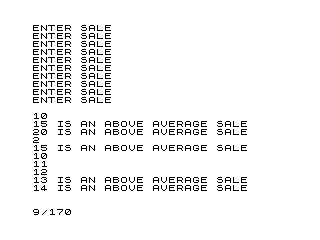
This program collects ten sales figures from the user, computes their arithmetic mean, then prints each figure — flagging those that exceed the average with the message “IS AN ABOVE AVERAGE SALE”. It uses a single-dimensional array S(10) to store all values before the comparison pass, requiring two separate loops: one for input and one for output. The conditional branch at line 120 uses a GOTO to skip the plain PRINT and reach the annotated PRINT at line 150, a common two-path idiom in early BASIC. All ten values are always printed, whether above average or not.
Program Analysis
Program Structure
The program divides cleanly into three phases: initialisation, input collection, and results display.
- Initialisation (lines 20–30): Declares the array
S(10)and zeroes the accumulatorT. - Input loop (lines 40–80): Iterates
Ifrom 1 to 10, prompting for and storing each sale value, accumulating the total inT. - Reporting loop (lines 90–160): Computes the average
AVG=T/10, then iterates over the array, printing each value with or without an annotation.
Key BASIC Idioms
The conditional display at lines 120–160 is a classic two-branch GOTO pattern. If S(I)>AVG, execution jumps to line 150 (annotated print); otherwise it falls through to line 130 (plain print) and then jumps over line 150 via line 140. This avoids an IF…ELSE construct, which standard BASIC does not provide.
Variable Summary
| Variable | Purpose |
|---|---|
S(10) | Array holding the ten sales figures |
T | Running total of all sales |
I | Loop counter for both FOR loops |
AVG | Computed arithmetic mean (T/10) |
Notable Techniques
- Storing all values in an array before comparison requires keeping all ten figures in memory simultaneously; a streaming approach could compute the average and re-prompt, but two-pass array storage is more straightforward here.
- The divisor in
AVG=T/10is hard-coded to match the array size and loop bound — changing any one of the three would require updating all three manually. - The blank
PRINTat line 100 inserts a visual separator between the input phase and the output phase.
Bugs and Anomalies
- Lines 180 and 190 (
SAVEandRUN) appear afterSTOPat line 170 and are unreachable during normal execution; they serve as a save-and-restart mechanism invoked only if the user manually executes those lines or the program is re-entered. - The program prints all values regardless of whether they are above average or not; items at or below the average are printed without annotation, which may not match the intention implied by the title “IDENTIFY ABOVE AVERAGE SALE” — one might expect below-average sales to be suppressed entirely.
- There is no input validation; entering a non-numeric value will cause an error.
Image Gallery
Source Code
   5 REM IDENTIFY ABOVE AVERAGE SALE
  20 DIM S(10)
  30 LET T=0
  40 FOR I=1 TO 10
  50 PRINT "ENTER SALE"
  60 INPUT S(I)
  70 LET T=T+S(I)
  80 NEXT I
  90 LET AVG=T/10
 100 PRINT
 110 FOR I=1 TO 10
 120 IF S(I)>AVG THEN GOTO 150
 130 PRINT S(I)
 140 GOTO 160
 150 PRINT S(I);" IS AN ABOVE AVERAGE SALE"
 160 NEXT I
 170 STOP
 180 SAVE "1012%3"
 190 RUN
Note: Type-in program listings on this website use ZMAKEBAS notation for graphics characters.