
General Purpose Graph Plotter is a bar-chart program that plots up to three data series simultaneously on a shared axis, each representing 12 months of numeric data. Up to 12 named files (labeled A–L) can be stored in a two-dimensional array g(12,12), with five-character labels held in the string array g$(12,5). The program uses a two-character instruction-code menu system (e.g., “e(a-l)” to enter data, “1-3(a-l)” to plot, “sv” to save, “fl” to view file values) and draws bars using PLOT/DRAW with INK color and OVER mode to distinguish the three plot positions. A sentinel value of −0.1 is used to mark uninitialized or “stop” data entries within a file.
Program Analysis
Program Structure
The program is organized into clearly labeled sections accessed via GO TO and GO SUB. Execution begins at line 10 with a splash screen, then jumps to the Initialize Routine at line 1360 before entering the main menu loop at line 250. The major sections are:
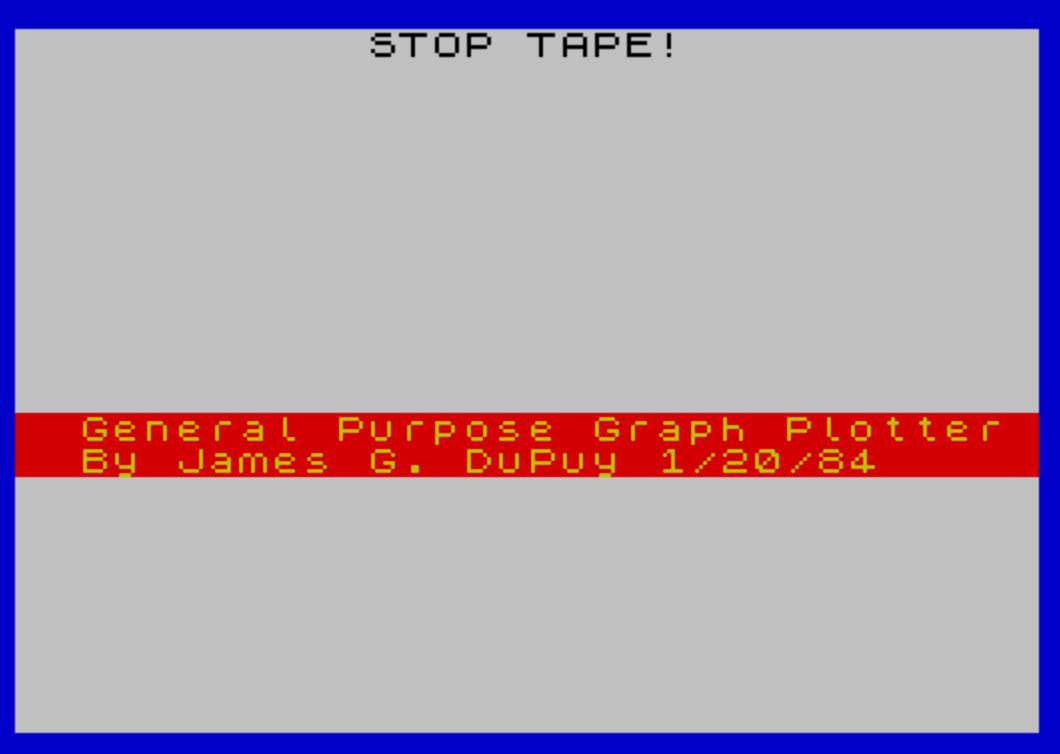
- Lines 10–60: Splash screen and startup
- Lines 70–90: Subroutine to draw horizontal grid lines
- Lines 110–240: Bar plotting routine
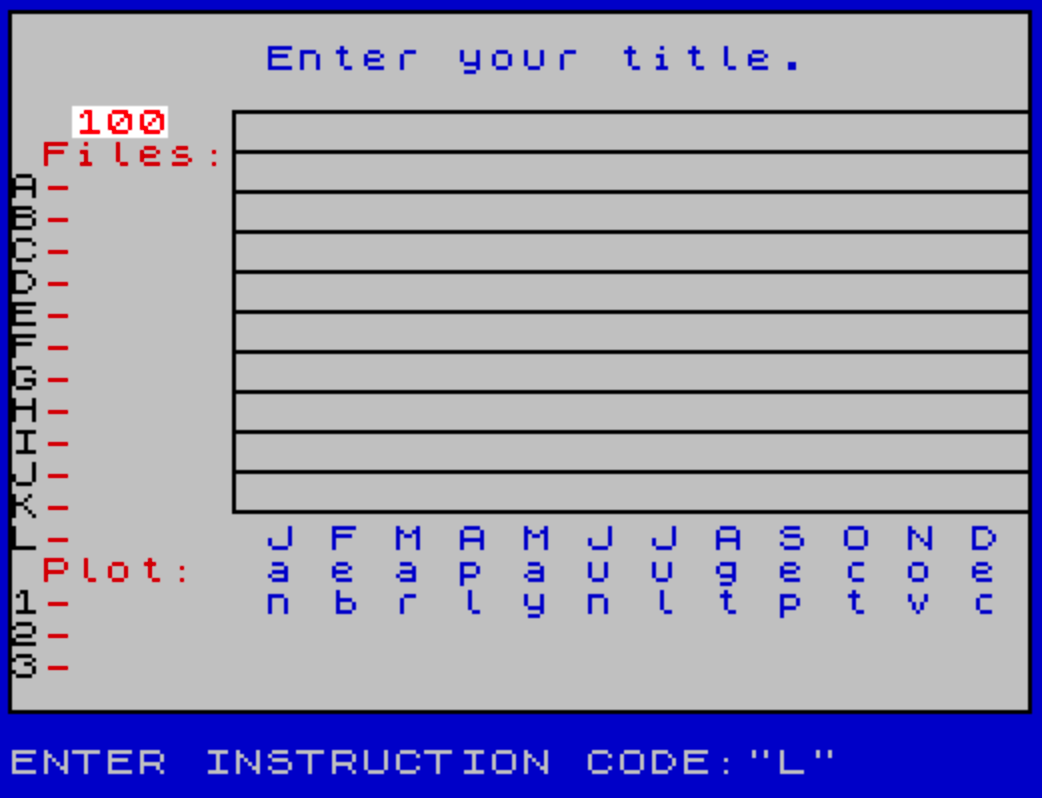
- Lines 250–560: Main menu input loop and screen setup
- Lines 570–800: Data entry (file input) routine
- Lines 810–920: Plot dispatch routine
- Lines 930–1270: File value display routine
- Lines 1280–1340: Subroutine to print file list on main screen
- Lines 1350–1350: Subroutine to draw screen border
- Lines 1360–1450: Initialization routine
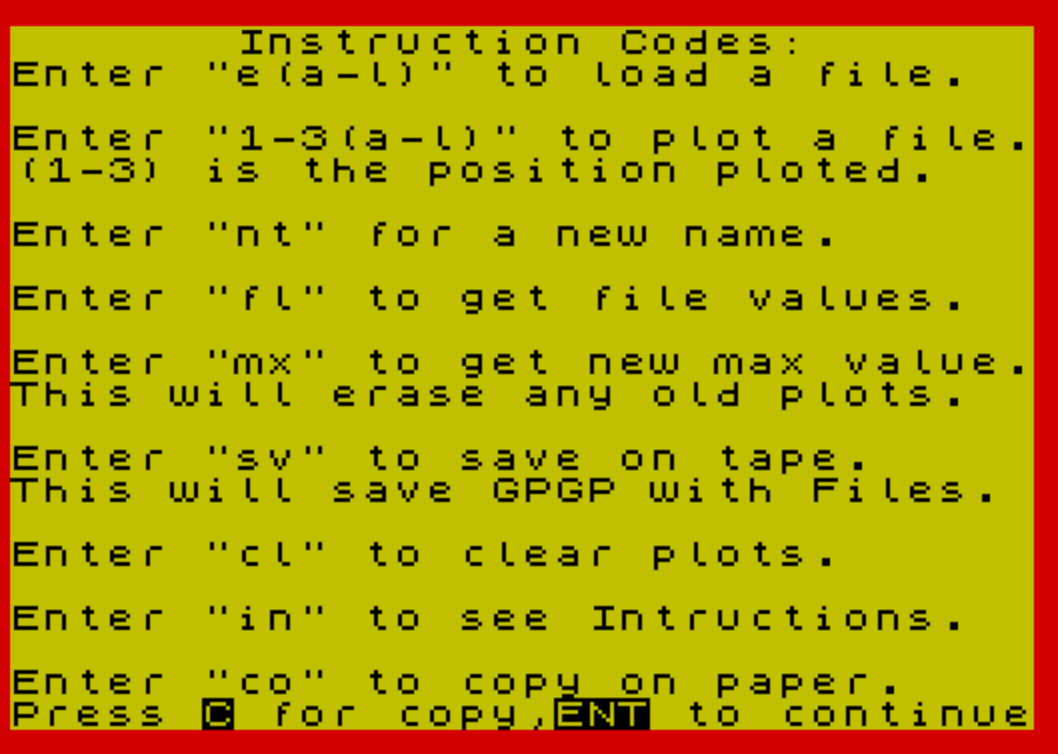
- Lines 1460–1640: Instruction screen and final SAVE line
Data Storage
All data is held in two arrays declared at initialization:
DIM g(12,12)— a 12×12 numeric array storing up to 12 data points (months) for each of 12 named files (A–L).DIM g$(12,5)— a 12-element string array holding a five-character label for each file.
Files are addressed by converting the letter code (a–l) to an array index via CODE a$(2)-96, exploiting the ASCII layout where CODE "a" = 97, yielding index 1 through 12. The sentinel value s=-.1 (line 1450) marks uninitialized or terminating data entries, allowing partial-month datasets.
Menu System
The menu at line 250 uses a two-character string a$ entered via INPUT. Commands are dispatched through a cascade of IF tests. The full command set is:
| Code | Action |
|---|---|
st | STOP the program |
in | Show instruction screen |
cl | Clear plots (new screen setup) |
e(a-l) | Enter/update a data file |
1-3(a-l) | Plot file in position 1, 2, or 3 |
sv | SAVE program with data, auto-running at line 1460 |
vr | VERIFY tape save |
fl | Display file values |
co | COPY screen to printer |
mx | Enter new maximum Y-axis value |
nt | Enter a new chart title |
Bar Plotting Routine (Lines 110–240)
The plotting routine draws three-pixel-wide bars for each of the 12 months. For each month n, the X position is n*16 and the bar height is scaled as z*(100/m), where m is the current Y-axis maximum. The three plot positions p1, p2, p3 (values 44, 49, 53) provide a small horizontal offset so bars for different series sit side by side.
INK colors differentiate the series: INK 1 for position 1, INK 2 for position 2, INK 8 (black) for position 3. The middle pixel of each bar is drawn with OVER 1 (line 220), which XORs it onto the display — this is used to provide a visual highlight stripe down the center of each bar. A bar that would exceed the maximum is clamped to m with a flag za=1 that adds one extra pixel to indicate clipping.
Negative or zero values are handled at line 230: if z<=0, a single pixel is plotted at the baseline (y=49) using OVER o.
Month Label Strings
Month abbreviations are stored across three string variables that together spell out the months vertically:
l$=" J F M A M J J A S O N D"m$=" a e a p a u u g e c o e "n$=" n b r l y n l t p t v c"
These are printed as three rows on the graph screen (line 530) and also used in the file values display (lines 1060–1090), where individual characters are accessed by index v=d*2 to step through the two-character-spaced string.
File Values Display (Lines 930–1270)
The file viewer at line 930 uses a column counter c starting at 5 to position up to three file columns on screen, incrementing by 9 each time a file is selected (line 1190). A guard at line 1120 wraps back to the start if c>=29. Files A–L are listed using CHR$ arithmetic to print the letter labels alongside their stored names from g$.
ON ERR and RESET Usage
Line 280 opens with ON ERR RESET before the INPUT statement. This ensures that if a BASIC error occurs during input (such as a type mismatch), the system resets the error handler rather than crashing, providing a degree of robustness to the menu loop.
Bugs and Anomalies
- Line 400 — erroneous
ATsyntax:PRINT AT 1,8,, AT 1,8;h$contains a double comma which is syntactically odd; the intent is to clear then reprint the title, but the double comma is likely a typo for a separate statement or a semicolon. - Line 900 — incorrect offset:
LET t=(CODE a$-48)operates on the full stringa$rather thana$(1), soCODE a$returns the code of the first character — which for “1”, “2”, “3” gives 49, 50, 51, yieldingtvalues of 1, 2, 3. This happens to work correctly but is not explicit in its intent. - Line 1200 — misplaced PLOT:
PLOT 255,0plots to the bottom-right corner of the screen, which appears to be a stray or accidental statement unrelated to the displayed data. - Line 1640 — unreachable SAVE:
CLEAR :SAVE "GPGP" LINE 10at line 1640 is never reached during normal execution (noGO TO 1640exists); it appears to be a developer convenience line to re-save the program from the editor. - Line 970–990 — label arithmetic off-by-one risk: The file list display in the
flroutine usesCHR$(48+e),CHR$(52+e),CHR$(56+e)forefrom 17 to 20, producing characters at codes 65–68, 69–72, 73–76 — the uppercase letters A–L spread across three columns. This is clever but fragile if the loop range changes.
POKE Usage
Lines 20 and 260 both execute POKE 23609,15, which sets the border color attribute byte (system variable BORDCR) to 15 — white paper, black ink — ensuring consistent border rendering after screen operations that might alter it.
Line 950 uses POKE 23693,7, which sets the system variable ATTR_T (temporary color attributes) to value 7 (white paper, black ink, no flash/bright) before the file values display.
Image Gallery
Source Code
    10 REM "GPGP"by James G. DuPuy DATE  1/20/84
   20 POKE 23609,15
   30 INK 0:PAPER 7:BORDER 1:CLS
   40 CLS :PRINT FLASH 1;"           STOP TAPE!",
   50 PRINT AT 12,0; PAPER 6; INK 2;"  General Purpose Graph Plotter   By James G. DuPuy 1/20/84     "
   60 PAUSE 200:CLS :GO TO 1360
   70 FOR u=50 TO 150 STEP 10
   80 PLOT 56,u:DRAW 199,0
   90 NEXT u:RETURN
  110 REM Plotting Routine
  120 LET f= CODE a$(2)-96
  130 IF p=p1 THEN LET i=1
  140 IF p=p2 THEN LET i=2
  150 IF p=p3 THEN LET i=8
  160 FOR n=1 TO 12
  170 LET x=n*16:LET z=g(f,n)
  180 LET za=0:IF z>m THEN LET z=m:LET za=1
  190 FOR k=1 TO 3
  200 PLOT INK i;x+k+p,50
  210 LET o=0:IF k=2 THEN LET o=1
  220 DRAW INK i; OVER o;0,z*(100/m)+za
  230 IF z <=0 THEN PLOT OVER o;x+k+p,49
  240 NEXT k:NEXT n
  250 REM Menu Input Routine
  260 POKE 23609,15
  270 LET c$="gpgp"
  280 ON ERR RESET :INPUT "ENTER INSTRUCTION CODE:";a$:IF LEN a$<2 OR LEN a$>2 THEN GO TO 280
  290 IF a$="st" THEN STOP
  300 IF a$="in" THEN GO TO 1460
  310 IF a$="cl" THEN GO TO 440
  320 IF a$(1)="e" THEN GO TO 570
  330 IF a$(1)="1" OR a$(1)="2" OR a$(1)="3" THEN GO TO 810
  340 IF a$="sv" THEN SAVE c$ LINE 1460
  350 IF a$="vr" THEN VERIFY c$
  360 IF a$="fl" THEN GO TO 930
  370 IF a$="co" THEN COPY
  380 IF a$="mx" THEN GO TO 420
  390 IF a$="nt" THEN INPUT "Title?:";h$:IF LEN h$>22 THEN GO TO 390
  400 IF a$="nt" THEN PRINT AT 1,8,, AT 1,8;h$
  410 GO TO 250
  420 REM New max routine
  430 INPUT "Enter new Max value:";m
  440 REM Set up new screen
  450 PAPER 7:CLS
  460 BORDER 1
  470 PRINT AT 1,8; INK 1;h$
  480 GO SUB 1280
  490 PRINT INK 2; AT 17,1;"Plot:"; AT 18,0;"1-"; AT 19,0;"2-"; AT 20,0;"3-"
  500 PLOT 56,150
  510 DRAW 0,-100:DRAW 199,0
  520 GO SUB 70
  530 PRINT INK 1; AT 16,7;l$; AT 17,7;m$; AT 18,7;n$
  540 PRINT AT 3,2; INK 2; BRIGHT 1;m
  550 PLOT 0,0:DRAW 255,0:DRAW 0,175:DRAW -255,0:DRAW 0,-175
  560 GO TO 250
  570 REM Input Routine
  580 IF CODE a$(2)>108 OR CODE a$(2)<97 THEN GO TO 250
  590 LET st=1
  600 IF g$(CODE a$(2)-96)="     " THEN GO TO 670
  610 IF g$(CODE a$(2)-96) <>"     " THEN INPUT "New file(Y)/Update old(N):";t$:IF t$="y" THEN GO TO 670
  620 LET st=1
  630 FOR w=1 TO 12
  640 IF g(CODE a$(2)-96,w)=-.1 THEN LET st=w:GO TO 740
  650 NEXT w
  660 GO TO 740
  670 INPUT "Enter file name(5char):";g$(CODE a$(2)-96)
  680 PRINT AT 4+ CODE a$(2)-96,2;g$(CODE a$(2)-96)
  690 PLOT 56,150:DRAW 0,-100
  700 GO SUB 70
  710 FOR b=1 TO 12
  720 LET g(CODE a$(2)-96,b)=0
  730 NEXT b
  740 FOR a=st TO 12
  750 PRINT AT 20,9;"Data for month- ";a;" ?"
  760 INPUT g(CODE a$(2)-96,a)
  770 IF g(CODE a$(2)-96,a)=s THEN GO TO 790
  780 NEXT a
  790 PRINT AT 20,8,"              "
  800 GO TO 250
  810 REM Set up for plot routine
  820 IF CODE a$(2)<97 OR CODE a$(2)>108 THEN GO TO 250
  830 FOR y=1 TO 12
  840 IF g(CODE a$(2)-96,y) <>0 THEN GO TO 870
  850 NEXT y
  860 PRINT AT 20,9;"No file at:"; CHR$ (CODE a$(2)-32):PAUSE 100:PRINT AT 20,9;"             ":GO TO 250
  870 IF a$(1)="1" THEN LET p=p1
  880 IF a$(1)="2" THEN LET p=p2
  890 IF a$(1)="3" THEN LET p=p3
  900 LET t=(CODE a$-48)
  910 PRINT AT 17+t,2;g$(CODE a$(2)-96)
  920 GO TO 110
  930 REM File value on sceen
  940 LET c=5
  950 POKE 23693,7:CLS :PRINT AT 0,10; BRIGHT 1;" File Values "
  960 FOR e=17 TO 20
  970 PRINT AT e,3; CHR$ (48+e);"-";g$(e-16)
  980 PRINT AT e,12; CHR$ (52+e);"-";g$(e-12)
  990 PRINT AT e,21; CHR$ (56+e);"-";g$(e-8)
 1000 NEXT e
 1010 PLOT 0,52:DRAW 255,0
 1020 GO SUB 1350
 1030 PRINT AT 0,10; BRIGHT 1;" File Values "
 1040 FOR d=1 TO 12
 1050 LET v=d*2
 1060 PRINT AT 2+d,1;l$(v)
 1070 PRINT AT 2+d,2;m$(v)
 1080 PRINT AT 2+d,3;n$(v);"-"
 1090 NEXT d
 1100 PRINT AT 16,12; BRIGHT 1;" Files: "
 1110 PLOT 0,164:DRAW 255,0
 1120 IF c >=29 THEN GO TO 930
 1130 INPUT "Enter file (A-L):";o$:IF CODE o$<97 OR CODE o$>108 THEN GO TO 1130
 1140 PRINT AT 2,c; CHR$ (CODE o$-32);"-";g$(CODE o$-96)
 1150 FOR q=1 TO 12
 1160 IF g(CODE o$-96,q)=s THEN PRINT AT q+2,c;"0":GO TO 1180
 1170 PRINT AT q+2,c;g(CODE o$-96,q)
 1180 NEXT q
 1190 LET c=c+9
 1200 PLOT 255,0:DRAW 0,175
 1210 INPUT "(f)-File;(c)-Copy;(p)-plot:";r$
 1220 IF r$="s" THEN STOP
 1230 IF r$="f" THEN GO TO 1120
 1240 IF r$="c" THEN COPY
 1250 IF r$="p" THEN GO TO 440
 1260 IF r$="in" THEN GO TO 1460
 1270 GO TO 1210
 1280 INK 2
 1290 PRINT AT 4,1;"Files:"
 1300 FOR n=5 TO 16
 1310 PRINT AT n,0; CHR$ (60+n);"-"; AT n,2;g$(n-4)
 1320 NEXT n
 1330 INK 0
 1340 RETURN
 1350 PLOT 0,0:DRAW 255,0:DRAW 0,175:DRAW -255,0:DRAW 0,-175:RETURN
 1360 REM Initialize Routine
 1370 DIM g(12,12)
 1380 DIM g$(12,5)
 1390 LET p1=44:LET p2=49:LET p3=53:LET m=100
 1400 LET l$=" J F M A M J J A S O N D"
 1410 LET m$=" a e a p a u u g e c o e "
 1420 LET n$=" n b r l y n l t p t v c"
 1430 LET c$="gpgp"
 1440 LET h$="Enter your title."
 1450 LET s=-.1
 1460 BORDER 2:PAPER 6:CLS
 1470 PRINT FLASH 1;"       Instruction Codes:",
 1480 PRINT "Enter ""e(a-l)"" to load a file."
 1490 PRINT '"Enter ""1-3(a-l)"" to plot a file."
 1500 PRINT "(1-3) is the position ploted."
 1510 PRINT '"Enter ""nt"" for a new name."
 1520 PRINT '"Enter ""fl"" to get file values."
 1530 PRINT '"Enter ""mx"" to get new max value."
 1540 PRINT "This will erase any old plots."
 1550 PRINT '"Enter ""sv"" to save on tape."
 1560 PRINT "This will save GPGP with Files."
 1570 PRINT '"Enter ""cl"" to clear plots."
 1580 PRINT '"Enter ""in"" to see Intructions."
 1590 PRINT '"Enter ""co"" to copy on paper."
 1600 PRINT FLASH 1;"Press C for copy,ENT to continue"
 1610 PAUSE 0
 1620 IF INKEY$="c" THEN COPY
 1630 GO TO 440
 1640 CLEAR :SAVE "GPGP" LINE 10
Note: Type-in program listings on this website use ZMAKEBAS notation for graphics characters.