Fastload

Products: IPS Fastload
Date: 1982
Type: Cassette
Platform(s): TS 1000
Tags: Tape

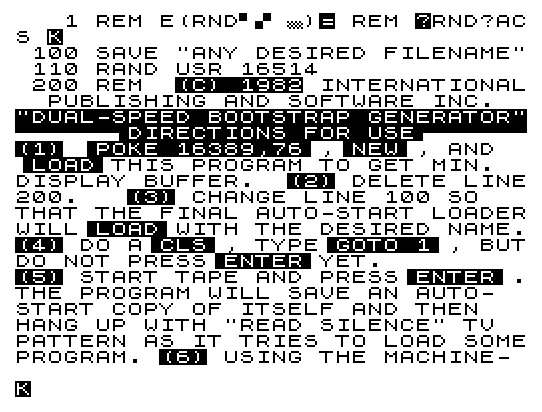
Fastload is a dual-speed bootstrap generator for the ZX81/TS1000 that embeds a short machine-code routine in a REM statement at line 1 and executes it via RAND USR 16514. The machine code (visible as raw bytes in the REM) performs a fast-load bootstrap operation, allowing programs to be saved and loaded at accelerated speeds. To use it, the operator must POKE 16389,76 to minimize the display buffer, delete the directions at line 200, rename line 100’s SAVE target, then execute the program from line 1 while the tape is running. After saving, the machine-code monitor is used to append the desired program data after the loader on tape.


Program Analysis

Program Structure

The program is minimal in terms of BASIC lines but carries its real payload inside a REM statement:

  1. Line 1 — REM containing 21 raw machine-code bytes, positioned at address 16514 (the first byte after the REM token and length bytes in a ZX81 program).
  2. Line 100SAVE "ANY DESIRED FILENAME", which the user is instructed to rename before use.
  3. Line 110RAND USR 16514, which transfers control to the machine code in the REM.
  4. Line 200 — A lengthy REM containing inverse-video instructions for the end user, intended to be deleted before the final save.

Machine Code in the REM

The bytes stored in line 1’s REM are:

OffsetHexMnemonic (Z80)
02A 10 40LD HL,(4010h) — load HL with the value at address 16400 (VARS)
301 06 00LD BC,0006h
609ADD HL,BC
711 94 7ELD DE,7E94h
1001 6C 01LD BC,016Ch
13ED A0LDI — block copy one byte (HL)→(DE), decrement BC
15EA 8F 40JP PE,408Fh — jump if parity/overflow (BC≠0) to address 16527; effectively loops… but this is a single LDI, so this is more likely a computed jump for bootstrap setup
18C3 CB 7FJP 7FCBh — jump to address 32715, the fast-load entry point

The routine reads the VARS pointer from system variable VARS (16400), adds 6, then uses that as a source address for a block copy into high RAM near 7E94h, and finally jumps to 7FCBh. This relocates data out of the BASIC variable area into a fixed high-memory location before handing off to the fast-loader code stored there.

Setup Procedure

The directions in line 200 describe a precise six-step workflow:

  • POKE 16389,76 to reduce the display file to its minimum, maximizing available RAM below the machine code.
  • Enter NEW and reload the program to apply the minimized display buffer.
  • Delete line 200 (the directions REM) to reduce program size.
  • Edit line 100 to set the desired SAVE filename for the final auto-start loader.
  • Issue CLS, type GOTO 1 but hold ENTER until the tape is running.
  • After the bootstrap saves itself, use a machine-code monitor to append the target program to the tape image after the loader.

Key BASIC Idioms

RAND USR 16514 is the standard ZX81/TS1000 idiom for calling machine code embedded in a REM at line 1. Because line 1’s REM token occupies bytes at address 16509 and the data begins after the REM opcode, line-length word, and newline, the actual code starts at 16514. Using RAND rather than LET discards the USR return value silently, avoiding a variable being created.

Notable Techniques

  • The machine code is entirely self-contained in a single REM line, requiring no separate POKE sequence to install it.
  • The final JP 7FCBh assumes a secondary fast-loader binary already resides at 7FCBh in RAM — this would be the “dual-speed” component loaded or resident separately, consistent with the instructions to use a machine-code monitor to append it.
  • The POKE 16389,76 step sets the system variable D_FILE low byte to collapse the display file, a well-known ZX81 technique to reclaim RAM for machine code in the upper address space.
  • All user-facing instructions are encoded in inverse video inside the REM at line 200, making them visually distinct on screen while remaining harmlessly ignored by the interpreter.

Bugs and Anomalies

The single LDI at offset 13 copies only one byte before the JP PE instruction. Since LDI decrements BC and sets the P/V flag if BC≠0 after the operation, with BC=016Ch (364 decimal) the jump back would loop — but the destination 408Fh (16527) is two bytes past the end of the REM data, pointing into subsequent program lines. This suggests the block-copy loop is intentional and 408Fh re-enters the LDI instruction in a self-modifying or positionally-dependent way, or that the listing as printed has been slightly truncated. The overall design is consistent with a working fast-loader tool despite this apparent ambiguity.

Content

Appears On

Related Products

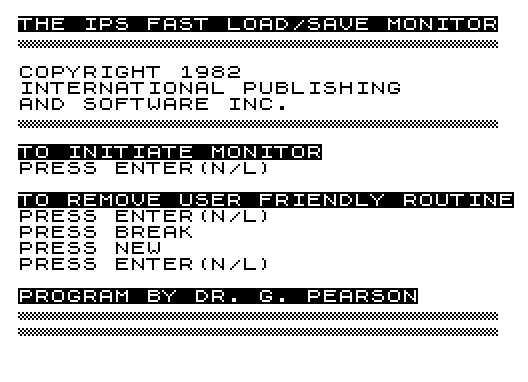
LOAD and SAVE programs up to six times faster. Catalog feature lists programs and memory usage. Package includes 2 programs:...

Related Articles

Related Content

Image Gallery

Source Code

   1 REM 


Fastload

Products: IPS Fastload
Date: 1982
Type: Cassette
Platform(s): TS 1000
Tags: Tape

Fastload is a dual-speed bootstrap generator for the ZX81/TS1000 that embeds a short machine-code routine in a REM statement at line 1 and executes it via RAND USR 16514. The machine code (visible as raw bytes in the REM) performs a fast-load bootstrap operation, allowing programs to be saved and loaded at accelerated speeds. To use it, the operator must POKE 16389,76 to minimize the display buffer, delete the directions at line 200, rename line 100’s SAVE target, then execute the program from line 1 while the tape is running. After saving, the machine-code monitor is used to append the desired program data after the loader on tape.


Program Analysis

Program Structure

The program is minimal in terms of BASIC lines but carries its real payload inside a REM statement:

  1. Line 1 — REM containing 21 raw machine-code bytes, positioned at address 16514 (the first byte after the REM token and length bytes in a ZX81 program).
  2. Line 100SAVE "ANY DESIRED FILENAME", which the user is instructed to rename before use.
  3. Line 110RAND USR 16514, which transfers control to the machine code in the REM.
  4. Line 200 — A lengthy REM containing inverse-video instructions for the end user, intended to be deleted before the final save.

Machine Code in the REM

The bytes stored in line 1’s REM are:

OffsetHexMnemonic (Z80)
02A 10 40LD HL,(4010h) — load HL with the value at address 16400 (VARS)
301 06 00LD BC,0006h
609ADD HL,BC
711 94 7ELD DE,7E94h
1001 6C 01LD BC,016Ch
13ED A0LDI — block copy one byte (HL)→(DE), decrement BC
15EA 8F 40JP PE,408Fh — jump if parity/overflow (BC≠0) to address 16527; effectively loops… but this is a single LDI, so this is more likely a computed jump for bootstrap setup
18C3 CB 7FJP 7FCBh — jump to address 32715, the fast-load entry point

The routine reads the VARS pointer from system variable VARS (16400), adds 6, then uses that as a source address for a block copy into high RAM near 7E94h, and finally jumps to 7FCBh. This relocates data out of the BASIC variable area into a fixed high-memory location before handing off to the fast-loader code stored there.

Setup Procedure

The directions in line 200 describe a precise six-step workflow:

  • POKE 16389,76 to reduce the display file to its minimum, maximizing available RAM below the machine code.
  • Enter NEW and reload the program to apply the minimized display buffer.
  • Delete line 200 (the directions REM) to reduce program size.
  • Edit line 100 to set the desired SAVE filename for the final auto-start loader.
  • Issue CLS, type GOTO 1 but hold ENTER until the tape is running.
  • After the bootstrap saves itself, use a machine-code monitor to append the target program to the tape image after the loader.

Key BASIC Idioms

RAND USR 16514 is the standard ZX81/TS1000 idiom for calling machine code embedded in a REM at line 1. Because line 1’s REM token occupies bytes at address 16509 and the data begins after the REM opcode, line-length word, and newline, the actual code starts at 16514. Using RAND rather than LET discards the USR return value silently, avoiding a variable being created.

Notable Techniques

  • The machine code is entirely self-contained in a single REM line, requiring no separate POKE sequence to install it.
  • The final JP 7FCBh assumes a secondary fast-loader binary already resides at 7FCBh in RAM — this would be the “dual-speed” component loaded or resident separately, consistent with the instructions to use a machine-code monitor to append it.
  • The POKE 16389,76 step sets the system variable D_FILE low byte to collapse the display file, a well-known ZX81 technique to reclaim RAM for machine code in the upper address space.
  • All user-facing instructions are encoded in inverse video inside the REM at line 200, making them visually distinct on screen while remaining harmlessly ignored by the interpreter.

Bugs and Anomalies

The single LDI at offset 13 copies only one byte before the JP PE instruction. Since LDI decrements BC and sets the P/V flag if BC≠0 after the operation, with BC=016Ch (364 decimal) the jump back would loop — but the destination 408Fh (16527) is two bytes past the end of the REM data, pointing into subsequent program lines. This suggests the block-copy loop is intentional and 408Fh re-enters the LDI instruction in a self-modifying or positionally-dependent way, or that the listing as printed has been slightly truncated. The overall design is consistent with a working fast-loader tool despite this apparent ambiguity.

Content

Appears On

Related Products

LOAD and SAVE programs up to six times faster. Catalog feature lists programs and memory usage. Package includes 2 programs:...

Related Articles

Related Content

Image Gallery

Source Code

   1 REM \2A\10\40\01\06\00\09\11\94\7E\01\6C\01\ED\A0\EA\8F\40\C3\CB\7F
 100 SAVE "ANY DESIRED FILENAME"
 110 RAND USR 16514
 200 REM  %(%C%)% %1%9%8%2 INTERNATIONAL  PUBLISHING AND SOFTWARE INC.  %"%D%U%A%L%-%S%P%E%E%D% %B%O%O%T%S%T%R%A%P% %G%E%N%E%R%A%T%O%R%"\''\''\''\''\''\''\':%D%I%R%E%C%T%I%O%N%S% %F%O%R% %U%S%E\:'\''\''\''\''\''\''%(%1%) \ :%P%O%K%E% %1%6%3%8%9%,%7%6\: ,\ :%N%E%W\: , AND  \ :%L%O%A%D\: THIS PROGRAM TO GET MIN.  DISPLAY BUFFER.  %(%2%) DELETE LINE200.   %(%3%) CHANGE LINE 100 SO   THAT THE FINAL AUTO-START LOADERWILL\ :%L%O%A%D\: WITH THE DESIRED NAME.%(%4%) DO A\ :%C%L%S\: , TYPE\ :%G%O%T%O% %1\: , BUTDO NOT PRESS\ :%E%N%T%E%R\: YET.         %(%5%) START TAPE AND PRESS\ :%E%N%T%E%R\: .THE PROGRAM WILL SAVE AN AUTO-  START COPY OF ITSELF AND THEN   HANG UP WITH "READ SILENCE" TV  PATTERN AS IT TRIES TO LOAD SOMEPROGRAM. %(%6%) USING THE MACHINE- CODE MONITOR, SAVE THE DESIRED  PROGRAM AFTER THE END OF THE    LOADER.

Note: Type-in program listings on this website use ZMAKEBAS notation for graphics characters.

People

No people associated with this content.

Scroll to Top
A itemtype='https://schema.org/Blog' itemscope='itemscope' class="wp-singular computer_media-template-default single single-computer_media postid-51880 wp-custom-logo wp-embed-responsive wp-theme-astra wp-child-theme-astra-child ast-desktop ast-separate-container ast-left-sidebar astra-4.12.7 group-blog ast-blog-single-style-1 ast-custom-post-type ast-single-post ast-inherit-site-logo-transparent ast-hfb-header ast-full-width-primary-header ast-box-layout ast-normal-title-enabled astra-addon-4.12.5"

Fastload

Products: IPS Fastload
Date: 1982
Type: Cassette
Platform(s): TS 1000
Tags: Tape

Fastload is a dual-speed bootstrap generator for the ZX81/TS1000 that embeds a short machine-code routine in a REM statement at line 1 and executes it via RAND USR 16514. The machine code (visible as raw bytes in the REM) performs a fast-load bootstrap operation, allowing programs to be saved and loaded at accelerated speeds. To use it, the operator must POKE 16389,76 to minimize the display buffer, delete the directions at line 200, rename line 100’s SAVE target, then execute the program from line 1 while the tape is running. After saving, the machine-code monitor is used to append the desired program data after the loader on tape.


Program Analysis

Program Structure

The program is minimal in terms of BASIC lines but carries its real payload inside a REM statement:

  1. Line 1 — REM containing 21 raw machine-code bytes, positioned at address 16514 (the first byte after the REM token and length bytes in a ZX81 program).
  2. Line 100SAVE "ANY DESIRED FILENAME", which the user is instructed to rename before use.
  3. Line 110RAND USR 16514, which transfers control to the machine code in the REM.
  4. Line 200 — A lengthy REM containing inverse-video instructions for the end user, intended to be deleted before the final save.

Machine Code in the REM

The bytes stored in line 1’s REM are:

OffsetHexMnemonic (Z80)
02A 10 40LD HL,(4010h) — load HL with the value at address 16400 (VARS)
301 06 00LD BC,0006h
609ADD HL,BC
711 94 7ELD DE,7E94h
1001 6C 01LD BC,016Ch
13ED A0LDI — block copy one byte (HL)→(DE), decrement BC
15EA 8F 40JP PE,408Fh — jump if parity/overflow (BC≠0) to address 16527; effectively loops… but this is a single LDI, so this is more likely a computed jump for bootstrap setup
18C3 CB 7FJP 7FCBh — jump to address 32715, the fast-load entry point

The routine reads the VARS pointer from system variable VARS (16400), adds 6, then uses that as a source address for a block copy into high RAM near 7E94h, and finally jumps to 7FCBh. This relocates data out of the BASIC variable area into a fixed high-memory location before handing off to the fast-loader code stored there.

Setup Procedure

The directions in line 200 describe a precise six-step workflow:

  • POKE 16389,76 to reduce the display file to its minimum, maximizing available RAM below the machine code.
  • Enter NEW and reload the program to apply the minimized display buffer.
  • Delete line 200 (the directions REM) to reduce program size.
  • Edit line 100 to set the desired SAVE filename for the final auto-start loader.
  • Issue CLS, type GOTO 1 but hold ENTER until the tape is running.
  • After the bootstrap saves itself, use a machine-code monitor to append the target program to the tape image after the loader.

Key BASIC Idioms

RAND USR 16514 is the standard ZX81/TS1000 idiom for calling machine code embedded in a REM at line 1. Because line 1’s REM token occupies bytes at address 16509 and the data begins after the REM opcode, line-length word, and newline, the actual code starts at 16514. Using RAND rather than LET discards the USR return value silently, avoiding a variable being created.

Notable Techniques

  • The machine code is entirely self-contained in a single REM line, requiring no separate POKE sequence to install it.
  • The final JP 7FCBh assumes a secondary fast-loader binary already resides at 7FCBh in RAM — this would be the “dual-speed” component loaded or resident separately, consistent with the instructions to use a machine-code monitor to append it.
  • The POKE 16389,76 step sets the system variable D_FILE low byte to collapse the display file, a well-known ZX81 technique to reclaim RAM for machine code in the upper address space.
  • All user-facing instructions are encoded in inverse video inside the REM at line 200, making them visually distinct on screen while remaining harmlessly ignored by the interpreter.

Bugs and Anomalies

The single LDI at offset 13 copies only one byte before the JP PE instruction. Since LDI decrements BC and sets the P/V flag if BC≠0 after the operation, with BC=016Ch (364 decimal) the jump back would loop — but the destination 408Fh (16527) is two bytes past the end of the REM data, pointing into subsequent program lines. This suggests the block-copy loop is intentional and 408Fh re-enters the LDI instruction in a self-modifying or positionally-dependent way, or that the listing as printed has been slightly truncated. The overall design is consistent with a working fast-loader tool despite this apparent ambiguity.

Content

Appears On

Related Products

LOAD and SAVE programs up to six times faster. Catalog feature lists programs and memory usage. Package includes 2 programs:...

Related Articles

Related Content

Image Gallery

Source Code

   1 REM \2A\10\40\01\06\00\09\11\94\7E\01\6C\01\ED\A0\EA\8F\40\C3\CB\7F
 100 SAVE "ANY DESIRED FILENAME"
 110 RAND USR 16514
 200 REM  %(%C%)% %1%9%8%2 INTERNATIONAL  PUBLISHING AND SOFTWARE INC.  %"%D%U%A%L%-%S%P%E%E%D% %B%O%O%T%S%T%R%A%P% %G%E%N%E%R%A%T%O%R%"\''\''\''\''\''\''\':%D%I%R%E%C%T%I%O%N%S% %F%O%R% %U%S%E\:'\''\''\''\''\''\''%(%1%) \ :%P%O%K%E% %1%6%3%8%9%,%7%6\: ,\ :%N%E%W\: , AND  \ :%L%O%A%D\: THIS PROGRAM TO GET MIN.  DISPLAY BUFFER.  %(%2%) DELETE LINE200.   %(%3%) CHANGE LINE 100 SO   THAT THE FINAL AUTO-START LOADERWILL\ :%L%O%A%D\: WITH THE DESIRED NAME.%(%4%) DO A\ :%C%L%S\: , TYPE\ :%G%O%T%O% %1\: , BUTDO NOT PRESS\ :%E%N%T%E%R\: YET.         %(%5%) START TAPE AND PRESS\ :%E%N%T%E%R\: .THE PROGRAM WILL SAVE AN AUTO-  START COPY OF ITSELF AND THEN   HANG UP WITH "READ SILENCE" TV  PATTERN AS IT TRIES TO LOAD SOMEPROGRAM. %(%6%) USING THE MACHINE- CODE MONITOR, SAVE THE DESIRED  PROGRAM AFTER THE END OF THE    LOADER.

Note: Type-in program listings on this website use ZMAKEBAS notation for graphics characters.

People

No people associated with this content.

Scroll to Top
E itemtype='https://schema.org/Blog' itemscope='itemscope' class="wp-singular computer_media-template-default single single-computer_media postid-51880 wp-custom-logo wp-embed-responsive wp-theme-astra wp-child-theme-astra-child ast-desktop ast-separate-container ast-left-sidebar astra-4.12.7 group-blog ast-blog-single-style-1 ast-custom-post-type ast-single-post ast-inherit-site-logo-transparent ast-hfb-header ast-full-width-primary-header ast-box-layout ast-normal-title-enabled astra-addon-4.12.5"C itemtype='https://schema.org/Blog' itemscope='itemscope' class="wp-singular computer_media-template-default single single-computer_media postid-51880 wp-custom-logo wp-embed-responsive wp-theme-astra wp-child-theme-astra-child ast-desktop ast-separate-container ast-left-sidebar astra-4.12.7 group-blog ast-blog-single-style-1 ast-custom-post-type ast-single-post ast-inherit-site-logo-transparent ast-hfb-header ast-full-width-primary-header ast-box-layout ast-normal-title-enabled astra-addon-4.12.5"\ED\A0\EAF\C3\CBF 100 SAVE "ANY DESIRED FILENAME" 110 RAND USR 16514 200 REM %(%C%)% %1%9%8%2 INTERNATIONAL PUBLISHING AND SOFTWARE INC. %"%D%U%A%L%-%S%P%E%E%D% %B%O%O%T%S%T%R%A%P% %G%E%N%E%R%A%T%O%R%"\''\''\''\''\''\''\':%D%I%R%E%C%T%I%O%N%S% %F%O%R% %U%S%E\:'\''\''\''\''\''\''%(%1%) \ :%P%O%K%E% %1%6%3%8%9%,%7%6\: ,\ :%N%E%W\: , AND \ :%L%O%A%D\: THIS PROGRAM TO GET MIN. DISPLAY BUFFER. %(%2%) DELETE LINE200. %(%3%) CHANGE LINE 100 SO THAT THE FINAL AUTO-START LOADERWILL\ :%L%O%A%D\: WITH THE DESIRED NAME.%(%4%) DO A\ :%C%L%S\: , TYPE\ :%G%O%T%O% %1\: , BUTDO NOT PRESS\ :%E%N%T%E%R\: YET. %(%5%) START TAPE AND PRESS\ :%E%N%T%E%R\: .THE PROGRAM WILL SAVE AN AUTO- START COPY OF ITSELF AND THEN HANG UP WITH "READ SILENCE" TV PATTERN AS IT TRIES TO LOAD SOMEPROGRAM. %(%6%) USING THE MACHINE- CODE MONITOR, SAVE THE DESIRED PROGRAM AFTER THE END OF THE LOADER.

Note: Type-in program listings on this website use ZMAKEBAS notation for graphics characters.

People

No people associated with this content.

Scroll to Top