
Draw is a joystick-driven freehand drawing program that lets users sketch on the screen and overlay geometric shapes. Movement is handled by reading STICK values that map eight compass directions (1, 2, 4, 5, 6, 8, 9, 10) to pixel increments, with boundary wrapping at the 256×176 pixel canvas edges. The program supports drawing circles centered on the cursor, tangent circles in any of eight directions, XOR-mode erasing/duplicating of the last circle via CIRCLE OVER 1, and a COPY command to print the screen. A flag variable tracks which circle type and position was last drawn so that the erase subroutine can reproduce its exact geometry. ON ERR is used for error trapping on the COPY command path, and PAUSE with STICK polling is used in the tangent-circle subroutine to read a directional joystick input before placing the new circle.
Program Structure
The program is organized into a main loop and two subroutines:
- Lines 10–180: Initialization and main input/draw loop.
- Lines 500–515: Tangent-circle subroutine — prompts for diameter, polls joystick, draws a tangent circle in the chosen direction.
- Lines 1000–1028: Erase/duplicate subroutine — redraws the last circle using
OVER 1(XOR mode) to toggle it. - Line 9999: Clean exit, restoring paper and ink attributes before
STOP.
Main Loop Logic
The loop begins at line 40 with PLOT x,y to mark the cursor, then reads both fire (f) and direction (c) from STICK. Lines 80–110 compute new x and y positions using Boolean arithmetic: each direction code evaluates to 0 or 1, and combined additions and subtractions move the cursor diagonally or cardinally. Lines 100–110 implement wrapping so the cursor re-enters from the opposite edge when it goes out of the 0–255 / 0–175 range.
Lines 130–170 handle drawing vs. erasing. If fire is not pressed (f=0), the loop simply repositions. If fire is held, line 140 detects a lit pixel and erases it with PLOT OVER 1; line 150 detects a dark pixel, plots it, then immediately re-plots with OVER 1 to restore the cursor dot on top. This gives a freehand drawing effect while maintaining a visible cursor.
Direction Code Mapping
STICK returns a numeric code encoding eight directions. The program maps these as follows:
| STICK code | Direction | Δx | Δy |
|---|---|---|---|
| 1 | Up | 0 | +1 |
| 2 | Down | 0 | −1 |
| 4 | Left | −1 | 0 |
| 8 | Right | +1 | 0 |
| 5 | Up-Left | −1 | +1 |
| 9 | Up-Right | +1 | +1 |
| 6 | Down-Left | −1 | −1 |
| 10 | Down-Right | +1 | −1 |
Flag System for Circle Tracking
The variable flag records which circle was most recently drawn and its positional relationship to the cursor. A value of 11 means a simple circle centered at (x,y); values 1, 2, 4, 5, 6, 8, 9, 10 correspond to tangent circles offset in each of the eight joystick directions by the diameter d. The erase subroutine at line 1000 uses this flag together with the current x, y, and d to reconstruct the exact circle command with OVER 1, toggling it off or duplicating it.
Notable Techniques
- Boolean arithmetic for movement: Expressions like
(c=9)+(c=8)exploit the fact that a true condition returns 1 and false returns 0, avoiding IF branches for cursor movement (lines 80–90). - XOR drawing with OVER 1: Both freehand erasing (line 140) and circle toggling (subroutine 1000) use
PLOT OVER 1/CIRCLE OVER 1to invert pixels rather than unconditionally set or clear them. - ON ERR for COPY robustness: Line 72 sets
ON ERR GO TO 75before the COPY command path (line 73), so a printer error does not crash the program. Line 71 usesON ERR RESETbefore jumping to 9999 to clear the handler on exit. - Joystick-timed input in subroutine: Lines 501–512 use
PAUSE 90followed by STICK polling with individual IF tests for each direction, thenPAUSE 20for debounce before returning. - Edge wrapping: Lines 100–110 use the same Boolean arithmetic trick:
x=x-(x>255)+(x<0)wraps the coordinate in a single expression.
Bugs and Anomalies
- The variable
dis shared between the simple circle (line 75) and the tangent circle subroutine (line 500). If the user draws a circle via “c” and then presses “e”, the erase subroutine correctly uses the storedd; however, if the user subsequently draws a tangent circle with a different diameter,dis overwritten and erase of the original circle will use the wrong radius. - Lines 501–509 check each STICK direction independently with sequential IF statements rather than ELSE-IF logic, so if two conditions are somehow true simultaneously (unlikely with real hardware), multiple circles could be drawn and
flagwould be set to the last matched value. - Line 79 clears the screen with
CLSbut does not resetflagto 0, meaning the erase subroutine could attempt to redraw a circle from a now-cleared screen. - The REM at line 7 references a “joystik” (typo for joystick) and instructs all input in lower case, which is consistent with the INKEY$ comparisons in the main loop.
Image Gallery
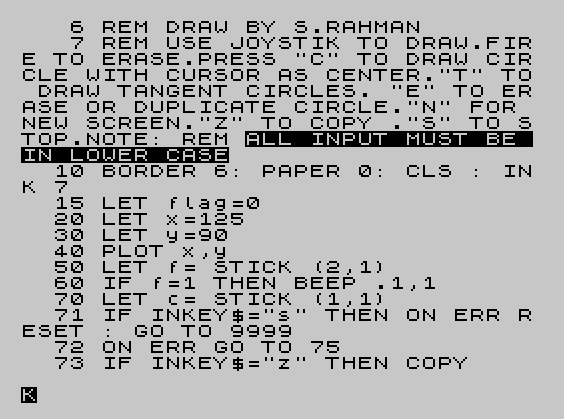
Source Code
    6 REM DRAW BY S.RAHMAN
    7 REM USE JOYSTIK TO DRAW.FIRE TO ERASE.PRESS "C" TO DRAW CIRCLE WITH CURSOR AS CENTER."T" TO DRAW TANGENT CIRCLES. "E" TO ERASE OR DUPLICATE CIRCLE."N" FOR NEW SCREEN."Z" TO COPY ."S" TO STOP.NOTE:\{20}\{1}\{20}\{0}REM \{20}\{1}ALL INPUT MUST BE IN LOWER CASE\{20}\{0}
   10 BORDER 6:PAPER 0:CLS :INK 7
   15 LET flag=0
   20 LET x=125
   30 LET y=90
   40 PLOT x,y
   50 LET f=STICK (2,1)
   60 IF f=1 THEN BEEP .1,1
   70 LET c=STICK (1,1)
   71 \{16}\{0} IF INKEY$="s" THEN ON ERR RESET :GO TO 9999
   72 ON ERR GO TO 75
   73 IF INKEY$="z" THEN COPY
   75 IF INKEY$="c" THEN INPUT "DIAMETER";d:CIRCLE x,y,d:LET flag=11
   77 IF INKEY$="t" THEN GO SUB 500
   78 IF INKEY$="e" THEN GO SUB 1000
   79 IF INKEY$="n" THEN CLS
   80 LET x=x+(c=9)+(c=8)+(c=10)-(c=5)-(c=4)-(c=6)
   90 LET y=y+(c=5)+(c=1)+(c=9)-(c=6)-(c=2)-(c=10)
  100 LET x=x-(x>255)+(x<0)
  110 LET y=y-(y>175)+(y<0)
  130 IF f=0 THEN GO TO 40
  140 IF \{19}\{0}\{18}\{0}\{18}\{0}\{18}\{0} POINT (x,y)=1 THEN PLOT OVER 1;x,y
  150 IF POINT (x,y)=0 THEN PLOT x,y:PLOT OVER 1;x,y
  160 IF STICK (2,1)=1 THEN LET f=0
  165 IF f=0 THEN BEEP .1,1
  170 IF f=0 THEN GO TO 40
  180 GO TO 70
  500 INPUT "Diameter. Joy to Translate";d
  501 PAUSE 90
  502 IF STICK (1,1)=1 THEN CIRCLE x,y+d,d:LET flag=1
  503 IF STICK (1,1)=9 THEN CIRCLE x+d,y+d,d:LET flag=9
  504 IF STICK (1,1)=8 THEN CIRCLE x+d,y,d:LET flag=8
  505 IF STICK (1,1)=10 THEN CIRCLE x+d,y-d,d:LET flag=10
  506 IF STICK (1,1)=2 THEN CIRCLE x,y-d,d:LET flag=2
  507 IF STICK (1,1)=6 THEN CIRCLE x-d,y-d,d:LET flag=6
  508 IF STICK (1,1)=4 THEN CIRCLE x-d,y,d:LET flag=4
  509 IF STICK (1,1)=5 THEN CIRCLE x-d,y+d,d:LET flag=5
  510 IF STICK (1,1) <>0 THEN BEEP .1,1
  512 PAUSE 20
  515 RETURN
 1000 IF flag=0 THEN RETURN
 1010 IF flag=11 THEN CIRCLE OVER 1;x,y,d
 1012 IF flag=1 THEN CIRCLE OVER 1;x,y+d,d
 1014 IF flag=9 THEN CIRCLE OVER 1;x+d,y+d,d
 1016 IF flag=8 THEN CIRCLE OVER 1;x+d,y,d
 1018 IF flag=10 THEN CIRCLE OVER 1;x+d,y-d,d
 1020 IF flag=2 THEN CIRCLE OVER 1;x,y-d,d
 1022 IF flag=6 THEN CIRCLE OVER 1;x-d,y-d,d
 1024 IF flag=4 THEN CIRCLE OVER 1;x-d,y,d
 1026 IF flag=5 THEN CIRCLE OVER 1;x-d,y+d,d
 1028 RETURN
 9999 PAPER 7:INK 0:STOP
Note: Type-in program listings on this website use ZMAKEBAS notation for graphics characters.