
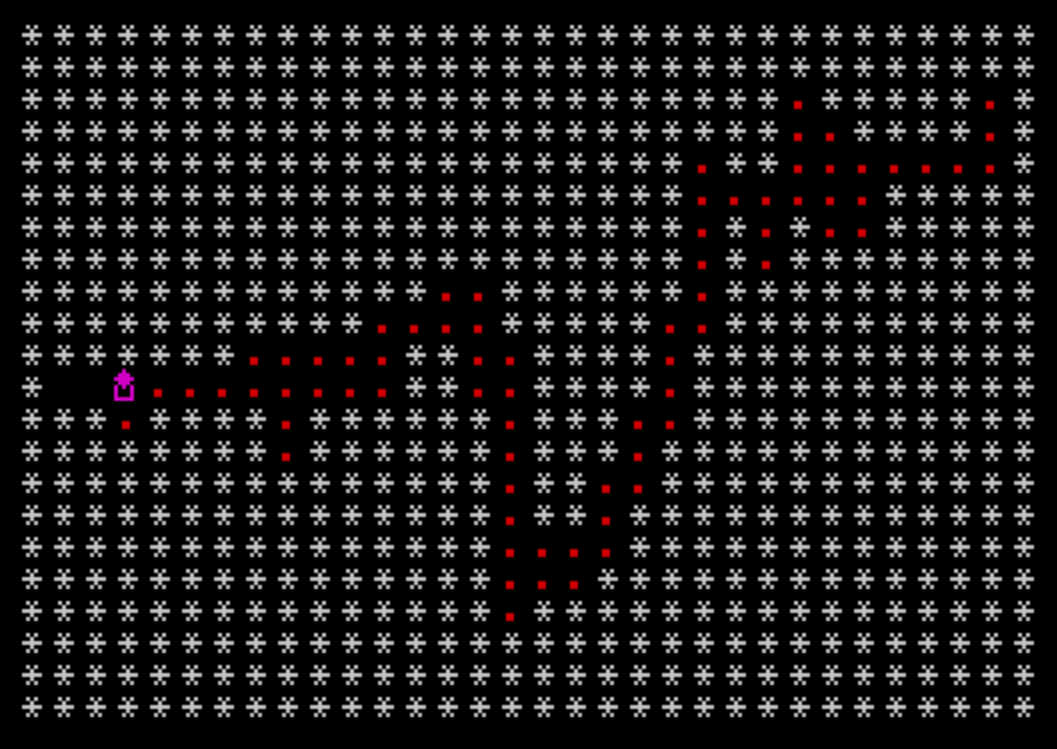
Crazy Balloons is a multi-stage maze navigation game in which the player steers a balloon character through obstacle courses, avoiding asteroids and the balloon’s own ink trail. The program uses four distinct screen stages with increasing difficulty: stage 1 is a basic obstacle run, stages 2 and 3 add collectible gold bars (UDG “\b”) that must all be gathered to open the exit gate, and stage 4 switches to a different movement engine with a twisting passage and crystal collection. Two custom UDG characters are defined via the DATA statement at line 9999, stored using POKE USR, providing the balloon sprite (“\a”) and gold bar (“\b”) glyphs. The ATTR function is used to detect gold bar tiles by their INK color (6), and SCREEN$ is used for collision detection against asteroids and trail markers. Skill level is translated into a PAUSE duration that controls game speed, and an optional sound flag drives BEEP calls throughout movement.
Program Structure
The program is organized into several functional blocks:
- Lines 1–90: Main game loop — display balloon, read keys, dispatch movement.
- Lines 100–410: Four directional movement handlers (left, down, up, right), each checking for gold bars via
ATTRand collisions viaSCREEN$. - Lines 2001–2910: Stage 4 engine — a separate movement and random asteroid-scatter routine with its own loop and collision logic.
- Lines 3000–3010: Pause/scan loop that scans all screen positions for remaining trail dots.
- Lines 3700–3830: End-of-level (win) and crash sequences, score display, and game restart.
- Lines 4000, 8000–8080: Gold initialization and instruction screens.
- Lines 9000–9050: Title screen, instructions prompt, and sound/skill-level setup.
- Lines 9100–9220: Level layout drawing — prints the maze of asterisks and places UDG gold bars and extra asteroids depending on
SCREENstage. - Lines 9990–9999: UDG definition routine and DATA, plus initial position setup.
UDG Character Definitions
Lines 9990–9999 define two UDG characters using a FOR loop over character codes 144 and 145, reading 8 bytes each from the DATA statement at line 9999 and writing them with POKE USR CHR$ f+g, a. Character \a (code 144) is the balloon sprite, and \b (code 145) is the gold bar. The balloon bitmap bytes 16,56,124,56,84,68,68,124 produce a roughly circular balloon shape; the gold bar bytes 0,0,0,60,126,255,0,0 produce a horizontal bar.
Dual Collision Detection Strategy
The program uses two complementary collision methods. ATTR (x,y) is used to detect gold bars: since they are printed in INK 6, a returned attribute value of 6 signals a collectible pickup. SCREEN$ (x,y) is used for structural collision — comparing to "*" for asteroids and "." for the balloon’s own trail. This combination avoids the need to maintain a separate map array.
Movement and Direction Encoding
The variable d stores the current direction (1–4 in the main engine, 6–9 in the stage 4 engine). Line 90 uses the computed GO TO (d+4)*100-400 to jump to the appropriate movement handler (100, 200, 300, or 400) when no key is pressed, maintaining momentum. Similarly, line 2560 uses GO TO D*100+2000 for the stage 4 equivalent.
Stage 4 Random Asteroid Placement
Lines 2001–2330 implement an unusual asteroid-scatter routine. Starting from a fixed position, the code loops picking a random value 1–3 and jumping to one of three sub-handlers that move a print cursor right, down, or up, printing "." characters as potential collectibles. This generates a semi-random passage layout each time stage 4 is reached.
Skill Level and Speed Control
At line 9070, the user-entered skill level pa (0–9) is converted to a pause duration: LET pause=(9-pa)*10+1, giving values from 1 to 91. This pause value is used in PAUSE pause at line 25 and line 2513 to throttle game speed. On completing all four screens, if the stage counter wraps, the pause is decremented by 5 (line 3730), progressively speeding up the game across repeated playthroughs.
Win Condition
The main-loop win check at line 30 tests IF X=10 AND Y=6 AND gold=10. The gate position is hardcoded to row 10, column 6. The gold variable counts collected gold bars; it is initialized to 0 for stages 2 and above (line 9200), and the win condition requires accumulating all 10. For stage 1, gold is set to 10 at line 4000, so the gate is immediately passable.
Notable Anomalies and Quirks
- Line 8080 contains
PRINT 0, which is likely a misprint or typo forPAUSE 0(a keypress wait), since the instruction screen logic usesPAUSE 1:PAUSE 0elsewhere. - Line 9020 contains
\{16}\{0}inline in the code (character codes 16 and 0), which are INK control codes embedded directly in the program line, setting ink to black — an unusual way to embed attribute control without a PRINT statement. - Lines 205 and 210 both increment
SCby 1 in the down-movement handler, while lines 305 and 310 only increment once in the up handler — a minor scoring inconsistency. - The stage 4 movement handlers (lines 2600–2910) use direction values 6–9, while the main game uses 1–4, making the two engines mutually incompatible if accidentally crossed.
Image Gallery
Source Code
    1 REM ***********************         *Underlined characters*         *are entered in       *         *GRAPHICS mode.       *         ***********************
    5 LET SCREEN=4:LET SC=0
    6 POKE 23658,8
    7 GO SUB 9990
   10 GO SUB 9000
   15 POKE 23658,8
   20 PRINT AT x,y; INK 3;"\a": IF s$="y" THEN  BEEP .008,20
   25 PAUSE pause
   30 IF X=10 AND Y=6 AND gold=10 THEN  GO TO 3700
   35 IF INKEY$="M" OR INKEY$="0" THEN PAUSE  1:PAUSE 0
   40 PRINT AT x,y; INK 3;"."
   50 IF INKEY$="5" OR INKEY$="0" THEN  GO TO 100
   60 IF INKEY$="6" OR INKEY$="A" THEN  GO TO 200
   70 IF INKEY$="7" OR INKEY$="o"  THEN  GO TO 300
   80 IF INKEY$="8" OR INKEY$="P" THEN  GO TO 400
   90 GO TO (d+4)*100-400
  100 IF ATTR (x,y-1)=6 THEN  PRINT AT x,y-1;" ":LET sc=sc+10:BEEP .5,20:LET gold=gold+1
  105 LET sc=sc+1:IF SCREEN$ (x,y-1) <>" "  THEN GO TO 3000
  110 LET d=1:LET y=y-1:GO TO 20
  200 IF ATTR (x+1,y)=6 THEN PRINT  AT x+1,y;" ":LET sc=sc+10:BEEP .5,20:LET gold=gold+1
  205 LET SC=SC+1:IF SCREEN$ (x+1,y) <>" "  THEN  GO TO 3800
  210 LET SC=SC+1:LET d=2:LET x=x+1: GO TO 20
  300 IF ATTR (x-1,y)=6  THEN  PRINT AT x-1,y;" ":LET sc=sc+10:BEEP .5,20: LET gold = gold+1
  305 LET SC=SC+1:IF SCREEN$ (x-1,y) <>" "  THEN  GO TO 3800
  310 LET d=3:LET x=x-1: GO TO 20
  400 IF ATTR (x,y+1)=6  THEN  PRINT AT x,y+1;" ": LET sc=sc+10:BEEP .5,20: LET gold=gold+1
  405 LET SC=SC+1:IF SCREEN$ (x,y+1) <>" "  THEN  GO TO 3800
  410 LET d=4:LET y=y+1:GO TO 20
 2001 LET d=8
 2005 PAPER 0:CLS :INK 7:BORDER 0
 2010 FOR f=1 TO 22:PRINT "********************************":NEXT f
 2011 LET x=11:LET y=1
 2020 LET a= INT (RND*3)+1
 2025 PRINT AT x,y; INK 2;"."
 2030 GO TO a*100+2000
 2100 LET y=y+1
 2105 IF y>30 THEN GO TO  2500
 2110 GO TO 2020
 2200 LET x=x+1
 2210 IF x>20 THEN  LET x=20
 2220 GO TO 2020
 2300 LET x=x-1
 2315 IF x<1 THEN LET x=1
 2330 GO TO 2020
 2500 LET x=11:LET y=1
 2510 PRINT AT x,y; INK 3;"\a"
 2513 PAUSE pause
 2515 IF INKEY$="0" OR INKEY$="M"  THEN  GO TO 3000
 2517 PRINT AT x,y;" "
 2518 BEEP .008,20
 2520 IF INKEY$="5" OR INKEY$="O"  THEN  GO TO 2900
 2530 IF INKEY$="6" OR INKEY$="A"  THEN  GO TO 2600
 2540 IF INKEY$="7" OR INKEY$="Q"  THEN GO TO 2700
 2550 IF INKEY$="8" OR INKEY$="P"  THEN  GO TO 2800
 2560 GO TO D*100+2000
 2600 LET d=6:IF SCREEN$ (x+1,y)="*"  THEN  GO TO 3800
 2605 IF SCREEN$ (x+1,y)="."  THEN LET sc=sc+ INT  (RND*10)
 2610 LET x=x+1:GO TO 2510
 2700 LET d=7:IF SCREEN$ (x-1,y)="*"  THEN  GO TO 3000
 2705 IF SCREEN$ (x-1,y)="." THEN  LET sc=sc+ INT (RND*10)
 2710 LET x=x-1: GO TO 2510
 2800 LET d=8:IF SCREEN$ (x,y+1)="*"  THEN  GO TO 3800
 2805 IF SCREEN$ (x,y+1)="." THEN  LET sc=sc+ INT (RND*10)
 2810 LET y=y+1:GO TO 2510
 2900 LET d=9:IF SCREEN$ (x,y-1)="*"  THEN  GO TO 3800
 2905 IF SCREEN$ (x,y-1)="."  THEN  LET sc=sc+ INT (RND*10)
 2910 LET y=y-1:GO TO 2510
 3000 FOR F=0  TO 21: FOR G=0 TO 31: IF SCREEN$ (F,G)="." THEN PAUSE  1:PAUSE 0: GO TO 2520
 3010 NEXT G:NEXT F
 3700 PRINT AT 0,0;:FOR F=1  TO 22: LET A= INT (RND*6)+1: PRINT  INK A;"********************************"
 3710 NEXT F
 3720 INK 2:PAPER 6:PRINT AT 8,10; FLASH 1;"WELL DONE!!"; AT 16,11;"SCORE: ";SC: PAUSE 50:LET SCREEN=SCREEN+1
 3730 IF SCREEN>4  THEN LET SCREEN= 1: LET PAUSE=PAUSE-5:IF PAUSE<1  THEN LET PAUSE=1
 3750 GO SUB 9100:GO TO 20
 3800 INK 2:PAPER 6:PRINT AT 7,9; FLASH 1;"YOU CRASHED!!"; AT 14 ,12;"SCORE:";sc
 3805 FOR f=1 TO 200:NEXT f
 3810 PRINT AT 21,0;" PRESS ANY KEY FOR ANOTHER GAME"
 3820 IF INKEY$="" THEN GO TO  3020
 3830 RUN
 4000 LET gold=10:IF screen>1  THEN  LET gold=0
 8000 INK 6:PRINT AT 2,0;"Stage 1-Guide the balloon (\a)           round the course while          avoiding the deadly             asteroids (*) and your          own trail (.)."
 8010 PRINT '"Stage 2-As stage 1,but you must         eat all the gold bars           (\b) to pass through the         gate."
 8020 PRINT '"Stage 3-As above,but more               asteroids have moved  in"
 8030 PRINT '"Stage 4-Negotiate your way along        the twisting passage.           Collect all the crystals        (.)to pass.Press pause           when completed."
 8040 PAUSE 1:PAUSE 0
 8050 INK 5:PRINT AT 2,0;"                                        UP......7 or Q                                                  DOWN....6 or A                                                                          "
 8060  PRINT "        LEFT....5 or                                 O                                                  RIGHT...8 or P                                                  PAUSE...0 or M         "
 8070 FOR f=1 TO 9:PRINT "                                ":NEXT f
 8080 PAUSE 1:PRINT 0
 9000 INK 7:PAPER 0:BORDER 0:CLS :PRINT TAB 9; INK 4;"CRAZY BALLOONS"; TAB 9;"\''\''\''\''\''\''\''\''\''\''\''\''\''\''":
 9010 FOR F=0  TO 40:NEXT f
 9012 PRINT AT 3,0;"Do you want instructions ?":IF INKEY$="y" OR INKEY$="Y"  THEN  GO TO 8000
 9014 IF INKEY$="n" OR INKEY$="N"  THEN  GO TO 9018
 9016 GO TO 9012
 9018 FOR f=1  TO 20:NEXT f
 9020 PRINT AT 3,0;"Do you want sound ?       ":\{16}\{0} IF INKEY$="" THEN  GO TO 9020
 9030 IF INKEY$="y" OR INKEY$="Y"  THEN  LET s$="y":GO TO 9050
 9040 IF INKEY$="n" OR INKEY$="N"  THEN  LET s$="n":GO TO 9050
 9045 GO TO 9030
 9050 PRINT AT 3,0;"Enter the skill level (0  TO 9)"
 9060 INPUT pa:IF pa<0 OR pa>9  THEN  GO TO 9060
 9070 LET pause=(9-pa)*10+1
 9100 RESTORE :INK 7:PAPER 0:CLS :BORDER 0:IF screen>3  THEN  GO TO 2000
 9110 PRINT "**********************************         ************  ********           **       *    ******"
 9120 PRINT "*  ******               *     ***   **   *    *******  ***    ****   *    ***  ****  *******  **"
 9130 PRINT "***  *                   ***  *****  *  *          *          ***    *   ***************     * *"
 9140 PRINT "*   *"; INK 2;" \''\''"; INK 7;"  ****      *********  **  **"; INK 2;"\ : \ :"; INK 7;"   *          *        **  **  *      ******           *"
 9150 PRINT "* **    **   *****  *   *****  ** **      ******    *********  ** ****     ****    *    ****   *"
 9160 PRINT "*  **     *     ****    **   ***** *     *     *******  ***    *** *    *   ***********  ***   *"
 9170 PRINT "** *       ************   ***  **"; INK 2;"\ : \ :"; INK 7;"**    **************       **"; INK 2;"\:.\.:"; INK 7;"***   ***************        *"
 9180 PRINT "********************************"
 9190 LET gold=10
 9200 INK 6:IF SCREEN>1 THEN  PRINT AT 11,1;"\b"; AT 1,6;"\b"; AT 2,16;"\b"; AT 7,17;"\b"; AT 6,14;"\b"; AT 12,11;"\b"; AT 9,16;"\b"; AT 10,25;"\b"; AT 17,5;"\b"; AT 11,5;"\b": LET gold=0
 9210 INK 4:IF screen=3 THEN PRINT AT 10,1;"*"; AT 2,17;"*"; AT 3,19;"*"; AT 6,19;"*"; AT 3,2;"*"; AT 3,11;"*"; AT 3,28;"*"
 9220 IF screen>2 THEN PRINT AT  5,29;"*"; AT 7,26;"*"; AT 12,22;"*"; AT 10,26;"*"; AT 15,13;"*"; AT 18,8;"*"; AT 13,5;"*"
 9980 RETURN
 9990 FOR f=144 TO 145:FOR g=0  TO 7:READ a:POKE USR CHR$ f+g,a:NEXT g:NEXT f
 9996 LET d=3
 9997 LET x=19:LET y=2
 9998 RETURN
 9999 DATA 16,56,124,56,84,68,68,124,0,0,0,60,126,255,0,0
Note: Type-in program listings on this website use ZMAKEBAS notation for graphics characters.