
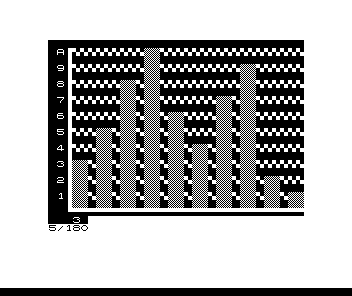
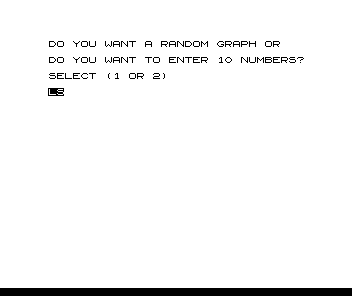
A bar-chart program for a 2K ZX80 (it was written on a 2K MicroAce and will not fit in 1K). Answer SELECT (1 OR 2) with 1 for ten random values or 2 to type ten numbers from 0 to 10. The program draws the bars in graphic characters against a dotted grid with labels on both axes.
Later issues printed fixes. In May 1981 Syntax gave the missing comparison signs in line 134 (Y<10 AND T>1), which are in this listing. In June 1981 a reader noted that lines 175 and 181 need a semicolon at the end; the printed Syntactic Sum matches the program with one on line 181, but the listing as printed has none, so each label below the chart goes on a new line. Line 155 jumps to line 98, which does not exist; the program carries on at the next line. In testing, the chart was drawn and the program then stopped with report 5 at line 180 because the labels had filled the screen.
Published in Syntax April 1981 (Bar Graphics).
Image Gallery
Source Code
   1 DIM U(50)
   2 LET T=0
   3 RANDOMISE
   4 PRINT "DO YOU WANT A RANDOM GRAPH OR"
   5 PRINT
   6 PRINT "DO YOU WANT TO ENTER 10 NUMBERS?"
   7 PRINT
   8 PRINT "SELECT (1 OR 2)"
  10 INPUT Z
  11 IF Z>1 THEN GO TO 19
  15 FOR X=1 TO 10
  16 LET U(X)=RND(10)
  17 NEXT X
  18 GO TO 60
  19 CLS
  20 PRINT " THIS PROGRAM WILL PRINT A GRAPH"
  21 PRINT "OF 10 NUMBERS FROM 0 TO 10"
  23 PRINT
  25 PRINT "ENTER"
  30 FOR X=1 TO 10
  40 PRINT "NUMBER ";X;
  45 INPUT U(X)
  46 PRINT "?"; U(X)
  50 NEXT X
  60 CLS
  65 FOR X=1 TO 32
  68 PRINT CHR$(128);
  70 NEXT X
  72 PRINT
  75 LET X=11
  80 FOR W=1 TO 10
  90 LET X=X-1
  91 PRINT CHR$(128);
  92 PRINT CHR$(X+28+128);CHR$(2);
 105 LET T=T+1
 107 IF T>1 THEN PRINT CHR$(128);CHR$(128); CHR$(2);
 109 FOR Y=1 TO 10
 110 IF U(Y)>X THEN PRINT "▒▒";
 120 IF U(Y)=X THEN PRINT "▒▒";
 121 IF Y=10 AND T=1 AND U(Y)<X THEN PRINT "▞▞";
 122 IF Y=10 AND T=1 AND U(Y)<X THEN GO TO 140
 125 IF T=1 AND U(Y)<X THEN PRINT "▞▞▞";
 126 IF T=1 AND U(Y)<X THEN GO TO 140
 130 IF U(Y)<X THEN PRINT CHR$(128);CHR$(128);
 133 IF Y<10 AND T=1 THEN PRINT "▞";
 134 IF Y<10 AND T>1 THEN PRINT CHR$(128);
 140 NEXT Y
 150 PRINT
 155 IF T<2 THEN GO TO 98
 156 LET T=0
 160 NEXT W
 163 PRINT CHR$(128);CHR$(128);CHR$(133);
 165 FOR X=1 TO 29
 166 PRINT CHR$(3);
 167 NEXT X
 168 PRINT CHR$(128);CHR$(128);
 170 FOR X=1 TO 10
 175 IF X=10 THEN PRINT CHR$(128);CHR$(U(X)+128+28);CHR$(128)
 179 IF X=10 THEN GO TO 190
 180 PRINT CHR$(128);
 181 PRINT CHR$(U(X)+128+28);CHR$(128)
 190 NEXT X
 191 STOP
Note: Type-in program listings on this website use ZMAKEBAS notation for graphics characters.