
This program implements a natural-language block-world simulation in which the user can issue text commands to manipulate colored geometric shapes displayed on screen. It supports commands including LIST, MOVE, PUT, MAKE, WHERE IS, DESTROY, HELP, and QUIT, with a parser that matches words by their first three characters against a letter-indexed DATA dictionary. Shapes are stored in a 20×6 array tracking size, color, name, screen position, stacking status, and height, and a machine-code routine is POKEd into the UDG area (characters “o” and “u”) to provide a callable routine accessed via USR USR “o”. Custom UDGs (characters A–N) define the block-graphic art for squares, oblongs, triangles, and circles in both small and large sizes, rendered with INK coloring at computed screen positions.
Program Structure
The program is organized into clearly separated functional blocks, each at a well-spaced line number range:
- Lines 2–8:
DEF FNdeclarations for string-building and height calculation - Lines 10–50: Initialization, machine-code check, title screen
- Line 100–110: Main command dispatch loop using computed
GO SUB 200*action - Lines 200–1840: Command handlers (LIST, MOVE, PUT, WHERE IS, MAKE, DESTROY, QUIT, HELP, COMMANDS)
- Lines 2000–2200: Input tokenizer and semantic analyzer
- Lines 6900–6910: Bounded single-keypress input subroutine
- Lines 7100–7960: Utility routines (error reporting, description, matching, printing, word lookup, input)
- Lines 8000–8500: Variable and shape data initialization
- Lines 8800–8880: Shape rendering subroutine with DATA for UDG-composed graphics
- Lines 8999–9025: Data dictionary indexed by first letter of each word
- Lines 9200–9380: UDG bitmap data for 14 custom characters (A–N) plus the machine-code routine in slots O and U
- Line 9400: UDG POKE-in routine
Command Dispatch
The main loop at line 100 uses the computed GO SUB 200*action idiom, where action is a number 1–7 set by the parser. This maps commands cleanly to subroutines at lines 200 (LIST), 400 (MOVE), 600 (PUT), 800 (WHERE IS), 1000 (MAKE), 1200 (DESTROY), and 1400 (QUIT), without a chain of IF statements.
Data Representation
All shapes are stored in the two-dimensional array o(20,6) with the following column semantics:
| Column | Meaning | Values |
|---|---|---|
| 1 | Size | 1=small, 2=large |
| 2 | Color | 1–6 (blue, red, magenta, green, cyan, yellow) |
| 3 | Shape name | 1=square, 2=oblong, 3=triangle, 4=circle |
| 4 | X position | 1–8 (screen column slot) |
| 5 | Stacked on | 0=ground, else index of supporting shape |
| 6 | Height above ground | in character rows |
A parallel boolean array f(10) serves as a match-flag set during shape-matching queries at line 7300.
Natural Language Parser
Input is collected character-by-character at lines 7900–7960 into i$ with an on-screen cursor indicator. The analyzer at lines 2000–2200 loops, extracting whitespace-delimited tokens into w$ (subroutine 7800), then looking each up in the dictionary (subroutine 7700). Each dictionary entry carries a type (1=command, 2=relation, 3=ignore/article, 4=size, 5=color, 6=shape name) and a number. Descriptors are packed into x$ and y$ as two-byte pairs (CHR$(type) + CHR$(number)) for later matching.
Letter-Indexed Dictionary
The DATA dictionary at lines 9000–9025 is organized by first letter: each group begins at line 9000 + CODE(first_letter) - CODE("a"). The subroutine at line 7700 uses RESTORE 9000 + CODE w$(1) - CODE("a") to jump directly to the relevant section, then reads entries until the sentinel ©©© (RESET token, used here as a string literal end-of-section marker). Words are matched on their first three characters only, enabling abbreviated input.
Shape Matching
The match subroutine at lines 7300–7370 sets all f(n) flags to 1, then iterates over the encoded descriptor string k$. For each two-byte descriptor pair, any shape whose corresponding attribute doesn’t match has its flag cleared and nomat decremented. The variable fmat is set to the index of the first matching shape. This allows the command handlers to report ambiguous matches, no matches, or exactly one match.
Shape Rendering
The rendering subroutine at lines 8800–8860 computes the screen position from a shape’s X slot (px = o(printx,4)*4 - 4) and height offset, selects the correct DATA block based on shape name and size via RESTORE 8870 + 2*o(printx,3) + o(printx,1), then prints each row string with INK pc. Wiping (erasing) a shape is handled by replacing each row string with spaces of equal length when wipe=1.
Custom UDG Graphics
Fourteen UDGs (A–N) are defined at lines 9200–9330 and POKEd in by the subroutine at line 9400. They are used in shape DATA strings to compose quarter-circle arcs and triangular corners, allowing rounded and angled shapes to be drawn using block graphics. The rendering DATA at lines 8873–8880 interleaves these UDG characters with block-graphic fill characters to construct each shape type.
Stacking and Height Logic
The function FN h(x) at line 8 computes a shape’s height contribution: base 2 plus 1 if large (size=2) plus 1 if oblong (name=2). The PUT handler at line 653 checks that the cumulative height (o(fmat,6) + FN h(fmat) + FN h(from)) does not exceed 10 rows, preventing shapes from being stacked off-screen. Circles and triangles cannot have shapes placed on them (o(fmat,3)>2 check at line 652).
Notable Anomalies
- Line 1110: Tests
o(nosha,2)=0to prompt for color, but the comment and variable name suggest it should testo(nosha,1)=0(size). This appears to be a bug — size is never explicitly prompted if not provided, since the branch tests color twice. - Line 9012: The DATA entry for “mag” (magenta) is missing its third field —
DATA "mag",5,"©©©",0,0— which will cause aREADerror or misalignment if “mag” is ever matched, since the number field is absent. - Line 8999: This line reads 100 entries from the DATA blocks starting at 9000 and prints them, functioning as a diagnostic dump that runs unconditionally if reached, though it is never called from the main flow.
- Line 910: The condition
NOT (nl OR nr OR n)uses the loop variablenafter theFORloop at line 835 has completed, which on the TS 2068n will hold the valuenosha+1— always nonzero — making this branch unreachable.
Image Gallery
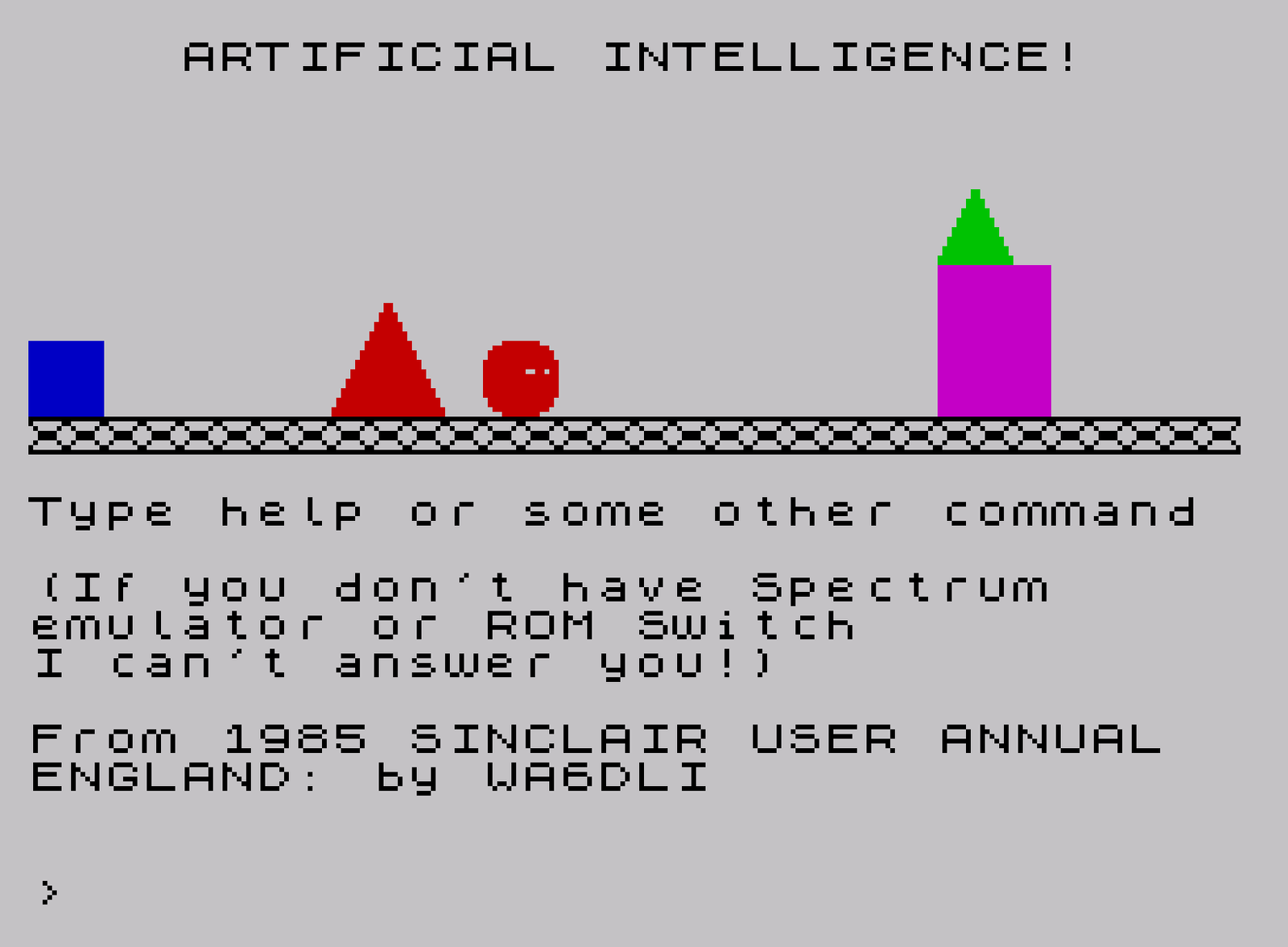
Source Code
    2 POKE 23658,0:REM caps off
    3 DEF FN s$(n)=" "+("small" AND n=1)+("big" AND n=2)
    4 DEF FN c$(n)=" "+("blue" AND n=1)+("red" AND n=2)+("magenta" AND n=3)+("green" AND n=4)+("cyan" AND n=5)+("yellow" AND n=6)
    5 DEF FN n$(n)=" "+("square" AND n=1)+("oblong" AND n=2)+("triangle" AND n=3)+("circle" AND n=4)
    6 DEF FN a$(n)= FN s$(o(n,1))+ FN c$(o(n,2))+ FN n$(o(n,3))
    7 DEF FN q$(n)=" "+("any" AND n=0)+("one" AND n=1)+("two" AND n=2)+("three" AND n=3)+("four" AND n=4)+("five" AND n=5)+("six" AND n=6)+("seven" AND n=7)+("eight" AND n=8)+("nine" AND n=9)+("ten" AND n=10)
    8 DEF FN h(x)=2+(1 AND o(x,1)=2)+(1 AND o(x,3)=2)
   10 IF PEEK (USR "o"+5) <>201 THEN GO SUB 9400:REM check if m/code in place
   20 PAPER 7:INK 0:BORDER 7:BRIGHT 0:INVERSE 0:FLASH 0:OVER 0:CLS
   30 PRINT AT 10,0;"[UDG-N][UDG-N][UDG-N][UDG-N][UDG-N][UDG-N][UDG-N][UDG-N][UDG-N][UDG-N][UDG-N][UDG-N][UDG-N][UDG-N][UDG-N][UDG-N][UDG-N][UDG-N][UDG-N][UDG-N][UDG-N][UDG-N][UDG-N][UDG-N][UDG-N][UDG-N][UDG-N][UDG-N][UDG-N][UDG-N][UDG-N][UDG-N]"
   40 GO SUB 8000
   50 PRINT AT 0,4;"ARTIFICIAL INTELLIGENCE!"; AT 12,0;"Type help or some other command"''"(If you don't have Spectrum     emulator or ROM Switch"'"I can't answer you!)"''"From 1985 SINCLAIR USER ANNUAL  ENGLAND: by WA6DLI"
  100 GO SUB 2000:LET v= USR USR "o":GO SUB 200*action:LET v= USR USR "o"
  110 GO TO 100
  200 LET k$=x$:GO SUB 7300:REM "list"
  210 IF nomat=0 THEN GO SUB 7100:RETURN
  220 LET z$="I can see : ":GO SUB 7400
  230 FOR n=1 TO nosha:IF o(n,1) <>0 AND f(n) THEN LET z$=" a"+ FN a$(n):GO SUB 7400:IF o(n,5) <>0 THEN LET z$="which is on top of the"+ FN a$(o(n,5)):GO SUB 7400
  240 NEXT n
  250 RETURN
  400 LET k$=x$:GO SUB 7300:REM move
  410 IF nomat <>1 THEN GO SUB 7100:RETURN
  420 IF relation=0 THEN LET z$="Which way to ?":GO SUB 7400:RETURN
  430 IF relation>2 THEN LET z$="I don't understand.":GO SUB 7400:RETURN
  440 LET drn=(-1 AND relation=1)+(1 AND relation=2):LET from=fmat:IF y$ <>"" THEN LET k$=y$:GO SUB 7300:IF nomat <>1 THEN GO SUB 7100:RETURN :REM print out match error
  450 LET to=o(fmat,4)+drn:IF to<1 OR to>8 THEN LET z$="There's no room to do that":GO SUB 7400:RETURN
  452 FOR n=1 TO nosha:IF o(n,4)=to THEN LET z$="There's a"+ FN a$(n)+" there already!":GO SUB 7400:RETURN
  455 IF o(n,4)=from THEN LET z$="What about the"+ FN a$(n)+" on top !":GO SUB 7400:RETURN
  460 NEXT n:LET wipe=1:LET printx=from:GO SUB 8800:LET wipe=0:LET o(from,4)=to:LET o(from,5)=0:LET o(from,6)=0:GO SUB 8800:LET z$="O.K. ":GO SUB 7400:RETURN
  600 LET k$=x$:GO SUB 7300:REM put
  610 IF nomat <>1 THEN GO SUB 7100:RETURN
  620 IF relation=0 THEN LET z$="What on ?":GO SUB 7400:RETURN
  630 IF relation <>3 THEN LET z$="I don't understand.":GO SUB 7400:RETURN
  640 LET from=fmat:LET k$=y$:GO SUB 7300:IF nomat <>1 THEN GO SUB 7100:RETURN :REM printout match error
  650 LET to=o(fmat,4):IF from=fmat THEN LET z$="You can't put a shape on itself!":GO SUB 7400:RETURN
  652 IF o(fmat,3)>2 THEN LET z$="I won't balance !":GO SUB 7400:RETURN
  653 LET height=o(fmat,6)+ FN h(fmat):IF height+ FN h(from)>10 THEN LET z$="That's too high":GO SUB 7400:RETURN
  655 FOR n=1 TO nosha:IF o(n,5)=from THEN LET z$="What about the"+ FN a$(n)+" on top !":GO SUB 7400:RETURN
  660 NEXT n:LET wipe=1:LET printx=from:GO SUB 8800:LET wipe=0:LET o(from,4)=to:LET o(from,5)=fmat:LET o(from,6)=height:GO SUB 8800:LET z$="O.K. ":GO SUB 7400:RETURN
  800 LET k$=x$:GO SUB 7300:REM where is?
  810 IF nomat <>1 THEN GO SUB 7100:RETURN
  820 LET x=o(fmat,4):IF o(fmat,5) <>0 THEN LET z$="On top of the"+ FN a$(o(fmat,5)):GO SUB 7400:RETURN
  830 LET wl=9:LET wr=9:LET nl=0:LET nr=0:LET under=0:REM find nearest to left and right
  835 FOR n=1 TO nosha
  840 IF o(n,4)<x THEN IF x-o(n,4)<wr THEN LET wr=x-o(n,4):LET nr=n
  850 IF o(n,4)>x THEN IF o(n,4)-x<wl THEN LET wl=o(n,4)-x:LET nl=n:REM nearest on lest and right
  860 IF o(n,5)=fmat THEN LET under=n:REM underneath
  865 NEXT n
  870 IF nl AND nr THEN LET z$="It's between the"+ FN a$(nl)+" and the"+ FN a$(nr)
  880 IF nl AND NOT nr THEN LET z$="It's to the left of the"+ FN a$(nl)
  890 IF nr AND NOT nl THEN LET z$="It's to the right of the"+ FN a$(nr)
  900 IF under THEN LET z$=z$+(" and" AND (nl OR nr))+" under the "+ FN a$(under)
  910 IF NOT (nl OR nr OR n) THEN LET z$="It's the only shape"
  920 GO SUB 7400:RETURN
 1000 IF nosha=10 THEN LET z$="I can only make 10 shapes-sorry!":GO SUB 7400:RETURN :REM make
 1010 LET space=1:LET n=1
 1020 IF o(n,4)=space THEN LET space=space+1:LET n=1:GO TO 1020
 1030 LET n=n+1:IF n<11 THEN GO TO 1020
 1040 IF space=9 THEN LET z$="There's no room to put in a new shape":GO SUB 7400:RETURN
 1050 LET nosha=nosha+1:FOR n=1 TO 6:LET o(nosha,n)=0:NEXT n:IF x$="" THEN GO TO 1100:REM np parameters
 1060 FOR n=1 TO LEN x$ STEP 2:LET t= CODE x$(n)-3:LET nn= CODE x$(n+1):IF o(nosha,t) <>0 THEN LET z$="That doesn't make sense":LET nosha=nosha-1:GO SUB 7400:RETURN :REM two same
 1070 LET o(nosha,t)=nn:NEXT n
 1100 IF o(nosha,2)=0 THEN LET z$="What size? Press 1 for small, 2 for large":GO SUB 7400:LET inmax=2:GO SUB 6900:LET o(nosha,1)=inkey
 1110 IF o(nosha,2)=0 THEN LET z$="What colour? Press 1 to 6 for blue to yellow":GO SUB 7400:LET inmax=6:GO SUB 6900:LET o(nosha,2)=inkey
 1120 IF o(nosha,3)=0 THEN LET z$="What shape? Press 1 for a square, 2 for an oblong, 3 for a triangle and 4 for a circle.":GO SUB 7400:LET inmax=4:GO SUB 6900:LET o(nosha,3)=inkey
 1130 LET k$="":FOR n=1 TO 3:LET k$=k$+ CHR$ (n+3)+ CHR$ o(nosha,n):NEXT n:GO SUB 7300:IF nomat>1 THEN LET z$="You'll confuse me if you have two shapes the same!":LET nosha=nosha-1:GO SUB 7400:RETURN
 1140 LET o(nosha,4)=space:LET wipe=0:LET printx=nosha:GO SUB 8800:LET z$="O.K. ":GO SUB 7400:RETURN
 1200 LET k$=x$:GO SUB 7300:REM destroy
 1210 IF nomat <>1 THEN GO SUB 7100:RETURN :REM not unique
 1220 FOR n=1 TO nosha:IF o(n,5)=fmat THEN LET z$="What about the shape on top ?":GO SUB 7400:RETURN
 1230 NEXT n
 1240 LET printx=fmat:LET wipe=1:GO SUB 8800:REM now move the other down to fill gap(if one)
 1249 REM now move the others down to fill the gap(if any)
 1250 IF fmat <>nosha THEN FOR n=1 TO 6:LET o(fmat,n)=o(nosha,n):NEXT n
 1260 FOR n=1 TO nosha:IF o(n,5)=nosha THEN LET o(n,5)=fmat
 1270 NEXT n
 1280 LET nosha=nosha-1:LET z$="O.K. ":GO SUB 7400:RETURN
 1400 LET z$="Are you sure you want to quit ? y/n":GO SUB 7400:REM quit
 1410 LET i$= INKEY$:IF i$ <>"y" AND i$ <>"n" THEN GO TO 1410
 1420 IF i$="n" THEN RETURN
 1430 CLS :PRINT ''"Type 'RUN' then Enter to Restart":STOP
 1600 REM help
 1610 LET z$="In this program you can instruct the computer to manipulate the objects on the screen.          The computer will try to give   intelligent answers. For example you could type in 'move the red circle right of the green tri- angle'. For a list of the words understood   type commands":GO SUB 7400:RETURN
 1800 REM  commands
 1810 LET z$="I understand the words LIST,MOVE, PUT, MAKE, WHERE IS, DESTROY, LEFT, RIGHT, ON and the names   and colours of the shapes."
 1820 LET z$=z$+" Some examples are...  'Move the green triangle left'   'Where is the small circle'    'List the red shapes'  'Put the circle on the square'.        "+ CHR$ 17+ CHR$ 6+"Press any key for more.":GO SUB 7400
 1830 IF INKEY$="" THEN GO TO 1830
 1840 LET z$="You can also abbreviate all of  the commands and words down to  their  first three letters. For example 'mov gre tri lef of red tri'would be interpeted as 'move the green triangle left of red triangle'.  To finish type in   quit.":GO SUB 7400:RETURN
 1999 REM **the input & analysis**
 2000 LET x$="":LET y$="":LET action=0:LET rel=0:LET end=0:GO SUB 7900:REM get input
 2010 GO SUB 7800:REM first word in w$ , is TO
 2020 IF end THEN GO TO 2000:REM no action
 2030 GO SUB 7700:IF end THEN GO SUB 7600:GO TO 2000
 2040 LET action=number:IF action=7 THEN RETURN :REM all done
 2045 REM now check for ignores
 2050 GO SUB 7800:IF end THEN RETURN
 2060 GO SUB 7700:IF end THEN GO SUB 7600:GO TO 2000
 2070 IF type=3 THEN GO TO 2050:REM skip ignores
 2080 IF type<4 THEN GO SUB 7600:GO TO 2000:REM expect a decriptor
 2090 LET x$=x$+ CHR$ type+ CHR$ number
 2100 GO SUB 7800:IF end THEN RETURN
 2110 GO SUB 7700:IF end THEN GO SUB 7600:GO TO 2000
 2120 IF type >=4 THEN GO TO 2090:REM next descriptor
 2130 IF type=3 THEN GO TO 2100
 2140 IF type=1 THEN GO SUB 7600:GO TO 2000
 2150 IF type=2 THEN LET relation=number
 2160 GO SUB 7800:IF end THEN RETURN
 2170 GO SUB 7700:IF end THEN GO SUB 7600:GO TO 2000
 2180 IF type=3 THEN GO TO 2160
 2190 IF type<4 THEN GO SUB 7600:GO TO 2000:REM 2 relatives
 2200 LET y$=y$+ CHR$ type+ CHR$ number:GO TO 2160
 6899 REM inkey$ (1 to inmax)     returned in inkey.....
 6900 LET g$= INKEY$:IF g$<"1" OR g$> STR$ inmax THEN GO TO 6900
 6910 LET inkey= VAL g$:RETURN
 6999 STOP
 7100 LET z$="I can"+("'t" AND nomat=0)+" see"+ FN q$(nomat):GO SUB 7200:LET z$=z$+". "+("Which do you mean ?" AND nomat):GO SUB 7400:RETURN
 7199 REM **description function**
 7200 LET sflag=0:IF k$="" THEN GO TO 7260
 7210 FOR n=1 TO LEN k$ STEP 2:LET t= CODE k$(n)-3:LET nn= CODE k$(n+1)
 7220 IF t=1 THEN LET z$=z$+ FN s$(nn)
 7230 IF t=2 THEN LET z$=z$+ FN c$(nn)
 7240 IF t=3 THEN LET z$=z$+ FN n$(nn):LET sflag=1
 7250 NEXT n
 7260 IF sflag=0 THEN LET z$=z$+" shape"
 7270 IF nomat <>1 THEN LET z$=z$+"s"
 7280 RETURN
 7299 REM **match function**
 7300 REM f(10) all set by this       1=match 0= no match            no of matches & 1st match      set also
 7302 REM hold 0 if free -1 if conflict
 7303 REM uses k$ to pass params(x$/y$)
 7310 FOR n=1 TO nosha:LET f(n)=1:NEXT n:LET nomat=nosha:LET fmat=1
 7320 IF k$="" THEN RETURN
 7330 FOR n=1 TO LEN k$ STEP 2:LET t= CODE k$(n)-3:LET nn= CODE k$(n+1):FOR m=1 TO nosha:IF f(m)=1 THEN IF o(m,t) <>nn THEN LET f(m)=0:LET nomat=nomat-1
 7340 NEXT m:NEXT n
 7350 IF f(fmat)=1 THEN RETURN
 7360 LET fmat=fmat+1:IF fmat<11 THEN GO TO 7350
 7370 LET fmat=0:RETURN :REM none
 7399 REM **print**
 7400 PRINT #1; AT 0,0;
 7410 IF LEN z$<33 THEN PRINT #1; AT 0,0;z$:LET v= USR USR "o":RETURN
 7420 FOR l=32 TO 10 STEP -1:IF z$(l) <>" " THEN NEXT l:LET l=32
 7430 PRINT #1; AT 0,0;z$( TO l):LET v= USR USR "o":LET z$=z$(l+1 TO ):GO TO 7400
 7599 REM **error routine**
 7600 LET v= USR USR "o":LET z$="I don't understand ":IF type=0 THEN LET z$=z$+w$
 7610 GO SUB 7400:RETURN
 7699 REM **find word in dict**
 7700 RESTORE 9000+ CODE w$(1)- CODE ("a"):LET w$=w$+"   "
 7710 READ z$,type,number:IF z$="©©©" THEN LET end=1:RETURN
 7720 IF w$( TO 3) <>z$ THEN GO TO 7710
 7730 RETURN
 7800 LET w$="":IF i$="" THEN LET end=1:RETURN
 7810 IF i$(1)=" " THEN LET i$=i$(2 TO ):GO TO 7800
 7820 LET n=1
 7830 IF i$(n) <>" " AND n< LEN i$ THEN LET n=n+1:GO TO 7830
 7835 IF n= LEN i$ THEN LET w$=i$:LET i$="":RETURN
 7840 LET w$=i$( TO n-1):LET i$=i$(n TO ):RETURN
 7900 LET i$="":PRINT #1; AT 0,0;">";
 7910 IF INKEY$ <>"" THEN GO TO 7910
 7920 LET z$= INKEY$:IF z$="" THEN GO TO 7920
 7930 IF z$ >=" " AND z$<"©" AND LEN (i$)<59 THEN LET i$=i$+z$:PRINT #1; AT 0,1;i$;"▖ ";:GO TO 7910
 7940 IF z$= CHR$ 13 THEN PRINT #1; AT 0,1;i$;" ";:LET v= USR USR "o":RETURN
 7950 IF z$= CHR$ 12 AND LEN (i$)>0 THEN LET i$=i$( TO LEN i$-1):PRINT #1; AT 0,1;i$;"▖ ";:GO TO 7910
 7960 BEEP .1,12:GO TO 7910
 7999 REM set up variables
 8000 DIM o(20,6):DIM f(10):LET nosha=5:REM objects+matches
 8001 REM 6th=height
 8010 REM 1. size  2. colour              3. name  4. x pos               5. status (0=ground)            6. height above gnd
 8020 REM size small or large             colour red/blue/green           /yellow (1-4)
 8030 REM name square/oblong/                  triangle/circle
 8040 REM status 0=on ground              x=on object no x
 8050 RESTORE 8060:FOR n=1 TO 5:FOR m=1 TO 6:READ o(n,m):NEXT m:NEXT n
 8060 DATA 1,1,1,1,0,0:REM small blue square
 8070 DATA 2,2,3,3,0,0:REM large red triangle
 8080 DATA 1,2,4,4,0,0:REM small red circle
 8090 DATA 2,3,2,7,0,0:REM large green oblong
 8100 DATA 1,4,3,7,4,4:REM small yellow triangle on the oblong
 8200 LET wipe=0:FOR m=1 TO 5:LET printx=m:GO SUB 8800:NEXT m
 8500 RETURN
 8800 REM print in an object (x)
 8810 LET px=o(printx,4)*4-4:LET py=o(printx,6):REM :IF o(printx,4)<>0 THEN LET py=1+o(o(printx,4),3)
 8820 LET pc=o(printx,2)
 8830 LET psize=o(printx,1):REM size
 8840 RESTORE 8870+2*o(printx,3)+o(printx,1)
 8850 FOR n=py TO py+psize+(o(printx,3)=2):READ p$:IF wipe=1 THEN LET p$="      "( TO LEN p$)
 8860 PRINT AT 9-n,px; INK pc;p$:NEXT n:RETURN
 8873 DATA "  ","██"
 8874 DATA "███","███","███"
 8875 DATA "██","██","██"
 8876  DATA "███","███","███","███"
 8877  DATA "[UDG-L][UDG-M]","[UDG-J][UDG-K]"
 8878 DATA "[UDG-L]█[UDG-M]","[UDG-J]█[UDG-K]"," [UDG-I]"
 8879 DATA "[UDG-C][UDG-D]","[UDG-A][UDG-B]"
 8880 DATA "[UDG-G]█[UDG-H]","███","[UDG-E]█[UDG-F]"
 8999 RESTORE 9000:FOR n=1 TO 100:READ a$,b,c:PRINT a$,b,c:NEXT n
 9000 DATA "a  ",3,2,"©©©",0,0
 9001 DATA "bal",6,4,"blu",5,1,"big",4,2,"©©©",0,0:REM b
 9002 DATA "cir",6,4,"cya",5,5,"com",1,9,"©©©",0,0:REM c
 9003 DATA "des",1,6,"©©©",0,0:REM d
 9004 REM e
 9005 REM f
 9006 DATA "gre",5,4,"©©©",0,0:REM g
 9007 DATA "hel",1,8,"©©©",0,0:REM h
 9008 DATA "is ",3,5,"©©©",0,0:REM i
 9009 REM j
 9010 REM k
 9011 DATA "lis",1,1,"lef",2,1,"lar",4,2,"©©©",0,0:REM l
 9012 DATA "mov",1,2,"mak",1,5,"mag",5,"©©©",0,0:REM m
 9013 REM n
 9014 DATA "obl",6,2,"off",2,4,"on ",2,3,"ont",2,3,"of ",3,4,"©©©",0,0:REM o
 9015 DATA "put",1,3,"©©©",0,0:REM p
 9016 DATA "qui",1,7,"©©©",0,0:REM q
 9017 DATA "rec",6,2,"red",5,2,"rig",2,2,"©©©",0,0:REM r
 9018 DATA "squ",6,1,"sma",4,1,"sha",3,5,"©©©",0,0:REM s
 9019 DATA "tri",6,3,"to ",3,1,"the",3,3,"©©©",0,0:REM t
 9020 REM u
 9021 REM v
 9022 DATA "whe",1,4,"wha",1,1,"©©©",0,0:REM w
 9023 REM x
 9024 DATA "yel",5,6,"©©©",0,0:REM y
 9025 DATA "©©©",0,0:REM z
 9100 REM 1 list  2 move  3 put           4 where 5 make 6destroy         7 quit 8 help 9
 9200 DATA 15,63,127,127,255,255,255,255:REM A
 9210 DATA 240,252,254,254,255,255,155,255:REM B
 9220 DATA 255,255,255,255,127,127,63,15:REM C
 9230 DATA 255,255,255,255,254,254,252,240:REM D
 9240 DATA 0,7,31,63,63,127,127,127:REM E
 9250 DATA 0,224,248,252,252,254,254,254:REM F
 9260 DATA 127,127,127,63,63,31,7,0:REM G
 9270 DATA 254,254,254,252,252,248,224,0:REM H
 9280 DATA 24,24,60,60,126,126,255,255:REM I
 9290 DATA 1,1,3,3,7,7,15,15:REM J
 9300 DATA 128,128,192,192,224,224,240,240:REM K
 9310 DATA 31,31,63,63,127,127,255,255:REM L
 9320 DATA 248,248,252,252,254,254,255,255:REM M
 9330 DATA 255,129,66,60,60,66,129,255:REM N
 9340 DATA 6,12,205,0,14,201,0,0:REM O (careful this is m/c                 routine        )
 9380 DATA 6,12,205,0,14,201,0,0:REM u (careful this is a m/c               routine         )
 9400 CLS :PRINT AT 3,10;"A.I. Program."; AT 5,2;"Poking in data. Please wait.":RESTORE 9200:FOR n=0 TO 127:READ a:POKE USR "a"+n,a:NEXT n:RETURN
 9997 STOP
 9998 GO SUB 9400:RUN
 9999 SAVE "ArtIntel" LINE 9998
Note: Type-in program listings on this website use ZMAKEBAS notation for graphics characters.