
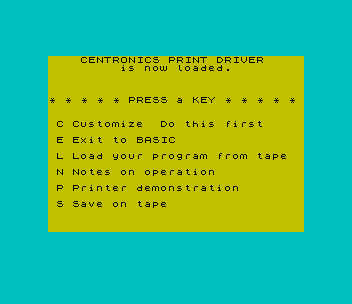
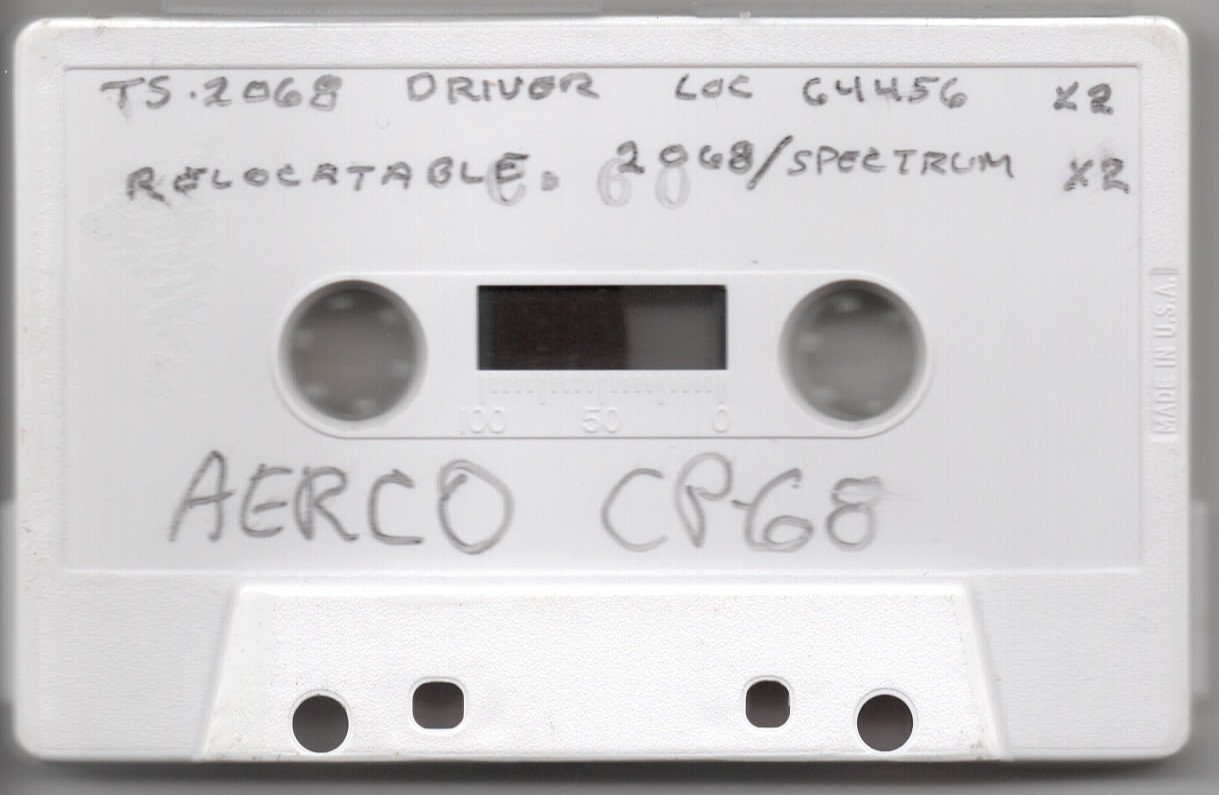
Holds the software for AERCO’s CP-68 Centronics printer interface, which connects the TS2068 to a parallel printer. The main program, PRINT (version 2.1, 12/84), loads a 1111-byte driver at 64456 and points the printer channel at it, so LPRINT and LLIST go to the Centronics printer. Its menu customizes screen copies for a list of dot-matrix printers, shows notes on operation, prints a demonstration page, saves a customized copy, or loads your own program from tape. The second program, RALOADER, is a relocatable 800-byte driver that can be loaded at any reasonable address and supports eight printer types.
RALOADER’s REMs identify it as the Relocatable AERCO Centronics Print Driver, version 4T (7-26-85), a fairware program by Jack Dohany. Its help pages say the driver works with either the 2068 or the Spectrum ROM and mention a planned version 5 with left margin, lines per page, word wrap and constant relocatability. The PRINT demonstration screen also advertises AERCO’s dual-channel RS 232 interface, a family of four-axis stepper motor controllers and a floppy disk interface with 64K of RAM that runs CP/M.
Program Analysis
Tape Contents
- BASIC
PRINT(autostart 9990) and CODEPRCODE(1111 bytes at 64456), recorded twice. - BASIC
RALOADER(autostart 8100) and CODERADRIVER(800 bytes at 64000), also recorded twice. Both copies have the same listing. The second is larger because it was saved with more variables.
- Line 9992 runs
CLEAR 64455, POKEs the driver entry point 64461 into 26703/26704 (the output address of the TS2068’s printer channel), sets text mode, width 80 and no linefeed, and loadsPRCODE. - Lines 1–29: the menu. C customizes, E exits to BASIC, L loads a program from tape, N shows notes, P prints a demonstration and S saves the driver.
- Lines 9034–9070: the notes.
POKE 64456,1expands keyword tokens andPOKE 64456,0sends characters literally for control codes and bit-image graphics.POKE 64459sets the width andPOKE 64460the linefeed after carriage return. POKEs to 26703/26704 switch between the TS2040 and the Centronics printer, andLPRINT CHR$ 1copies the screen. - Lines 9100–9199: the demonstration asks for the printer width, shows the AERCO advertisement, then
LPRINTs a page of humorous "Laws of Computer Programming" andLLISTs the program. - Lines 9800–9870: customization menu covering the Gorilla Banana and Seikosha GP100, Prowriter 8510, Star Gemini 10X and older Epsons, newer Epsons and the Mannesmann Tally Spirit 80, Olivetti PR 2300 zoom and normal modes, and the Seikosha GP250X. Each choice POKEs that printer’s escape sequences into the screen-copy routine.
- Lines 9981–9998: REM-documented entry points for saving the driver (
GOTO 9984) and for initializing it (GOTO 9990).
RALOADER
- Lines 8100–8212:
CLEAR 63999, loadRADRIVERat 64000 and offer to make and verify a backup. - Lines 8900–9150: the main menu shows the width and linefeed settings and offers help, width, linefeed, save, test and quit, plus printer types 1–8. The current type is shown in inverse.
- Lines 9400–9498: each printer type POKEs escape sequences into tables at offsets from the driver base, some of them read from DATA.
- Lines 9500–9692: the test menu runs
LPRINT,LLIST, a TS2040COPYor the driver’s own copy routine on a test pattern of crossing lines and circles. - Lines 9700–9798: paged help covering loading at any base address,
RANDOMIZE USR baseto turn the driver on andbase+2to turn it off,base+450for a screen copy,base+612for the Olivetti PR2300 copy, and the width and linefeed POKEs. - Lines 9900–9920: save the customized driver under a name of your choice.
Notable Techniques
- Both drivers attach to the ROM’s printer channel by changing the output address at 26703/26704, so existing
LPRINTandLLISTstatements work unchanged. - Once customized, PRINT runs the TS2068 command
DELETE 3,3: DELETE 9867,9867, which removes the flashing "Do this first" prompt and then the line that did the deleting. - The relocatable driver can only be moved until it has been turned on. RALOADER checks two bytes at 64040/64041 before a save or backup, and refuses if they show the driver has already been activated.
Potential Issues
- In PRINT, line 9865 tests
Pr=3.3, which can never be true, and a choice of 0 passes the range check without setting a printer but still deletes line 3. - Menu option N runs
GO TO 9000, but the notes start at line 9034. This works becauseGO TOgoes on to the next existing line.
Image Gallery
Source Code
## Program "PRINT" (autostart 9990)
    1 REM Version 2.1  12/84
    2 BORDER 5: PAPER 6: INK 0: CLS
    3 FLASH 1: PRINT AT 8,14;"Do this first";: FLASH 0
    4 PRINT AT 0,0;"    CENTRONICS PRINT DRIVER              is now loaded.",,,,,,,
    5 PRINT "* * * * * PRESS a KEY * * * * *",,,,,
    6 PRINT " C Customize "
    8 PRINT AT 10,0;" E Exit to BASIC",,,
   10 PRINT " L Load your program from tape",,,
   11 PRINT " N Notes on operation",,,
   12 PRINT " P Printer demonstration",,,
   14 PRINT " S Save on tape"
   15 IF INKEY$="" THEN GO TO 15
   17 LET C$=INKEY$
   18 IF C$(1)="C" OR C$(1)="c" THEN GO TO 9800
   19 IF C$(1)="E" OR C$(1)="e" THEN CLS : PRINT "Timex BASIC awaiting Keyboard   entry ";: FLASH 1: PRINT "K";: FLASH 0: STOP
   21 IF C$(1)="L" OR C$(1)="l" THEN GO TO 9998
   23 IF C$(1)="S" OR C$(1)="s" THEN SAVE "PRINT" LINE 9990: SAVE "PRCODE"CODE 64456,1111
   25 IF C$(1)="P" OR C$(1)="p" THEN GO TO 9100
   27 IF C$(1)="N" OR C$(1)="n" THEN GO TO 9000
   29 GO TO 1
 9034 CLS : PRINT "The PRINT driver has 2 basic    modes. The default mode is for  use with the TIMEX BASIC system and automatically expands all   tokens as they are encountered.                                 Select this mode by             POKE 64456,1                                                    The other mode is LITERAL where characters are sent directly to the printer with no changes madeto them. Use the LITERAL mode tosend control characters to the  printer and for bit mapped      graphics.                                                       Select this mode by             POKE 64456,0"
 9040 GO SUB 9090
 9042 CLS : PRINT "To set the width of the printer:POKE 64459,width-1"
 9044 PRINT ,,,,"To send LINE FEED after CARRIAGERETURN: POKE 64460,10"
 9046 PRINT ,,,,"To suppress LINE FEED after     CARRIAGE RETURN: POKE 64460,0"
 9048 PRINT ,,,,"To select Timex 2040 printer:   POKE 26703,0; POKE 26704,5"
 9050 PRINT ,,,,"To select Centronics printer:   POKE 26703,205; POKE 26704,251"
 9055 GO SUB 9090
 9060 CLS : PRINT "To COPY the screen to the       Centronics printer:             LPRINT CHR$ 1"
 9062 PRINT ,,,,"Note that the details of the    COPY command are different for  various brands of printers.     This package needs to be        customized for your printer."
 9064 PRINT ,,,,"Please press the C key from the main menu to customize the      software for your printer."
 9070 GO SUB 9090
 9089 GO TO 1
 9090 FLASH 1: PRINT AT 21,3;"PRESS ANY KEY TO CONTINUE": FLASH 0
 9092 IF INKEY$<>"" THEN GO TO 9092
 9094 IF INKEY$="" THEN GO TO 9094
 9096 PRINT AT 21,3;"                         "
 9098 RETURN
 9100 PRINT AT 19,0;"                                ": FLASH 1: PRINT AT 21,0;"ENTER printer width";: FLASH 0: PRINT "        "
 9105 INPUT W
 9110 POKE 64459,W-1
 9115 CLS : PRINT "Welcome to the world of TIMEX   2068 APPLICATIONS!                                              AERCO currently also  offers a  dual channel RS 232 Serial      Interface, a family of four axisStepper Motor Controllers,      and a Floppy Disc Interface     with 64 K of RAM that runs CPM.                                                                 AERCO  Acme Electric Robot Co.  Box 18093                       Austin, TX 78760                                                (512) 451-5874"
 9118 LPRINT
 9120 LPRINT "LAWS OF COMPUTER PROGRAMMING"
 9122 LPRINT
 9125 LPRINT "Any given program, when running, is obsolete."
 9127 LPRINT
 9130 LPRINT "If a program is useless, it will have to be documented."
 9132 LPRINT
 9135 LPRINT "If a program is useful, it will have to be changed."
 9137 LPRINT
 9140 LPRINT "Any program will expand to fill all available memory."
 9142 LPRINT
 9145 LPRINT "The value of a program is proportional to the weight of it's output."
 9147 LPRINT
 9150 LPRINT "Program complexity grows until it exceeds the capability of the programmer to maintain it."
 9152 LPRINT
 9155 LPRINT "Make it possible for programmers to write in English and you will find that programmers cannot write in English."
 9157 LPRINT
 9160 LPRINT "If builders built buildings the way programmers wrote programs, then the first woodpecker that came along would destroy civilization."
 9162 LPRINT
 9165 LPRINT "Inside every large program is a small program struggling to get out."
 9167 LPRINT
 9170 LPRINT "The attention span of a computer is only as long as its power cord."
 9172 LPRINT
 9175 LPRINT "If a test installation functions perfectly, all subsequent systems will malfunction."
 9177 LPRINT
 9180 LPRINT "Not until a program has been in production for at least six months will the most harmful error be discovered."
 9182 LPRINT
 9185 LPRINT "One good reason that computers can do more work than people is that they never have to stop and answer the telephone."
 9187 LPRINT
 9190 LPRINT "If you put tomfoolery in a computer nothing comes out but tomfoolery. But this tomfoolery, having passed through a very expensive machine, is somehow enobled and none dare criticize it."
 9192 LPRINT ,,,,,,,,
 9195 LLIST
 9199 GO TO 1
 9800 CLS : PRINT " This program needs to be told   what kind of printer you have   in order to properly COPY the   screen.",,,,
 9802 PRINT "If you do not have a dot matrix printer with BIT MAPPED GRAPHIC capability, you cannot COPY the screen. LPRINT and LLIST should still work fine on your printer.",,,,
 9804 PRINT "In order to COPY the screen,    use the command LPRINT CHR$ 1.                                  Don't forget to change all      references in your programs     from COPY to LPRINT CHR$ 1",,,
 9810 GO SUB 9090
 9815 CLS : FLASH 1: PRINT AT 0,3;"PLEASE SELECT YOUR PRINTER": FLASH 0
 9820 PRINT ,,"Gorrilla Bananna . . . . . . . 1"
 9822 PRINT "Seikosha GP100 . . . . . . . . 1"
 9824 PRINT "Prowriter 8510 . . . . . . . . 2"
 9826 PRINT "Star Gemini  10X . . . . . . . 3"
 9828 PRINT "Epson (All older models) . . . 3"
 9830 PRINT "Epson (All newer models) . . . 4"
 9832 PRINT "Mannesmann Tally Spirit 80 . . 4"
 9833 PRINT "Olivett1  PR 2300 (Zoom) . . . 5"
 9834 PRINT "Olivett1  PR 2300 (Norm) . . . 6"
 9835 PRINT "Seikosha  GP250X . . . . . . . 7"
 9836 PRINT ,,"If your printer is not on this  list, try the various types.                                    Contact AERCO at Box 18093      Austin, TX 78760 for assistance."
 9837 PRINT ,,"Don't forget to SAVE your       customized version on a         DIFFERENT tape. (S on main menu)"
 9840 INPUT Pr
 9845 IF Pr<0 OR Pr>7 THEN GO TO 9815
 9848 IF Pr=1 THEN LET P$="Seikosha 100": GO SUB 9870: POKE 64460,0: POKE 64782,1: POKE 64783,8: POKE 64799,0: POKE 64834,1: POKE 64835,15: POKE 64850,25: POKE 64874,64: POKE 64886,251: POKE 64888,11: POKE 64894,11
 9850 IF Pr=2 THEN LET P$="Prowriter type": GO SUB 9870: POKE 64460,10: POKE 64782,6: POKE 64783,27: POKE 64784,84: POKE 64785,49: POKE 64786,54: POKE 64787,27: POKE 64788,62: POKE 64799,6: POKE 64800,27: POKE 64801,83: POKE 64802,48: POKE 64803,50: POKE 64804,53: POKE 64805,54: POKE 64834,4: POKE 64835,27: POKE 64836,60: POKE 64837,27: POKE 64838,65: POKE 64850,24: POKE 64874,128: POKE 64886,59: POKE 64888,251: POKE 64894,59
 9852 IF Pr=3 THEN LET P$="Gemini type": GO SUB 9870: POKE 64460,10: POKE 64782,3: POKE 64783,27: POKE 64784,51: POKE 64785,16: POKE 64799,4: POKE 64800,27: POKE 64801,75: POKE 64802,0: POKE 64803,1: POKE 64834,2: POKE 64835,27: POKE 64836,64: POKE 64850,24: POKE 64874,1: POKE 64886,35: POKE 64888,195: POKE 64894,35
 9854 IF Pr=4 THEN LET P$="Epson type": GO SUB 9870: POKE 64460,10: POKE 64782,3: POKE 64783,27: POKE 64784,51: POKE 64785,24: POKE 64799,4: POKE 64800,27: POKE 64801,75: POKE 64802,0: POKE 64803,1: POKE 64834,2: POKE 64835,27: POKE 64836,64: POKE 64850,24: POKE 64874,1: POKE 64886,195: POKE 64888,35: POKE 64894,35
 9856 IF Pr=5 THEN LET P$="Olivetti ": POKE 64464,238: POKE 64980,27: POKE 64981,47
 9858 IF Pr=6 THEN LET P$="Olivetti ": POKE 64464,238: POKE 64980,0: POKE 64981,0
 9859 IF Pr=7 THEN LET P$="Seikosha 250": GO SUB 9870: POKE 64460,0: POKE 64782,3: POKE 64783,27: POKE 64784,76: POKE 64785,2: POKE 64799,8: POKE 64800,27: POKE 64801,16: POKE 64802,0: POKE 64803,111: POKE 64804,27: POKE 64805,71: POKE 64806,1: POKE 64807,0: POKE 64834,3: POKE 64835,27: POKE 64836,76: POKE 64837,3: POKE 64850,24: POKE 64874,128: POKE 64886,59: POKE 64888,251: POKE 64894,59
 9865 IF Pr=3.3 THEN GO TO 1
 9867 DELETE 3,3: DELETE 9867,9867
 9869 GO TO 1
 9870 POKE 64464,76: RETURN
 9980 STOP
 9981 REM
 9982 REM   GOTO here to save BASIC program and machine code PRINTDRIVER on tape
 9983 REM
 9984 SAVE "PRINT" LINE 9990: SAVE "PRCODE"CODE 64456,1111
 9985 REM
 9986 REM  Jump to start of your BASIC program
 9987 REM
 9988 PRINT "Copy is completed. GOTO 1 to    make another copy.": STOP
 9989 REM
 9990 REM GOTO here to initialize BASIC and load machine code PRINT DRIVER
 9991 REM
 9992 CLEAR 64455: LET PRINTORG=64461: POKE 26704,INT (PRINTORG/256): POKE 26703,PRINTORG-(INT (PRINTORG/256))*256: POKE 64456,1: POKE 64458,0: POKE 64457,0: POKE 64459,79: LOAD ""CODE 64456,1111
 9993 REM
 9994 REM  Jump to start of your BASIC program
 9995 REM
 9996 GO TO 1
 9998 CLS : PRINT AT 8,0;"Looking for program from tape...",,,,,,,,"Start Tape Recorder": LOAD ""


## Program "PRINT" (autostart 9990)
    1 REM Version 2.1  12/84
    2 BORDER 5: PAPER 6: INK 0: CLS
    3 FLASH 1: PRINT AT 8,14;"Do this first";: FLASH 0
    4 PRINT AT 0,0;"    CENTRONICS PRINT DRIVER              is now loaded.",,,,,,,
    5 PRINT "* * * * * PRESS a KEY * * * * *",,,,,
    6 PRINT " C Customize "
    8 PRINT AT 10,0;" E Exit to BASIC",,,
   10 PRINT " L Load your program from tape",,,
   11 PRINT " N Notes on operation",,,
   12 PRINT " P Printer demonstration",,,
   14 PRINT " S Save on tape"
   15 IF INKEY$="" THEN GO TO 15
   17 LET C$=INKEY$
   18 IF C$(1)="C" OR C$(1)="c" THEN GO TO 9800
   19 IF C$(1)="E" OR C$(1)="e" THEN CLS : PRINT "Timex BASIC awaiting Keyboard   entry ";: FLASH 1: PRINT "K";: FLASH 0: STOP
   21 IF C$(1)="L" OR C$(1)="l" THEN GO TO 9998
   23 IF C$(1)="S" OR C$(1)="s" THEN SAVE "PRINT" LINE 9990: SAVE "PRCODE"CODE 64456,1111
   25 IF C$(1)="P" OR C$(1)="p" THEN GO TO 9100
   27 IF C$(1)="N" OR C$(1)="n" THEN GO TO 9000
   29 GO TO 1
 9034 CLS : PRINT "The PRINT driver has 2 basic    modes. The default mode is for  use with the TIMEX BASIC system and automatically expands all   tokens as they are encountered.                                 Select this mode by             POKE 64456,1                                                    The other mode is LITERAL where characters are sent directly to the printer with no changes madeto them. Use the LITERAL mode tosend control characters to the  printer and for bit mapped      graphics.                                                       Select this mode by             POKE 64456,0"
 9040 GO SUB 9090
 9042 CLS : PRINT "To set the width of the printer:POKE 64459,width-1"
 9044 PRINT ,,,,"To send LINE FEED after CARRIAGERETURN: POKE 64460,10"
 9046 PRINT ,,,,"To suppress LINE FEED after     CARRIAGE RETURN: POKE 64460,0"
 9048 PRINT ,,,,"To select Timex 2040 printer:   POKE 26703,0; POKE 26704,5"
 9050 PRINT ,,,,"To select Centronics printer:   POKE 26703,205; POKE 26704,251"
 9055 GO SUB 9090
 9060 CLS : PRINT "To COPY the screen to the       Centronics printer:             LPRINT CHR$ 1"
 9062 PRINT ,,,,"Note that the details of the    COPY command are different for  various brands of printers.     This package needs to be        customized for your printer."
 9064 PRINT ,,,,"Please press the C key from the main menu to customize the      software for your printer."
 9070 GO SUB 9090
 9089 GO TO 1
 9090 FLASH 1: PRINT AT 21,3;"PRESS ANY KEY TO CONTINUE": FLASH 0
 9092 IF INKEY$<>"" THEN GO TO 9092
 9094 IF INKEY$="" THEN GO TO 9094
 9096 PRINT AT 21,3;"                         "
 9098 RETURN
 9100 PRINT AT 19,0;"                                ": FLASH 1: PRINT AT 21,0;"ENTER printer width";: FLASH 0: PRINT "        "
 9105 INPUT W
 9110 POKE 64459,W-1
 9115 CLS : PRINT "Welcome to the world of TIMEX   2068 APPLICATIONS!                                              AERCO currently also  offers a  dual channel RS 232 Serial      Interface, a family of four axisStepper Motor Controllers,      and a Floppy Disc Interface     with 64 K of RAM that runs CPM.                                                                 AERCO  Acme Electric Robot Co.  Box 18093                       Austin, TX 78760                                                (512) 451-5874"
 9118 LPRINT
 9120 LPRINT "LAWS OF COMPUTER PROGRAMMING"
 9122 LPRINT
 9125 LPRINT "Any given program, when running, is obsolete."
 9127 LPRINT
 9130 LPRINT "If a program is useless, it will have to be documented."
 9132 LPRINT
 9135 LPRINT "If a program is useful, it will have to be changed."
 9137 LPRINT
 9140 LPRINT "Any program will expand to fill all available memory."
 9142 LPRINT
 9145 LPRINT "The value of a program is proportional to the weight of it's output."
 9147 LPRINT
 9150 LPRINT "Program complexity grows until it exceeds the capability of the programmer to maintain it."
 9152 LPRINT
 9155 LPRINT "Make it possible for programmers to write in English and you will find that programmers cannot write in English."
 9157 LPRINT
 9160 LPRINT "If builders built buildings the way programmers wrote programs, then the first woodpecker that came along would destroy civilization."
 9162 LPRINT
 9165 LPRINT "Inside every large program is a small program struggling to get out."
 9167 LPRINT
 9170 LPRINT "The attention span of a computer is only as long as its power cord."
 9172 LPRINT
 9175 LPRINT "If a test installation functions perfectly, all subsequent systems will malfunction."
 9177 LPRINT
 9180 LPRINT "Not until a program has been in production for at least six months will the most harmful error be discovered."
 9182 LPRINT
 9185 LPRINT "One good reason that computers can do more work than people is that they never have to stop and answer the telephone."
 9187 LPRINT
 9190 LPRINT "If you put tomfoolery in a computer nothing comes out but tomfoolery. But this tomfoolery, having passed through a very expensive machine, is somehow enobled and none dare criticize it."
 9192 LPRINT ,,,,,,,,
 9195 LLIST
 9199 GO TO 1
 9800 CLS : PRINT " This program needs to be told   what kind of printer you have   in order to properly COPY the   screen.",,,,
 9802 PRINT "If you do not have a dot matrix printer with BIT MAPPED GRAPHIC capability, you cannot COPY the screen. LPRINT and LLIST should still work fine on your printer.",,,,
 9804 PRINT "In order to COPY the screen,    use the command LPRINT CHR$ 1.                                  Don't forget to change all      references in your programs     from COPY to LPRINT CHR$ 1",,,
 9810 GO SUB 9090
 9815 CLS : FLASH 1: PRINT AT 0,3;"PLEASE SELECT YOUR PRINTER": FLASH 0
 9820 PRINT ,,"Gorrilla Bananna . . . . . . . 1"
 9822 PRINT "Seikosha GP100 . . . . . . . . 1"
 9824 PRINT "Prowriter 8510 . . . . . . . . 2"
 9826 PRINT "Star Gemini  10X . . . . . . . 3"
 9828 PRINT "Epson (All older models) . . . 3"
 9830 PRINT "Epson (All newer models) . . . 4"
 9832 PRINT "Mannesmann Tally Spirit 80 . . 4"
 9833 PRINT "Olivett1  PR 2300 (Zoom) . . . 5"
 9834 PRINT "Olivett1  PR 2300 (Norm) . . . 6"
 9835 PRINT "Seikosha  GP250X . . . . . . . 7"
 9836 PRINT ,,"If your printer is not on this  list, try the various types.                                    Contact AERCO at Box 18093      Austin, TX 78760 for assistance."
 9837 PRINT ,,"Don't forget to SAVE your       customized version on a         DIFFERENT tape. (S on main menu)"
 9840 INPUT Pr
 9845 IF Pr<0 OR Pr>7 THEN GO TO 9815
 9848 IF Pr=1 THEN LET P$="Seikosha 100": GO SUB 9870: POKE 64460,0: POKE 64782,1: POKE 64783,8: POKE 64799,0: POKE 64834,1: POKE 64835,15: POKE 64850,25: POKE 64874,64: POKE 64886,251: POKE 64888,11: POKE 64894,11
 9850 IF Pr=2 THEN LET P$="Prowriter type": GO SUB 9870: POKE 64460,10: POKE 64782,6: POKE 64783,27: POKE 64784,84: POKE 64785,49: POKE 64786,54: POKE 64787,27: POKE 64788,62: POKE 64799,6: POKE 64800,27: POKE 64801,83: POKE 64802,48: POKE 64803,50: POKE 64804,53: POKE 64805,54: POKE 64834,4: POKE 64835,27: POKE 64836,60: POKE 64837,27: POKE 64838,65: POKE 64850,24: POKE 64874,128: POKE 64886,59: POKE 64888,251: POKE 64894,59
 9852 IF Pr=3 THEN LET P$="Gemini type": GO SUB 9870: POKE 64460,10: POKE 64782,3: POKE 64783,27: POKE 64784,51: POKE 64785,16: POKE 64799,4: POKE 64800,27: POKE 64801,75: POKE 64802,0: POKE 64803,1: POKE 64834,2: POKE 64835,27: POKE 64836,64: POKE 64850,24: POKE 64874,1: POKE 64886,35: POKE 64888,195: POKE 64894,35
 9854 IF Pr=4 THEN LET P$="Epson type": GO SUB 9870: POKE 64460,10: POKE 64782,3: POKE 64783,27: POKE 64784,51: POKE 64785,24: POKE 64799,4: POKE 64800,27: POKE 64801,75: POKE 64802,0: POKE 64803,1: POKE 64834,2: POKE 64835,27: POKE 64836,64: POKE 64850,24: POKE 64874,1: POKE 64886,195: POKE 64888,35: POKE 64894,35
 9856 IF Pr=5 THEN LET P$="Olivetti ": POKE 64464,238: POKE 64980,27: POKE 64981,47
 9858 IF Pr=6 THEN LET P$="Olivetti ": POKE 64464,238: POKE 64980,0: POKE 64981,0
 9859 IF Pr=7 THEN LET P$="Seikosha 250": GO SUB 9870: POKE 64460,0: POKE 64782,3: POKE 64783,27: POKE 64784,76: POKE 64785,2: POKE 64799,8: POKE 64800,27: POKE 64801,16: POKE 64802,0: POKE 64803,111: POKE 64804,27: POKE 64805,71: POKE 64806,1: POKE 64807,0: POKE 64834,3: POKE 64835,27: POKE 64836,76: POKE 64837,3: POKE 64850,24: POKE 64874,128: POKE 64886,59: POKE 64888,251: POKE 64894,59
 9865 IF Pr=3.3 THEN GO TO 1
 9867 DELETE 3,3: DELETE 9867,9867
 9869 GO TO 1
 9870 POKE 64464,76: RETURN
 9980 STOP
 9981 REM
 9982 REM   GOTO here to save BASIC program and machine code PRINTDRIVER on tape
 9983 REM
 9984 SAVE "PRINT" LINE 9990: SAVE "PRCODE"CODE 64456,1111
 9985 REM
 9986 REM  Jump to start of your BASIC program
 9987 REM
 9988 PRINT "Copy is completed. GOTO 1 to    make another copy.": STOP
 9989 REM
 9990 REM GOTO here to initialize BASIC and load machine code PRINT DRIVER
 9991 REM
 9992 CLEAR 64455: LET PRINTORG=64461: POKE 26704,INT (PRINTORG/256): POKE 26703,PRINTORG-(INT (PRINTORG/256))*256: POKE 64456,1: POKE 64458,0: POKE 64457,0: POKE 64459,79: LOAD ""CODE 64456,1111
 9993 REM
 9994 REM  Jump to start of your BASIC program
 9995 REM
 9996 GO TO 1
 9998 CLS : PRINT AT 8,0;"Looking for program from tape...",,,,,,,,"Start Tape Recorder": LOAD ""


## Program "RALOADER" (autostart 8100)
 8000 LET B=64000: LET BASE=B: GO TO 8900
 8010 REM RELOCATABLE AERCO
 8014 REM CENTRONICS PRINT DRIVER
 8016 REM VERSION 4T (7-26-85)
 8018
 8020 REM **A FAIRWARE PROGRAM**
 8022 REM **COPYING IS WELCOME**
 8024
 8026 REM IF YOU LIKE THIS            PROGRAM, PLEASE SEND $5.00      TO THE AUTHOR:
 8028
 8030 REM  JACK DOHANY
 8032 REM  325 O'CONNOR ST.
 8034 REM  MENLO PARK, CA  94025
 8036 REM  [phone removed]
 8038
 8040
 8090 CLS : PRINT "**RELOCATABLE AERCO DRIVER  V4**": RETURN
 8100 REM LOAD MC
 8101 CLEAR 63999
 8102 BORDER 0: PAPER 0: INK 7: GO SUB 8090: PRINT AT 10,0;"LOADING 800-BYTE DRIVER CODE"'" AT LOC 64000 FOR CUSTOMIZING."
 8104 LOAD "RADRIVER"CODE 64000
 8106 LET B=64000: LET BASE=B
 8108 GO SUB 8090
 8110 INPUT "MAKE BACKUP? (Y/N): ";Q$: IF Q$="" THEN GO TO 8110
 8112 IF Q$="Y" OR Q$="y" THEN GO TO 8200
 8114 IF q$="n" OR q$="N" THEN GO TO 8900
 8116 GO TO 8110
 8200 REM BACKUP
 8204 IF PEEK 64040<>8 OR PEEK 64041<>0 THEN GO TO 9920
 8208 GO SUB 8090: PRINT AT 10,0;"MAKING TWO-PART BACKUP": SAVE "RALOADER" LINE 8100: BEEP .1,10: SAVE "RADRIVER"CODE 64000,800
 8210 GO SUB 8090: PRINT AT 10,0;"REWIND and PLAY to VERIFY"''"or BREAK and RUN."
 8212 VERIFY "": VERIFY ""CODE : GO TO 8108
 8900 REM INITIALIZE
 8905 LET k$=""
 8906 LET L$="OFF": IF PEEK (B+5)=10 THEN LET L$="ON "
 8908 LET width=1+PEEK (B+4)
 8910 LET TA=B+388: LET TG=B+405: LET TT=B+440
 8912 LET l1=b+456: LET l2=b+480: LET l3=b+492: LET l4=b+494: LET l5=b+500: LET l6=b+586: LET l7=b+587
 8914 LET c1=b+450: LET c2=b+612
 8920 GO SUB 9490: LET typ=2
 8954 GO TO 9000
 9000 REM MAIN MENU
 9050 CLS : PRINT TAB 6;"*** MAIN MENU ***"
 9052 PRINT '"H: HELP (INSTRUCTIONS)"''"W: SET WIDTH";TAB 20;"-NOW ";width;'"L: LINEFEED SWITCH";TAB 20;"-NOW": GO SUB 9226
 9060 PRINT "S: SAVE CUSTOMIZED DRIVER"'"T: TEST CUSTOMIZED DRIVER"'"Q: QUIT"
 9070 PRINT AT 10,5;" TO CUSTOMISE DRIVER "'"PLEASE SELECT YOUR PRINTER TYPE:"''" 1: Seikosha GP100"'" 2: Prowriter 8510"'" 3: Star Gemini, older Epsons"'" 4: Newer Epsons"'" 5: Olivetti PR2300 Zoom"'" 6: Olivetti PR2300 Normal"'" 7: Seikosha 250"
 9073 PRINT " 8: MT Spirit 80"
 9074 PRINT AT 12+typ,1; INVERSE 1;typ
 9100 PRINT #1;AT 1,4;"** Please press a key ** "
 9110 IF k$=INKEY$ THEN GO TO 9110
 9112 IF INKEY$="" THEN GO TO 9112
 9114 LET k$=INKEY$: BEEP .01,25
 9116 IF k$>"`" THEN LET k$=CHR$ (CODE k$-32)
 9120 IF K$="H" THEN GO TO 9700
 9122 IF k$="W" THEN GO TO 9230
 9124 IF k$="L" THEN GO TO 9220
 9128 IF k$="S" THEN GO TO 9900
 9130 IF K$="T" THEN GO TO 9500
 9132 IF k$="Q" THEN CLS : PRINT AT 10,9;" OK TO RUN ": STOP
 9134 IF k$="1" THEN GO TO 9410
 9135 IF k$="2" THEN GO TO 9420
 9136 IF k$="3" THEN GO TO 9430
 9137 IF k$="4" THEN GO TO 9440
 9138 IF k$="5" THEN GO TO 9450
 9139 IF k$="6" THEN GO TO 9460
 9140 IF k$="7" THEN GO TO 9470
 9141 IF k$="8" THEN GO TO 9480
 9150 GO TO 9110
 9220 IF PEEK (b+5)=0 THEN POKE b+5,10: GO TO 9224
 9222 POKE b+5,0
 9224 GO SUB 9226: GO TO 9110
 9226 LET L$="OFF": IF PEEK (b+5)=10 THEN LET L$="ON "
 9228 PRINT AT 5,25; INVERSE 1;L$: RETURN
 9230 INPUT "WIDTH: "; LINE q$: IF q$="" THEN GO TO 9100
 9231 FOR i=1 TO LEN q$
 9232 IF q$(i)<"0" OR q$(i)>"9" THEN GO TO 9230
 9233 NEXT i
 9235 IF VAL q$<2 OR VAL q$>255 THEN GO TO 9230
 9236 LET width=VAL q$: POKE b+4,width-1: PRINT AT 4,25;width;"   ": GO TO 9100
 9400 REM TYPES
 9402 LET copy=c1: RETURN
 9404 LET copy=c2: RETURN
 9410 REM type 1
 9412 GO SUB 9402: POKE TA,1: POKE TA+1,8: POKE TG,0: POKE TT,1: POKE TT+1,15: POKE L1,25: POKE L2,64: POKE L3,251: POKE L4,11: POKE L5,11
 9415 PRINT AT 12+typ,1;typ: LET typ=CODE k$-48: PRINT AT 12+typ,1; INVERSE 1;typ: GO TO 9100
 9416 GO TO 9100
 9420 REM type 2
 9422 GO SUB 9490: GO TO 9415
 9430 REM type 3
 9432 GO SUB 9435: GO TO 9415
 9435 GO SUB 9402: RESTORE 9438: FOR i=TA TO TA+3: READ by: POKE i,by: NEXT i: FOR i=TG TO TG+4: READ by: POKE i,by: NEXT i: FOR i=TT TO TT+2: READ by: POKE i,by: NEXT i
 9436 POKE L1,24: POKE L2,1: POKE L3,35: POKE L4,195: POKE L5,35: RETURN
 9438 DATA 3,27,51,16,4,27,75,0,1,2,27,64
 9440 REM type 4
 9442 GO SUB 9435: POKE TA+3,24
 9446 GO TO 9415
 9450 REM type 5
 9452 GO SUB 9404: POKE L6,27: POKE L7,47: GO TO 9415
 9460 REM type 6
 9462 GO SUB 9404: POKE L6,0: POKE L7,0: GO TO 9415
 9470 REM type 7
 9471 GO SUB 9402
 9472 RESTORE 9478: FOR i=TA TO TA+3: READ by: POKE i,by: NEXT i: FOR i=TG TO TG+8: READ by: POKE i,by: NEXT i: FOR i=TT TO TT+3: READ by: POKE i,by: NEXT i
 9474 POKE L1,24: POKE L2,128: POKE L3,59: POKE L4,251: POKE L5,59
 9476 GO TO 9415
 9478 DATA 3,27,76,2,8,27,16,0,111,27,71,1,0,3,27,76,3
 9480 REM TYPE 8
 9482 GO SUB 9435: POKE TA+3,21
 9484 GO TO 9415
 9490 REM initialize (type 2)
 9491 GO SUB 9402
 9493 RESTORE 9498: FOR i=TA TO TA+6: READ by: POKE i,by: NEXT i: FOR i=TG TO TG+6: READ by: POKE i,by: NEXT i: FOR i=TT TO TT+4: READ by: POKE i,by: NEXT i
 9494 POKE L1,24: POKE L2,128: POKE L3,59: POKE L4,251: POKE L5,59
 9495 RETURN
 9498 DATA 6,27,84,49,54,27,62,6,27,83,48,50,53,54,4,27,60,27,65
 9500 REM TEST
 9510 CLS : PRINT TAB 10;"** TEST **"''"1: LPRINT"''"2: LLIST"''"3: COPY (to T/S 2040)"''"4: COPY (RANDOMIZE USR ";copy;")"''"0: RETURN TO MAIN MENU"
 9512 PRINT '"NOTE: TESTING WILL TURN THE"'"DRIVER ON AND MAKE IT NO LONGER"'"RELOCATABLE."
 9515 INPUT Q$: IF Q$="" THEN GO TO 9515
 9520 IF Q$="0" THEN GO TO 9000
 9522 IF Q$="1" OR Q$="2" OR Q$="4" THEN RANDOMIZE USR BASE
 9523 IF Q$="1" THEN GO TO 9610
 9524 IF Q$="2" THEN GO TO 9620
 9525 IF Q$="3" THEN GO TO 9630
 9526 IF Q$="4" THEN GO TO 9640
 9530 GO TO 9515
 9610 REM LPRINT
 9612 CLS : LET Q$="This is a test."+CHR$ 13+"Linefeed Switch is "+L$+"."+CHR$ 13+"End of test."
 9614 PRINT q$: LPRINT q$
 9616 PAUSE 200: GO TO 9500
 9620 REM LLIST
 9624 LLIST 9700: GO TO 9500
 9630 REM COPY 2040
 9632 GO SUB 9680: COPY : GO TO 9616
 9640 REM COPY AERCO
 9644 GO SUB 9680: RANDOMIZE USR copy: PAUSE 200: GO TO 9500
 9680 CLS : FOR f=0 TO 174 STEP 2: PLOT 0,f: DRAW OVER 1;f,174-f: PLOT 255,f: DRAW OVER 1;-f,174-f: NEXT f
 9682 FOR f=0 TO 174 STEP 2: PLOT 0,f: DRAW OVER 1;174-f,-f: PLOT 255,f: DRAW OVER 1;-174+f,-f: NEXT f
 9690 PLOT 0,0: DRAW 0,175: DRAW 255,0: DRAW 0,-175: DRAW -255,0: FOR i=20 TO 70 STEP 10: CIRCLE 127,87,i: NEXT i
 9692 RETURN
 9700 REM HELP
 9701 LET q$="": GO SUB 8090
 9702 PRINT '"PLEASE FOLLOW THIS SEQUENCE:"''"1. CUSTOMIZE DRIVER."'"2. SAVE IT."'"3. THEN TEST IT."
 9703 PRINT '"TO USE YOUR CUSTOMIZED DRIVER,"'"SIMPLY LOAD IT TO ANY REASONABLE"'"BASE ADDRESS WITH THIS COMMAND:"''"LOAD ""NAME"" CODE base"''"WHERE base IS THE BASE ADDRESS"'"OF YOUR CHOICE."''"THEN TURN THE DRIVER ON WITH:"''"RANDOMISE USR base"
 9704 LET ret=9705: GO TO 9790
 9705 PRINT '"The driver is 800 bytes long."''"The driver will work with either"'"ROM, 2068 or Spectrum."''"NOTE: THE CUSTOMIZED DRIVER IS"'"RELOCATABLE, BUT ONLY UNTIL IT"'"HAS BEEN TURNED ON."
 9706 PRINT '"THE DRIVER MAY BE TURNED ON AND"'"OFF REPEATEDLY, BUT TURNING IT"'"OFF DOES NOT RESTORE ITS"'"RELOCATABILITY."
 9707 LET ret=9708: GO TO 9790
 9708 PRINT '"The print driver shouldn't be"'"turned on until after it's been"'"CUSTOMIZED and SAVED from"'"the MENU."
 9709 PRINT '"You can then leave it where it"'"is (64000-64799) or load it to"'"another base address with:"''"CLEAR base-1           e.g.62999"'"LOAD ""NAME"" CODE base  e.g.63000"
 9710 PRINT '"To turn the driver ON:"''"RANDOMIZE USR base     e.g.63000"''"Note that the driver is now at"'"64000, so you'd turn it on with"'"RANDOMIZE USR 64000"
 9714 LET RET=9720: GO TO 9790
 9720 PRINT '"   IMPORTANT DRIVER CONTROLS:   "''"POKE (BASE+4),WIDTH-1"''"POKE (BASE+5),10 = LINEFEED ON"'"POKE (BASE+5),0  = LINEFEED OFF"
 9722 PRINT '"RANDOMIZE USR BASE = TURN ON"''"RANDOMIZE USR (BASE+2)= TURN OFF"
 9724 PRINT '"RANDOMIZE USR (BASE+450) = COPY"'"(EXCEPT PR2300 PRINTER)"
 9730 LET RET=9731: GO TO 9790
 9731 PRINT '"The OLIVETTI PR2300 printer"'"uses a unique copy function:"''"TO SET NORMAL MODE:"'"POKE (base+586),0"'"POKE (base+587),0"
 9732 PRINT '"TO SET ZOOM MODE:"'"POKE (base+586),27"'"POKE (base+587),47"''"TO COPY SCREEN TO PR2300:"'"RANDOMIZE USR (base+612)"
 9735 LET RET=9736: GO TO 9790
 9736 PRINT '"The menu can be used to set the"'"two print parameters:"'"WIDTH and LINEFEED SWITCH."
 9737 PRINT '"These can also be changed"'"directly as follows:"''"TO SET WIDTH:"'"POKE base+4, width-1"
 9738 PRINT ''"TO TURN LINEFEED SWITCH ON/OFF:"'"POKE base+5, 10 (ON) or 0 (OFF)"
 9739 PRINT ''"EXAMPLE: say the driver is"'"loaded at 60000 and you want the"'"printing width to be 80 columns:"'"POKE 60004,79 will do it."
 9740 LET RET=9742: GO TO 9790
 9742 PRINT '"NOTE: If the Auto-Linefeed DIP"'"switch on your printer is OFF"'"then the driver's linefeed"'"switch should be ON, and vice-"'"versa."
 9743 PRINT ''"NOTE RE COPY FUNCTION:"'"If your printer doesn't have"'"BIT-IMAGE GRAPHICS CAPABILITY,"'"then it cannot copy the screen."
 9744 PRINT '"If your dot-matrix printer is"'"not among the types listed, you"'"can try various types."'"For further assistance, contact"'"AERCO (512)451-5874"
 9746 LET ret=9748: GO TO 9790
 9748 PRINT '"For further help in using the"'"Relocatable Print Driver, call"'"or write:"''"Jack Dohany"'"[address removed]"
 9749 PRINT '"Note that Version 5 is now being"'"worked on. Features:"'". Set Left Margin"'". Set Lines Per Page"'". Word Wrap"'". Constant Relocatability"''"Enquire re price/availability."
 9750 LET RET=9700: GO TO 9790
 9790 PRINT #1;AT 0,0;"menu  copy(2040)  ENT=next pg"
 9791 IF q$=INKEY$ THEN GO TO 9791
 9792 IF INKEY$="" THEN GO TO 9792
 9793 LET q$=INKEY$
 9795 IF q$="c" OR q$="C" THEN COPY : GO TO 9790
 9796 IF q$=CHR$ 13 THEN GO SUB 8090: GO TO ret
 9797 IF q$="M" OR q$="m" THEN GO TO 9000
 9798 GO TO 9790
 9900 REM SAVE
 9902 IF PEEK 64040<>8 OR PEEK 64041<>0 THEN GO TO 9920
 9905 INPUT "FILE NAME: ";f$: IF f$="" THEN GO TO 9905
 9906 SAVE f$CODE 64000,800
 9908 INPUT "VERIFY? (y/n): ";q$: IF q$="" THEN GO TO 9908
 9910 IF q$="y" OR q$="Y" THEN VERIFY ""CODE : GO TO 9000
 9912 IF q$="n" OR q$="N" THEN GO TO 9000
 9914 GO TO 9908
 9920 CLS : PRINT AT 10,0;"DRIVER HAS BEEN TURNED ON AND IS"'"NO LONGER RELOCATABLE."''"PLEASE RELOAD ORIGINAL DRIVER,"'"CUSTOMIZE, SAVE, AND RELOAD": STOP


## Program "RALOADER" (autostart 8100)
 8000 LET B=64000: LET BASE=B: GO TO 8900
 8010 REM RELOCATABLE AERCO
 8014 REM CENTRONICS PRINT DRIVER
 8016 REM VERSION 4T (7-26-85)
 8018
 8020 REM **A FAIRWARE PROGRAM**
 8022 REM **COPYING IS WELCOME**
 8024
 8026 REM IF YOU LIKE THIS            PROGRAM, PLEASE SEND $5.00      TO THE AUTHOR:
 8028
 8030 REM  JACK DOHANY
 8032 REM  325 O'CONNOR ST.
 8034 REM  MENLO PARK, CA  94025
 8036 REM  [phone removed]
 8038
 8040
 8090 CLS : PRINT "**RELOCATABLE AERCO DRIVER  V4**": RETURN
 8100 REM LOAD MC
 8101 CLEAR 63999
 8102 BORDER 0: PAPER 0: INK 7: GO SUB 8090: PRINT AT 10,0;"LOADING 800-BYTE DRIVER CODE"'" AT LOC 64000 FOR CUSTOMIZING."
 8104 LOAD "RADRIVER"CODE 64000
 8106 LET B=64000: LET BASE=B
 8108 GO SUB 8090
 8110 INPUT "MAKE BACKUP? (Y/N): ";Q$: IF Q$="" THEN GO TO 8110
 8112 IF Q$="Y" OR Q$="y" THEN GO TO 8200
 8114 IF q$="n" OR q$="N" THEN GO TO 8900
 8116 GO TO 8110
 8200 REM BACKUP
 8204 IF PEEK 64040<>8 OR PEEK 64041<>0 THEN GO TO 9920
 8208 GO SUB 8090: PRINT AT 10,0;"MAKING TWO-PART BACKUP": SAVE "RALOADER" LINE 8100: BEEP .1,10: SAVE "RADRIVER"CODE 64000,800
 8210 GO SUB 8090: PRINT AT 10,0;"REWIND and PLAY to VERIFY"''"or BREAK and RUN."
 8212 VERIFY "": VERIFY ""CODE : GO TO 8108
 8900 REM INITIALIZE
 8905 LET k$=""
 8906 LET L$="OFF": IF PEEK (B+5)=10 THEN LET L$="ON "
 8908 LET width=1+PEEK (B+4)
 8910 LET TA=B+388: LET TG=B+405: LET TT=B+440
 8912 LET l1=b+456: LET l2=b+480: LET l3=b+492: LET l4=b+494: LET l5=b+500: LET l6=b+586: LET l7=b+587
 8914 LET c1=b+450: LET c2=b+612
 8920 GO SUB 9490: LET typ=2
 8954 GO TO 9000
 9000 REM MAIN MENU
 9050 CLS : PRINT TAB 6;"*** MAIN MENU ***"
 9052 PRINT '"H: HELP (INSTRUCTIONS)"''"W: SET WIDTH";TAB 20;"-NOW ";width;'"L: LINEFEED SWITCH";TAB 20;"-NOW": GO SUB 9226
 9060 PRINT "S: SAVE CUSTOMIZED DRIVER"'"T: TEST CUSTOMIZED DRIVER"'"Q: QUIT"
 9070 PRINT AT 10,5;" TO CUSTOMISE DRIVER "'"PLEASE SELECT YOUR PRINTER TYPE:"''" 1: Seikosha GP100"'" 2: Prowriter 8510"'" 3: Star Gemini, older Epsons"'" 4: Newer Epsons"'" 5: Olivetti PR2300 Zoom"'" 6: Olivetti PR2300 Normal"'" 7: Seikosha 250"
 9073 PRINT " 8: MT Spirit 80"
 9074 PRINT AT 12+typ,1; INVERSE 1;typ
 9100 PRINT #1;AT 1,4;"** Please press a key ** "
 9110 IF k$=INKEY$ THEN GO TO 9110
 9112 IF INKEY$="" THEN GO TO 9112
 9114 LET k$=INKEY$: BEEP .01,25
 9116 IF k$>"`" THEN LET k$=CHR$ (CODE k$-32)
 9120 IF K$="H" THEN GO TO 9700
 9122 IF k$="W" THEN GO TO 9230
 9124 IF k$="L" THEN GO TO 9220
 9128 IF k$="S" THEN GO TO 9900
 9130 IF K$="T" THEN GO TO 9500
 9132 IF k$="Q" THEN CLS : PRINT AT 10,9;" OK TO RUN ": STOP
 9134 IF k$="1" THEN GO TO 9410
 9135 IF k$="2" THEN GO TO 9420
 9136 IF k$="3" THEN GO TO 9430
 9137 IF k$="4" THEN GO TO 9440
 9138 IF k$="5" THEN GO TO 9450
 9139 IF k$="6" THEN GO TO 9460
 9140 IF k$="7" THEN GO TO 9470
 9141 IF k$="8" THEN GO TO 9480
 9150 GO TO 9110
 9220 IF PEEK (b+5)=0 THEN POKE b+5,10: GO TO 9224
 9222 POKE b+5,0
 9224 GO SUB 9226: GO TO 9110
 9226 LET L$="OFF": IF PEEK (b+5)=10 THEN LET L$="ON "
 9228 PRINT AT 5,25; INVERSE 1;L$: RETURN
 9230 INPUT "WIDTH: "; LINE q$: IF q$="" THEN GO TO 9100
 9231 FOR i=1 TO LEN q$
 9232 IF q$(i)<"0" OR q$(i)>"9" THEN GO TO 9230
 9233 NEXT i
 9235 IF VAL q$<2 OR VAL q$>255 THEN GO TO 9230
 9236 LET width=VAL q$: POKE b+4,width-1: PRINT AT 4,25;width;"   ": GO TO 9100
 9400 REM TYPES
 9402 LET copy=c1: RETURN
 9404 LET copy=c2: RETURN
 9410 REM type 1
 9412 GO SUB 9402: POKE TA,1: POKE TA+1,8: POKE TG,0: POKE TT,1: POKE TT+1,15: POKE L1,25: POKE L2,64: POKE L3,251: POKE L4,11: POKE L5,11
 9415 PRINT AT 12+typ,1;typ: LET typ=CODE k$-48: PRINT AT 12+typ,1; INVERSE 1;typ: GO TO 9100
 9416 GO TO 9100
 9420 REM type 2
 9422 GO SUB 9490: GO TO 9415
 9430 REM type 3
 9432 GO SUB 9435: GO TO 9415
 9435 GO SUB 9402: RESTORE 9438: FOR i=TA TO TA+3: READ by: POKE i,by: NEXT i: FOR i=TG TO TG+4: READ by: POKE i,by: NEXT i: FOR i=TT TO TT+2: READ by: POKE i,by: NEXT i
 9436 POKE L1,24: POKE L2,1: POKE L3,35: POKE L4,195: POKE L5,35: RETURN
 9438 DATA 3,27,51,16,4,27,75,0,1,2,27,64
 9440 REM type 4
 9442 GO SUB 9435: POKE TA+3,24
 9446 GO TO 9415
 9450 REM type 5
 9452 GO SUB 9404: POKE L6,27: POKE L7,47: GO TO 9415
 9460 REM type 6
 9462 GO SUB 9404: POKE L6,0: POKE L7,0: GO TO 9415
 9470 REM type 7
 9471 GO SUB 9402
 9472 RESTORE 9478: FOR i=TA TO TA+3: READ by: POKE i,by: NEXT i: FOR i=TG TO TG+8: READ by: POKE i,by: NEXT i: FOR i=TT TO TT+3: READ by: POKE i,by: NEXT i
 9474 POKE L1,24: POKE L2,128: POKE L3,59: POKE L4,251: POKE L5,59
 9476 GO TO 9415
 9478 DATA 3,27,76,2,8,27,16,0,111,27,71,1,0,3,27,76,3
 9480 REM TYPE 8
 9482 GO SUB 9435: POKE TA+3,21
 9484 GO TO 9415
 9490 REM initialize (type 2)
 9491 GO SUB 9402
 9493 RESTORE 9498: FOR i=TA TO TA+6: READ by: POKE i,by: NEXT i: FOR i=TG TO TG+6: READ by: POKE i,by: NEXT i: FOR i=TT TO TT+4: READ by: POKE i,by: NEXT i
 9494 POKE L1,24: POKE L2,128: POKE L3,59: POKE L4,251: POKE L5,59
 9495 RETURN
 9498 DATA 6,27,84,49,54,27,62,6,27,83,48,50,53,54,4,27,60,27,65
 9500 REM TEST
 9510 CLS : PRINT TAB 10;"** TEST **"''"1: LPRINT"''"2: LLIST"''"3: COPY (to T/S 2040)"''"4: COPY (RANDOMIZE USR ";copy;")"''"0: RETURN TO MAIN MENU"
 9512 PRINT '"NOTE: TESTING WILL TURN THE"'"DRIVER ON AND MAKE IT NO LONGER"'"RELOCATABLE."
 9515 INPUT Q$: IF Q$="" THEN GO TO 9515
 9520 IF Q$="0" THEN GO TO 9000
 9522 IF Q$="1" OR Q$="2" OR Q$="4" THEN RANDOMIZE USR BASE
 9523 IF Q$="1" THEN GO TO 9610
 9524 IF Q$="2" THEN GO TO 9620
 9525 IF Q$="3" THEN GO TO 9630
 9526 IF Q$="4" THEN GO TO 9640
 9530 GO TO 9515
 9610 REM LPRINT
 9612 CLS : LET Q$="This is a test."+CHR$ 13+"Linefeed Switch is "+L$+"."+CHR$ 13+"End of test."
 9614 PRINT q$: LPRINT q$
 9616 PAUSE 200: GO TO 9500
 9620 REM LLIST
 9624 LLIST 9700: GO TO 9500
 9630 REM COPY 2040
 9632 GO SUB 9680: COPY : GO TO 9616
 9640 REM COPY AERCO
 9644 GO SUB 9680: RANDOMIZE USR copy: PAUSE 200: GO TO 9500
 9680 CLS : FOR f=0 TO 174 STEP 2: PLOT 0,f: DRAW OVER 1;f,174-f: PLOT 255,f: DRAW OVER 1;-f,174-f: NEXT f
 9682 FOR f=0 TO 174 STEP 2: PLOT 0,f: DRAW OVER 1;174-f,-f: PLOT 255,f: DRAW OVER 1;-174+f,-f: NEXT f
 9690 PLOT 0,0: DRAW 0,175: DRAW 255,0: DRAW 0,-175: DRAW -255,0: FOR i=20 TO 70 STEP 10: CIRCLE 127,87,i: NEXT i
 9692 RETURN
 9700 REM HELP
 9701 LET q$="": GO SUB 8090
 9702 PRINT '"PLEASE FOLLOW THIS SEQUENCE:"''"1. CUSTOMIZE DRIVER."'"2. SAVE IT."'"3. THEN TEST IT."
 9703 PRINT '"TO USE YOUR CUSTOMIZED DRIVER,"'"SIMPLY LOAD IT TO ANY REASONABLE"'"BASE ADDRESS WITH THIS COMMAND:"''"LOAD ""NAME"" CODE base"''"WHERE base IS THE BASE ADDRESS"'"OF YOUR CHOICE."''"THEN TURN THE DRIVER ON WITH:"''"RANDOMISE USR base"
 9704 LET ret=9705: GO TO 9790
 9705 PRINT '"The driver is 800 bytes long."''"The driver will work with either"'"ROM, 2068 or Spectrum."''"NOTE: THE CUSTOMIZED DRIVER IS"'"RELOCATABLE, BUT ONLY UNTIL IT"'"HAS BEEN TURNED ON."
 9706 PRINT '"THE DRIVER MAY BE TURNED ON AND"'"OFF REPEATEDLY, BUT TURNING IT"'"OFF DOES NOT RESTORE ITS"'"RELOCATABILITY."
 9707 LET ret=9708: GO TO 9790
 9708 PRINT '"The print driver shouldn't be"'"turned on until after it's been"'"CUSTOMIZED and SAVED from"'"the MENU."
 9709 PRINT '"You can then leave it where it"'"is (64000-64799) or load it to"'"another base address with:"''"CLEAR base-1           e.g.62999"'"LOAD ""NAME"" CODE base  e.g.63000"
 9710 PRINT '"To turn the driver ON:"''"RANDOMIZE USR base     e.g.63000"''"Note that the driver is now at"'"64000, so you'd turn it on with"'"RANDOMIZE USR 64000"
 9714 LET RET=9720: GO TO 9790
 9720 PRINT '"   IMPORTANT DRIVER CONTROLS:   "''"POKE (BASE+4),WIDTH-1"''"POKE (BASE+5),10 = LINEFEED ON"'"POKE (BASE+5),0  = LINEFEED OFF"
 9722 PRINT '"RANDOMIZE USR BASE = TURN ON"''"RANDOMIZE USR (BASE+2)= TURN OFF"
 9724 PRINT '"RANDOMIZE USR (BASE+450) = COPY"'"(EXCEPT PR2300 PRINTER)"
 9730 LET RET=9731: GO TO 9790
 9731 PRINT '"The OLIVETTI PR2300 printer"'"uses a unique copy function:"''"TO SET NORMAL MODE:"'"POKE (base+586),0"'"POKE (base+587),0"
 9732 PRINT '"TO SET ZOOM MODE:"'"POKE (base+586),27"'"POKE (base+587),47"''"TO COPY SCREEN TO PR2300:"'"RANDOMIZE USR (base+612)"
 9735 LET RET=9736: GO TO 9790
 9736 PRINT '"The menu can be used to set the"'"two print parameters:"'"WIDTH and LINEFEED SWITCH."
 9737 PRINT '"These can also be changed"'"directly as follows:"''"TO SET WIDTH:"'"POKE base+4, width-1"
 9738 PRINT ''"TO TURN LINEFEED SWITCH ON/OFF:"'"POKE base+5, 10 (ON) or 0 (OFF)"
 9739 PRINT ''"EXAMPLE: say the driver is"'"loaded at 60000 and you want the"'"printing width to be 80 columns:"'"POKE 60004,79 will do it."
 9740 LET RET=9742: GO TO 9790
 9742 PRINT '"NOTE: If the Auto-Linefeed DIP"'"switch on your printer is OFF"'"then the driver's linefeed"'"switch should be ON, and vice-"'"versa."
 9743 PRINT ''"NOTE RE COPY FUNCTION:"'"If your printer doesn't have"'"BIT-IMAGE GRAPHICS CAPABILITY,"'"then it cannot copy the screen."
 9744 PRINT '"If your dot-matrix printer is"'"not among the types listed, you"'"can try various types."'"For further assistance, contact"'"AERCO (512)451-5874"
 9746 LET ret=9748: GO TO 9790
 9748 PRINT '"For further help in using the"'"Relocatable Print Driver, call"'"or write:"''"Jack Dohany"'"[address removed]"
 9749 PRINT '"Note that Version 5 is now being"'"worked on. Features:"'". Set Left Margin"'". Set Lines Per Page"'". Word Wrap"'". Constant Relocatability"''"Enquire re price/availability."
 9750 LET RET=9700: GO TO 9790
 9790 PRINT #1;AT 0,0;"menu  copy(2040)  ENT=next pg"
 9791 IF q$=INKEY$ THEN GO TO 9791
 9792 IF INKEY$="" THEN GO TO 9792
 9793 LET q$=INKEY$
 9795 IF q$="c" OR q$="C" THEN COPY : GO TO 9790
 9796 IF q$=CHR$ 13 THEN GO SUB 8090: GO TO ret
 9797 IF q$="M" OR q$="m" THEN GO TO 9000
 9798 GO TO 9790
 9900 REM SAVE
 9902 IF PEEK 64040<>8 OR PEEK 64041<>0 THEN GO TO 9920
 9905 INPUT "FILE NAME: ";f$: IF f$="" THEN GO TO 9905
 9906 SAVE f$CODE 64000,800
 9908 INPUT "VERIFY? (y/n): ";q$: IF q$="" THEN GO TO 9908
 9910 IF q$="y" OR q$="Y" THEN VERIFY ""CODE : GO TO 9000
 9912 IF q$="n" OR q$="N" THEN GO TO 9000
 9914 GO TO 9908
 9920 CLS : PRINT AT 10,0;"DRIVER HAS BEEN TURNED ON AND IS"'"NO LONGER RELOCATABLE."''"PLEASE RELOAD ORIGINAL DRIVER,"'"CUSTOMIZE, SAVE, AND RELOAD": STOP
Note: Type-in program listings on this website use ZMAKEBAS notation for graphics characters.