
ADDFILE is a ZX81/TS1000 address-book manager published in Compute! magazine (March 1983) that stores up to 100 records, each holding a name, address, city, ZIP code, and phone number across five parallel string arrays. The program offers four operating modes — Entry, Change, List, and Search — selectable from a menu, with Search supporting lookup by either full name or city using exact-string matching against fixed-width string slices. The FAST/SLOW toggle is used during search loops to accelerate scanning. Fixed-length DIM declarations (e.g., 30, 25, 12, 5 characters) require users to pad or truncate input to fit array widths, and substring slice notation is used consistently for both assignment and comparison.
Program Analysis
Program Structure
The program is divided into clearly separated functional blocks, each starting at a round line number, making the code easy to navigate by section:
| Line Range | Function |
|---|---|
| 1–17 | REMs and array declarations |
| 25–75 | Initialisation and main menu |
| 500–570 | CHANGE mode |
| 1000–1150 | ENTRY mode |
| 1500–1550 | LIST mode |
| 2000–2165 | SEARCH mode |
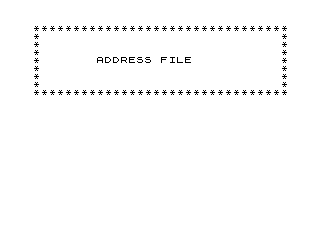
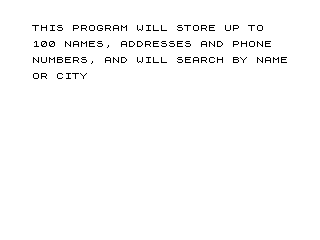
| 5000–5050 | Splash screen and initialisation entry point |
The program starts at line 5000 via the GOTO 35 on line 35, which is itself reached from the splash screen at line 5030 (GOTO 38). Line 38 does not exist, so execution falls through to line 40, which sets the label variables for each mode. This is a deliberate technique to skip re-initialising those labels on subsequent returns to the menu.
Data Storage
All data is held in five parallel two-dimensional string arrays, each with 100 rows:
N$(100,30)— name (30 chars)A$(100,30)— address (30 chars)C$(100,25)— city (25 chars)P$(100,12)— phone number (12 chars)Z$(100,5)— ZIP code (5 chars)
Two single-row scratch arrays, S$(1,30) and T$(1,30), are used to hold search terms for name and city respectively before comparison. The variable L tracks the index of the last entered record, and N is used as a snapshot of L at menu time to allow the ENTRY loop to begin at the correct position.
Note that DIM L(1) on line 10 declares a numeric array, while the scalar variable L used throughout the program is a completely separate entity — the array L() is never referenced again.
Menu and Mode Dispatch
The main menu (lines 49–75) uses a string INPUT B$ and a chain of IF/GOTO tests to dispatch to the correct mode. The destination line numbers are pre-stored in variables CHANGE, ENTER, LIST, and SEARCH (lines 40–46), but these variables are never actually used in the GOTO statements — the GOTOs on lines 67–70 use the literal values 500, 1000, 1500, and 2000 directly. The label variables serve no functional purpose.
Entry Mode
Entry mode (lines 1000–1150) loops from N+1 to 100 using a FOR/NEXT construct. After each record is entered, the user is prompted with “ANOTHER ENTRY?? (Y/N)”; any response other than “Y” exits via GOTO 47, which snapshots L into N before returning to the menu. If the loop reaches record 100, line 1015 exits early with a “LIST FILLED” message.
Search Mode
Search mode (lines 2000–2165) supports two search types selected by entering “N” or “C”. For city search, T$(1,1 TO 25) holds the target string and is compared slice-by-slice against C$(S,1 TO 25). For name search, S$(1,1 TO 30) is compared against N$(S,1 TO 30). In both cases FAST mode is enabled before the loop to accelerate scanning, and SLOW is restored after.
The city search on a match jumps to line 2160, prints the record, then falls to GOTO 2041 — the NEXT S statement — continuing the loop to find all matching cities. The name search jumps to line 2160 similarly, but after printing also falls to GOTO 2041, so it too will continue scanning for further name matches rather than stopping at the first hit.
List Mode
List mode (lines 1500–1532) uses SCROLL between each printed field to advance the display without clearing the screen, giving a rolling-feed effect. Each record’s index number is printed alongside the name (PRINT N$(V);V) for reference in CHANGE mode.
Change Mode
Change mode (lines 500–570) prompts for a record number C, displays the existing fields, then prompts for corrected values one field at a time. Assignment uses substring slice notation for name, address, and city (e.g. LET N$(C,1 TO 30)=Y$), but for ZIP and phone uses bare array element assignment (INPUT Z$(C), INPUT P$(C)), which is functionally equivalent for single-row-dimension slices.
Notable Techniques and Anomalies
- Line 5030 uses
GOTO 38, a non-existent line, to fall through to line 40 — a deliberate idiom to skip lines 35 (the initialGOTO 5000) while landing exactly at the label-variable initialisation block. - Line 47 (
LET N=L) is placed before theCLSat line 49 rather than inside the menu, ensuringNis always updated on each menu visit so ENTRY mode resumes at the correct position. - The unused
DIM L(1)array declaration consumes memory without serving any purpose and may reflect an early draft of the program where a numeric array was planned. - Lines 2140–2145 (an unreachable block after a city search match) print record fields and pause, but are never reached because all match branches jump to line 2160. This is dead code.
- Line 113 (
PRINT) appears in isolation with no apparent purpose; it is never reached by normal program flow and seems to be a remnant of editing. PAUSE 30000is used as an indefinite pause (the user presses a key to continue), which is a standard ZX81 idiom since there is noINKEY$-based wait built in.- Lines 5035–5050 provide a
SAVEroutine under a custom filename with an auto-run flag, saving the program as1000 6(with the inverse-video character encoding the auto-run marker).
Content
Image Gallery
Source Code
   1 REM "ADDFILE"
   2 REM  GEORGE W. MILLER
   3 REM  COMPUTE MAG. MAR. 1983
   4 REM
   5 REM  START PROGRAM BY                ENTERING GOTO 35
   6 REM
  10 DIM L(1)
  11 DIM S$(1,30)
  12 DIM T$(1,30)
  13 DIM N$(100,30)
  14 DIM A$(100,30)
  15 DIM C$(100,25)
  16 DIM P$(100,12)
  17 DIM Z$(100,5)
  25 LET L=0
  30 LET N=0
  35 GOTO 5000
  40 LET CHANGE=500
  42 LET ENTER=1000
  44 LET LIST=1500
  46 LET SEARCH=2000
  47 LET N=L
  49 CLS
  50 PRINT AT 0,10;":FUNCTION:"
  52 PRINT
  54 PRINT TAB 5;"ENTER %C FOR CHANGE MODE"
  55 PRINT
  56 PRINT TAB 5;"ENTER %E FOR ENTRY MODE"
  57 PRINT
  59 PRINT TAB 5;"ENTER %L FOR LIST MODE"
  60 PRINT
  61 PRINT TAB 5;"ENTER %S FOR SEARCH MODE"
  62 PRINT
  63 PRINT TAB 5;"ENTER STOP...TO STOP"
  65 INPUT B$
  67 IF B$="C" THEN GOTO CHANGE
  68 IF B$="E" THEN GOTO ENTER
  69 IF B$="L" THEN GOTO LIST
  70 IF B$="S" THEN GOTO SEARCH
  71 IF B$="STOP" THEN STOP
  75 GOTO 49
 113 PRINT
 500 CLS
 510 PRINT AT 0,12;"CHANGE MODE"
 512 PRINT
 513 PRINT TAB 5;"ENTER NUMBER TO CHANGE"
 514 INPUT C
 515 CLS
 516 PRINT N$(C,1 TO 30)
 517 PRINT A$(C,1 TO 30)
 518 PRINT C$(C,1 TO 25)
 519 PRINT Z$(C,1 TO 5)
 520 PRINT P$(C,1 TO 12)
 524 PRINT AT 10,5;"ENTER CORRECT NAME"
 525 INPUT Y$
 530 LET N$(C,1 TO 30)=Y$
 535 PRINT AT 10,5;"ENTER CORRECT ADDRESS"
 540 INPUT H$
 545 LET A$(C,1 TO 30)=H$
 550 PRINT AT 10,5;"ENTER CORRECT CITY"
 555 INPUT G$
 560 LET C$(C,1 TO 25)=G$
 562 PRINT AT 10,5;"ENTER CORRECT ZIP CODE"
 563 INPUT Z$(C)
 564 PRINT AT 10,5;"ENTER CORRECT PHONE NUMBER"
 565 INPUT P$(C)
 570 GOTO 49
 1000 CLS
 1010 FOR X=N+1 TO 100
 1015 IF X=100 THEN GOTO 1142
 1020 LET L=X
 1030 CLS
 1040 PRINT AT 0,10;"    ENTRY MODE"
 1050 PRINT AT 2,10;"LAST ENTRY WAS : ";X-1
 1052 PRINT
 1055 PRINT "ENTER NAME"
 1060 INPUT N$(X)
 1070 PRINT
 1075 PRINT "ENTER ADDRESS"
 1080 INPUT A$(X)
 1090 PRINT
 1095 PRINT "ENTER CITY"
 1100 INPUT C$(X)
 1105 PRINT
 1107 PRINT "ENTER ZIP CODE"
 1108 INPUT Z$(X)
 1109 PRINT
 1110 PRINT "ENTER PHONE NUMBER"
 1111 INPUT P$(X)
 1112 PRINT
 1115 PRINT "ANOTHER ENTRY?? (Y/N)"
 1130 INPUT F$
 1138 IF F$<>"Y" THEN GOTO 47
 1140 NEXT X
 1142 PRINT
 1145 PRINT "          LIST FILLED"
 1147 PAUSE 200
 1150 GOTO 47
 1500 CLS
 1505 PRINT AT 20,12;"LIST MODE"
 1510 FOR V=1 TO L
 1515 SCROLL
 1520 PRINT N$(V);V
 1521 SCROLL
 1522 PRINT A$(V)
 1523 SCROLL
 1524 PRINT C$(V)
 1525 SCROLL
 1526 PRINT Z$(V)
 1527 SCROLL
 1528 PRINT P$(V)
 1529 SCROLL
 1530 PRINT
 1532 NEXT V
 1540 PAUSE 200
 1550 GOTO 49
 2000 CLS
 2020 PRINT AT 0,12;"SEARCH MODE"
 2021 PRINT
 2022 PRINT "SEARCH NAME(N) OR CITY(C)??"
 2023 INPUT V$
 2033 FAST
 2034 IF V$="N" THEN GOTO 2050
 2036 PRINT "ENTER CITY AND STATE"
 2037 PRINT "NOTE: SPELLING MUST BE EXACT"
 2038 INPUT T$(1,1 TO 25)
 2039 FOR S=1 TO L
 2040 IF C$(S,1 TO 25)=T$(1,1 TO 25) THEN GOTO 2160
 2041 NEXT S
 2042 SLOW
 2043 PRINT TAB 5;"      END OF LIST"
 2044 PAUSE 30000
 2045 GOTO 47
 2047 PRINT
 2050 PRINT "ENTER NAME FOR SEARCH"
 2055 PRINT
 2060 INPUT S$(1,1 TO 30)
 2062 FAST
 2063 FOR S=1 TO L
 2065 IF N$(S,1 TO 30)=S$(1,1 TO 30) THEN GOTO 2160
 2070 NEXT S
 2100 PRINT
 2110 PRINT ,"NAME NOT FOUND"
 2115 PAUSE 30000
 2117 SLOW
 2120 GOTO 47
 2140 PRINT N$(S)
 2141 PRINT A$(S)
 2142 PRINT C$(S)
 2143 PRINT Z$(S)
 2144 PRINT P$(S)
 2145 SLOW
 2146 PAUSE 30000
 2150 GOTO 47
 2160 PRINT N$(S)
 2161 PRINT A$(S)
 2162 PRINT C$(S)
 2163 PRINT Z$(S)
 2164 PRINT P$(S)
 2165 GOTO 2041
 5000 PRINT "********************************"
 5005 PRINT "*                              *"
 5006 PRINT "*                              *"
 5007 PRINT "*                              *"
 5008 PRINT "*                              *"
 5009 PRINT "*                              *"
 5010 PRINT "*                              *"
 5011 PRINT "*                              *"
 5012 PRINT "********************************"
 5013 REM FILE NAME
 5015 PRINT AT 4,5;"   ADDRESS FILE"
 5020 PAUSE 300
 5021 CLS
 5022 PRINT "THIS PROGRAM WILL STORE UP TO"
 5023 PRINT
 5024 PRINT "100 NAMES, ADDRESSES AND PHONE"
 5025 PRINT
 5026 PRINT "NUMBERS, AND WILL SEARCH BY NAME"
 5027 PRINT
 5028 PRINT "OR CITY"
 5029 PAUSE 500
 5030 GOTO 38
 5035 CLEAR
 5040 SAVE "1000%6"
 5050 RUN
Note: Type-in program listings on this website use ZMAKEBAS notation for graphics characters.