
Asteroids
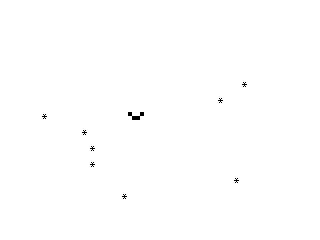
Asteroids is a falling-object dodging game where the player steers a cursor left and right using keys 5 and 8 to avoid asterisks scrolling up the screen, with the step size doubling at score 104 and the marker changing to a block-graphic character at score 100.
This self-contained game occupies lines 50–570. An asterisk (A$="*") falls from the bottom of the screen as the display scrolls upward; the player steers a marker at column X (initially 12) using keys 5 (left) and 8 (right) to avoid it.
Structure of Asteroids
| Lines | Purpose |
|---|---|
| 50 | REM label |
| 100–135 | Initialisation: A$, score counter N, position history A–D, step T=1, player column X=12 |
| 160–300 | Main loop: random column R, print/scroll, update history ring buffer, collision test, key input |
| 500–570 | Crash handler: print score, CLEAR/PAUSE/CLS, restart with RUN |
Notable Techniques in Asteroids
- Four-deep history ring buffer (
A,B,C,D): each iteration shiftsRback through the variables, giving a four-frame memory of where the falling object has been. Collision is tested against the oldest valueE=D, providing a lookahead windowX>=E-2 AND X<=E+T. - Progressive difficulty: at
N=100the marker sprite changes to a two-cell block-graphic character (A$="\.'\. "— the zmakebas escape represents ▘▖); atN=104the step sizeTdoubles to 2, widening the collision zone and player speed simultaneously. - SCROLL × 2 (lines 180–190): calling
SCROLLtwice per frame keeps the action near row 11 where the player bar is drawn. - The erase strip at line 255 (
PRINT AT 9,X-2;" ") clears six spaces to blank the previous player position before redrawing at line 260. - No
PAUSEloop — speed is controlled purely by the overhead of the display loop, typical of ZX81 SLOW mode programs.
London Bridge
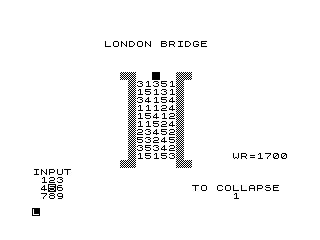
London Bridge is a puzzle/strategy game played on a 5×11 grid stored in a 66-element array, where the player moves a token across numbered tiles using a numeric keypad direction input, scoring points for matches while avoiding falling into water.
Lines 1–930 implement a tile-hopping board game. A 66-element array A() stores tile values (1–5) for an 11×5 grid laid out on screen from row 5, columns 13–37. Element A(1) is repurposed as the running score accumulator. The player’s token starts at N=8 and must cross to beyond position 60.
Structure of London Bridge
| Lines | Purpose |
|---|---|
| 1–5 | Label, FAST mode |
| 10–135 | Initialisation: title, WR display, grid drawing and random tile fill |
| 140–440 | Main game loop: pick random drop tile, get direction input, validate move, animate, score |
| 500–510 | Subroutine: translate 1-D index N to screen row/column via M=(N-1)/5 |
| 600–700 | Fallen-in-water end |
| 800–820 | Successful crossing end (score bonus 1000) |
| 900–930 | Score update/display subroutine |
Notable Techniques in London Bridge
- 1-D to 2-D mapping:
M=(N-1)/5maps flat index to row;INT Mis the integer row,M-INT Mis a fractional column indicator scaled by 5 at print time. This single formula drives the display subroutine at line 500. - Numpad direction encoding (lines 200–230):
I=(INT DIR-1)/3converts a 1–9 keypad digit to a row offset and3*(I-INT I)to a column offset, computing the destination indexN1arithmetically rather than with a lookup table. A(N)=-28is used as a sentinel for the player’s current position (line 150, 240); adding 28 yields CHR$ 0, effectively a blank tile marker.- Score formula (line 390):
10*(3-INT I)+10*(2-INT I)*(1-INT I)rewards moving forward (lowINT I) and penalises backward moves; a tile-value match triples the score (line 400). RAND 0at line 10 seeds the RNG to zero for reproducibility — unusual and potentially intentional for debugging.- Potential anomaly:
WR=1700is displayed (line 50) but never used in any calculation; it appears to be a decorative or leftover variable. - The
\@@escapes in PRINT strings are ZX81 inverse-space block characters used to draw the bridge pillars and deck.
Sketch Pad
Sketch Pad is a pixel-plotting utility that lets the user PLOT and UNPLOT a single point, toggle between three movement modes (continuous loop, reverse loop, or COPY screen), and move the point around the 64×44 ZX81 graphics canvas with keys 5–8.
Lines 10–600 provide an interactive pixel manipulation tool. The user positions a single pixel at (X,Y) (initially 32, 22) and switches between three drawing modes, plus a screen-dump trigger.
Structure of Sketch Pad
| Lines | Mode / Purpose |
|---|---|
| 40–70 | Mode A: UNPLOT then PLOT — moves point (erase old, draw new) |
| 80–90 | Mode B: reverse — no draw, just calls movement subroutine |
| 100–130 | Mode C: PLOT then UNPLOT — draws a trail then erases current |
| 500–590 | Movement/mode-switch subroutine: keys 1/2/3/0 change mode, keys 5/6/7/8 move X/Y |
| 600 | COPY — sends screen to ZX printer |
Notable Techniques in Sketch Pad
- Boundary guards at lines 555 (
IF Y=43) and 565 (IF X=63) prevent the cursor from leaving the 64×44 graphics canvas before the corresponding move key is tested, avoiding an out-of-rangePLOTerror. - Mode B (lines 80–90) loops calling the subroutine without ever plotting, making it effectively a “move without drawing” mode — useful for repositioning before switching back to a drawing mode.
- The three modes and the
COPYcommand together form a rudimentary graphics editor; mode C’s PLOT-then-UNPLOT sequence in a tight loop would leave a brief visible trace at each visited coordinate. - Key
"0"jumps to line 100 (mode C) while keys"1","2","3"select modes A, B, and COPY respectively — a compact four-option menu embedded in the movement subroutine.
Image Gallery

Source Code
  50 REM "A"
 100 LET A$="*"
 105 LET N=0
 110 LET A=0
 115 LET B=0
 120 LET C=0
 125 LET D=0
 130 LET T=1
 135 LET X=12
 160 LET R=INT (RND*27)
 170 PRINT AT 21,R;A$
 180 SCROLL
 190 SCROLL
 200 LET N=N+T
 205 IF N=100 THEN LET A$=".'. "
 210 IF N=104 THEN LET T=2
 215 LET E=D
 220 LET D=C
 230 LET C=B
 240 LET B=A
 250 LET A=R
 255 PRINT AT 9,X-2;"      "
 260 PRINT AT 11,X;"'..'"
 270 IF X>=E-2 AND X<=E+T THEN GOTO 500
 280 IF INKEY$="5" THEN LET X=X-T
 290 IF INKEY$="8" THEN LET X=X+T
 300 GOTO 160
 500 PRINT AT 11,X-1;"CRASH"
 510 PRINT AT 0,0;"SCORE=";N
 520 CLEAR
 530 PAUSE 100
 540 FAST
 550 CLS
 560 SLOW
 570 RUN

   1 REM "LB"
   5 FAST
  10 RAND 0
  20 DIM A(66)
  30 PRINT AT 2,9;"LONDON BRIDGE"
  40 LET WR=1700
  50 PRINT AT 16,25;"WR=";WR;TAB 11;"@@       @@";TAB 0;"INPUT";TAB 1;"123";TAB 1;"4%56";TAB 1;"789"
  55 PRINT AT 6,11;"@@@@  %   @@@@"
  60 FOR I=1 TO 11
  70 PRINT TAB 12;"@@     @@"
  80 NEXT I
  90 FOR N=11 TO 60
 100 LET A(N)=INT (RND*5+1)
 110 LET A$=CHR$ (28+A(N))
 120 LET M=(N-1)/5
 130 GOSUB 500
 135 NEXT N
 140 LET N=8
 145 SLOW
 150 LET A(N)=-28
 155 PRINT AT 20,20;"TO COLLAPSE"
 160 LET DROP=INT (RND*(67-N)+N-6)
 170 IF A(DROP)<=0 THEN GOTO 160
 180 PRINT TAB 25;A(DROP)
 190 INPUT DIR
 200 LET I=(INT DIR-1)/3
 205 LET M=(N-1)/5
 210 LET J=M-INT M+I-INT I
 220 LET N1=N+5*(INT I-1)+3*(I-INT I)-1
 230 IF DIR<1 OR DIR>9 OR J<0.1 OR J>1.4 OR N1<6 THEN GOTO 190
 235 IF A(N1)<=0 AND N1<=60 THEN GOTO 190
 240 IF N1>60 THEN LET A(N1)=-28
 250 LET A$=CHR$ (28+A(N))
 260 GOSUB 500
 270 LET M=(N1-1)/5
 280 LET A$=CHR$ (156+A(N1))
 290 GOSUB 500
 300 PRINT AT 20,20;"           ";TAB 25;" "
 310 FOR J=1 TO 70
 320 NEXT J
 330 LET M=(DROP-1)/5
 350 LET A$=" "
 360 GOSUB 500
 370 IF N1=DROP THEN GOTO 600
 380 IF N1>60 THEN GOTO 800
 390 LET SCORE=10*(3-INT I)+10*(2-INT I)*(1-INT I)
 400 IF A(N1)=A(DROP) THEN LET SCORE=SCORE*3
 410 GOSUB 900
 420 LET A(DROP)=0
 430 LET N=N1
 440 GOTO 155
 500 PRINT AT 5+INT M,13+5*(M-INT M);A$
 510 RETURN
 600 PRINT AT 20,16;"YOU HAVE FALLEN";TAB 18;"IN THE WATER"
 700 STOP
 800 LET SCORE=1000
 810 GOSUB 900
 820 STOP
 900 LET A(1)=A(1)+SCORE
 910 PRINT AT 11,22;"SCORE ";SCORE;" "
 920 PRINT AT 13,22;"TOTAL ";A(1)
 930 RETURN

  10 REM "SP"
  20 LET X=32
  30 LET Y=22
  40 GOSUB 500
  50 UNPLOT X,Y
  60 PLOT X,Y
  70 GOTO 40
  80 GOSUB 500
  90 GOTO 80
 100 GOSUB 500
 110 PLOT X,Y
 120 UNPLOT X,Y
 130 GOTO 100
 500 IF INKEY$="1" THEN GOTO 40
 510 IF INKEY$="2" THEN GOTO 80
 520 IF INKEY$="3" THEN GOTO 600
 530 IF INKEY$="0" THEN GOTO 100
 540 IF INKEY$="5" THEN LET X=X-1
 550 IF INKEY$="6" THEN LET Y=Y-1
 555 IF Y=43 THEN GOTO 565
 560 IF INKEY$="7" THEN LET Y=Y+1
 565 IF X=63 THEN GOTO 590
 570 IF INKEY$="8" THEN LET X=X+1
 590 RETURN
 600 COPY
Note: Type-in program listings on this website use ZMAKEBAS notation for graphics characters.