
This program generates and displays a monthly calendar for any user-specified month and year. It implements Zeller’s-style day-of-week calculation at line 310 to determine the starting weekday, with adjustments for January and February treated as months 13 and 14 of the prior year. Leap year detection at lines 260–270 correctly handles the century and 400-year exceptions, setting February to 28 or 29 days accordingly. The calendar is laid out in a 6-row by 7-column grid using a DIM a(42) array, with TAB-based column positioning at 4-character intervals. The program concludes with a prompt to use the TS2040 thermal printer via the COPY command.
Program Structure
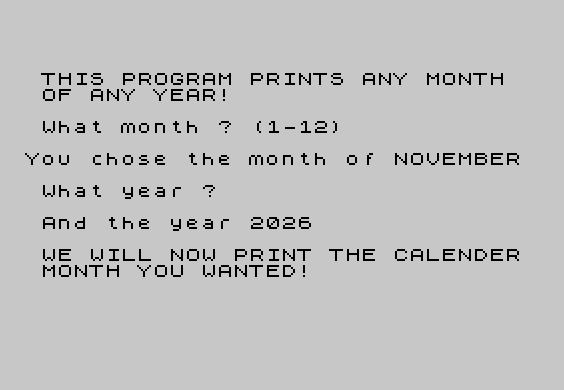
The program divides into two logical phases. Lines 1–49 handle initialization and user input: the month-name array a$(12,9) is populated, and the user is prompted for a month number (mo) and a year (yr) with FLASH-highlighted echo of the choices. Lines 200–530 perform the calendar calculation and rendering, followed by a printer hint at line 540 and a STOP at line 550. Line 9999 holds a SAVE with an auto-run directive.
Day-of-Week Algorithm
The starting weekday is computed at lines 290–340 using a variation of Zeller’s congruence. Lines 290–300 adjust January and February to months 13 and 14 of the previous year, a standard move to keep the formula continuous across year boundaries. The core expression at line 310 is:
x = d + 2*mo + 2 + INT((3*mo+3)/5) + INT(yr/4) + yr - INT(yr/100) + INT(yr/400)
The fractional part of x/7, multiplied by 7 and rounded, gives a day index 0–6 (line 320–330). Line 350 remaps 0 to 7, placing Sunday as day 1 of the week header “SUN MON TUE WED THU FRI SAT”.
Leap Year Detection
Lines 260–280 implement the full Gregorian leap-year rule in two steps:
- Line 260: divisible by 4 but not by 100 → leap year
- Line 270: divisible by 400 → leap year (overrides the century exclusion)
February’s day count is then set to 29 at line 280 if leap=1.
Calendar Grid Layout
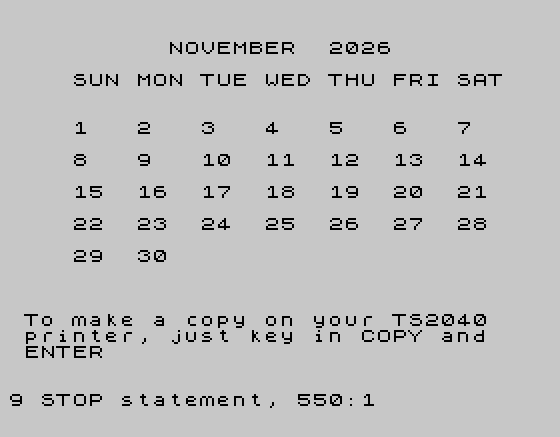
A 42-element numeric array a(42) (6 weeks × 7 days) is filled from position start onward with day numbers 1–end; all other slots remain 0 from DIM initialization. The rendering loop (lines 440–530) iterates over 6 rows (x=0 TO 5) and 7 columns (c), using TAB(4*cc) for 4-character column spacing. Zero-valued cells and cells beyond end print a space to blank that position, while valid days print the day number.
Month-Name Array
a$(12,9) stores all month names padded to exactly 9 characters, matching “SEPTEMBER” (the longest). The variable mon is saved at line 203 before mo is modified by the Zeller adjustment, so the correct name can be retrieved for display at line 410.
Notable Techniques and Idioms
- FLASH 1 / FLASH 0 used to draw attention to user-echoed input values before proceeding.
- Multiple
PAUSEstatements (120, 180 frames) provide paced reading time without requiring a keypress. - The separate
monandyearvariables preserve original user input whilemoandyrare mutated for the algorithm. PRINT TAB(4*cc);a(c);with a trailing semicolon keeps the cursor on the same line across the inner column loop, with an explicitPRINT(line 525) to terminate each row.
Bugs and Anomalies
- Line 6 contains extraneous byte sequences (
\\{20}\\{1}\\{20}\\{1}\\{20}\\{0}) embedded mid-statement before the array reference, likely a data corruption artifact in the saved file; the assignment itself functions correctly. - The program spells “CALENDER” (line 47) where “CALENDAR” is standard American English — a typographic error in the original entry.
- No input validation is performed on
mo(expected 1–12) oryr; entering out-of-range values will produce incorrect or error results. - Lines 17, 47, and 540 use mid-string line-breaking with spaces to wrap text across the 32-column display, a common but fragile manual formatting technique.
Image Gallery
Source Code
    1 REM "2068MONTH":"keyed in by Cedric R. Bastiaans, June '85"
    2 DIM a$(12,9)
    3 LET a$(1)="JANUARY  "
    4 LET a$(2)="FEBRUARY "
    5 LET a$(3)="MARCH    "
    6 LET a\{20}\{1}\{20}\{1}\{20}\{0}$(4)="APRIL    "
    7 LET a$(5)="MAY      "
    8 LET a$(6)="JUNE     "
    9 LET a$(7)="JULY     "
   10 LET a$(8)="AUGUST   "
   11 LET a$(9)="SEPTEMBER"
   12 LET a$(10)="OCTOBER  "
   13 LET a$(11)="NOVEMBER "
   14 LET a$(12)="DECEMBER "
   15 PAPER 7:INK 0:CLS
   17 PRINT AT 5,1;"THIS PROGRAM PRINTS ANY MONTH   OF ANY YEAR! "
   19 PAUSE 120:PRINT AT 8,1;"What month ? (1-12)"
   20 INPUT mo
   23 PRINT
   25 FLASH 1:PRINT "You chose the month of ";a$(mo)
   30 PAUSE 120:FLASH 0:PRINT AT 12,1;"What year ?"
   40 INPUT yr
   45 FLASH 1:PRINT AT 14,1;"And the year ";yr
   46 PRINT
   47 PAUSE 120:PRINT " WE WILL NOW PRINT THE CALENDER  MONTH YOU WANTED!"
   48 PAUSE 180
   49 FLASH 0:CLS
  200 LET d=1
  203 LET mon=mo
  205 LET year=yr
  210 DIM a(42)
  220 LET end=30
  230 IF mo=1 OR mo=3 OR mo=5 OR mo=7 OR mo=8 OR mo=10 OR mo=12 THEN LET end=31
  240 IF mo=2 THEN LET end=28
  250 LET leap=0
  260 IF yr/4= INT (yr/4) AND yr/100 <> INT (yr/100) THEN LET leap=1
  270 IF yr/400= INT (yr/400) THEN LET leap=1
  280 IF mo=2 AND leap=1 THEN LET end=29
  290 IF mo=1 OR mo=2 THEN LET mo=mo+12
  300 IF mo=13 OR mo=14 THEN LET yr=yr-1
  310 LET x=d+2*mo+2+ INT ((3*mo+3)/5)+ INT (yr/4)+yr- INT (yr/100)+ INT (yr/400)
  320 LET num=(x/7- INT (x/7))*7
  330 LET num= INT (num+.5)
  340 LET start=num
  350 IF num=0 THEN LET start=7
  360 LET day=1
  370 FOR p=start TO 42
  380 LET a(p)=day
  390 LET day=day+1
  400 NEXT p
  410 PRINT AT 1,10;a$(mon);" ";year
  420 PRINT
  430 PRINT "    SUN MON TUE WED THU FRI SAT"
  435 PRINT
  440 FOR x=0 TO 5
  445 PRINT
  450 FOR c=1+x*7 TO 7+x*7
  460 LET cc=c-x*7
  470 IF a(c)=0 THEN PRINT TAB (4*cc);" ";
  480 IF a(c)=0 THEN GO TO 520
  490 IF a(c)>end THEN PRINT TAB (4*cc);" ";
  500 IF a(c)>end THEN GO TO 520
  510 PRINT TAB (4*cc);a(c);
  520 NEXT c
  525 PRINT
  530 NEXT x
  540 PAUSE 180:PRINT AT 18,1;"To make a copy on your TS2040   printer, just key in COPY and   ENTER"
  550 STOP
 9999 SAVE "mont27.B1" LINE 1
Note: Type-in program listings on this website use ZMAKEBAS notation for graphics characters.