How many of you have a ZX PRINTER you discovered would not work with the TS2068? Frustrating, isn’t it?
The cause of the incompatibility is very simple. Unregulated DC power is provided on pin 2B at the rear of the ZX81. The corresponding pin 5B at the rear of the TS2068 is isolated.
The ZX PRINTER uses this power to run a voltage boosting oscillator regulator to get the 35 vdc or so needed for the stylus. It accommodates a wide range of voltage, actually having to work harder as the voltage decreases. The motor and motor switching circuits also use this power. The ZX PRINTER gets 9vdc from the ZX81/TS1000. The TS2068 could supply 15vdc if connected.
The printer seems to work fine (and a little faster), when it is hooked up this way. Then again, some marginal parts might be damaged. There are better ways.
Remember the heavy duty power supply that came with your new ZX PRINTER? Well, don’t throw it away. You have need of it.
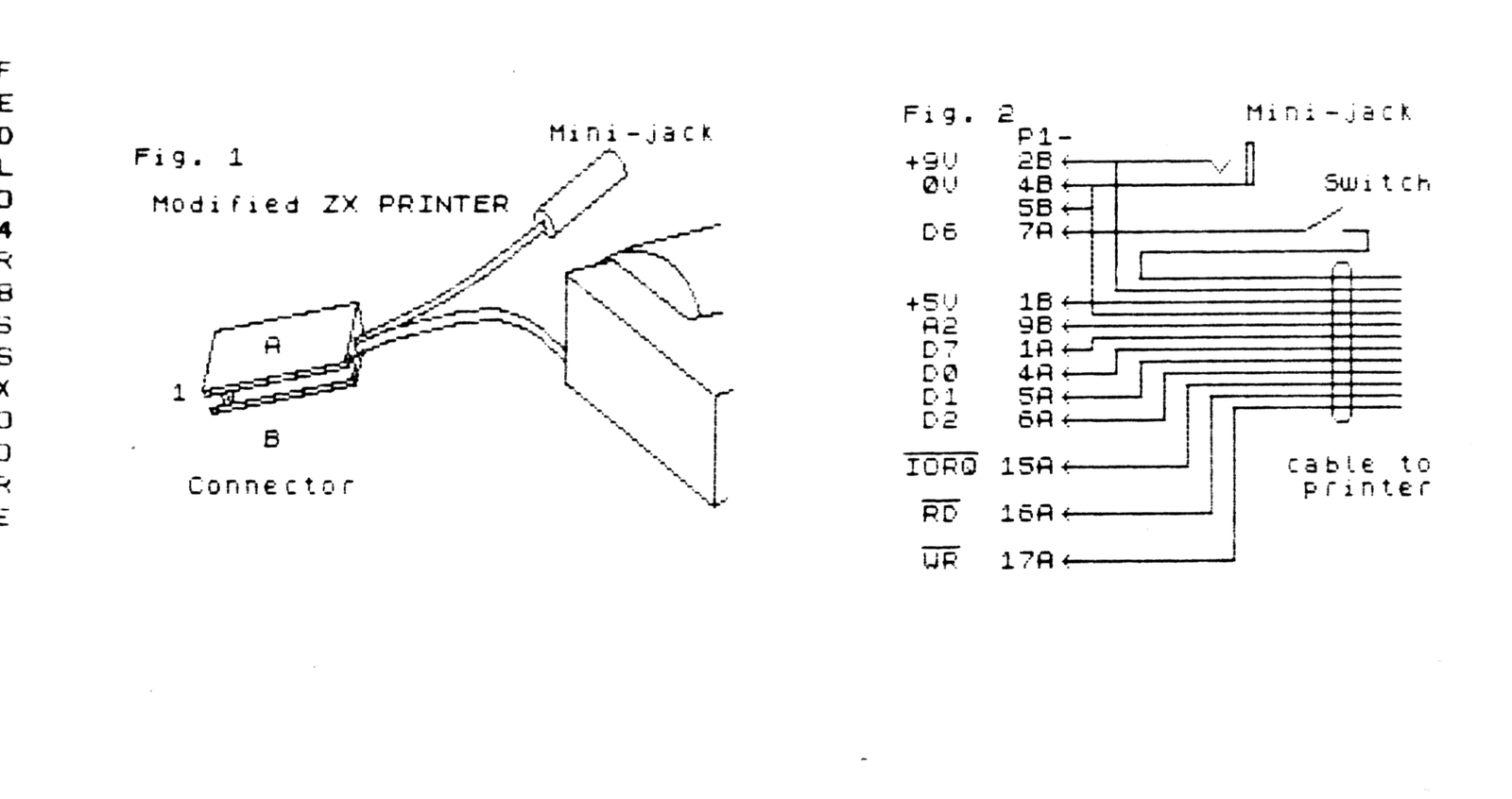
Fig.1 shows how your modified ZX PRINTER will look.
Fig.2 shows the wiring for the modified printer.
Carefully remove the two screws that hold the connector cover in place. Do NOT disassemble the printer! Remove the cover. Locate pads 2B,4B-5B, and 7A. The upper side is A, the lower B, as installed. Numbers start with 1 at the left near the key. The key is position 3.
Using about six inches of AWG 22 insulated wire, solder one to pad 2B and the other to 4B-5B, being careful not to disturb the wires already there. Lay these wires along the existing cable, and being careful not to clamp the new wires, replace the cover.
Now connect the other ends of the wires to a miniature cable jack. (Make sure it fits your power supply.) The wire from 2B goes to the tip (+). The other goes to the shell (gnd).
The rework is complete, but check the connections before using it.
What about pad 7A? Putting a switch in the wire from this pad lets you fool the computer into thinking the printer isn’t home. A small utility box can be used in place of the cable jack shell if you wish to add this feature as well.
Is it really worth doing? Even if you also own a TS2040, what about what happens to thermal paper when you lay it on top of a hot power supply or try to read it a year later? Why not have the best of both worlds? Use the ZX for permanent records, and the more economical TS2040 for mundane purposes. It’s not hard to change printers if you remember to SAVE before turning the power off, and then reLOADing.
Graphics are not stretched nearly as much on the ZX PRINTER.
Dig out that old ZX PRINTER!