Here’s a nice little project you can whip up and get running in a couple of hours, or you can choose to spend as long as you want refining and upgrading it to suit your particular demands. This light pen plugs into the joystick port, and is so simple that you’ll spend more time putting together the joystick connector than you will wiring the things up!
Before describing the light pen, we need some backgound. Your TV set works by sending a bright spot flying across the screen, drawing individual lines, eventually making a complete picture. Because our eyes tend to “see” the brightness of the spot after it has moved elsewhere, we perceive a picture. But if our eyes had a faster responce, all we’d see would be a moving dot, and TV displays as we know them would be worthless.
Fortunately, our eyes are a bit slower than that, but the light pen has the ability to detect the spot as it streaks by, and by sychronizing our program to the video display, we can measure the time it takes for the spot to go from the top of the picture to the light pen. This tells us the vertical position of the pen, and a sample program, included here, demostrates this. (Those who want to learn more about synchronizing a program to the video should read “Computus Interruptus, part 7 (SINCUS NEWS, Jul/Aug 1986)
Finding the horizontal position is a bit more difficult. The D’Ktronics light pen for the Spectrum does this by putting a large white rectangle on the proper vertical position, and collapsing it until the light pen momentarily doesn’t see the spot going by anymore. It then collapses the rest of the rectangle until knows exactly where the pen is. The demostrator program doesn’t do this, but I’m sure some of you readers will be glad to expand it. Since this will involve putting white shapes directly into the display file, you may first want to read “Navigating through the Display file Jungle,(SINCUS NEWS, May/Jun 1986).
If you’re starting to suspect that there’s some reasoning behind the order in which I publish my articles here, you’re absolutely right! An experimental project like this ties arcane concepts together into something practical. It also encourages us to work together on projects; an idea that will become increasingly important as vendor support fades.
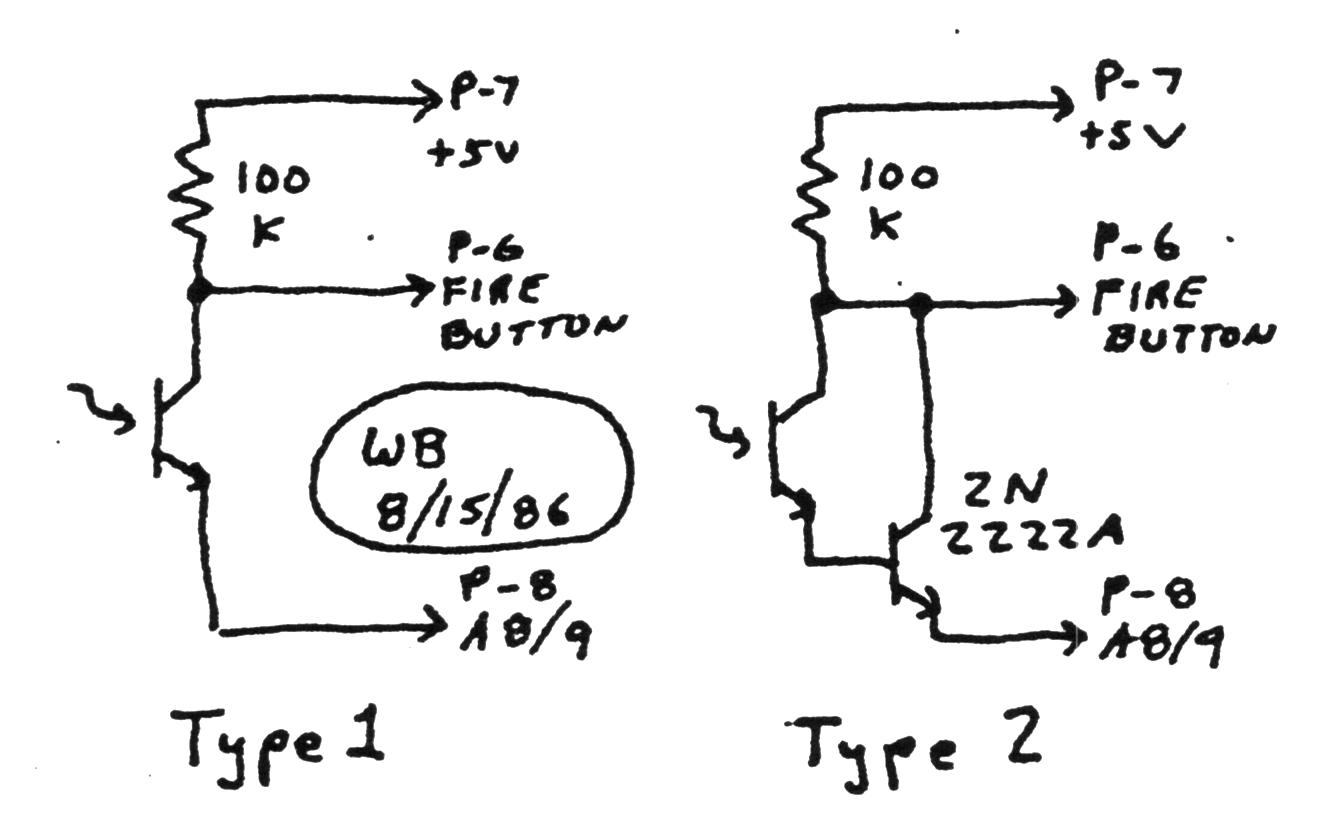
In any case, either of the two lightpen circuits in figure 1 send a low signal to the joystick “FIRE Button” pin when the spot is in front of the light pen (and the address lines have been diddled properly) and a high signal, otherwise. The fact that there are two light pen schemctics will accommodate the many different types of phototransistors available.
What’s a phototransistor? Basically, it’s a transistor that switches on when light is shined on it. For the technical crowd, all transistors essentially start out as phototransistors. Photons of the proper wavelength can kick electrons in the base region from the valence band into the conduction band, where they’ll support conduction, turning the transistor on. The fact that most transistors are sealed in a metal can or black epoxy hides this fact. Phototransistors may have design tweaks to optimize their sensitivity, but we can think of them as orinary transistors in a clear epoxy package.
Because we often only turn the transistor on with light, some phototransistors only have two wires, the collector and the emitter. Others have the third “base” lead connected so that the transistor can also be biased into its linear region, if desired. But you’ll find no biases here, bucko! If you’ve that third lead, you can tape over it, or cut it off, or whatever, ’cause you don’t need it.
For ordinary silicon, the energy difference between the valence and conduction bands is equal to the energy of a photon in the infrared region of the spectrum, so phototransistors are usually most sensitive to this, as well. It’s too bad, because the glass in your picture tube filters most of the stuff out, letting only the visible light pass.
This is why there are two light pen schematics.
The type 1 schematic is what you’ll probably want if you’re lucky enough to scrouge up a phototransistor that’s optimized for visible light. The type 2 schematic is for infrared transistors. It adds a transistor to increase the pen’s overall sensitivity, and it almost does it too well. With the type 2 circuit, ordinary room lighting affects my prototype in an unusual way. The miniscule amount of light that leaks through the plastic pen case causes false readings. I had to cover the whole pen over with black electrical tape to keep the thing from going bonkers.
The pen should be wide enough that the transistor fits almost all the way down inside. If it’s too far away from the surface of the picture tube, it may not reliably see the “spot”. Again, the infrared coming from the picture tube is fairly dim. Even if you have to tape over the pen to keep the light out, the picture tube, which seems brighter, really isn’t. Since we can’t see in the infrared band, this isn’t at all obvious to us.
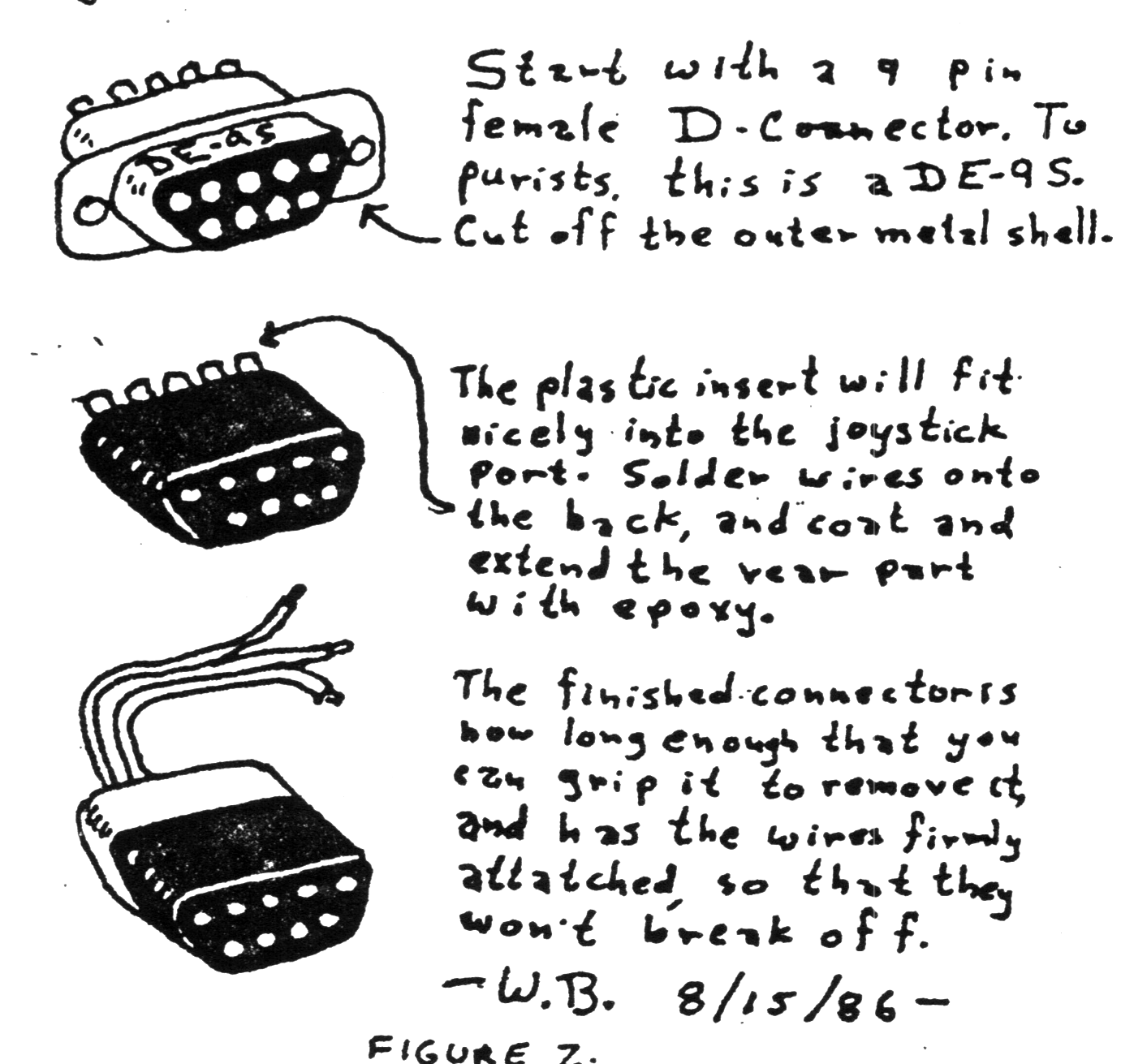
It’ll take a bit of work to make a connector to plug into the joystick port. It turns out the connector is recessed too far into the TS2068 for a standard 9 pin D connector to fit. The plastic insert inside the D connecter will fit fine, but it’ll go in so far that there’ll be nothing left to grip to pull it out. Figure 2 shows a reasonable way to solve this problem. Make sure your wiring is correct before you apply the epoxy;there’ll be no second chance. Incidentally, you can easily make a “mold” for the epoxy extension out of cellophane tape. Just wrap it around the insert, and make sure it’s on tight with no holes before you pour the epoxy in.
When the pen is finished, plug ut in to the left port and type in listing 1. When running, the computer should beep like crazy, whenever the light pen is pointed at a lamp or the sun. You may also get it to beep a bit by holding the light pen against the TV screen, but BASIC is too slow to do this properly and it seems to have some tendancy to synchronize improperly to the video, making only some small portions of the screen useable. To use the light pen on the screen, use listing 2.
The program will move an asterisk in the left hand column to whatever vertical position the pen is at, on the screen. It will also plot pixels at the proper vertical position, and print pen’s distance from the top of the screen. The small machine code portion uses the HALT instruction to synchronize us to the video, and then updates a counter until the light pen sees the spot. This is a measure of the pen’s distance from the top of the screen, and is returned to the BASIC program.
Line 60 of the BASIC program converts this to a pixel distance. By subtracting 180, we remove the approximate number of counts that occured in the top border area and above, before the spot got into the active part of the screen. By dividing by 5, we can account for the fact that the counter is updated about five times per video line. Neither of these numbers is immutable. I worked them out by trial and error, so feel free to change them a bit. By the way, when we add .5 and take the INT, we really just round up or down to the nearest interger. This part should not be changed.
You may have to adjust the brightness and contrast on your set to get decent results. If your set is real old and the picture tube is shot, you may find portions of the tube where light pen won’t work reliably. There’s not much we can do about this.
By the way, if you let the light pen go off the screen into the border area, or point it away from the screen altogether, you’ll get a false reading for a moment. Commercial light pens usually include a switch to tell the computer that the pen is at a valid location. You may wish to include something like this, or change the code so that you press a key when you want a reading taken.
Lastly, note that you’ll stay looping in the machine code if the pen never sees any light, so if you want to BREAK out of the program, make sure that the pen is pointed at the screen, or you’ll be ignored.
I’ve found this little project to be quite fun. I’d be interested in hearing of your improvements or problems, and will help out in whatever way I can. Radio Shack does carry an infrared phototransistor, if anyone tries it, let us know how it does.
The simplicity if the thing should make it particularly nice for club projects. Once we show the software guys which end of the soldering iron to hold, they’ll be glad to go out and whip up some dandy code to put this gadget through its paces. Until then, it’s a nifty project for all you tinkerers, out there. Enjoy!
 10 REM Light Pen Tester
 20 BRIGHT 1: CLS
 30 IF STICK (2,1)=1 THEN BEEP
.04,1
 40 GO TO 30
Listing 1. To debug Light Pen
  2 BORDER 0
  5 BRIGHT 1: CLS
 10 DATA 62,7,211,245,62,191,21
1,246,62,14,211,245
 20 DATA 1,0,0,118
 30 DATA 62,255,219,246,3,254,1
27,32,247,201
 40 CLEAR 32767
 45 LET oldrow=0
 50 FOR j=32768 TO 32793: READ
k: POKE j,k: NEXT j
 60 LET line=INT (.5+(USR 32768
-180)/5)
 65 IF line>175 THEN LET line=1
75
 66 IF line<0 THEN LET line=0
 70 LET row=INT (line/8)
 80 PRINT AT oldrow,0;" ": PRIN
T AT row,0;"*"
 82 PRINT AT 10,10;line;"
"
 83 OVER 1: PLOT 50,175-line: O
VER 0
 85 LET oldrow=row
 90 GO TO 60
Listing 2. Light Pen Demo