In SYNC (3:4) I reviewed the Votem—a device which converts continuously changing voltages from sensing transducers, such as a temperature probe or photocell, into digital information which the computer can understand.
The limitation of the Votem which I noted then was that, though it could monitor an outside event very accurately, the Votem by itself could do nothing about it. As a possibility for control, I mentioned the Byte-Back Control Module. Another option is offered by Thurnall Electronics which has a relay driver box or transistor driver that can be connected to the computer via the I/O port. Both of these devices would require a modest knowledge of electronics to be successfully implemented.
The Intercontroller gives us a third option that controls outside events, that is reasonably priced, and that is extremely easy to use with completely Basic programs.
To get the Intercontroller working, requires four steps:
1) Connect the cable to the expansion port of computer.
2) Plug in two AC cords (Plug the Intercontroller power strip into a wall outlet. Plug at least one device, perhaps a desk lamp, into the Intercontroller.)
3) Use the direct Basic command.
POKE 8192, 1If you have plugged your lamp into the first outlet on the Intercontroller, the LED should glow and your light will come on.
4) Write a Basic program that will take advantage of the timing and decision-making capabilities of the computer.
The four grounded AC outlets on the Intercontroller HV Bus accept plug-in devices that will draw up to 9 amperes current. (The Thurnall unit will not stand half as much current, but it will take 230V.) The Intercontroller is only stated as being rated for 115V.
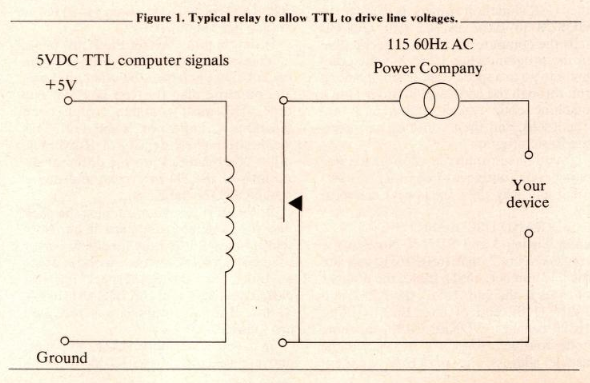
The Intercontroller is not extremely sophisticated as far as a D/A since it is a binary event. It just switches on or off. The main problem in doing this is keeping the 115VAC away from the 5VDC TTL (Transistor Transistor Logic) levels of the computer. A schematic for the Intercontroller was not available, but a typical relay type circuit which shows how this can be done is found in Figure 1. The coil on the computer goes high (1), causing the switch to close in an SSR (Solid State Relay) or EMR (Electromechanical relay), thereby activating the AC high voltage circuit.
The documentation (other than technical) with the device is clear. Several approaches to timing and ideas for implementation are presented. One of the things I plugged into the strip was the TV set. There was no need to keep the screen display going while the computer was just timing so I had the unit turn the TV off while timing and turn it back on when it needed to display something. My daughter thought this was truly elegant—a computer that was smart enough to turn itself on and off
The device is very nicely made. But one warning should be given. In order to be so “friendly” to use, the device is addressed at memory addresses in the unused 8K area above the Sinclair ROM. This is fine if you understand that you cannot plug in other devices that will want to use this memory space. The low order bit is all that is used to switch the socket on. Thus, POKEing a 1 (00000001b) turns the outlet on; POKEing a 2 (00000010b) shuts it off; POKEing a 3 (00000011b) turns it on, etc., up to POKEing 255 (11111111b) which, of course, turns it on.
The unit could be a useful asset to many automation projects in the home, office, or laboratory. Compared to equivalent control systems, the cost is nominal.