
TALKING TIMEX
In this issue we’ve included a series of articles on speech synthesizers. A few of them have appeared before, but even these have been upgraded, where new information has become available. My versions of the Parrot “super” exclusive programs (TS1000 and 2068) will be on upcoming library tapes. We’ll finish out the series, next month, with some other interesting information on these units and the results of our side by side tests of the Parrot and Zebra-talker.
TALK to ME
The Parrot.* [price struck out] plus $4 s&h. R.I.S.T. Computer Components, PO Box 499, Ft. Hamilton Sta., Brooklyn, NY 11209-0499.
A voice or speech sythesizer is a combination of software and hardware which your computer can use to talk. The two principle methods of producing voice type sounds on ZX/TS computers are Pulse Code Modulation (PCM) and Linear Predictive Coding (LPC).
PCM in effect uses “silicon chip” recordings of someone speaking a selected number of words. Because an actual voice is used, the sound can be very lifelike. The disadvantage is that ROM addresses are required for all the words you want to use. An article in Computers and Electronics (March 1983) gets around this requirement by using TI’s Speak and Spell for the business end. Still you are limited to the Speak and Spell vocabulary and/or attenuated versions of those words. PCM gives the best sound, but costs more in memory space and dollars though recent reductions in memory cost will make it more competitive.
LPC uses a combination of random and periodic signals fed to the electronic voice tract. The periodic and random voices can be modulated digitally to produce most of the individual sounds (phonemes) which the human voice can produce. While the range is almost infinite, the sound is very mechanical. The Voicetech units described in Radio Electronics (March 1983) use this method.
The Parrot speech module uses LPC allophones “Allphone concatenation” is used to make intelligible words or phrases.
I could not get inside the unit, but the recent merger of R.I.S.T. with Voicetech suggests that the unit combines a general(2) purpose speech development kit (readily available for about $25)(1) the proper ZX/TS interfacing hardware (another $25 in parts), and software to produce a very cost effective unit about the size of the Sinclair 16K RAM pack.
The unit comes with a reset button, ZX/TS expansion bus, and provision for an external power supply to power other peripherals through the unit which functions as an I/O port. (R.I.S.T. indicates that ports 0-16 and 32-48 are used, but the initializer program seems to use only location 03 for IN and OUT commands.)(3)
The documentation is professional looking and good as far as it goes. However, it does not explain the machine language initializing routine. Most annoying was the lack of a schematic and OEM specs on the voice chips. The “crash course” in voice synthesis might be superfluous for some users and certainly could include a bibliography. The expanded loader program allows cursor editing. This is a big plus.(4)
On the hardware side are three minor flaws: the unit is top heavy; it uses a subminiature external power jack (these are hard to find); it does not come with a speaker.
Using the pilot program which comes with the unit, I was able to make it say “Hello” almost immediately. The voice is, unfortunately, that “tinny,” mechanical one associated with first generation robots and Cylons. Some people have difficulty understanding this type of speech at first, but most adapt to it easily.
A friend asked if this unit simply speaks the words you type in. The answer, for now, is no. You must enter the words phonetically, including clicks, stops, and pauses after the appropriate 3 character phoneme. R.I.S.T. promises to develop text-to-speech software.(5)
All in all, this is an excellent unit and performs up to and even over my expectations. I plan to use the Parrot primarily as an annunciator (e.g., warnings, observations), but I can see great potential for games, clocks, and handicapped applications.
(1) You can buy an SPO-25 X chip at Radio Shack for about $12.00.
(2) I had originally guessed however, from the traces used, software and documentation, that one of General Instrument’s line of SPO 250 series chips had been used. RIST confirmed this and even provided some further technical data (the data sheets which G.I. provides with the chip).
(3) Decoding is incomplete, and while the system only uses port 03, any port in the range 0 to 16 or 64 to 80 decimal, will cause the Parrot to respond.
(4) I was able to upload the exclusive program to the TS 2068, and since the Parrot is I/O mapped, it was a simple matter to move the 17 byte machine code driver and use the unit with the 2068.
(5) Steve Velt[illegible], of VOICETECH, tells me that the Parrot is no longer in production, and that text-to speech software was never developed. Still, you may find these units in the used equipment market. Voicetech now sells peripherals only for the original Tramiel computers, but the GI chips are still available, and in widespread use.
* This is my original review of the RIST Parrot, up-dated to reflect its compatibility with the 2068 and a few other minor changes.
© 1983, 1985 P. Donnelly
SPEECH SYNTHESIZERS
Your ZX/TS computer can talk to you, with the help of a “Speech Synthesizer” system. Speech or Voice synthesis systems are combinations of hardware and software which, when tied in with your computer, can put electronically generated sounds and noises together into intelligible words and phrases. There are currently at least 16 semiconductor houses producing special LSI (Large scale integration) chips which can talk. (see March 83′ Electronic Products)
These chips can all be computer controlled and most use one of 5 principal synthesis techniques. These are: Linear Predictive Coding, Allophone Synthesis, Pulse Code Modulation (PCM), Time Domain Synthesis and PARCOR. The first two methods are the most popular and perhaps the easiest to obtain for your ZX/TS machine and will be the focus of this article.
Early attempts at recreating speech centered around digitally encoding actual spoken words. The problem with such methods was that prodigious amounts of memory (as much as 1M bit/word) were required for a microproccessor to speak in real time. The PCM technique digitizes and compresses speech to the point where perhaps only 20 to 70 thousand bits are required for one second of speech. This is still rather a large requirement for a microcomputer. In addition, the entire vocabulary, just as it will be spoken, must be stored in memory (usually ROM) somewhere.
LPC uses an electronic model of the human vocal tract to produce sounds. In LPC, just as with PCM, the words we want the computer to say must be stored in ROM. In LPC however, instead of a compressed duplicate of actual human speech being stored in ROM, only the parameters for producing the sounds are kept.
These parameters tell the “electronic mouth” when to perform the electronic analogue of exhaling fully, vibrating vocal cords, placing the tip of its tongue against the back of its teeth, etc. Straight LPC requires that the desired word be spoken, by a human, into a special computer controlled filtering system and then stored in a ROM. Memory requirements are less than PCM, but so is speech quality. Straight LPC for your ZX/TS is perhaps best illustrated by the TI Speak and Spell interface article given in the Feb.83issue of Computers and Electronics magazine. TI’s TMS 5220 chip works well with Z80 processors and can be used, for example, with their VM 71003 ROM chip to create a “talking clock” (see Radio Electronic’s May and July 83′).
‘Phoneme’ or ‘Allophone’ synthesizers start with as few as 64 basic sounds (the phonemes) or their variants (allophones) which can be used to make up most of the words of a spoken language. These use a number of techniques, including LPC, to concatenate these fundamental sounds into words. In this case, there is virtually no off chip ROM requirement, as simple 8 bit codes representing the phoneme can be stored in your computer’s RAM and fed through the synthesizer one at a time. Speech quality is often not as high as ROM word based LPC or PCM, due to the limited number of phonemes or ways of combining them. The General Instrument/Voicetech units mentioned in March Radio Electronic magazine and used in the R.I.S.T. Parrot, and Votrax’s SC-01 chips* are of the LPC allophone type. G.I. also makes ROM based LPC chips (SPO 250) (see the June R.E. article on talking computer games)
The synthesizer chips themselves have been dropping in price faster than TS1000’s in recent months, with chips which used to sell for up to $100 now going to OEM’s for less than $10 and in some cases less than $5. Complete Synthesizer units consisting of the synthesizer itself, operating system and ROM (if required) can now be purchased for from between $30 (Cheaptalk) to $100 (Digitalker). Most of these can be easily interfaced with a ZX/TS through a Z80 PIO or other peripheral interface.
What can you use speech synthesis for? In a security system, a synthesized voice can warn you of impending problems verbally. Other annuciator uses include over-temperature, hi-water level, “lights on”, etc. all of which can warn you of situations requiring your attention. In Education uses, a voiced response can be more “friendly” for young or novice students. Speech or visually handicapped people can even use their ZX/TS to communicate with the world. How about adding some interesting byplay to your favorite game, or make the “voice” your third eye when running complicated action/adventure games. The voice can describe your general circumstances, while you concentrate on the visual information presented on the immediate screen.
“Which is the best technique for long term?”, has been a big question in the field of voice synthesis for a long time. Generally, as we said, the more memory intensive systems sound better, but cost more, and are relatively inflexible. The allophone systems are cheaper and more versatile, but produce speech that is far from human sounding. The dividing line between the ROM based and allophone systems weems to be bluring as hardware manufacturers strive to get the best of both worlds. As an example, consider that prefixes (e.g., the AT in ATTACK) of many words in some ROM based systems can be addressed individually. We might be getting very close to using phonemes with such slicing. Similarly, with certain pairs of English letters, there is no specific combination of two individual letter sounds, which produces the correct sound for both if they appear in a particular word (this is called – coarticulation). The only way to get really accurate reproduction of these sounds is to add them to our basic list of allophones in ROM.
We could continue this argument ad nauseam (maybe I already have), but the point should be clear; a judicious blend of hardware, software (e.g., in a small on-board ROM), and expandability should provide a system capable of realistic, infinitely variable speech. This is, we understand, the sort of approach which Votrax, one of the leaders in the field, is following with its second generation systems which are due out this summer.
One final note, while adequate hardware and quite a few word libraries exist today, there is very little adequate software for users and even OEM’s. The development of user friendly, comprehensive software packages for the various personal microcomputers will greatly enhance the usefulness of your “talking” computer.
OTHER BACKGROUND READING:
1) “Speech Synthesis Techniques”, Radio Electronic, Feb. 82 – P.62ff
2) “Speech Synthesizer” (Construction), R.E. July 82, P43ff
3) Teaching Your Computer to Talk, Teja
4) “Games That Talk”, RE June 83
5) RIST’S PARROT Manual
6) Back Issues of BYTE, Ciarcia’s Circuit Celler – “THE MICRO MOUTH”
PARROT “SUPER” EXCLUSIVE PROGRAM
R.I.S.T.’s “Exclusive” program, supplied with the PARROT, is an excellent editing tool for creating an output phrase or sentence. One big problem with the program though, is that you can only play with one phrase at a time. The ‘Super’ Exclusive program addition, shown on the next pages, uses the ZX/TS’s array handling capabilities to allow you to edit and “speak out” with as many phrases as your memory can hold.
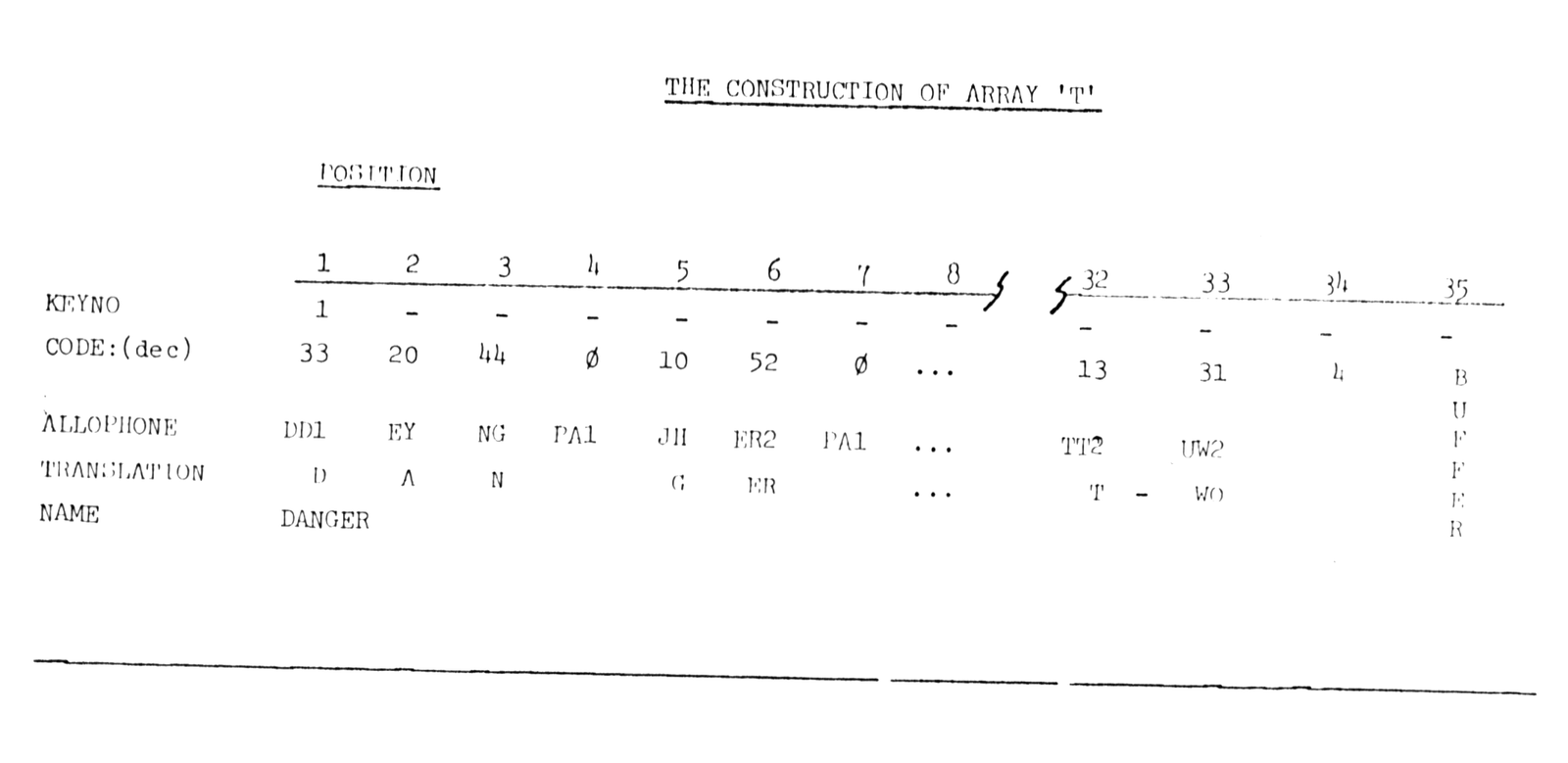
The addition consists of new lines which you must type into the “exclusive” program. These allow you to put the allophone codes for a number of phrases into one long “phrase bank” array called T. The position of each “phrase” within T, and its length, is recorded in array variable B. A detailed explanation of the variable and major segments of the program addition are given below. We have also provided an illustration of the phrase select menu and some typical allophone phrases.
Do note that you can only RUN the program once and that it is during this initial RUN that you specify the maximum number of phrases you will “ever” want. After the initial run you must GOTO 300 to start again. I chose 10 phrases, 32 “codes” long for this example, but quite a few more could be selected. If you want to generate phrases and store them as variable arrays which can be switched between programs (e.g., create game phrases with this program and then imbed them in the game program later) you’ll need a utility program like RAM-Drive. (or See the May 83 issue of Microcomputing, “A Sinclair Quick Fix”)
PARROT SUPER EXCLUSIVE PROGRAM
NEW VARIABLES
N = number of phrases you wish to have (KEYNO is one of these)
T = a numeric array capable of storing N allophone code elements 32 units long. (we’ll call these “phrases”)
B = A numeric array which will contain two numbers for each of N allophone code elements. The first number is the starting position, within T – called START, and the second is the length, called HOWLONG, of “phrase” number KEYNO.
B$ = a six character string for the “name” of the phrase whose KEYNUMBER we’re looking at.
KEYNO = is the Key number of the particular phrase we want, it will range from 1 to N.
All other variables are as originally used by RIST’s Sections of the program.
INITIALIZE
This portion sets aside a long numeric array (T) which can hold the codes for 32 X N allophones, sets up a string (B$) for naming the allophone subsets of that linear array, and sets up a small array (B) which keeps track of each phrase’s position and length within the long array T.
Lines 333 through 337 offer other choices during editing.
ADD (from line 333) – Here we select, KEYNO, the key number of our particular phrase. The end of the last phrase is shown. The option here is to either start the current phrase, under edit control, right after the end of the previous phrase, or to start somewhere else (line 122ff).
Having selected a starting position in long array ‘T’ we must now specify its LENGTH (line 1240) and name (1310). Line 1300 does all the work by putting our current phrase S(N) into the “phrase bank” array T.
‘SUPER’ EXCLUSIVE PROGRAM ADDITION FOR RIST PARROT
INITIALIZE
150 PRINT"HOW MANY PHRASES?"
152 INPUT N
153 DIM T (N*32)
154 DIM B (N,2)
155 DIM B$(N,6)
156 LET START=0
158 LET HOWLONG=0
333 IF I$="A"THEN GOTO 1200
335 IF I$="S"THEN GOTO 1400
337 IF I$="Q"THEN GOTO 1480
ADD
1200 REM CHECK &/OR SET INITIAL PARAMETERS OF PHRASE
1201 PRINT  "ADD(A) OR DELETE(D) PHRASE"
1202 INPUT Y$
1203 IF Y$="D" THEN GOTO 1326
1205 PRINT "STRING NO.?"
1207 INPUT KEYNO
1208 PRINT KEYNO
1209 IF KEYNO=1 THEN GOTO 1227
1211 PRINT KEYNO
1213 LET START=B(KEYNO-1,1)+B(KEYNO-1,2,)+1
1214 PRINT "PHRASE NO.";KEYNO-1;"ENDS AT";B (KEYNO-1,1)+B(KEYNO-1,2)
1215 PRINT "START THERE?"
1220 INPUT Y$
1225 IF Y$< >-"N" THEN GOTO 1240
1227 PRINT "START WHERE?" ;
1230 INPUT START
1235 PRINT START
1240 PRINT "LENGTH?"
1245 INPUT HOWLONG
1250 PRINT,,"PHRASE NO.";KEYNO;"STARTS AT";START,"AND IS";HOWLONG;"UNITS LONG"
1255 PRINT,,"HIT N IF THAT'S NOT RIGHT"
1260 INPUT Y$
1265 IF Y$<>"N" THEN GOTO 1275
1270 GOTO 1205
1275 REM SET PARAMETERS OF DATA DICTIONARY
1280 LET B (KEYNO,1)=START
1285 LET B (KEYNO,2)=HOWLONG
1295 FOR I=START TO (START + HOWLONG)
1300 LET T(I)=S (I-START+1)
1305 NEXT I
1310 PRINT "ENTER NAME OF PHASE NO.";KEYNO
1312 INPUT B$(KEYNO)
1325 GOTO 300
1326 LET P=1
1327 LET L=0
1328 GOTO 300
8K/16K
OUT (SPEAK)
This section gives us either a listing of what our phrase bank ‘T’ looks like (see PARROT PHRASES attached) or allows us to select one of the phrases. In the example, N was selected as 10, but only 8 phrases have been entered (#8 is being entered right now).
At line 1410 we select which phrase we want, and lines 1420 through 1430 takes that subset of T which begins at T(B(KEYNO,1) (the starting position of string KEYNO), and runs B(KEYNO,2) units further down the line and puts that subset into the “current” array ‘S’.
After all this, you return to line 300 which is the Main loop of RIST’s program. Oh yes, line 1480 gives a random selection of the phrases. Sample Phrases and Phonemes, along with their translation, are also given on the attachment.
OUT (SPEAK)
1400 REM CONVERTS S(I) TO SELECTED PHRASE
1402 PRINT "LISTING (L) OR SELECT (S)"
1403 INPUT Y$
1404 IF Y$<>"S" THEN GOSUB 1500
1405 PRINT "WHICH PHRASE WOULD YOU LIKE?"
1410 INPUT KEYNO
1420 FOR I=1 TO B (KEYNO,2)+1
1425 LET S(I)=T(B(KEYNO,1)+I-1)
1430 NEXT I
1431 LET L=B(KEYNO,2)
1445 GOTO 300
1480 LET KEYNO=INT ((RND*(N)+1)
1485 GOTO 1420
1500 REM LIST IS DISPLAYED
1505 CLS
1510 PRINT "PHRASE NO. DESCRIPTION START LENGTH"
1511 PRINT
1512 FOR I=1 TO N
1513 LET KEYNO=I
1515 PRINT TAB3;KEYNO;TAB8;B$(KEYNO),TAB17;B(KEYNO,1);TAB23;B(KEYNO,2)
1520 NEXT I
1525 RETURN
2006 IF P> +1 THEN LET P=L
2025 IF P=0 THEN LET P=1
2027 IF P=1 AND L=1 THEN LET P=2
PARROT PHRASES
PHRASE NO.   DESCRIPTION   START   LENGTH
    1        Danger           1      34
    2        Warning         36      27
    3        Hello           64      35
    4        LRUD           100      19
    5        Fire           120      35
    6        Kling          156      44
    7        Blank          201       1
    8        Dragon         202       1
    9        -               -       -
   10        Sound           -       -
PHRASE         PHONEMES

Danger         DD2  EY  NG  PA1  JH  ER2  PA1  WW  OR  NN1  IH  NG  PA2
Warning        OW  VV  ER1  LL  OW  PA1  DD1  PA3  IH  PA1  NN1  PA3
               DDZ  EH  MM  PP  ER2  PA4  TT2  UW2  PA5
Translation    (Danger, Warning.  Overload in Damper Two)

Hello          HH1  EH  LL  OW  PA5  (same as book)
               (Hello welcome. Your wish is my command)

LRUD           LL  EH  FF  TT2  PA5  RR1  AY  PA1  TT2  PA5
               AY  PA1  PP PA5  PA3  DD2  AW  NN1  PA5
               (Left, Right, up, Down)

Fire           PA2  FF  AY  RR1  PA5  WW  AX  NN1  PA4  PA5  SS SS SS SS PA4  PA5
               FF OW  TT2  AA  NN1  PA5  TT1  OR PA1  PP IY  DD2  OW  SS  PA5
               AX  WW EY  PA5
               (fire one, (whish), Photon Torpedos away)

Kling          PA1  FF  AY  RR1  PA2  TT2  UW2  PA4  PA5
               SS  SS  SS  SS  PA5  PP PP PP AA3  SH  ZH ZH PA5  BA5
               HH1  1H  PA1  TT2  PA4  AA  NN1  PA5  KK 3  LL IY  NG  AA  NN1
               PA4  KK3  RR2  UW2  ZZ  ER1  PA5
               (Fire Two (SS PP  ZH)  Hit on Klingon Cruiser)
                         THE CONSTRUCTION OF ARRAY 'T'

         POSITION

                  1     2     3     4     5     6     7     8  //  32    33    34    35
KEYNO             1     -     -     -     -     -     -     -      -     -     -     -
CODE:(dec)       33    20    44     Ø    10    52     Ø   ...     13    31     4     B
                                                                                    U
ALLOPHONE        DD1   EY    NG    PA1   JH    ER2   PA1  ...     TT2   UW2          F
TRANSLATION       D     A     N           G    ER         ...      T  -  WO          F
NAME             DANGER                                                             E
                                                                                    R
Note: Type-in program listings on this website use ZMAKEBAS notation for graphics characters.