
French language suffers the fate of English at times; being difficult to pronounce properly when read from text. So it is with QL “Pine tree”, “Pain tree”, “Pee-in-tray”, or “Pay entry” as this program may have been so falsely introduced to you. If we could all read French it would be instantly obvious that QL “Painter” is a French screen artist program.
QL PEINTRE is a classy program in many ways. After loading begins a picture of two chimps appears: seemingly a digitized photo image. Nearly three more minutes of on-and-off file loading finally brings a blank sub-screen with sharp surrounding icons. French and English titles toggle back and forth with a key press. The look is sophisticated, elegant. The icons are easily readable and easily used.

Should one require additional help, the documentation is excellent. Now this is not a flashy instruction booklet, but it is the first one I have seen which states simply what to press next and then accurately tells what the outcome will be. Even though the instructions do not mention it, I have found it helpful to have a formatted cartridge on hand for saving a sceen prior to running QL Peintre. There is a Microdrive icon, but like so many other QL software titles, it does not provide for formatting of a cartridge. It does provide a nice scrolling directory option, though!
Like GRAPHIQL, reviewed by Vince Lyon in the March/April 86 issue, QL Peintre has many, many abilities. Some are far more versatile as well. Circle and Arc drawing are so much improved! Fabulous, too, are the two type faces (one very MacIntosh) in two sizes with four spacings each. Line and spray widths with intensities are very adjustable as are the colors and textures. But keep in mind that QL Peintre is capable of only four colors in High Res mode F1, and will not run in mode F2 on an American TV. QL Peintre supports all the colors in F2 mode.
Is Peintre perfect? It does have a limitation or two. It incorporates the standard security checks requiring a backup and original present. The screen work area is much smaller than other such programs. It only provides 63% of the screen that GraphiQL uses. It also does not have a wrap-around feature when drawing. If one bumps into the work space edge diagonally, the cursor continues straight along that edge until stopped. Jotting and spraying do not quite reach the edge of this work area either. These are really minor items, however. Unlike GraphiQL, Peintre never does “growl” back!
QL Peintre isn’t intended as a drafting design or CAD program. QL WORLD MAGAZINE (from England), carried a review in the May ’86 issue, of six such programs. Most CAD packages were more expensive than Peintre, too. Missing from their review was a new release, TECHNIQL (from Talent…writers of GraphiQL). Such would be good future Quick Look fare.
QL Peintre has a good set of save and printer options. The Printdump program is unprotected and may be included by the user in other programs. I was amazed to find that it will load almost any saved screen, including ones from COSMOS (reviewed last issue) and GraphiQL, too. Screens can then be altered and printed out on an Epson printer. But the output process takes 22 minutes! GraphiQL’s beats it by three or four minutes. But unlike other dumps, this produces an output sideways! So if your printer is like my little Epson Homewriter 10, most graphics look slightly elongated. Now with Peintre they just come out taller.
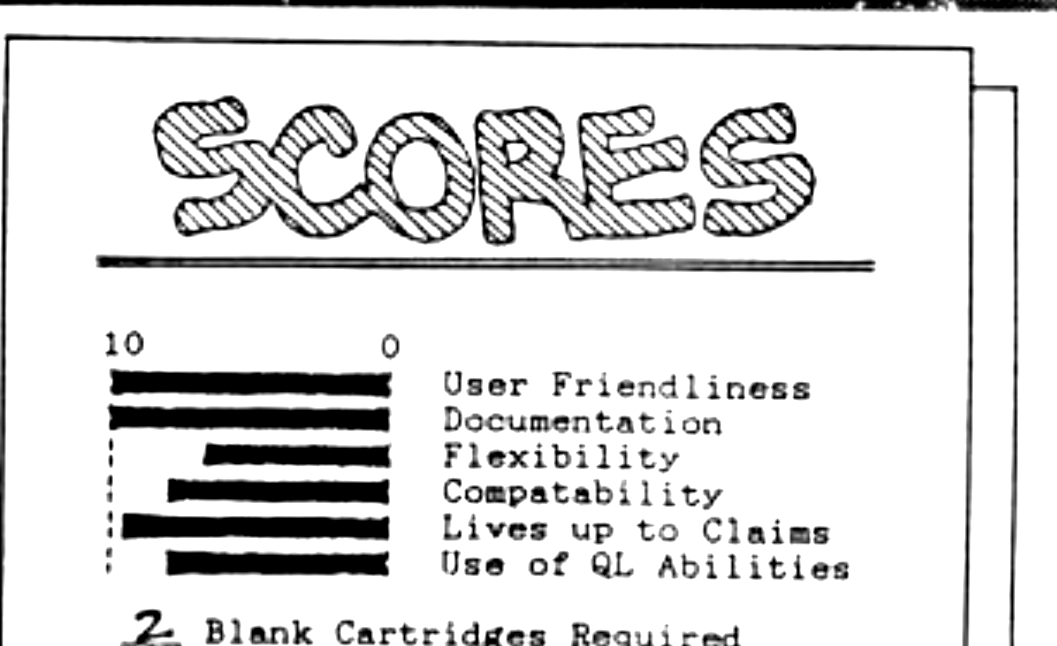
- Blank Cartridges Required: 2
- Blank Cartridges Included: 0
- Runs on U.S. T.V. mode: NO
- FINAL SCORE: 8.8
QL Peintre is sharp and professional. It has limitations but is very polished and easy to adapt to. If the programmers in France keep this up, I may start learning to read French.