
I would like to present some QL tips that I find useful when programming or probing about a QL for repair.
For saving a screen the normal syntax is ‘SAVE flp1_filename,131072, 32768’ and loading is ‘LOAD flp1_filename,131072’. The only reason I’m listing the numerical address is that I do get calls occasionally for the loading/saving screen address. For those of you who tend to forget the screen address, perhaps the following short-hand version of the address from the Italian Users Group (QITALY), will help:
'LOAD flp1_ (or mdv1_) filename,2^17' (^ is Shift/6)For several years I had been using my TS 2068, 360K disk drives with the QL. Several years later I changed over to 720K and ED drives. Recently I had decided to move all of my files from 360K disks to 720K disks and then I ran into some problems. A 720K disk drive (5-1/4″) should read a 360K disk. Most of my file transfers went along smoothly, however, I did get some ‘bad medium’ reports every once in a while. I did not want to hook up a 360K drive with a 720K drive (sometimes I tend to become lazy). Using Taskmaster, I transferred all files from 360K disk to RAM1_ , then copied all of files from RAM1_to a 720K disk without a problem.
I have several ‘IBM Keyboard’ interfaces for my QLs. All of the K/B interfaces are external, using ribbon cable from the MAB8049HP IC socket to a cased keyboard interface (SCHON and KB 90). The MAB 8049HP IC must be removed and installed onto a small interface which is installed into the MAB8049 socket. Removing this chip can sometimes give me a headache as the chip is very close to the front of the QL case. The remedy: Take a #6 finishing nail and using a hammer, flatten the point end on both sides of the nail. Place the flattened end of the nail into a vise and bend it at a right angle. Insert the formed IC puller under the forward end of the IC and lever it upwards. Now remove the device and insert it under the notched end of the IC and it will now be removed easily, without bent pins.
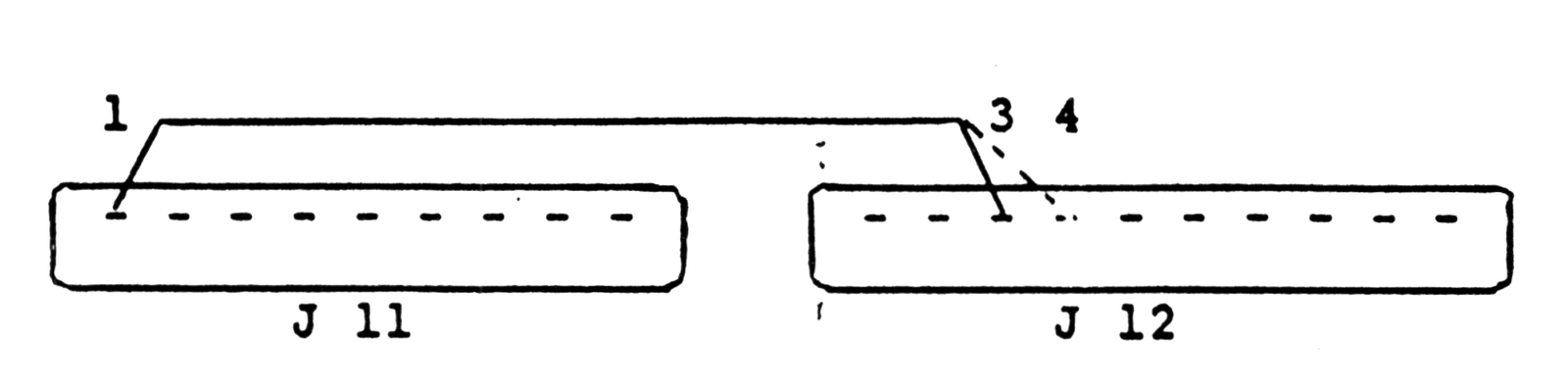
At times when reparing a QL, I must remove the K/B membrane tails from their respective sockets. When the repair is completed, I do not connect the keyboard membrane tails to the sockets for a check of the QL at power-up. I apply power to the QL and when the prompt appears on the screen to select F1 or F2 screens, I touch one end of a 6-inch length of wire (bared on both ends) to pin 1 on K/B connector J11 and the other end of the wire to pin 3 of K/B connector J12. This activates the F1 high-res screen. If all is well, I then connect the membrane keyboard to the connectors. If you use the low-res screen (F2), touch pin 4 instead ot pin 3 of the J12 connector.
The last tip is: If you intend to purchase any goods from the UK, now is the time to do so. The £ is at an all tine low. At the time of this writing, the £ is at $1.42 US. Take advantage of this price break if you need anything from the UK.
See you next month …..Bob Gilder