
As I suggested in the last issue, the most enduring contribution of the Sinclair QL™ system may turn out to be SuperBASIC. Many experts hold that SuperBASIC is the best BASIC language available on a microcomputer, and the dialect that most closely conforms to ANSI-85 BASIC standards. SuperBASIC, combined with other recent innovations may eliminate the present need for several more advanced (and more difficult) artificial languages.
Timex/Sinclair 1000 BASIC is a true subset of T/S 2068 BASIC–with few exceptions, programs written for the former machine will run on the latter–the same cannot be said for the 2068 BASIC and SuperBASIC. Though similar in many respects–some of which may confuse the T/S 2068 programmer at first–they differ markedly.
Gone are the smart cursor and single-keystroke keywords. There is only one type of cursor, and most SuperBASIC keywords must be spelled out. The SuperBASIC interpreter recognizes about 175 keywords, the T/S 2068 interpreter about 110. The following T/S 2068 BASIC keywords are affected in one way or another, either omitted or changed in meaning or usage: ATTR, BIN, BRIGHT, BORDER, CAT, CLOSE, COPY, DELETE, DEF FN, DRAW, ERASE, FOR, FREE, IF, IN, INVERSE, LET, LLIST, LOAD (including LOAD CODE, LOAD DATA, LOAD DATA$, and LOAD SCREEN$), LPRINT, MOVE, ON ERR, OPEN, OUT, PLOT, POINT, RANDOMIZE, RESET,’ SAVE (including SAVE CODE, SAVE DATA, SAVE LINE, and SAVE SCREEN$), SCREEN$, SGN, SOUND, SQR, STICK, STR$, USR, VAL, VAL$, and VERIFY. Become familiar with these changes before you start programming.
QL software programs have convenient HELP pages to aid the user. SuperBASIC has none. There is a definite need for a SuperBASIC HELP program on Microdrive cartridge which you could load and refer to during programming, with clear and succint explanations, comprehensive examples, and numerous suggestions. (I have done some work on this and could aid someone engaged on such a project; contact me through TIME DESIGNS, if interested.)
The main feature of SuperBASIC is its provision for structured programming. (Now in vogue, structured programming is not for everyone, but it may be superior for those given to a little makework in the interest of clarity.) Structured programming may be written using T/S 2068 BASIC, substituting descriptive variable names for subroutine addresses, but SuperBASIC is much more flexible in this regard. We’ll return to structured programming in SuperBASIC below, but first some basics.
SuperBASIC makes provision for numeric, string, and integer type variables. The last is designated by a % sign, for example, sum%. The integer variable is not significantly more efficient to use in SuperBASIC than the normal, floating-point numeric variable, but it is there, together with special provisions for integer division. Variable names may be up to 255 characters in length.
Alphabetic comparisons have been rationalized in SuperBASIC: “cat” precedes “DOG” and “A96” precedes “A112”.
SuperBASIC incorporates the principle of coercion, accepting string variables in cases where numeric variables are called for and vice versa. This is “user-friendly” in most cases, but could lead to unsuspected errors in mathematical computations, if not taken into consideration. Constructions such as LET a$ = 242 and b = “242” are now possible (the keyword LET is optional in SuperBASIC).
Channels, Windows, Devices, and Device-Independent Input/Output
To accomodate multi-tasking (running more than one program at a time), SuperBASIC had to be made more complex in certain instances than its predecessors. It had to incorporate the interdependent concepts of channels, windows, devices, and device-independent input/output.
A channel is merely a path between the QL and a built-in or external (peripheral) device, a piece of hardware such as the monitor screen (scr_); the console, that is, the combination of keyboard input and screen output (con_); a serial port (sern); a network port (neti_n or neto_n); or a named file on a Microdrive (mdv_ filename), floppy disk (fdkn_filename), ram disk (ramn_ filename), or hard disk (hdkn_filename). (The n in each instance indicates a device number, for example, mdv1_.)
The QL supports 16 channels–#0 to #15–each of which can be used to run and display the data of more than one program at a time. Channels #0, #1, and #2, are dedicated default channels, that is, they are available for specific functions at turn on. These default functions may be altered. The remaining channels are OPENed or CLOSEd, as required. This is done in various ways.
Channels #0, #1, and #2, the default channels opened when the QL is turned on, each have their own window (portion of the total monitor screen) and, unless modified by the user, handle and portray input, output, and program listings, respectively. Three separate windows are displayed in monitor mode; in TV mode, channel #1 (output and graphics) and channel #2 (program listings) are superimposed,displaying whichever type of information is last selected. Channel #0 displays command inputs and error signals. Figure 1 shows the QL screen display Monitor and TV modes.
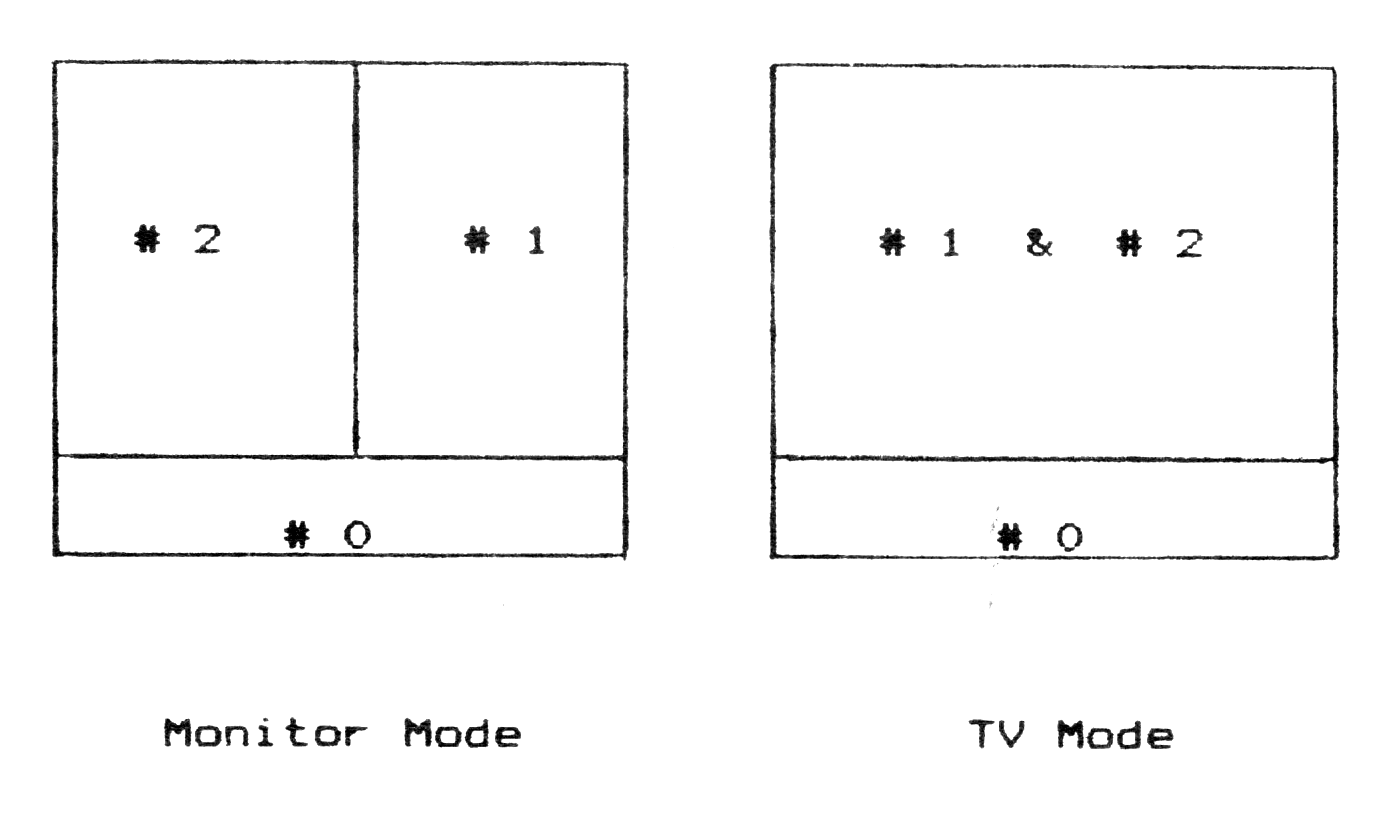
In SuperBASIC, a channel may be OPENed to a file, and data later PRINTed to our INPUT from the file; INKEY$ may be used to input data to the QL from a file one character at a time.
A QL device is a built-in or peripheral piece of equipment to which data may be sent and/or from which data may be received. The QL makes no assumptions about the ultimate source or destination of data and is thus said to have “device-independent input/output”, such data going to or emanating from a logical file. Channels are OPENed and data sent between QL devices in various ways:
a. OPEN #4,con_448x180a32x16_128
b. OPEN #6,scr_20x20a0x0
c. OPEN #3,ser
d. SAVE ser
e. OPEN_NEW #5,mdv2_filename
f. OPEN #5,mdv2_filename
g. OPEN_IN #5,mdv2_filename
h. REPEAT inloop: PRINT INKEY$(#5)
i. COPY mdv1_filename TO con
j. COPY mdv1_filename TO scr
k. COPY mdv1_filename TO ser
l. WINDOW 200,100,30,10
m. WINDOW #3,200,100,30,10
Example a opens channel #4 to the console (keyboard input, screen output) with a 448×180 pixel window whose upper left corner is 32 pixels in, and 16 pixels down from the upper left of the screen; the keyboard type-ahead buffer is set for 128 characters. Example b opens channel #6 with output to a small window at the upper left of the screen; c opens channel #3 to the serl port, the default ser port; d commands the sending of a loaded program to the device at serl (if a printer, it prints a listing); e opens a new data channel to a Microdrive file; f opens a channel to an existing Microdrive file for input and output; g opens a channel to an existing Microdrive file to input data to the QL; h uses a REPEAT loop to input data from a Microdrive file, a single letter at a time; i and j will display the contents of a Microdrive file on the screen; K sends the contents of a Microdrive file to the device connected to the serl port (if a printer, the file is printed); l directs channel #1 (the output default channel) to display output in a 200x 100 window 30 pixels in and 10 pixels down from the upper left of the screen; m directs channel #3 output to a window on the TV or monitor screen. The command CLOSE #n closes a channel.
NEW KEYWORDS
All of the rudimentary BASIC functions are available, for compatibility with other BASIC dialects, but in many cases, the old keyword has been made more flexible (and more complex). For example, CLS, the old clear screen command, may now be used in several ways: its new syntax is CLS [#n][,part of window], and it can be used to clear any part of a designated window.
In addition to the keywords listed above which have been eliminated or changed in meaning or use, there are a great many new keywords in SuperBASIC. So many that space limitations preclude a description of each. What follows is a discussion of various “families” of new SuperBASIC keywords not discussed elsewhere in the article.
About 30 new keywords relate primarily to programming on the QL–greatly enhancing what was already an excellent programmer’s language. These new keywords provide for multi-tasking, networking, peripheral use, disk use, editing and renumbering programs (including GOTOs and GOSUBs), managing variables, and better interoperability with machine code segments of complex programs.
About 20 new keywords deal with graphics on the QL, including five basic Turtle Graphics commands which together with SuperBASIC Defined Procedures permit the design of comprehensive Turtle Graphics programs. The graphics scale and character size are variable. There are no keyboard graphics symbols–befitting a “business” machine, but user-defined graphics are possible using your own or commercial software. All in all, SuperBASIC graphics capabilities are limited, but outstanding results are possisble using machine code programming.
There are six new print-control keywords and symbols, including a “smart” space, underlining, and printing width control. Character size is variable.
Five new keywords deal with the QL clock, permitting comprehensive clock, calendar, day-of-week, timing, and days-between-dates operations.
Four new math keywords provide for degree-radian conversion and integer division.
The QL sound system is rather primitive (it has only one command which can be used simply or in complex ways). This shows the intent, perhaps, to design a more business like, less game-oriented machine.
SuperBASIC Loops and Branches
FOR…NEXT loops and IF…THEN branches are greatly improved in SuperBASIC:
FOR f = 1,3,10 TO 20 STEP 2,25: PRINT fThis would print the following numbers in column: 1,3,10, 12,14,16,18,20 and 25; it is an example of the “short form” FOR loop. Note that the control variable has an irregular sequence and that the statement NEXT F is unnecessary. The “long form” FOR loop would look as follows:
10 INPUT "High,  low,  median"; alpha,
   omega, y
20 FOR f = alpha TO omega STEP -.5
30   x = f*y
40   PRINT 1/x
50 END FOR  [NEXT f may also be used]
Following are examples of the “short” and “long” forms of the IF…THEN construct, in SuperBASIC an IF…THEN… ELSE…END IF construct in which the use of THEN is optional:
10 IF a>5: PRINT a: ELSE PRINT "ng"

10 IF a>5 THEN PRINT a: ELSE PRINT "ng"

10 IF a>5 THEN [use of THEN optional]
20    PRINT a
30 ELSE
40    PRINT "ng"
50 END IF
Although the “short form” of IF is more economical, the “long form” is advisable if multiple statements and nested FOR and IF loops are used.
A common branching system new to Sinclair BASIC, the SELect…END SELect construct has been added, also in a “short” and “long” form. This construct permits complex choices depending on the value of a select variable.
10 SELECT ON a=1 TO 10: print a ! "ok"

10 a = RND(2 TO 12)
20 SELECT ON a
30   = 2 TO 6
40      PRINT "Pay 2 to 1"
50   = 7
60      PRINT "Pay 10 to 1"
70   = REMAINDER
80      PRINT "You lose!"
90 END SELECT
Two new types of loop are available in SuperBASIC: a WHEN ERRor…END WHEN loop used in error-trapping and debugging, of which no mention is made in the QLUG, and a REPeat…EXIT…END REPeat loop, also in a “short” and “long” form. Examples are as follows:
10 WHEN ERROR
20   REPORT
30   PRINT "Error number"; ERNUM;
40   PRINT " at line number "; ERLIN
50 END WHEN
Insert these lines anywhere in a SuperBASIC program to report the type and location of the first error encountered in a program; the error number is reported as a negative number corresponding to the error numbers on pages 19 and 20 of the “Concepts” section of the QLUG.
10 REPEAT flag:  a  =  RND(1  TO  100):
   PRINT a:  IF a > 50 THEN EXIT flag

10 REPEAT guess
20   INPUT "Enter number (1 to 100); n
30   a = RND(1 TO 100)
40   IF a > n THEN
50     PRINT a
60     EXIT guess
70   END IF
80     PRINT "Try again"
90 END REPEAT guess
SUPERBASIC PROCEDURES AND FUNCTIONS
The fundamental constructs of SuperBASIC are its Defined Procedures and Functions. Similar in construction–a procedure may often be written as a function and vice-versa–they differ in the way that they are “called” and used in a program. Defined Procedures may be called on their own, that is, alone on a numbered program line; Defined Functions must return a value to an expression.
When called in a program, the actual parameters of a Defined Procedure, if any, must not be enclosed in parentheses; those of a Defined Function must be. The use of a RETurn expression is optional in a Defined Procedure but mandatory in a Defined Function.
The structure of a Defined Procedure or Function begins with the term DEFINE PROCEDURE or DEFINE FUNCTION, which you may key in as DEF PROC or DEF FN, or def proc or def fn for that matter; a name identifier (all SuperBASIC identifiers must begin with an alphabetic character, consist of only alpha-numerics and the underscore character, and be from one to 255 characters in length); and, if required, a list of formal parameters.
To facilitate the use of a library of functions and procedures in any program, formal parameters are considered local variables which refer only to function/ procedure use as opposed to global variables which apply throughout the program. In addition to its formal parameters, a procedure or function may specify other LOCal variables.
The best way to explain SuperBASIC Defined Procedures and Defined Functions is by the use of examples. Listing 1 is a library of these constructs which you should add to and make use of in your programming.
THE MISSING VAL
Sinclair Research states in the QLUG that “coercion” makes the old VAL function unnecessary. This is not true. Recently I had to turn to the T/S 2068 to run a program using the VAL funtion; I could not figure out how to program around it on the QL. Coercion will not evaluate a numeric expression, and I cannot figure out how to translate one of the most useful short BASIC programs to the QL:
10 INPUT "Formula? "; n$
20 PRINT n$;" = "; VAL n$
30 GO TO 10
The program’s output is similar to that of a printing calculator. I’d like to offer the first annual THOMAS B. WOODS award–a cash award of $10, recognizing a great American Sinclair programmer, to the first reader of TIME DESIGNS to come up with a similar program for the QL using 10 or less program statements. In the event of a postmark tie, the award will go the the shortest, most elegant program submitted. Get busy, hackers! You too, Tom.
Next time: “Using QL Software Programs with 640K RAM and RAMdisks”.
Listing 1. SuperBASIC Procedures & Functions

9000 REMark PROCEDURES & FUNCTIONS
9010 DEFine FuNction SGN(n): IF n<>0: RETurn n/ABS(n): ELSE : RETurn 0
9020 DEFine FuNction CELSIUS(n): RETurn (n-32)*5/9
9030 DEFine FuNction FAHREN(n): RETurn n*9/5+32
9040 DEFine FuNction RN10: RETurn RND(1 TO 10)
9050 DEFine FuNction RN100: RETurn RND(1 TO 100)
9060 DEFine FuNction COMPINT(p,r,t): LOCal a: a=p*(1+r/100)^t: RETurn INT(a-p+.5): REMark Try FOR t=1 TO 10: PRINT t,COMPINT(p,r,t) [for table]
9070 DEFine PROCedure LIST953
9080      OPEN #3,ser1
9090      PRINT #3,CHR$(27);CHR$(77);CHR$(9)
9100      PRINT #3,CHR$(27);CHR$(81);CHR$(53)
9110      LIST #3
9120      PRINT #3, CHR$(12)
9130      CLOSE #3
9140 END DEFine
9150 DEFine PROCedure wscr
9160    WINDOW #0,500,40,4,216: WINDOW #1,500,216,4,0: WINDOW #2,500,216,4,0
9170    PAPER #1,0: INK #1,7: PAPER #2,0: INK #2,4
9180    MODE 4
9190    CLS #0: CLS #1: CLS #2
9200 END DEFine
Note: Type-in program listings on this website use ZMAKEBAS notation for graphics characters.