
From:
The Greater Cleveland
Sinclair Users Group
James G. DuPuy
6514 Bradley Ave. (Down)
Parma, Ohio, 44129
Have you ever been online to your favorite BBS and had bad blocks during file transfer or garbage characters appear on the screen for no reason? I have. In my case it seems to only happen on my favorite board, Free Net. I have also found it to happen only at 2400 baud. I called the manufacturer of my modem, Zoom Telephonics, and was told that since the problem seemed to be only with the one board, that it was more than likely due to line noise of some type. They gave me a suggestion that I tried and found to work GREAT! It is very simple and costs very little. (about $5.00)
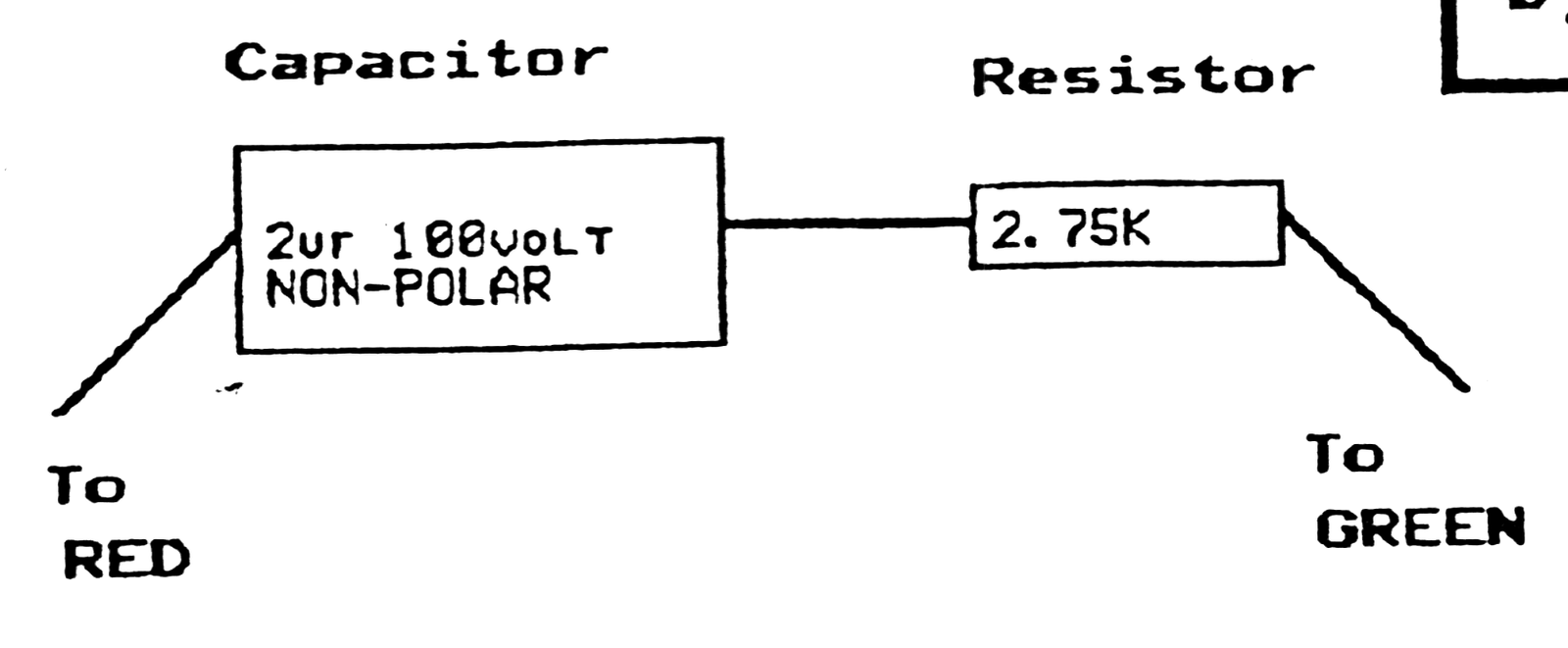
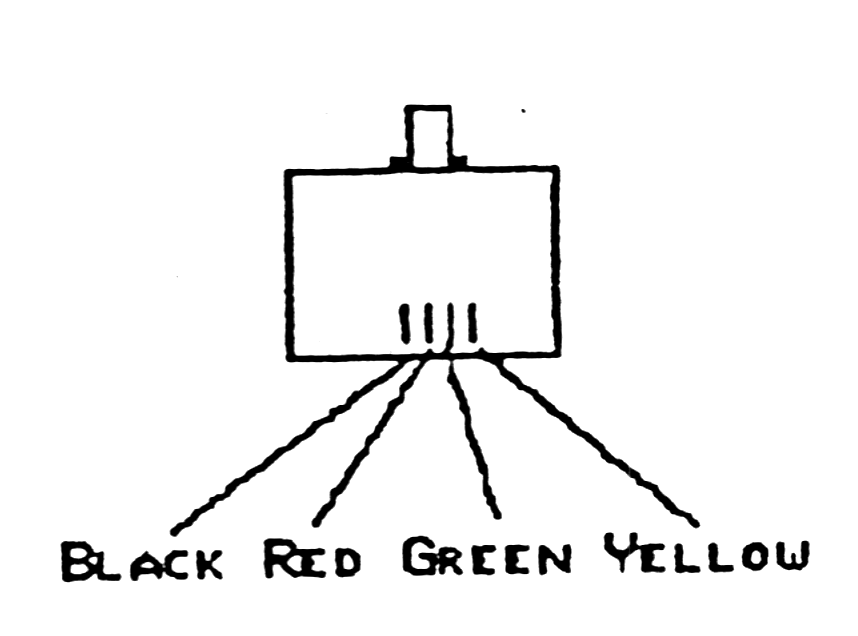
All you need is a 2uf non-polar capacitor rated at 90+ volts and a 2.75K resistor 1/2 watt and a modular plug. These values are a bit out of the ordinary but you may combine values to come up with the right ones. I ended up putting 2 1uf caps in parallel to get the 2uf and 2 5.6K resistors in parallel to get 2.8K (close enough). The way it’s wired is as follows: The capacitor (or combination) is connected in series with the resistor (or combination) and you are left with a lead from the cap and one from the resistor. These go to the RED and GREEN lines of the phone line. I just got a modular plug and connected them to the two pins in the center. The outer two leads are black and yellow. It does not matter if the resistor or cap lead goes to red. If you don’t have a modular plug available, you can do one of two things. 1: Get an adaptor that has one male and two female. 2: Solder the leads in the modem where the red and green lines are connected. I would NOT advise doing the soldering in the modem since it will void the varranty. Most modems (internal and external) are packed pretty tight so adding parts can be tough, especially if you don’t have much experience in electronics or soldering to high density PC boards.
Make sure that your leads are insulated so nothing can short! You can get a phone cord that your not using and cut it about 4 inches from the plug and strip off the outer insulation and use the red and green lines. This is what I did. Be sure that the plug will plug into the phone jack first! I believe the plug for the handset is different than the one that goes in the modem and the wall. To test it, plug it in then pick up the phone and be sure you get a dial tone and can dial. Also, be sure that you cover the whole thing up since there is normally 45 to 60 volts on an open phone line and up to 130 volts, 20 hertz AC during ring in.
Obviously don’t try this if you know nothing about electronics! Also, you are at your OWN risk doing this. Please note also that if you don’t insulate your connections and the phone line is shorted, You will be resposible when the phone man shows up to check your line and hands you the bill!
It did help in MY case. If you don’t have a problem then DON’T use this. It seems to help primarily noisy lines. It won’t help a bad modem or bad characters sent by either party. If you want further information, give me a call at: [phone number omitted].