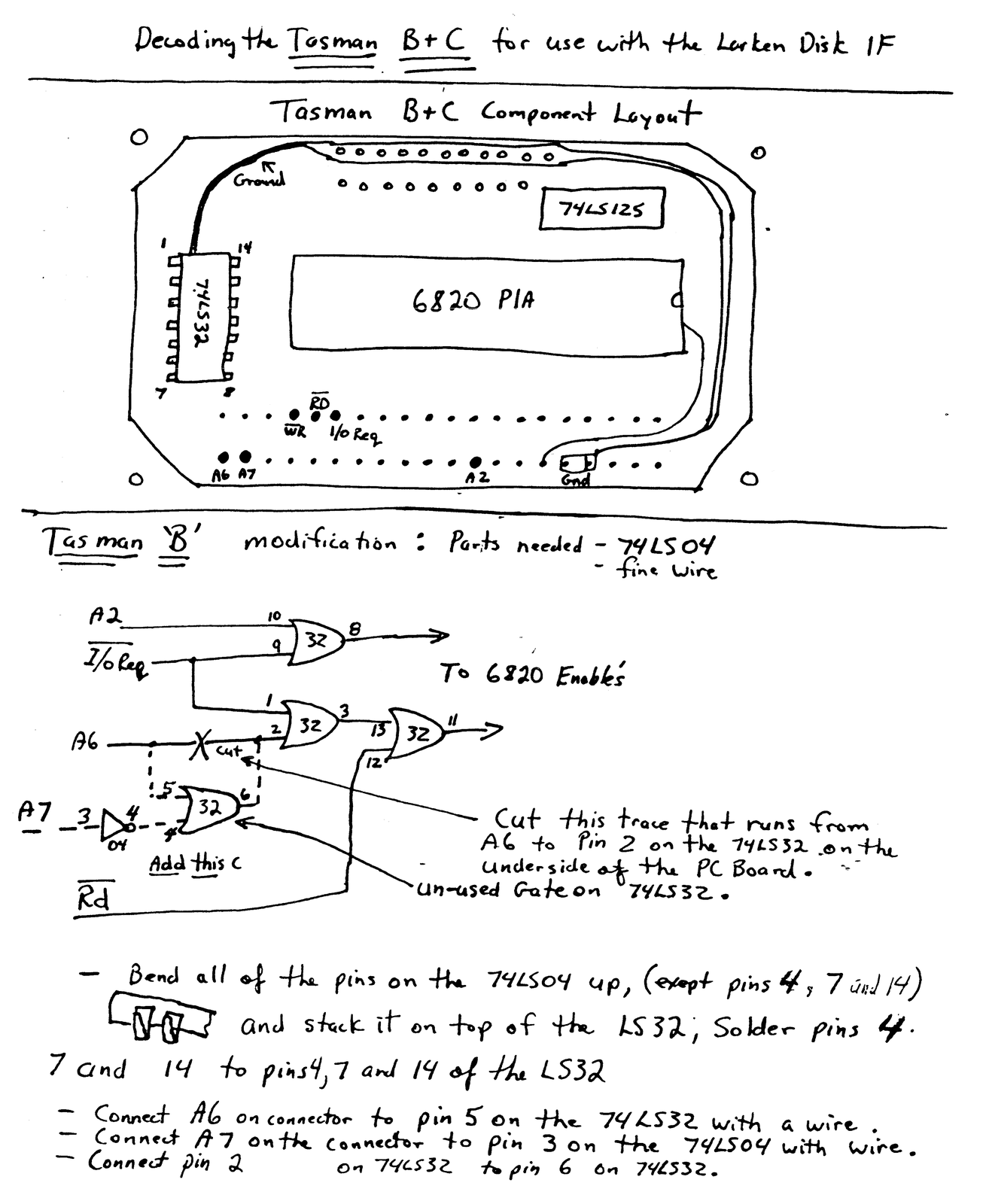
George Chambers wrote to say: “We have been looking at the possibilities, i.e. reasonableness, of modifying the Tasman ‘B’ printer interface to make it compatible with the LarKen disk system. Presently there is some sort of a port conflict and the LarKen will not function when this particular model of printer interface is connected. The question is, does anyone know what port addresses the LarKen system uses?”
Here is the answer on how to use the Tasman ‘B’ CPI from Larry Kenny himself. The problem is not really a port conflict. Instead, the problem is that the Tasman ‘B’ CPI is not completely decoded. The Tasman ‘B’ has an input port of 191 but A7 is not being looked at by the CPI to come to this conclusion! If the mailman only looked at the first two numbers of an address and gave me all mail that began with ’61’, my address being ‘613’, I would wind up getting a lot of wrong mail. That is the Tasman problem.
Larry favored the AERCO CPI because it completely decodes the address bus, but he made provisions for Tasman ‘B’, A & J and others if they were modified. I like the Tasman ‘B’ because it can send all bytes to the printer from 0 to 255 and the AERCO can’t. So I have modified my Tasman ‘B’ CPI for LarKen compatibility to run my Christmas Return Label program. It should be noted that this fix will not work for the Tasman ‘A’ or Tasman ‘C’.
To make the Tasman ‘B’ CPI work with the LarKen disk System, acquire a 74LS04 quad NAND and some small gauge insulated hook-up wire. Open the Tasman ‘B’ CPI by first carefully peeling back the plastic label away from the screws. (If you pick up the ends carefully with an Exacto-knife, the label will press back over the screws when you are done without even a wrinkle.)
Remove the four screws that hold the case together and open the case. Examine the PC board to be certain that you have a ‘B’ version Tasman CPI. It is a ‘B’ if it is labeled ‘VERSION B’.
Next, make the trace cut of A6 on the underside of the PC board close to board edge connector with the Exacto-knife. Now follow the rest of the instructions Larry has given us on the drawing. When you are finished, carefully check all connections against Larry’s drawing. I didn’t and had to go back in to fix my problem. Finally, close the case and press the plastic label back into place.
As for the port addresses of the LarKen system, I don’t know them, but here are the CPI addresses from ‘The Best of SUM‘, the newsletter-turned-magazine of the Gainsville Sinclair Users Group by Joe Williamson and Richard Cravy:
                PORT
Type:          IN   OUT
AERCO         127   127
Tasman 'A'     63   123
Tasman 'B'    191   123
Tasman 'C'    251   123